


 Video Converter Ultimate
 Gravador de ecrã
 Reparo de vídeo
 Secure Download
Conversão perfeita de Caf para MP3 para preservar a qualidade e a acessibilidade do áudio
A conversão de Caf para MP3 é essencial para melhorar a compatibilidade e a acessibilidade. A conversão de seus arquivos Caf para MP3 garante a reprodução perfeita em várias plataformas, eliminando problemas de compatibilidade. Além disso, os arquivos MP3 são menores em tamanho, tornando-os mais fáceis de armazenar, transferir e compartilhar. Se você deseja desfrutar de sua coleção de áudio em smartphones, computadores ou sistemas veiculares, a conversão de Caf para MP3 oferece maior flexibilidade e conveniência para acessar suas músicas, podcasts ou gravações favoritas.
By utilizing a Caf to MP3 converter, you can easily transform your Caf files into the popular MP3 format, which ensures broader accessibility, smaller file sizes, and seamless sharing of your audio collection. That said, find out the tools you can use to help you change your files from Caf to MP3.

Parte 1. O que é CAF e por que converter CAF para MP3
Caf ou Core Audio Format é um formato de arquivo de áudio introduzido pela Apple Inc. É comumente usado em plataformas macOS e iOS. Os arquivos CAF são frequentemente criados e utilizados em aplicativos de áudio profissionais, como edição de som, mixagem e gravação. A conversão de Caf para MP3 oferece vários motivos e vantagens atraentes. Aqui estão alguns dos principais motivos pelos quais você pode considerar converter seus arquivos Caf para o formato MP3:
Enhanced Compatibility: MP3 is one of the most widely supported audio formats across various devices, media players, and operating systems. By converting your Caf files to MP3, you ensure compatibility and eliminate any playback issues or limitations you might encounter with Caf files.
Accessibility: Converting Caf to MP3 enables greater accessibility to your audio content. MP3 files can be streamed on multiple devices, including smartphones, tablets, laptops, desktop computers, portable music players, and even in-car audio systems. This versatility allows you to enjoy your favorite music, podcasts, or recordings anytime, anywhere.
Smaller File Size: MP3 files are typically compressed, resulting in significantly smaller file sizes compared to Caf files. This compression helps save storage space on your devices without compromising the audio quality noticeably. It also makes it easier to transfer or share your audio files with others via email, messaging apps, or online platforms.
Parte 2. Converter CAF para MP3 offline
Video Converter Ultimate is a highly efficient software that enables the conversion of various file formats to diverse audio formats such as Caf and MP3. The software provides a batch conversion functionality enabling the user to convert multiple audio files simultaneously.
Além disso, os usuários têm a capacidade de otimizar a qualidade de qualquer música desejada por meio do recurso do programa que permite a personalização de detalhes técnicos de saída, incluindo taxa de amostragem e taxa de bits. Para indivíduos que desejam realizar a conversão em lote de arquivos de áudio de Caf para MP3 ou vice-versa, fornecemos um guia conciso abaixo para sua leitura. Você pode consultar as instruções abaixo para saber como alterar Caf para MP3.
Step 1. Select the appropriate Free Download icon below to launch the program on your device. Ensure to follow the on-screen instructions to activate the program in the following step. Once installed, its interface can be mastered. This tool works as a Caf to MP3 Mac and Windows converter.
Free DownloadFor Windows 7 or laterSecure Download
Free DownloadFor MacOS 10.7 or laterSecure Download
Step 2. Click the Add button on the primary interface to import the audio file you wish to edit. You will then be taken to a thumbnail of the imported file. You can submit a folder to convert multiple files at once. Choose the location within your directory that contains all the required audio files.
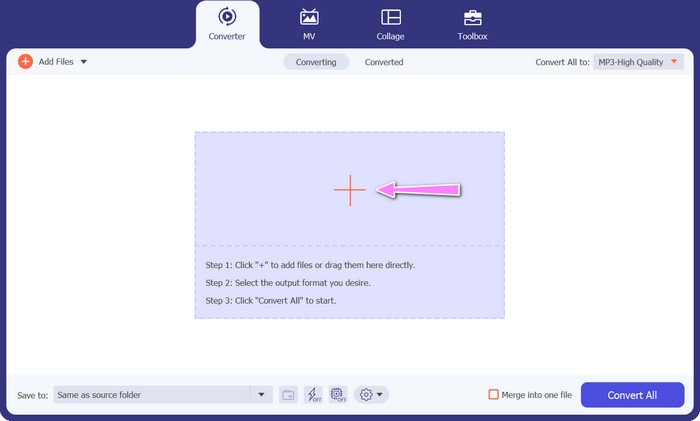
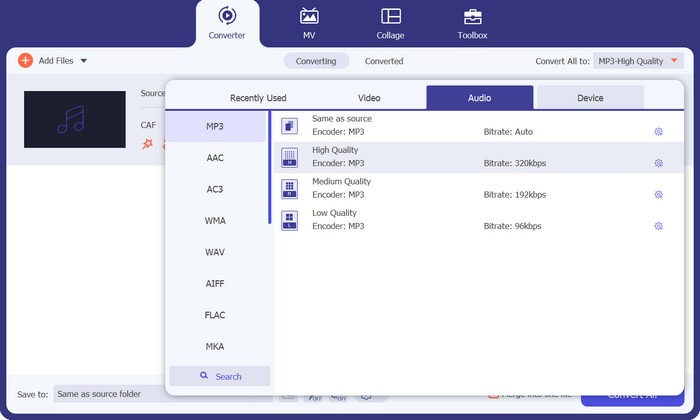
Step 3. You can now alter the output format by clicking the Converter All to button located at the top of the program's window. Choose MP3 from the pane labeled Audio. In the meantime, you can alter the output file's sample rate and bitrate to achieve the desired quality.
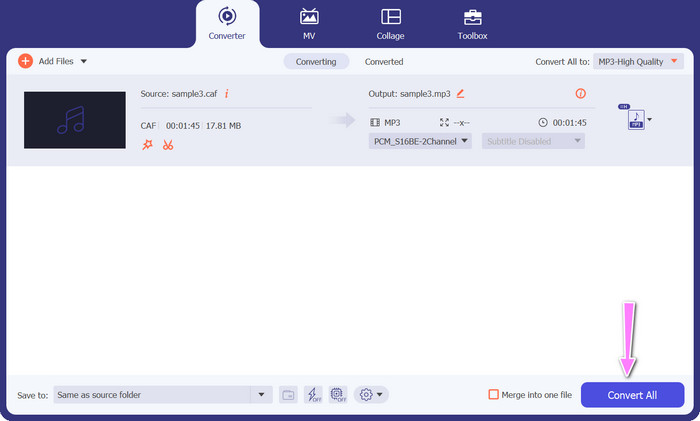
Step 4. Click the Convert All button below to initiate the conversion procedure as the final step. The program will then automatically open the output folder for you to verify the new file format.
Prós
- Ele pode converter Caf em lote para o formato de arquivo de áudio MP3.
- O programa funciona bem com Windows e Mac OS.
Contras
- Requer uma taxa de assinatura paga após o teste gratuito.
Parte 3. Converter CAF para MP3 Online
You can also utilize the Free MP3 Audio Converter Online, which is another option. This is a web-based application that works in conjunction with the internet, as its name suggests. Consequently, you do not need to have an app that converts Caf to MP3. Everything is reachable, and you need only your browser to get things done. In terms of features, this Caf to MP3 free converter does not fall short in any way. In addition, you can upload a large number of files, convert them in bulk, or adjust the profile of a video or audio clip. By following the techniques outlined here, you will get knowledge on the best online Caf to MP3 converter.
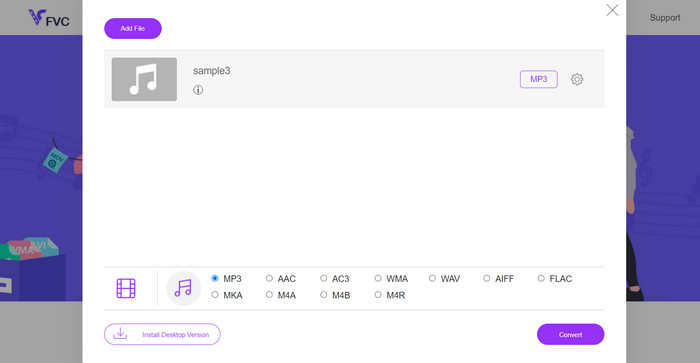
Step 1. Simply to the main website of the Free MP3 Audio Converter Online by clicking the link located above. You can submit your audio file by going to the main screen and selecting the Add Files to Convert option.
Step 2. On the screen will appear a glimpse of the original file that you selected. You may select the output format you want by going below the panel where you initially were.
Step 3. To change the file format from Caf to MP3, click the Convert button. You will need to do the same procedure from the beginning if you want to convert another file.
Prós
- Os usuários podem desfrutar de conversões ilimitadas por dia.
- Este conversor online de Caf para MP3 funciona em quase todos os navegadores da web.
Contras
- A velocidade de conversão é proporcional à largura de banda da Internet disponível.
Further Reading:
MP3 to AAC Conversion: How to Improve Your Audio Quality
MP3 Player Download – 10 Best Free MP3 Music Players of 2023
Parte 4. Perguntas frequentes sobre a conversão de CAF para MP3
Posso reter os metadados dos meus arquivos Caf depois de convertê-los para MP3?
A preservação dos metadados durante a conversão de Caf para MP3 depende do conversor ou software específico que você está usando. Algumas ferramentas de conversão têm a capacidade de reter metadados, como nome do artista, título do álbum, número da faixa e muito mais. No entanto, é importante observar que nem todos os conversores oferecem suporte à retenção de metadados.
Existem outros formatos de áudio para os quais posso converter arquivos Caf?
Sim, além do MP3, existem vários outros formatos de áudio para os quais você pode converter arquivos Caf, dependendo de suas necessidades específicas. Formatos alternativos comuns incluem WAV, FLAC (Free Lossless Audio Codec), AAC e OGG (Ogg Vorbis).
Tenho que pagar por um conversor de Caf para MP3?
Existem opções de conversão gratuitas e pagas de Caf para MP3 disponíveis. Muitos conversores online oferecem serviços gratuitos, permitindo que você converta arquivos Caf para MP3 sem nenhum custo. No entanto, alguns softwares avançados ou serviços online premium podem exigir uma compra ou assinatura para recursos adicionais ou velocidades de conversão mais altas.
Conclusão
With Caf to MP3 conversion, you can unlock the full potential of your audio collection and enjoy seamless playback anytime, anywhere. It lets you enjoy your favorite music, podcasts, or recordings on a wide range of devices and platforms.
-
 As 4 melhores maneiras de converter AIFF para MP3 em Mac e PC
 Está tendo dificuldades porque os arquivos AIFF são muito grandes para serem salvos? Portanto, você deve continuar lendo enquanto explicamos como consertar isso convertendo AIFF para o formato MP3.
-
 Descubra como converter AMR para MP3 [online e off-line]
 Está tendo dificuldades porque os arquivos .amr não podem ser reproduzidos na sua área de trabalho? Então leia este artigo para aprender como converter AMR para o formato MP3.
-
 Guia sobre como adicionar arte do álbum ao MP3 sem esforço no Breze
 Você quer saber como adicionar a arte do álbum ao MP3? Se sim, leia os detalhes completos e um tutorial sobre como editar a arte do álbum em seu arquivo.
