


 Video Converter Ultimate
 Gravador de ecrã
 Reparo de vídeo
 Secure Download
Como extrair MP3 de M4V com 4 métodos excelentes que você deve saber
Se você já comprou alguns vídeos M4V na loja iTunes, como converter M4V para MP3 com facilidade? Diferente dos outros formatos de vídeo, o M4V é um formato de vídeo protegido por DRM Fair-Play. Quando você precisar extrair os arquivos MP3 de M4V, você precisará descriptografar a proteção com antecedência. Saiba mais detalhes sobre os 4 melhores conversores de M4V para MP3 e escolha o desejado de acordo com suas necessidades.

Parte 1: O método definitivo para converter M4V em MP3
FVC Video Converter Ultimate is a desired M4V to MP3 converter, which not only turns M4V video into MP3 with a desired quality, but also enables you to decrypt the DRM protection. It also enables you to tweak the video and audio settings, or even convert the video files with advanced hardware acceleration.
- 1. Extraia os arquivos de áudio MP3 de M4V, MP4 e mais outros formatos de vídeo.
- 2. Ajuste a taxa de quadros, qualidade de vídeo, codec de vídeo, configurações de áudio e muito mais.
- 3. Aceleração de hardware avançada para converter o vídeo com velocidade rápida.
Free DownloadFor Windows 7 or laterSecure Download
Free DownloadFor MacOS 10.7 or laterSecure Download
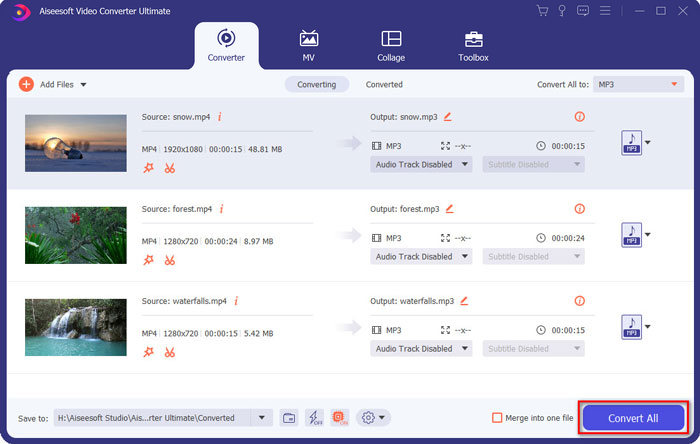
Step 1. Download and install the M4V to MP3 converter, you can launch the program on your computer. Click the Add Files menu or directly drag multiple M4V videos into this program.

Step 2. Once you have imported the M4V videos, choose MP3 as the output format. Of course, you can click the Gear icon to tweak the video and audio settings, such as sample rate, audio channel, etc.

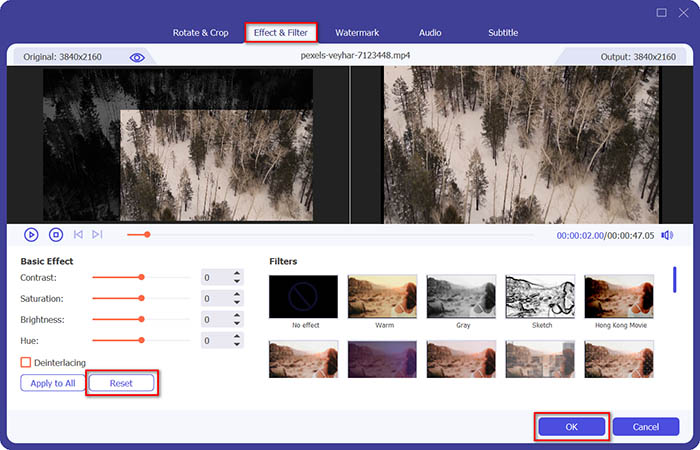
Step 3. Moreover, you can also click the Edit button or the Clip button to edit your output videos. It also enables to adjust brightness, contrast, saturation, hue and select de-interlacing as your requirement.
Step 4. If you are satisfied with the MP3 file, or need to merge the MP3 files, you can check the Merge into one file box and click the Convert button to start converting MP4 to MP3 with ease.
Parte 2: 3 métodos para extrair MP3 de M4V com facilidade
Método 1: Como converter M4V para MP3 online
FVC Free Online Video Converter is a versatile online M4V to MP3 converter that enables you to extract the MP3 from MP4 with ease. Moreover, you can also adjust video bitrate, sample rate, frame rate, resolution, etc.
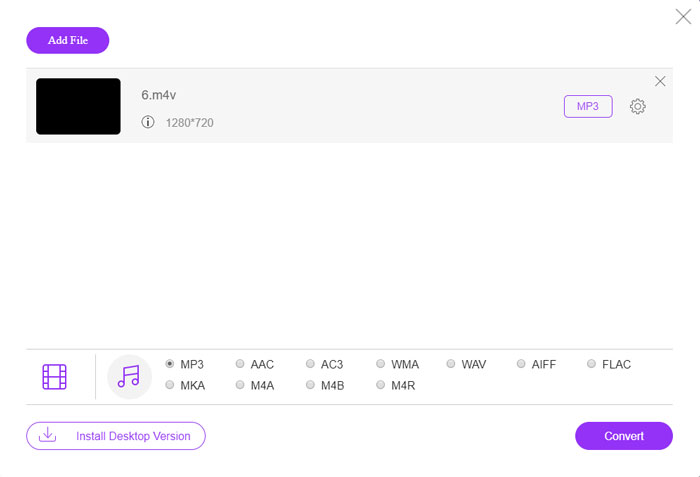
Step 1. Go to the M4V to MP3 online converter, you can click the Add Files to Convert button to load the M4V files into the program. For the first time, you should download the installer beforehand.

Step 2. Once you have loaded the M4V files, you can choose the MP3 option from the Audio menu. It also enables you to tweak the audio settings, such as the sample rate, audio codec and more.

Step 3. After that, you can click the Convert button to start the M4V to MP3 conversion. There will be no data will lose during the conversion process. You can save the output audio to your hard drive.
Método 2: Como converter M4V em MP3 via HandBrake
HandBrake é um conversor de M4V para MP3 de código aberto que permite personalizar o processo de transformação. Possui alguns parâmetros avançados que você pode ajustar a resolução do vídeo, taxa de quadros e muito mais.
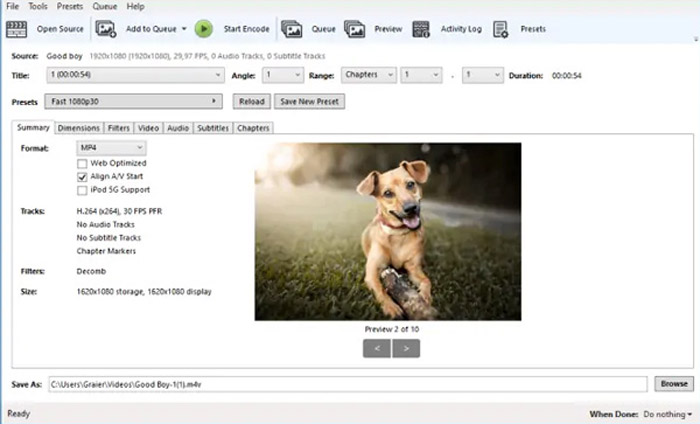
Step 1. Download and install the program on your computer, you can launch the program and locate the M4V file you want to convert. Then you can find the video within the user interface.
Step 2. After that, you can click the Browse button at the bottom and enter the new file name and destination folder. Then you can choose the MP3 as the output format and adjust the settings.
Step 3. Once you are satisfied with the output MP3, you can click the Start Encode button at the top menu to convert M4V to MP3 accordingly. It might take a period of time for the conversion.
Método 3: como converter M4V para MP3 por meio do Requiem
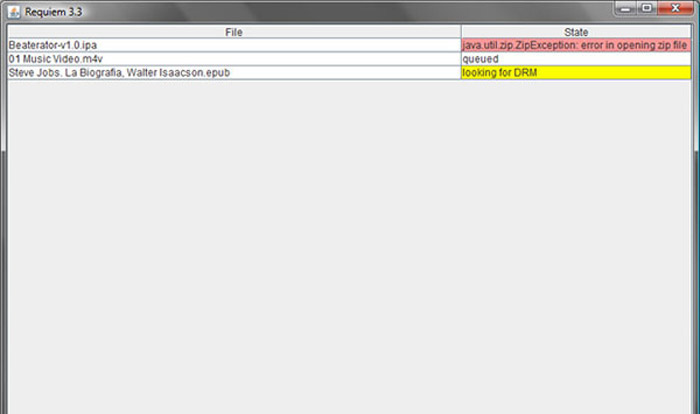
Existem dezenas de conversores online de M4V para MP3, quando você precisa se livrar da proteção DRM dos arquivos M4V. Requiem é um dos melhores freewares que você pode levar em consideração.
Step 1. Once you have installed the DRM decrypter, you can launch the program to detect the DRM-protected files, including music, videos, or audiobooks on your iTunes Library.
Step 2. After that, you can begin to remove DRM from these M4V files. Your original files would be transferred to trash, and now your files in iTunes Library are DRM-free.
Step 3. When you get the desired M4V files without DRM protection, you can simply convert the video with the online M4V to MP3 converters, or transfer to a smartphone directly. (See how to convert FLV to MP3)
Parte 2: Perguntas frequentes sobre a conversão de M4V para MP3
1. O que é o formato de arquivo M4V?
A extensão do arquivo M4V é um vídeo MPEG-4, também conhecido como arquivo de vídeo do iTunes. Ao comprar ou alugar arquivos de vídeo na iTunes Store, você pode obter os vídeos em M4V com proteção DRM. Mas o arquivo de vídeo é viável para os dispositivos autorizados. Ao converter M4V para MP3, você pode usar o arquivo de áudio para outros dispositivos.
2. O que é um método viável 100% para transformar M4V em MP3?
Se você não pode converter M4V para MP3 diretamente, o que é restrito pela proteção DRM, você pode usar o gravador de tela para capturar o vídeo M4V como áudio MP3. O FVC Free Screen Recorder é uma solução online versátil que permite obter o arquivo de áudio satisfatório sem qualquer custo.
3. Como converter M4V para MP3 com proteção DRM via HandBrake?
Quando você precisa converter M4V para MP3 com proteção DRM, pode usar o HandBrake para descriptografar os vídeos? Sim, você pode instalar alguns plug-ins extras para descriptografar os vídeos antes da conversão.
Conclusão
Quando precisar converter M4V para MP3, você deve aprender mais os fatores importantes para obter os arquivos desejados com facilidade. Se você tiver apenas alguns arquivos M4V simples sem proteção DRM, poderá escolher qualquer conversor de vídeo M4V para MP3 online ou freeware. FVC Video Converter Ultimate é o conversor definitivo que permite converter os vídeos e descriptografar a proteção DRM com facilidade.
-
 Como converter MP4 para MP3 no Windows / Mac / iPhone / Android / Online
 Se você deseja extrair áudio MP3 de vídeo MP4, você pode verificar este artigo e obter 8 soluções. Existem maneiras online e offline de converter MP4 para MP3 no seu telefone ou computador com facilidade.
-
 Como converter arquivos M2TS para MP3 gratuitamente
 Um arquivo M2TS pode ser convertido para MP3? Nesta postagem, listamos as 6 principais formas gratuitas e online de ajudá-lo a converter M2TS para MP3, AAC, AIFF e mais formatos de áudio.
-
 Qual é a diferença entre MP3 e MP4
 MP3 ou MP4, o que é melhor? Qual é a diferença entre MP3 e MP4? Este artigo irá comparar o MP3 com o MP4 em todos os aspectos que você pode imaginar.
