


 Video Converter Ultimate
 Gravador de ecrã
 Reparo de vídeo
 Secure Download
Converta 3GP para MP4 com conversores eficientes e fáceis de usar
A necessidade de converter formatos de arquivo cresceu significativamente. Uma conversão em particular que tem imensa importância é a conversão de arquivos 3GP para o formato MP4. Embora os arquivos 3GP fossem populares no passado, eles geralmente apresentam problemas de compatibilidade em dispositivos e plataformas modernas. Por outro lado, o formato MP4 oferece compatibilidade universal, reprodução de alta qualidade e suporte mais amplo em vários dispositivos e plataformas.
To address the need for converting 3GP to MP4 seamlessly, we have carefully reviewed and curated a list of powerful conversion tools. These tools provide efficient and reliable solutions to effortlessly transform your 3GP videos into the widely compatible MP4 format. Join us as we explore these top-rated conversion tools and discover how they can enhance your video experience by ensuring optimal playback quality and compatibility across multiple platforms and devices.

Parte 1. Melhores Conversores 3GP para MP4
1. Video Converter Ultimate
Video Converter Ultimate is an excellent program for converting videos to 3GP and MP4, and other audio formats. This software has a batch conversion function that lets you convert multiple audio files at once. In addition, the application lets users optimize the quality of their output by changing parameters like frame rate, bitrate, and resolution. Read the little tutorial we've prepared below if you want to learn how to convert 3GP to MP4.
Key Features
◆ O software FVC Video Converter Ultimate é projetado para gerar vídeos e arquivos de áudio de qualidade superior, com foco em preservar ao máximo a qualidade original dos arquivos convertidos.
◆ A interface do aplicativo foi projetada para ser amigável e intuitiva, facilitando a navegação tanto para usuários novatos quanto para usuários avançados.
◆ O FVC Video Converter Ultimate é uma ferramenta de software que apresenta alta velocidade e eficácia, facilitando a conversão imediata de vários formatos de arquivo.
Step 1. Get the 3GP to MP4 Converter App
First, click the relevant Free Download option below to begin downloading the program to your device. The next thing you should do is to follow the on-screen prompts in order to activate the software. Once it's set up, you can ask for assistance with the user interface.
Free DownloadFor Windows 7 or laterSecure Download
Free DownloadFor MacOS 10.7 or laterSecure Download
Step 2. Upload 3GP movie files
The second step is to import the movie file you wish to edit by hitting the Add icon on the main screen. After that, a preview of the imported file will load. If you wish to convert many files at once, just upload the folder. Choose the directory that has all of your audio files.
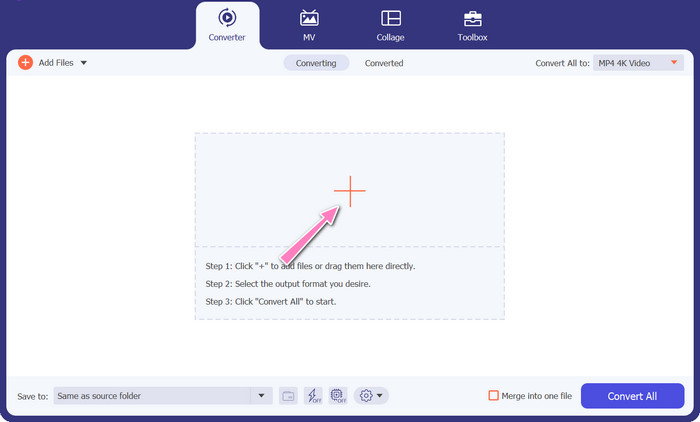
Step 3. Select output format
Third, hit the Converter All to button at the top of the program's interface to select a new format for the final product. Select MP4 from the Video Output drop-down menu. You have control over the output file quality by modifying its sample rate and bitrate.
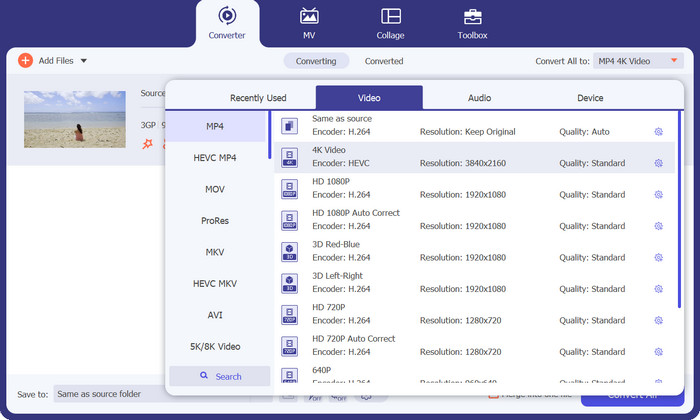
Step 4. Start the conversion process
Fourth, start the transformation by pressing the Convert All button down below. The output folder will then open so you can double-check the converted file.
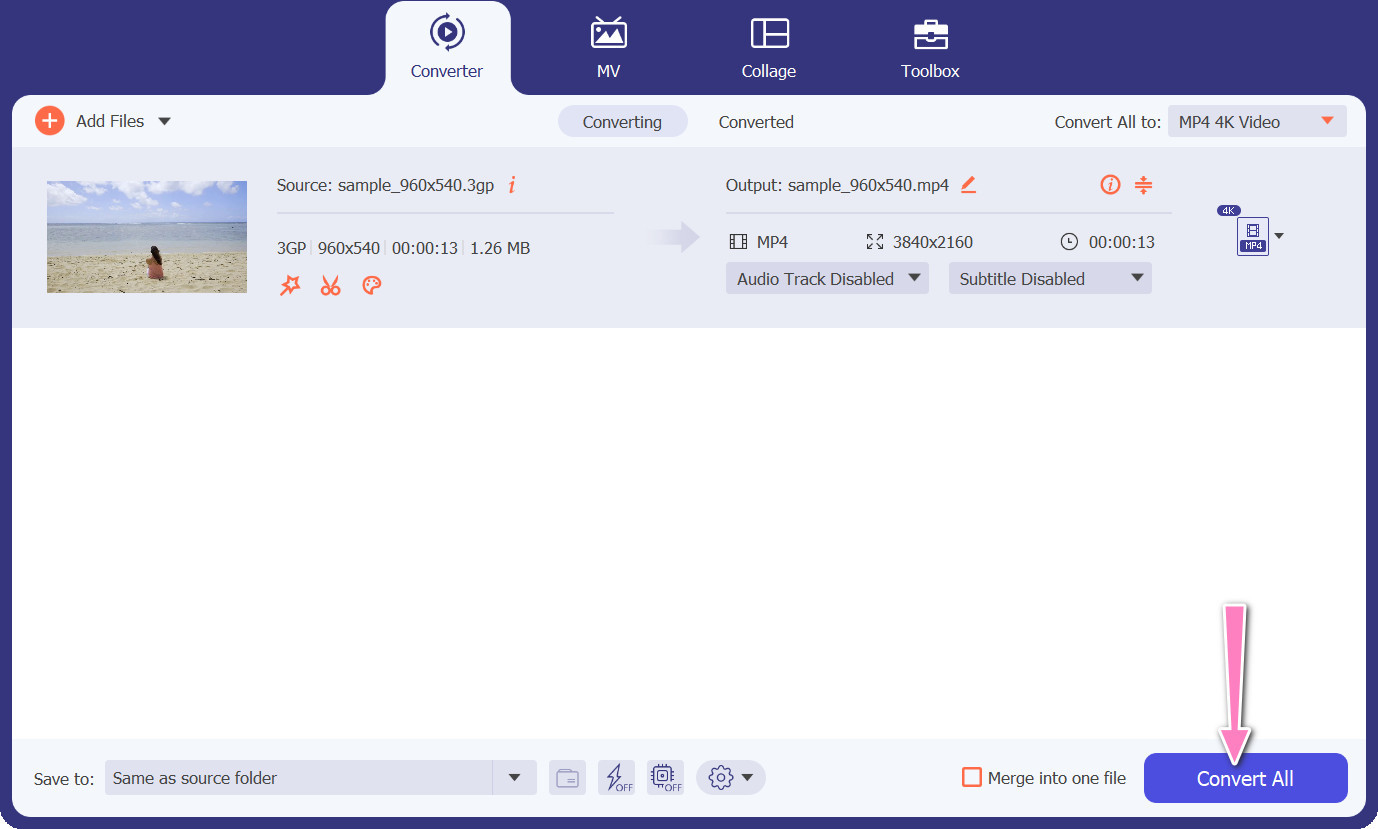
2. Conversor MP4 Gratuito Online
The utilization of Free MP4 Converter Online presents a viable alternative to the installation of a desktop program, thereby offering a convenient solution. This 3GP to MP4 converter online operates with seamless efficiency, ensuring the protection and confidentiality of personal data during the conversion process. Additionally, the software's bulk conversion functionality can be utilized similarly to that of a desktop program.
Key Features
◆ O Free MP4 Converter Online permite que você personalize as configurações de saída de acordo com suas preferências. Você pode ajustar parâmetros como codec de vídeo, resolução, taxa de bits e taxa de quadros para obter a qualidade e o tamanho do arquivo desejados.
◆ O Free MP4 Converter Online oferece suporte à conversão em lote, permitindo que você carregue e converta vários arquivos 3GP para MP4 simultaneamente. Isso economiza tempo e esforço ao lidar com vários arquivos.
◆ O Free MP4 Converter Online valoriza a privacidade do usuário e emprega medidas para proteger seus arquivos carregados. Eles geralmente oferecem opções para excluir arquivos após a conversão ou armazená-los com segurança por um período limitado.
Step 1. The initial step is to navigate to the primary website of the Free MP4 Converter Online by clicking on the provided hyperlink. Navigate to the Add Files to Convert option located on the primary interface and proceed to upload your audio file.

Step 2. Upon execution, the display of the initial document will be presented on the interface. Select your preferred output format by turning downwards from the same panel.
Step 3. Proceed to select the Convert button in order to change 3GP to MP4. To convert additional files, it is necessary to repeat the aforementioned instructions from the beginning.

3. Qualquer conversor de vídeo
O programa de desktop amplamente usado Any Video Converter tem uma contraparte gratuita baseada na web. É possível converter 3GP para MP4 e possui várias configurações sofisticadas e processamento em lote. Edição de vídeo e gravação de DVD são apenas dois dos extras disponíveis na edição do software.
Key Features
◆ Any Video Converter permite personalizar a resolução de vídeo, taxa de bits, taxa de quadros e qualidade de áudio. Ele otimiza o vídeo de saída de acordo com suas especificações.
◆ Any Video Converter permite cortar, recortar, mesclar e adicionar efeitos aos vídeos. Legendas e marcas d'água personalizam os vídeos.
◆ Any Video Converter suporta a importação e incorporação de legendas em seus vídeos. Você pode adicionar arquivos de legenda externos ou inserir legendas manualmente para tornar seus vídeos mais acessíveis ou multilíngues.
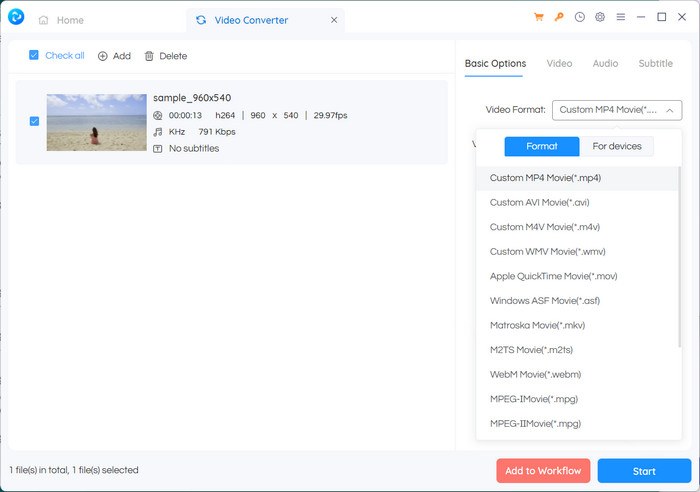
Step 1. First, install Any Video Converter. Download Any Video Converter from its website and install it on your computer using the on-screen directions. Launch Any Video Converter.
Step 2. Click on the Add Video(s) button within the software. Browse and select the 3GP files you want to convert to MP4. Next, click Open to add the selected files to the conversion queue.
Step 3. In the Profile section, select MP4 as the desired output format. You may have different MP4 options to choose from based on your preferences and requirements. Select the one that best suits your preferences.
Step 4. Tick on the Start button to begin the conversion process.
Further Reading:
Merge 3GP – How to Combine Different Video Clips from Your Smartphone
How to Convert 3GP to MOV Using Different Approaches [2023]
Parte 2. Perguntas frequentes sobre conversores 3GP para MP4
Quais são as diferenças entre 3GP e MP4?
O MP4 suporta mais dispositivos e plataformas do que o 3GP. Codecs: MP4 suporta mais codecs de áudio e vídeo para maior flexibilidade e qualidade de codificação. Características: 3GP não suporta legendas, capítulos ou múltiplas faixas de áudio, enquanto o MP4 sim. Devido a algoritmos de compactação mais eficientes, os arquivos MP4 são menores que os arquivos 3GP, mas possuem qualidade equivalente ou superior.
Existe alguma vantagem específica de usar MP4 sobre 3GP para streaming online?
A melhor qualidade de vídeo do MP4, as técnicas avançadas de compactação e a compatibilidade mais ampla o tornam a escolha preferida para plataformas de streaming online, proporcionando uma melhor experiência de visualização para os usuários.
Posso converter vídeos MP4 para o formato 3GP, se necessário?
Sim, existem conversores de vídeo disponíveis que permitem converter vídeos MP4 para o formato 3GP, se necessário, embora isso possa resultar em um downgrade na qualidade e recursos multimídia limitados.
Conclusão
While 3GP was popular in the past, especially for mobile devices, it has more limited support for advanced features and may not be as compatible with modern platforms. MP4, on the other hand, supports a wider range of video codecs, audio codecs, subtitles, and advanced features like chapters, menus, and multiple audio tracks. Luckily, you have many options to choose the best 3GP to MP4 converter based on your needs. Overall, if you have the choice between 3GP and MP4 for video files, it is recommended to opt for MP4 due to its superior quality, compatibility, and a broader range of features and functionalities.
-
 Como compactar vídeos 3GP para um tamanho menor com um processo em lote
 Para fazer backup dos vídeos 3GP em seu smartphone, aqui estão as 2 maneiras mais usadas para compactar arquivos 3GP em um tamanho muito pequeno com um processo em lote do artigo.
-
 Soluções notáveis para converter 3GP para MKV sem perdas
 Veja os tutoriais passo a passo de como converter 3GP para MKV sem perder qualidade. Se você deseja converter arquivos, prepare-se para conhecer esses métodos estupefatos.
-
 Os 3 melhores players 3GP gratuitos para computadores e celulares que você deve conhecer
 Quando quiser reproduzir seu filme 3GP facilmente sem a instalação ou conversão do codec de vídeo, você pode aprender mais sobre os três melhores players 3GP no Windows, Mac, Android e iPhone neste artigo.
