


 Video Converter Ultimate
 Gravador de ecrã
 Reparo de vídeo
 Secure Download
Métodos detalhados sobre como converter DIVX para MP4
DIVX is one of the popular video formats, but unfortunately, this format is not supported by other common programs, like Windows Media Player, Apple QuickTime Player, and more. The best way to play your DIVX video file is to convert it to a format supported by almost all programs like MP4. Then, if you want to convert your DIVX to MP4 file format, go to this article. Although converting files is difficult, we will show you the easiest methods you can try to convert your DIVX file to MP4 format.

Parte 1: Melhor Maneira de Converter DIVX para MP4 no Mac
The most effective way to convert DIVX to MP4 on Mac is using Video Converter Ultimate. This application is worth using because of its magical functions. You can continuously convert numerous files batch-by-batch instantly because it has a batch conversion process. Also, converting DIVX to MP4 is like child’s play with its intuitive interface and basic conversion instructions. In addition, you can convert more video formats. It supports 100+ formats, including AVI, FLV, MOV, AVI, M4V, MKV, WMV, VOB, and more. Also, Video Converter Ultimate offers a fast conversion process with a speed of 30x faster than other converters. Having this fast conversion process, you can ensure that converting numerous files will only take a short time.
Além disso, este conversor não é tendencioso em termos de usuários. Todos podem operá-lo, mesmo se você for um usuário avançado ou iniciante. Além disso, este aplicativo pode melhorar seu vídeo DIVX porque possui muitas ferramentas de edição de vídeo, como aprimorador de vídeo, cortador, correção de cores e muito mais. Além disso, se você deseja criar um videoclipe maravilhoso com uma combinação de imagens e vídeo, pode fazê-lo. Este criador de videoclipes oferece vários temas que você pode usar, como feliz, puro, romântico, noite de neve, listras e ondas, casamento, esportes, velhos tempos e muito mais.
Features
◆ Converta vídeos em vários arquivos, como MP4, DIVX, M4V, AVI, MOV, FLV, MKV, VOB e muito mais.
◆ A conversão em lote está disponível.
◆ Edite vídeos usando um aprimorador de vídeo, compressor, removedor de marca d'água, aparador, cortador, etc.
◆ Converta formatos de imagem, como BMP, JPG, PNG, TIF e muito mais.
Siga as instruções simples abaixo para converter DIVX para MP4 no Mac usando o FVC Video Converter Ultimate.
Step 1: Download the FVC Video Converter Ultimate on your Mac by clicking the Download button below. Then, launch the application after the installation process.
Free DownloadFor Windows 7 or laterSecure Download
Free DownloadFor MacOS 10.7 or laterSecure Download
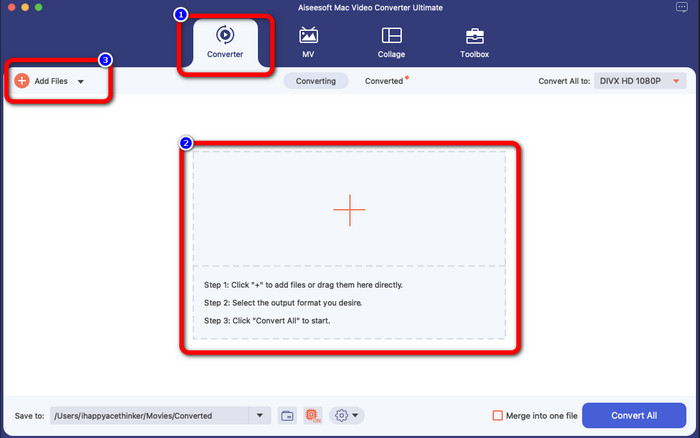
Step 2: After launching the application, the main interface will pop up on your screen. Go to the Converter panel and Click the Plus icon or the Add File button to insert the DIVX video file. You can also drag the file inside the box.
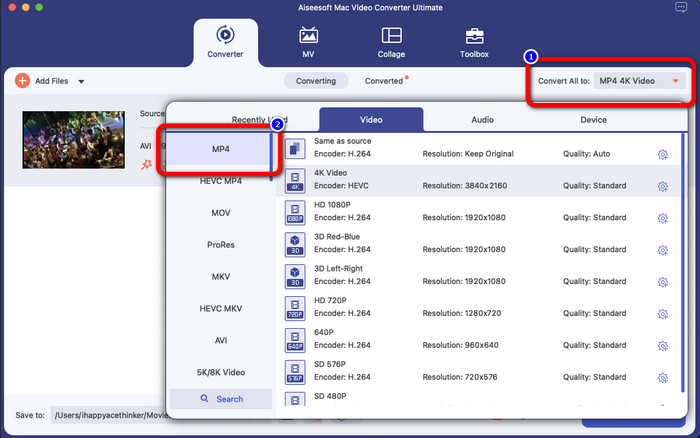
Step 3: Then, change the output format, and click the Convert All to button. The format options will appear on the screen and select the MP4 file format. You can choose the resolution you prefer, up to 4K Video.
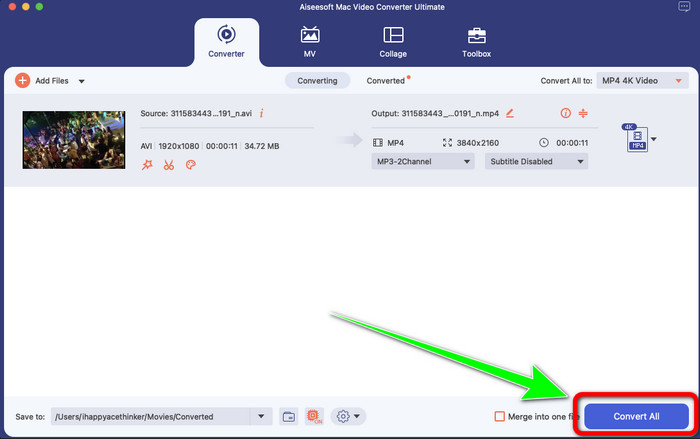
Step 4: After changing the output format, click the Convert All button to start.Then the conversion process will start. After that, your video is converted from a DIVX file to an MP4 format.
Parte 2: Maneira simples de converter DIVX para MP4 no Handbrake
Você quer usar o Handbrake para converter DIVX para MP4? Então, não se preocupe mais. Nesta parte, vamos ensinar como converter seus arquivos usando o Handbrake como seu conversor em seu computador. Esta ferramenta é confiável na conversão de muitos arquivos para outros formatos, como M4V, MP4, MKV, WEBM e muito mais. No entanto, o uso dessa ferramenta precisa ser esclarecido, pois possui muitas opções que você pode encontrar na interface. Nesse caso, podemos dizer que este conversor não é adequado para iniciantes. Além disso, há momentos em que, mesmo que você queira converter os arquivos para MP4, ele salva o vídeo como um arquivo M4V. Talvez esteja falhando por algum motivo. Mesmo assim, siga os passos simples abaixo para converter DIVX para MP4 usando o Handbrake.
Step 1: Download the Handbrake application on your computer. Then, when you are done installing the application, open it.
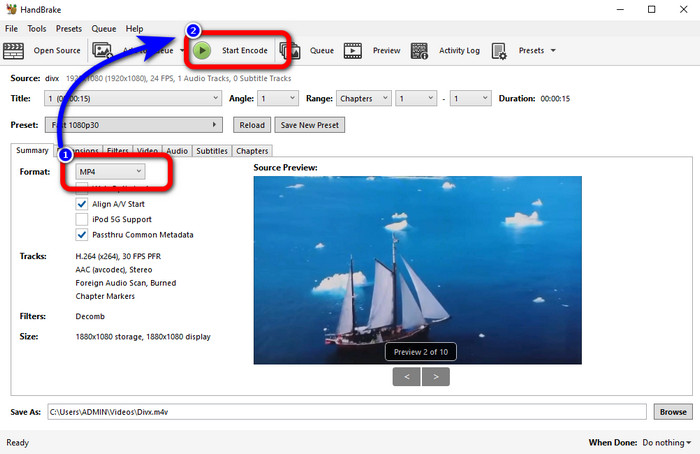
Step 2: Click the File option to add the DIVX video file.
Step 3: Select the Format option and choose the MP4 format. After that, click the Start Encode button to proceed with the conversion process. And that’s it, you can already play your video in an MP4 file format. This software also enables you to convert DIVX to 3GP.
Parte 3: Etapa fácil para converter DIVX para MP4 via VLC
Outro conversor offline que você pode usar é o VLC Media Player. Este aplicativo pode converter DIVX para MP4 facilmente. Isso não é bom apenas para reproduzir vídeos, mas também para converter. Com a ajuda desta ferramenta offline, você pode converter arquivos para outros formatos de arquivo, como MPEG, AVI, ASF, WMV e muito mais. No entanto, este conversor não é adequado para novos usuários porque possui procedimentos complicados de conversão de arquivos. Além disso, é difícil e demorado baixar o aplicativo. Use as etapas abaixo para converter DIVX para MP4 usando o VLC.
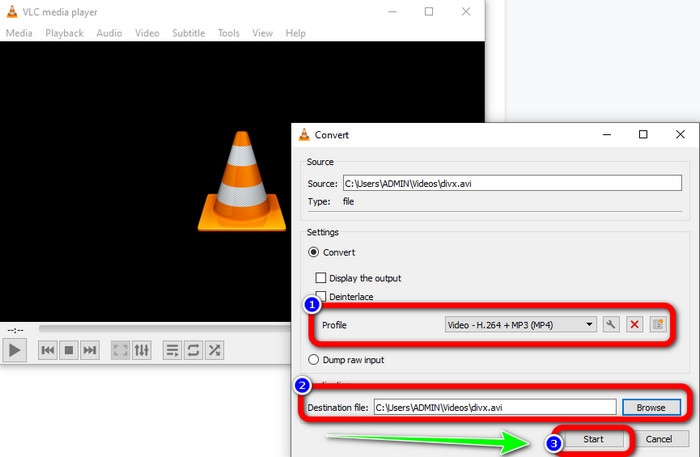
Step 1: Download and install the VLC on your computer.
Step 2: Go to the Media menu and select the Convert/Save button to add the DIVX video file you want to convert.
Step 3: On the lower part of the interface, click the Convert/Save button again.
Step 4: Proceed to the Profile option and select the MP4 file format. Click also the Destination file button to set up your desired location. Lastly, click the Start button to convert the DIVX file to MP4 format. You also can use this tool to convert MP4 to DIVX.
Parte 4: Maneira Eficaz de Converter DIVX para MP4 Online
After discovering all the converters you can use offline, in this part, we will show you the best DIVX to MP4 converter online. This remarkable converter is the FVC Free Video Converter Online. It can easily convert your DIVX file to MP4 format because it has a straightforward interface and simple steps. This tool supports various video formats, such as FLV, WMA, AVI, MOV, and more. Also, you can convert your DIVX file without losing the video quality, which is great for users. Follow the detailed guides below to convert your files in a simple way using FVC Free Video Converter Online.
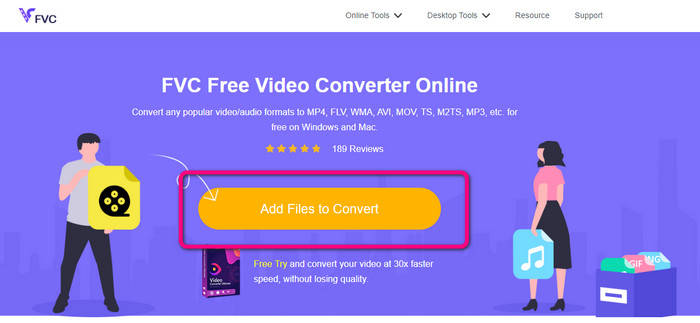
Step 1: Vá para o seu navegador e visite o FVC Free Video Converter Online local na rede Internet. Em seguida, clique no Adicionar arquivo para converter botão para carregar o arquivo DIVX.
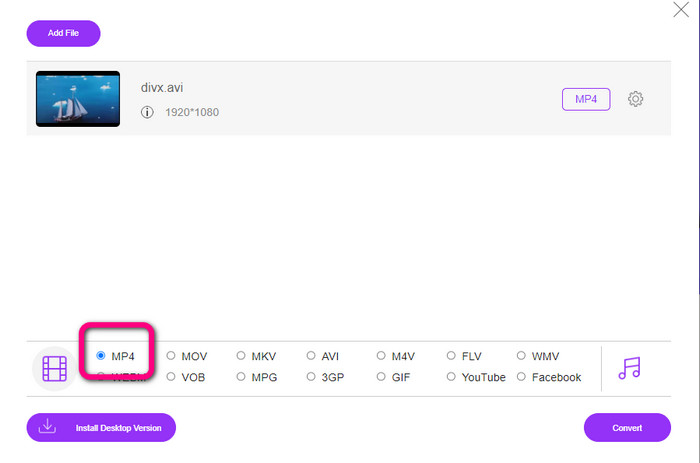
Step 2: On the lower part of the interface, select the MP4 file format from the format options.
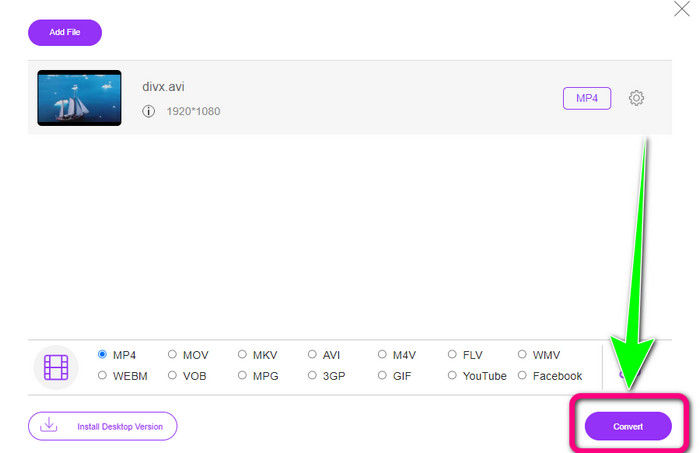
Step 3: For that final step, click the Convert button to start the conversion process. Then, save your MP4 video on your device.
Parte 5: DIVX vs. MP4
| DIVX | MP4 | |
| Extensão de arquivo | .divx/.avi | .mp4 |
| Descrição | A DivX, LLC desenvolveu o codec de vídeo DIVX. Este codec é compatível com programas do Windows. Também pode ser usado em consoles de jogos, som automotivo e muito mais. Além disso, há três codecs DIVX, o codec de vídeo de alta definição HEVC Ultra HD, H.264/MPEG-4 AVC DivX Plus e o MPEG-4 Parte 2. | É um contêiner de vídeo baseado no QuickTime MOV. Mas o MP4 suporta recursos MPEG. Além disso, o MP4 suporta áudio, vídeo e legendas. Essas combinações de codecs tornam o MP4 flexível. |
| Desenvolvido por | DivX Network Inc. | Organização Internacional para Padronização |
| Tipo MIME | vídeo/divx | vídeo/mp4 |
| Programas Associados | Xbox 360 som do carro Leitores de DVD/BLU-ray Despertadores | VLC Media Player Apple QuickTime Player 5KPlayer Windows Media Player |
Parte 6: Perguntas frequentes sobre a conversão de DIVX para MP4
1. Quem usa DIVX?
Quem usa o DIVX são os dispositivos eletrônicos de consumo com certificação DIVX, incluindo players de vídeo portáteis, DVD e Blu-ray Players.
2. MP4 é melhor que DIVX?
Sim. O DIVX já está desatualizado em relação ao arquivo popular agora, que é o MP4. O formato MP4 é um dos formatos mais usados, por isso é altamente recomendável usar o formato MP4.
3. Por que o MP4 é tão popular?
O formato MP4 é popular porque é suportado por quase todos os dispositivos, como Mac, Linux, Windows e diferentes dispositivos móveis. Desta forma, todos os usuários transformam seus vídeos em formato MP4, tornando-os mais acessíveis e disponíveis para todos.
Conclusão
Reading this article gave you essential insights about converting DIVX to MP4. There are four converters you can try. However, other converters are complicated to use, which is unsuitable for beginners. So, if you want to convert files easier, you can use two recommended converters: FVC Video Converter Online and Video Converter Ultimate.
-
 3 melhores maneiras de converter rapidamente MPG para MP4
 Quer converter seu formato de arquivo MPG para MP4? Neste artigo, listamos os melhores e mais rápidos conversores MPG para você!
-
 AMV Converter - 3 melhores métodos para converter MP4 em AMV no Win / Mac
 Quais são os melhores conversores de MP4 para AMV para transformar os vídeos em Amine Music Video, você pode aprender mais sobre os 3 métodos mais eficientes para obter os vídeos desejados com facilidade a partir do artigo.
-
 WebM para MP4 | Converta grátis WebM para MP4 (online e desktop)
 Como assistir arquivos WebM sem navegador da web? Você precisa converter WebM para MP4. Aqui estão os 10 principais conversores gratuitos de WebM para MP4 para alterar WebM para MP4 online e em computadores Mac e Windows
