


 Video Converter Ultimate
 Gravador de ecrã
 Reparo de vídeo
Como converter HTML para MP4 online: os três principais conversores que vale a pena considerar
People often download HTML videos from the internet for various reasons. One main reason is to watch them later without needing a good internet connection. This comes in handy, especially during travel or when internet access is spotty. The next common reason is to keep the video and share it with others who may not have access to the online source. Regardless of the reason you have for having HTML files, converting them to a much more accessible video format like MP4 is necessary. This is to accomplish smooth and non-problematic device compatibility. Now, to convert HTML to MP4 format, you will need a tool known for handling HTML very well. Fortunately, we have gathered the best online converters that you can consider using.

Parte 1. Por que é necessário converter vídeos HTML para MP4
Conforme mencionado anteriormente, existem vários motivos para converter vídeos da web, como HTML, em um formato de vídeo universal, como MP4. Mas para elaborar essa necessidade, aqui está uma explicação mais detalhada. Este tipo de conversão pode ser necessária quando se deseja preservar o conteúdo de um arquivo HTML. Isto é particularmente verdadeiro em elementos multimídia como vídeos em um formato que é universalmente acessível em reprodutores de mídia e diferentes plataformas.
Veja bem, os arquivos HTML contêm vários tipos de informações que podem ser renderizadas por navegadores da web, mas nem todos os reprodutores de mídia os suportam. Assim, a principal razão para procurar um conversor de HTML para MP4 para uma conversão eficiente é que você pode encapsular o conteúdo multimídia em um formato de vídeo padrão que pode ser facilmente reproduzido em vários players. Além disso, esta conversão também garante a adequação para compartilhar e consumir conteúdo multimídia em múltiplas plataformas.
Parte 2. Como converter HTML para MP4 online
Vamos direto ao assunto, conhecendo os conversores online eficientes que o ajudarão a obter os melhores resultados MP4 de seus arquivos HTML.
1. Online-Convert.com
O primeiro conversor da lista é Online-Convert.com. É um conversor de arquivos prático, mas multifuncional, que você pode usar na web para alterar rapidamente seus arquivos HTML para vários formatos de saída. Além de converter de e para arquivos HTML, você também pode ajustar outras configurações, como escolher a predefinição correta e alterar o tamanho da tela, a taxa de bits do vídeo e a taxa de quadros. Além disso, permite girar, cortar, espelhar, inverter, cortar e definir o áudio do seu projeto de vídeo. Certamente, este conversor de HTML para MP4 oferece muitas opções prontas para diferentes necessidades. A melhor parte é que não custará um centavo para usar, sem anúncios irritantes aparecendo para irritá-lo! No entanto, ele vem com um limite de tamanho de arquivo e não oferece suporte à conversão em massa de arquivos. Independentemente disso, aqui estão as etapas para realizar a conversão rapidamente.
Step 1. On the main website, choose the right converter tool that it offers for this conversion need. Now, get your HTML uploaded by clicking the Choose File button.
Step 2. When the file is successfully uploaded, you can browse to the lower part to do some editing you need for the output. Otherwise, click the START button to commence the conversion process.
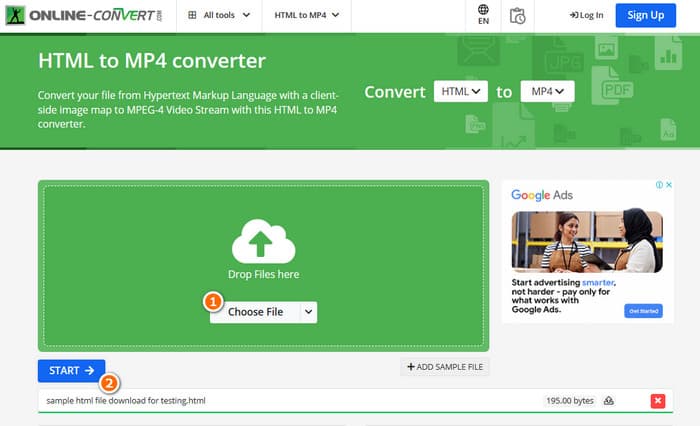
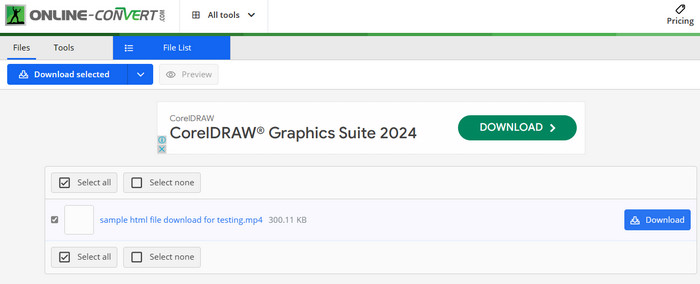
Step 3. When the conversion is done, you will need to download the converted file to save it to your device.
2. AConverter
Outro conversor flexível que permite converter HTML para MP4 online é o AConvert. Este conversor específico é uma ferramenta fácil de usar para converter vários formatos de arquivo sem nenhum custo. Além disso, o AConvert foi projetado para atender qualquer pessoa com ou sem experiência que precise de serviços de conversão online. Um de seus recursos de destaque é a conversão em massa, que permite converter vários arquivos de uma só vez, economizando tempo quando você tem muitos arquivos para processar. No entanto, o processo de conversão pode demorar um pouco mais do que o esperado e os anúncios no site podem ser um pouco intrusivos. Enquanto isso, aqui está um guia rápido para ajudá-lo a converter arquivos HTML usando AConvert.
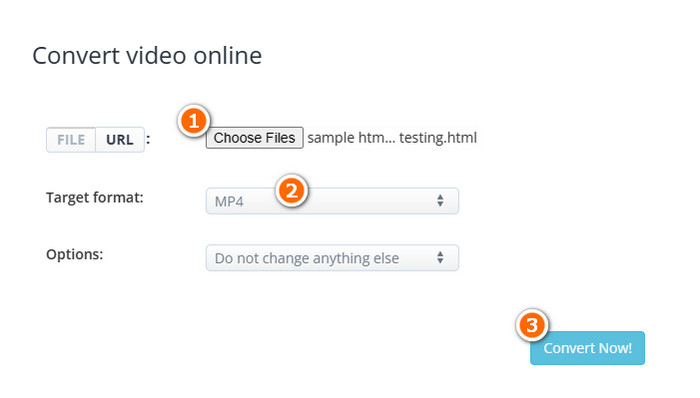
Step 1. Click the Choose Files button upon reaching the official tool converter. Then, select the HTML file that you want to convert.
Step 2. After that, navigate to the Target format section and choose the MP4 as your output.
Step 3. When all is set, click the Convert Now button to begin the process. Once the conversion succeeds, download the converted file for exportation.
3. Converterpoint - Conversor de vídeo online HTML5
Para completar o conjunto dos nossos 3 poderosos conversores online para HTML, aqui está o Converterpoint. Esta ferramenta online pode ser útil não apenas para usuários comuns, mas também para indivíduos ou empresas que desejam converter vídeos para uso em sites, plataformas de mídia social ou outros canais digitais que suportem HTML5.
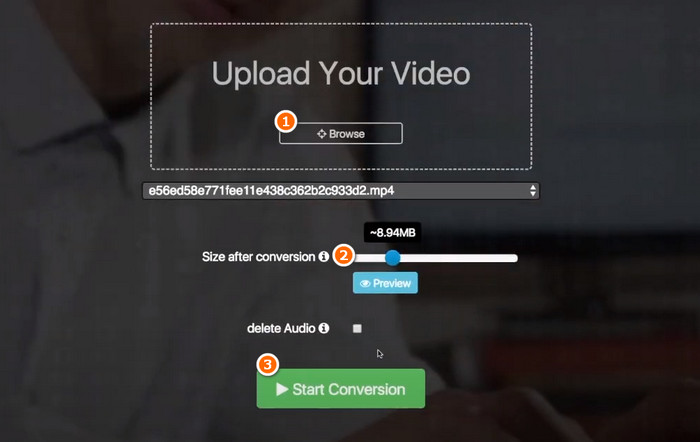
Step 1. Upload your video when you click its Browse button.
Step 2. Once uploaded, set your preferred output file size after the conversion.
Step 3. After that, click the Start Conversion button to begin the process.
Parte 3. Dica bônus: converta formatos de mídia para MP4 online gratuitamente
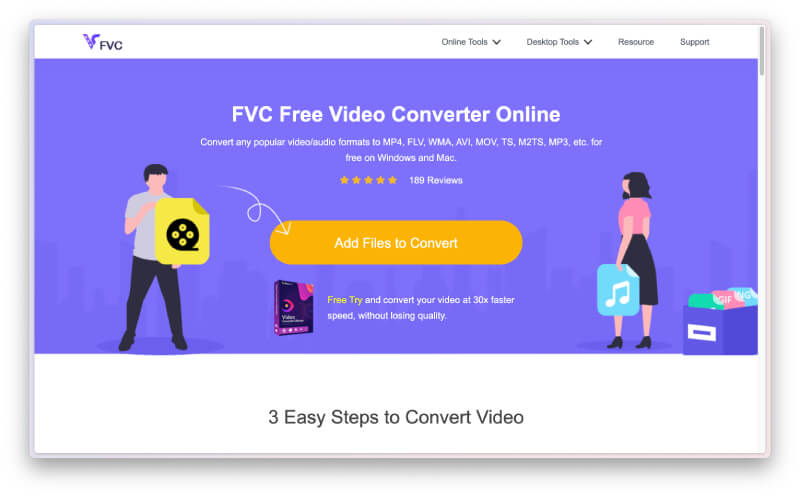
Don’t get enough and want more than just a converter to convert HTML to MP4 online? Then, see how this FVC Free Video Converter Online helps you with your various video and audio file conversion tasks. It is an excellent media file converter that lets you convert unlimited files without any restrictions! Furthermore, it is rapid when it comes to processing the conversion as it works with a special technology that makes the conversion much faster than the others. Thus, if you have bulk audio or video files there that you need to convert into MP4, follow the steps below.
Step 1. Click the Add Files to Convert button when you land on its official website. This will enable you to upload your first file.
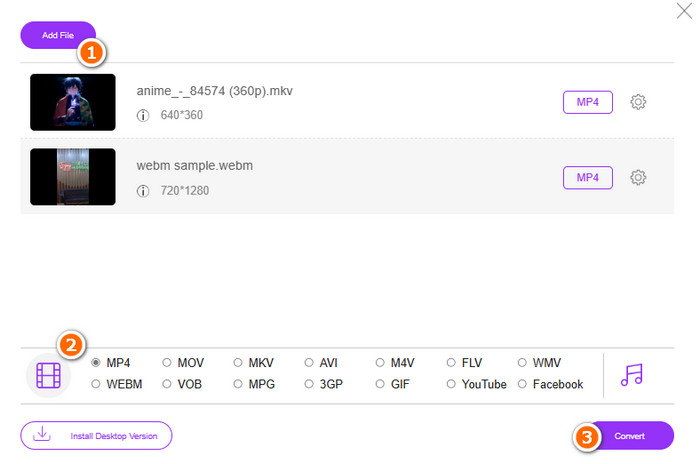
Step 2. After picking your first file to upload, you can upload more when you click the Add file button on the main window. Then, set the files to MP4 as you toggle the format from its location at the bottom.
Step 3. Finally, click the Convert button to start the bulk conversion process.
Parte 4. Perguntas frequentes sobre conversão de arquivos HTML em MP4
Os arquivos HTML podem ser convertidos para o formato MP4?
Yes, HTML files can be converted into MP4 format by grabbing a copy of your own and transforming it to MP4.
Quanto tempo leva para converter o arquivo HTML para o formato MP4?
A duração sempre depende de vários fatores, como o tamanho do arquivo e a confiabilidade da ferramenta de conversão.
Posso gravar o vídeo HTML?
Yes, you can. You can also find some free MP4 recorders online to help record while the HTML video is playing.
Conclusão
Above are the online converters that are notorious for converting HTML to MP4. You now have plenty of choices for doing the conversion. On the other hand, if you want a notorious audio-video file converter that remarkably offers excellence in the conversion process and produces high-quality outputs, FVC Free Video Converter Online is the best.
-
 Como converter RAR para MP4 de maneira online e offline
 Se você está procurando um conversor eficiente de RAR para MP4, você está na página certa. Esta postagem fornece maneiras de adquirir online e offline.
-
 AVCHD vs. MP4: revisão de qual é melhor escolher
 Veja esta postagem AVCHD vs. MP4 e saiba qual formato de vídeo melhor combina com você. Cave mais para saber suas descrições, diferenças, etc.
-
 Melhor técnica para transformar HEIC em MP4 com eficiência
 Aprenda as melhores maneiras de realizar a conversão de HEIC para MP4 em seu computador e dispositivos iPhone. Esta postagem contém a técnica para uma conversão eficaz.
