


 Video Converter Ultimate
 Gravador de ecrã
 Reparo de vídeo
 Secure Download
Converta JPG para MP4 no Windows/Mac sem perder a qualidade
JPG é o formato de imagem mais comum, e o usamos para vários propósitos, desde compartilhar fotos online até armazenar instantâneos digitais em nossos dispositivos. Com sua ampla compatibilidade e tamanho de arquivo relativamente pequeno, o JPG se tornou a escolha preferida para capturar e preservar memórias visuais na vida cotidiana.
But nowadays, creating videos out of pictures is becoming a thing. It’s also another way of saving memories in a more creative and passionate way. You can add audio, transitions, or just a plain slideshow MP4 video with your favorite music as its background. So, if you’re into it and planning to transform JPG to MP4, then continue reading this article and learn how to convert them using 4 different methods without losing their quality. Unleash those creative juices stored in you today!

Parte 1: A melhor maneira de converter JPG para MP4 no Windows/Mac [Melhor para iniciantes]
The ultimate way to convert JPG to MP4 is by using the FVC Video Converter Ultimate. This tool has a special feature called MV, allowing users to make good-quality MP4 videos from their JPG photos. This comes with a pre-set theme that you can freely use and various effects and filters. Also, you can easily rotate and crop JPG files accordingly before exporting them into MP4. The most fun thing about this tool is that you can import your audio, personalize it with a watermark, and more. Lastly, this tool isn’t overwhelming to use as it has a very intuitive and user-friendly interface. Now, to do this, follow the steps below:
Step 1. First, you need to get the software either on Windows or Mac, then download and install it.
Free DownloadFor Windows 7 or laterSecure Download
Free DownloadFor MacOS 10.7 or laterSecure Download
Step 2. After that, open the tool, and among the 4 tabs above, click MV.
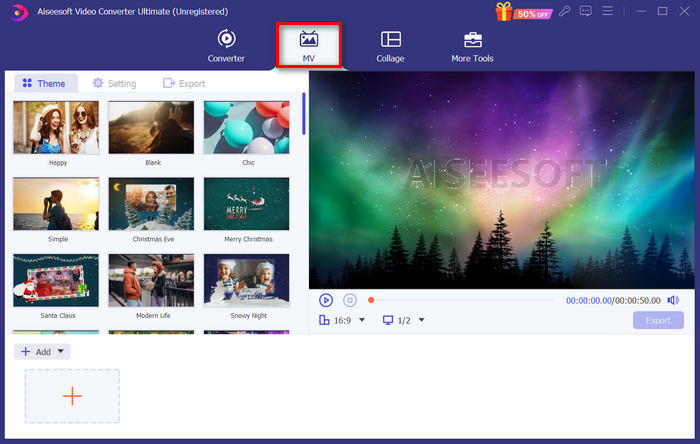
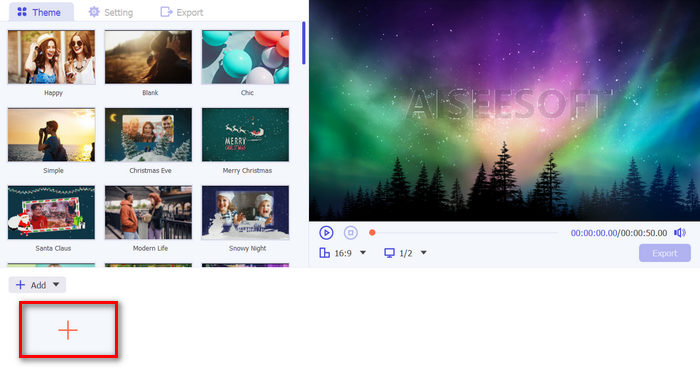
Step 3. Now, when you’re on the MV’s main interface, click the Add File button to add the JPG files that you want to convert to MP4.
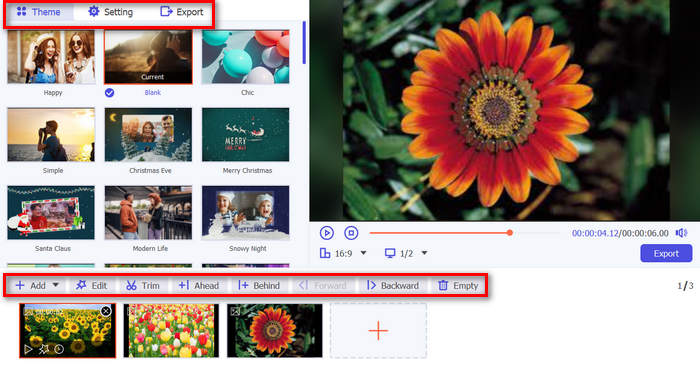
Step 4. To add, edit, and trim your MP4 video, click the button at the upper part of the Add File button. Also, you can choose a pre-set theme by clicking the Theme tab above.
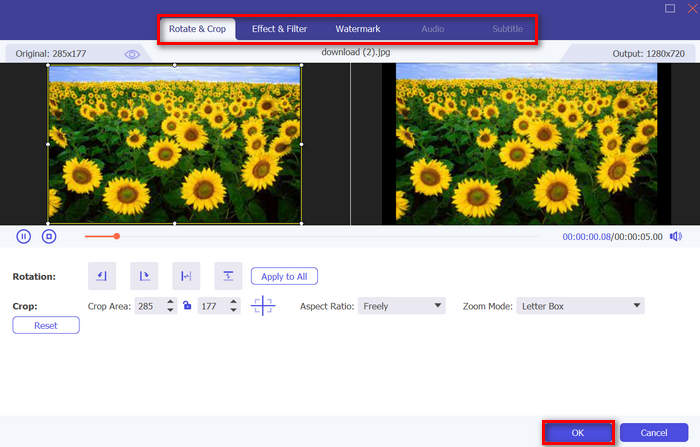
Step 5. Meanwhile, to crop and rotate the images, add filters and effects, and add a watermark to make it more personalized, just click on the Edit icon below, and it will bring you to another Window.
Step 6. If these are all set, click the Export button, where you can change the format to MP4 and change the frame rate, resolution, and quality. Also, you can indicate in what folder you want your converted JPG to MP4 will be saved. Lastly, to save your file, click on the Start Export button.
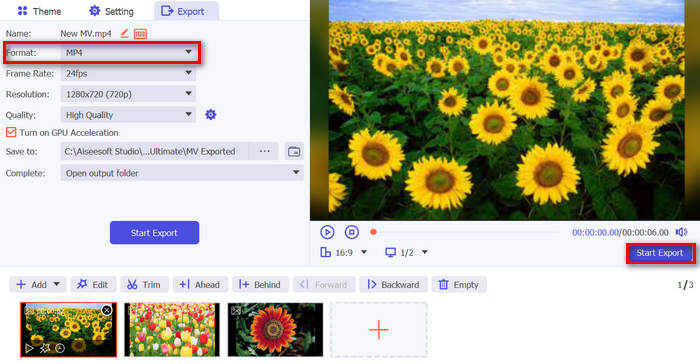
O FVC Video Converter Ultimate simplifica a conversão de JPG para MP4 com sua interface amigável, recursos personalizáveis, temas predefinidos, ferramentas de edição, saída de alta qualidade e compatibilidade com os sistemas operacionais Windows e Mac. É realmente a melhor maneira de transformar fotos chatas em vídeos divertidos e criativos.
Parte 2: Converta JPG para MP4 no Windows 11/10 com a ferramenta padrão Fotos
No Windows 10 e 11, o Clipchamp agora está integrado ao aplicativo Fotos, que permite aos usuários converter arquivos JPG para MP4. Essa integração facilita a edição, que pode ser salva em MP4. Então, para orientá-lo com isso, siga o processo passo a passo abaixo:
Step 1. First, you need to go to the Start Menu and from there, click on Photos.
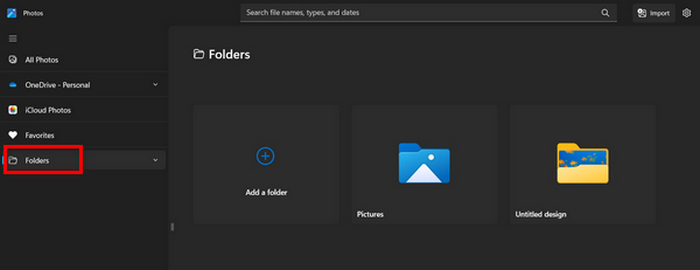
Step 2. On the Photos, go to the Folders in the left tab. You will be asked to add a folder or you can just simply select photos from the pictures that you want to transform into MP4.
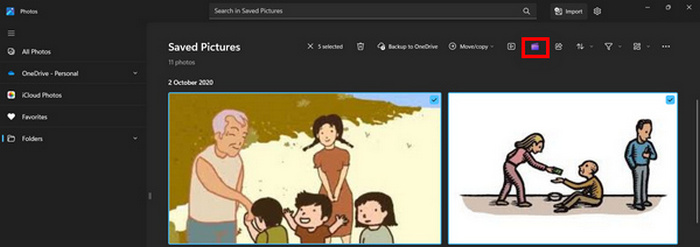
Step 3. After choosing the JPG pictures that you want to convert, click on the Create a video icon.
Step 4. On a new Window, you will be asked to add media files to this video? Click Yes to Add Video.

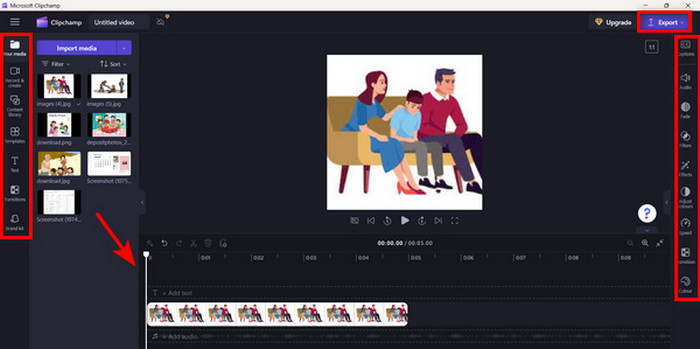
Step 5. Now, drag the imported media to the timeline. You can utilize the editing options on the Left tab, where you can add text, choose templates, and more. On the Right tab, you can add audio, effects, filters, etc. Once done, they just need to click on the Export button, and the MP4 will be saved directly to your computer.
Se você é um usuário do Windows, esse método torna a conversão de JPG para MP4 muito rápida. No entanto, esse método poderia ter sido mais fácil em comparação com outras ferramentas. Além disso, você não pode exportar resolução de vídeo 2K/4K usando sua versão gratuita e não tem acesso a outros bons efeitos e filtros em comparação com outras ferramentas de conversão.
Parte 3: Converta JPG para MP4 no Mac com o iMovie
Se você é um usuário de Mac, há uma solução útil para converter JPG para MP4 para você. O Mac tem um aplicativo integrado chamado iMovie. Este é um aplicativo de edição de vídeo que oferece edição básica para seus usuários, mas, além disso, também pode ser usado para transformar arquivos JPG em MP4. Eles só precisam importar suas imagens, adicionar alguns efeitos e filtros e salvá-los como MP4.
Step 1. On your Mac, launch the iMovie app and click on Create New.
Step 2. After that, add your JPG file to the app by clicking the Import Media button on the main interface.
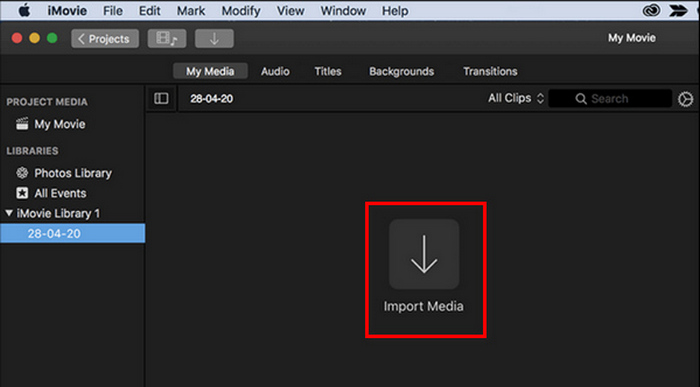
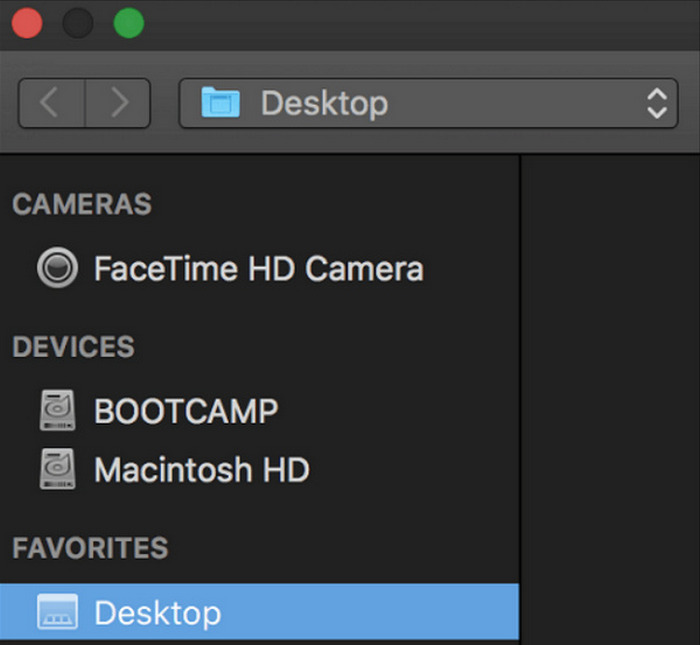
Step 3. Now, look for the JPG files that you want to convert to MP4.
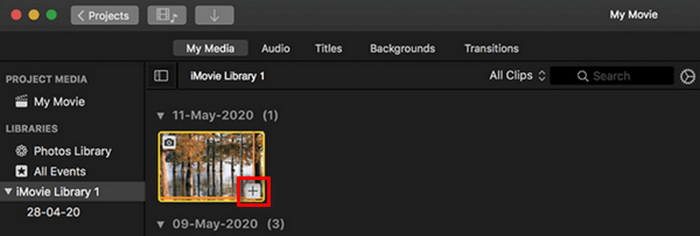
Step 4. After your JPG appears on the app interface, you can select it and notice a Plus. Click on it to enable you to add the photo to the timeline.
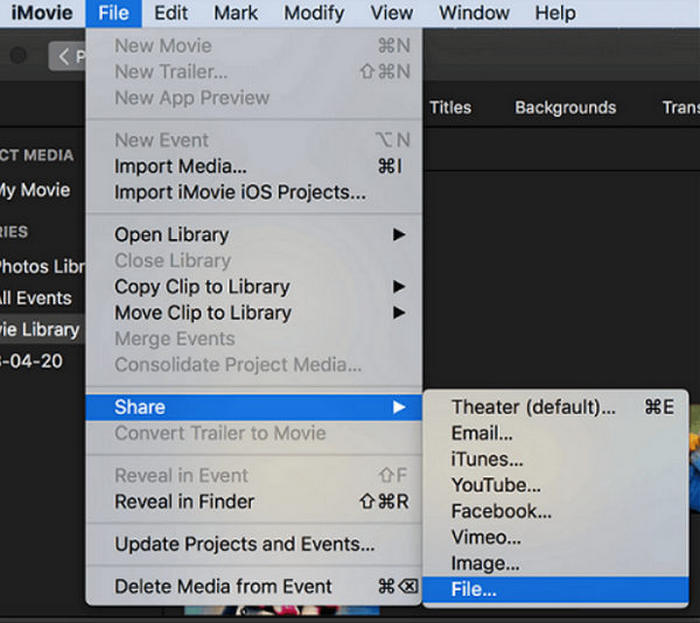
Step 5. After adding the JPG files to the timeline, you can now drag the corners to expand the duration of your final MP4 file. Then, click on the File menu at the top, select Share, and choose File to export your file.
Step 6. Lastly, name your MP4 file at the top, fill in other metadata fields for your video file, and click Next. Select the desired location to save the MP4 file that you want to convert. Once you have chosen the location, the conversion process will begin.
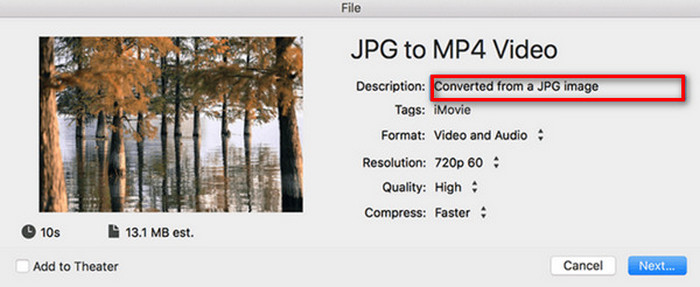
iMovie offers Mac users a convenient way of converting JPG to MP4 files with its user-friendly interface and integrated editing tools. However, it may lack advanced features compared to other converter tools, limiting customization options and effects. While suitable for basic editing, users are now becoming competitive and creative, seeking a tool that can really cater to everyone’s needs and expectations. Also, this tool is not working on Windows. If you like iMovie, find the iMovie for Windows tools here.
Parte 4: Converta JPG para MP4 online
Agora, se você está procurando outra maneira de converter JPG para MP4, então convertê-los online pode ser para você. Um dos melhores conversores online para isso é o Online Convert.com. Você pode executar esta ferramenta de diferentes navegadores no seu computador, e ela pode ser usada facilmente devido à sua interface de usuário intuitiva.
Step 1. On your browser, search for the Online Convert.com site.
Step 2. Once you’re on their site, select the formats accordingly. Since you are going to convert JPG to MP4, then choose JPG from the Convert drop-down button and MP4 from the To drop-down button.
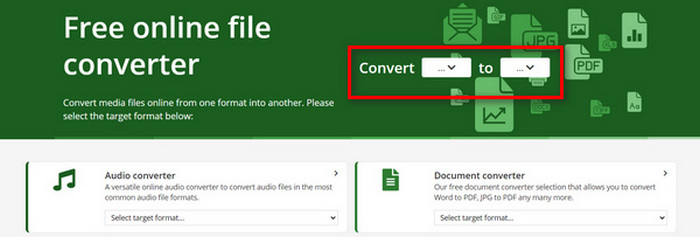
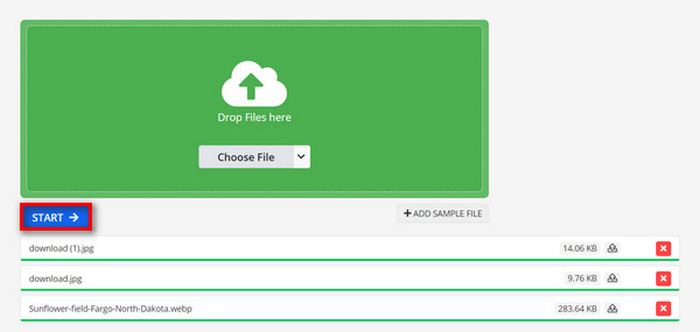
Step 3. After that, upload the JPG files you want to convert by clicking the Choose File drop-down button, where you can import your files from your Device, Dropbox, Google Drive, and even from the URL.

Step 4. Next, after uploading the JPG files that you want to convert to MP4, click the Start button.
Step 5. Lastly, download your MP4 file by clicking the Download button.
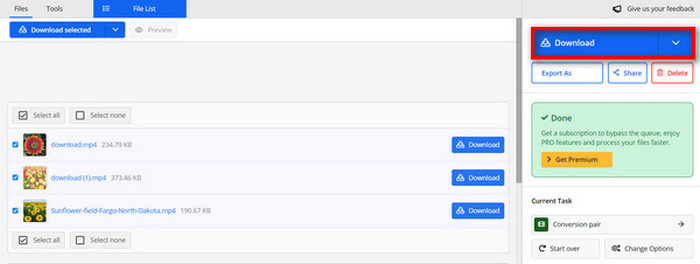
A saída convertida dessa ferramenta é resultado de uma configuração de vídeo predefinida que os usuários ajustaram manualmente antes de converter os arquivos. Embora isso transforme facilmente JPG em MP4, você não pode aprimorar diretamente o vídeo convertido com base no seu estilo criativo.
Parte 5: Perguntas frequentes sobre a conversão de JPG para MP4
JPEG é a mesma coisa que JPG?
JPEG and JPG are essentially the same digital image format, with both file extensions referring to the JPEG format created by the Joint Photographic Experts Group or JPEG. Learn it here to convert JPEG to JPG.
Quando devo converter JPG para MP4?
Você deve converter JPG para MP4 quando quiser criar uma apresentação visual ou compartilhar uma série de imagens como um vídeo, como criar slideshows, álbuns de fotos digitais ou slides de vídeo. Além disso, se você quiser ser criativo com a forma como quer que seus arquivos JPG sejam vistos, então convertê-los para MP4 é a melhor maneira de adicionar transições, música, sobreposições de texto e outros elementos multimídia.
Como faço para combinar JPG e MP4?
A única maneira de combinar JPG e MP4 é usando ferramentas de edição de vídeo. Com essa abordagem, você tem controle total sobre o arranjo, o tempo e a personalização das imagens e do vídeo que deseja combinar.
Conclusão
Now, it’s your turn! Converting JPG to MP4 is another means of keeping memories creatively. So, if you have JPG files and you want to convert them, then follow all the presented methods in this article and choose what suits you best. Get started today and see the magic happen!
-
 Os 5 principais tutoriais para converter PNG para JPG rapidamente
 Se você precisa converter seu arquivo PNG para o formato JPG, pode aprender as melhores maneiras aqui. Você também aprenderá a diferença entre os formatos de arquivo PNG e JPG.
-
 Métodos fáceis sobre como converter SVG para o formato JPG
 Encontrando a melhor maneira de converter SVG para JPG? Esta postagem fornecerá alguns tutoriais infalíveis que você pode experimentar. Você também descobrirá o conversor de SVG para JPG para você.
-
 Métodos úteis sobre como converter TIFF para JPG/PNG facilmente
 Não perca estas excelentes maneiras de transformar formatos TIF em JPG/PNG. Este post fornecerá as informações necessárias que você precisa saber. Inclui suas diferenças.
