


 Video Converter Ultimate
 Gravador de ecrã
 Reparo de vídeo
 Secure Download
Como converter MKV para MP4 no Windows / Mac
Ao reproduzir um filme, você descobre que ele não pode ser aberto porque alguns programas não oferecem suporte ao formato MKV. Então você pode se perguntar por que isso está acontecendo e como resolvê-lo.
O motivo pelo qual você não consegue reproduzir MKV pode ser causado pela falta de certos codecs em seu dispositivo. Por causa disso, embora você possa ver MKV em todos os lugares hoje em dia, alguns dispositivos ou programas ainda não suportam o formato MKV. Portanto, você precisa convertê-lo para um formato mais comum, como MP4, um formato muito mais utilizável que pode ser carregado corretamente em quase todos os dispositivos.
Today we are going to introduce you 2 free converters to help you convert MKV files to MP4.

Parte 1. Como alterar MKV para MP4 online e grátis
Se você não suporta instalar muitos softwares em seu computador como eu, sugiro que experimente um conversor online baseado na web.
Existem muitos conversores de vídeo online gratuitos no mercado, mas, para ser honesto, a maioria dos chamados conversores 'gratuitos' têm uma infinidade de limites. Você tem que pagá-los para ter um plano melhor. Só assim você pode converter rapidamente arquivos grandes em lotes sem marca d'água.
Então, existe um conversor de vídeo realmente grátis, rápido e poderoso? A resposta é sim.
FVC Free Online Video Converter, an MKV to MP4 efficient video converter that is able to help you convert videos with no limit. It supports converting nearly all mainstream videos to popular formats like MP4, MOV, WMV, AVI and FLV in seconds. It also supports batch conversion, which means you can convert a bunch of videos and keep their original quality at the same time.
Because FVC Free Online Video Converter is a web-based tool, so you can use it easily on both Windows and Mac, as long as you have a stable network and a browser. As for the usage, you can master this MKV to MP4 converter with only a few steps.
Step 1. Go to the website of FVC Free Online Video Converter on your browser. Then Click the Add Files to Convert button. If haven’t downloaded FVC Launcher to your computer before, it will remind you to download the launcher first. Just follow the prompt and install the launcher.
Download the Desktop Version to convert files in batch.

Step 2. After installing, the Open File window will show up automatically. Now choose the MKV file you want to convert. By the way, if you want to convert several MKV videos once and for all, select all the MKV files you need.
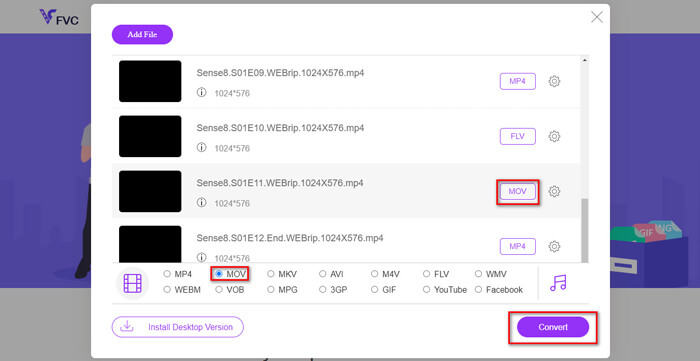
Step 3. Then click Open and you will see a list of selected files. Choose the output format MP4 under that list.
You can also select different formats for different files separately by clicking the format next to the Setting icon and change the output format below. But you can just skip that and click the Convert button. After that, find a destination to save the converted videos.
Parte 2. Como converter MKV para MP4 com o VLC Media Player
You may know VLC as a multimedia player, which is available for most desktop operating systems. But actually, it is also a hidden video converter. It allows you to convert MKV files to MP4 format. If you already have VLC on your computer, you can give it a try.
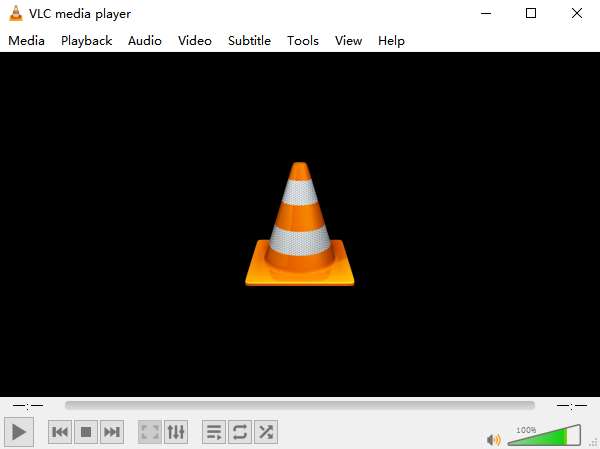
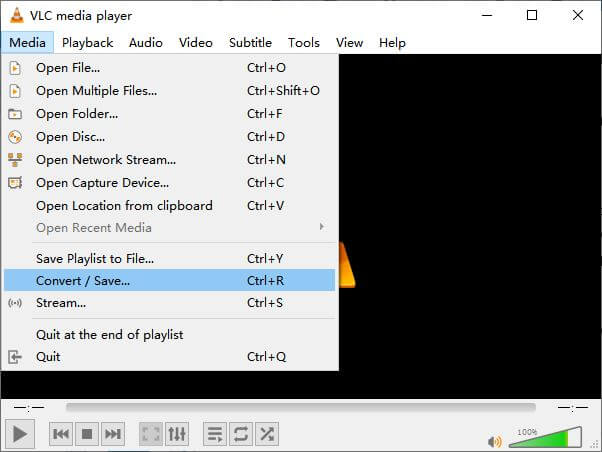
Step 1. First launch VLC Media Player on your computer. Click the Media menu. Find Convert / Save in the drop-down list.
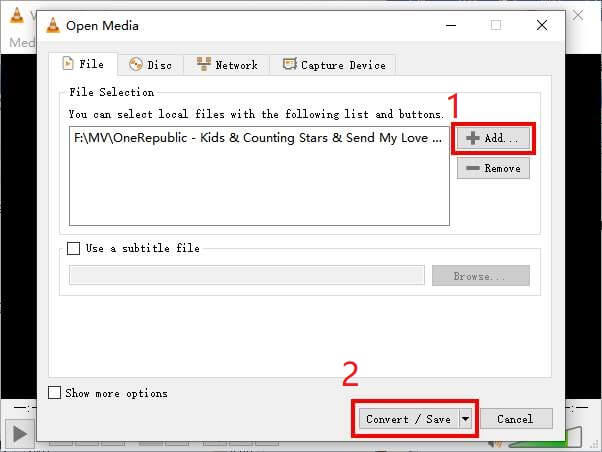
Step 2. Click + Add and find the MKV video you want to convert. Then click the Convert / Save button below.
Step 3. Choose the MP4 format in the Convert window.
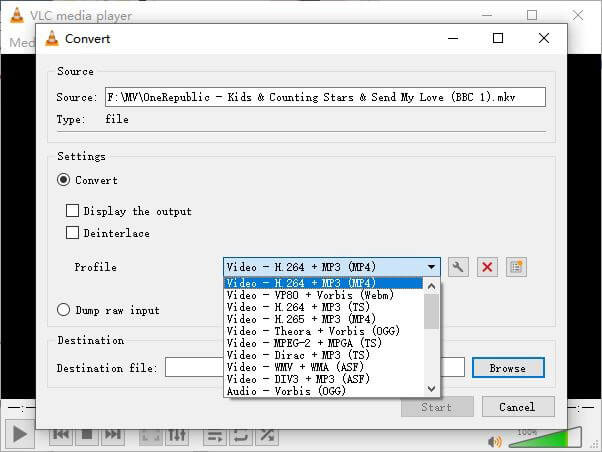
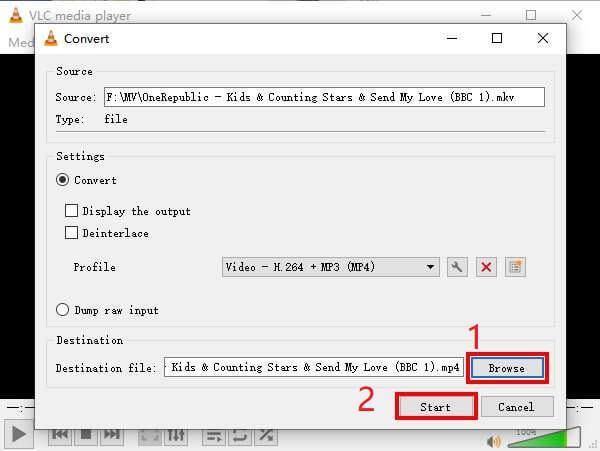
Step 4. Click the Browse button to confirm the destination for saving. Finally Start your conversion and wait to get your MP4 video.
MKV x MP4
O formato de contêiner multimídia Matroska, lançado em 2002, é um formato de código aberto que pode incluir várias faixas de vídeo, áudio, imagem e legendas. Assim, você pode usá-lo para armazenar clipes de vídeo curtos, programas de TV e filmes facilmente. É bastante popular para legendas de fãs de anime.
Lançado pelo Moving Picture Experts Group (MPEG) em 2001, o formato MP4 pode ajudá-lo a salvar dados de vídeo, áudio, legenda e imagem em faixas separadas. É a abreviação de MPEG-4 Part 14. Além disso, é um dos formatos mais populares usados para streaming e compartilhamento de vídeos.
Parte 3. Perguntas frequentes sobre a conversão de MKV em MP4
1. O ffmpeg pode converter MKV para MP4?
Yes, you can convert MKV to MP4 with ffmpeg. But it might be a little complex for you to understand how it works, even though the most effective step is only a sequence of characters: ffmpeg -i my_movie.mkv -vcodec copy -acodec copy my_movie.mp4
2. O HandBrake pode exportar MP4 do MKV?
If you only want a MP4 file after converting, HandBrake can help you with that indeed. However, it cannot convert your files to other formats, such as WMV, MOV, FLV. HandBrake does support most common multimedia files. But that is its supported input sources. For output formats, your options are MP4(.M4V) and MKV.
3. A conversão de MKV em MP4 perde qualidade?
A maioria dos conversores de vídeo perde qualidade ao converter arquivos MKV para MP4, talvez 1% ou 5%. Ao recodificar os arquivos MKV para MP4, é difícil evitar totalmente a perda de dados. Mas você pode aumentar a resolução das imagens para tornar a qualidade dos vídeos MP4 exportados próxima à do vídeo original.
Conclusão
Existem inúmeros conversores de vídeo para você escolher. É difícil encontrar um conversor gratuito e eficiente sozinho. Este post apresentou 2 métodos para converter MKV em MP4. Um é o VLC Media Player e o outro é o FVC Free Online Video Converter.
Se você quer apenas um arquivo MP4, o VLC é o suficiente. No entanto, o VLC suporta apenas um número finito de formatos. Portanto, se você deseja um conversor mais profissional, o FVC Free Online Video Converter parece ser a melhor escolha.
Espero que você ache este post útil. E não hesite em nos dizer a sua opinião.
-
 Como converter seus arquivos de vídeo MP4 em imagens GIF animadas sem perda de qualidade
 Procurando a melhor maneira de converter seu vídeo MP4 em GIFs animados? Aqui está um guia detalhado para fazer isso no Photoshop, Windows Movie Maker, conversor de vídeo online e muito mais.
-
 Como converter MOV para MP4 sem perder qualidade
 Quer converter arquivos MOV (Apple QuickTime Movie) para MP4? Esta postagem compartilha 4 métodos gratuitos para converter seus arquivos de vídeo MOV para o formato MP4 no Windows 10/8/7 / XP e Mac OS X.
-
 4 maneiras fáceis de converter WMV para MP4 no Mac e Windows
 Como converter arquivos WMV para MP4? Aqui estão as 4 maneiras fáceis de converter WMV para MP4 no Mac e Windows com etapas simples.

