


 Video Converter Ultimate
 Gravador de ecrã
 Reparo de vídeo
 Secure Download
Como converter MP4 em M4A no Windows / Mac (grátis e online)
MP4 é um formato de arquivo amplamente usado com várias estações e reprodutores de vídeo. Os arquivos MP4 podem armazenar vídeo, áudio e outros conteúdos. Agora, muitas pessoas preferem ouvir a trilha de áudio do vídeo MP4. Para preservar a qualidade, converter MP4 em M4A é uma ótima ideia. M4A significa Áudio MPEG 4. A maioria dos programas pode reproduzir arquivos M4A, incluindo iTunes, QuickTime, Windows Media Player e muito mais.

You might wonder how to extract the audio from MP4 file. There are many ways to turn a MP4 file into a M4A file. Check out this post to figure out how to convert MP4 to M4A for future listening on your mobile devices.
Parte 1. Melhor maneira online gratuita de converter MP4 em M4A sem perda de qualidade
FVC Free Online Video Converter is a free MP4 to M4A file converter that can convert the MP4 format to not only M4A but others like MP3, WAV, M4R, WMA, AIFF, AC3, etc. It allows you to make a batch conversion so that you can convert multiple MP4 videos to M4A instantly. Also, this free online tool also allows you to convert the MP4 video to MOV, AVI, FLV, and other video formats.
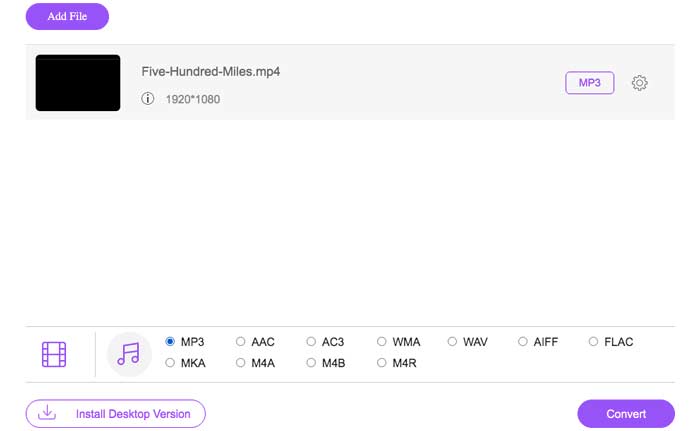
Step 1. Open https://www.free-videoconverter.net/free-online-video-converter/ on your browser. Click the Add Files to Convert button and then you need to download and install its launcher.

Step 2. Upload the MP4 video you want to convert, and then click Open to move on.
Step 3. After uploading your video files to this application, click the Audio icon and choose the M4A format as the output format.
Step 4. In the end, click the Convert button in the bottom right corner. Wait for a while, and you’ll get your M4A audio from the MP4 file.
Parte 2. Como converter MP4 para M4A com conversor de áudio grátis
FVC Free Audio Converter é o freeware que permite converter arquivos MP4 em M4A sem esforço. É capaz de alterar qualquer arquivo de vídeo ou áudio para M4A, MP3, WAV, etc. Você pode fazer o download e instalá-lo em seu PC com Windows para iniciar a conversão.
Free DownloadFor Windows 7 or laterSecure Download
Free DownloadFor MacOS 10.7 or laterSecure Download
Step 1. Launch this audio converter on your computer. Click the Add File(s) button to upload the MP4 files to this program.

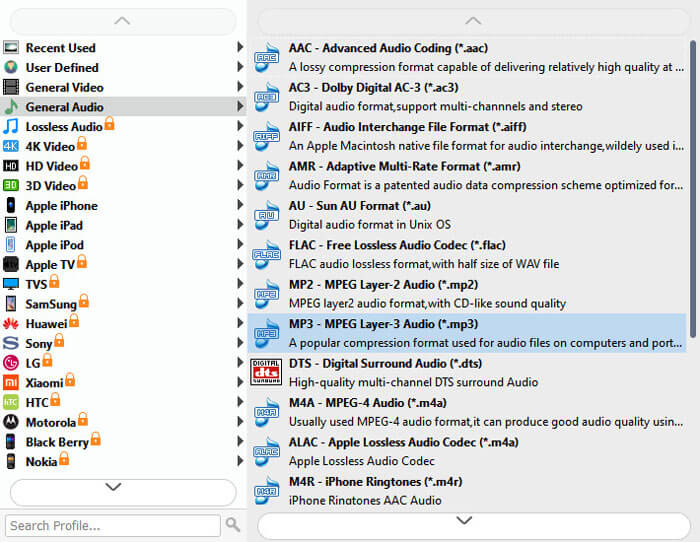
Step 2. Find the Output formats option and choose the M4A as the output format from its drop-down list.
Step 3. Click the Convert button to start turning MP4 files into M4A.
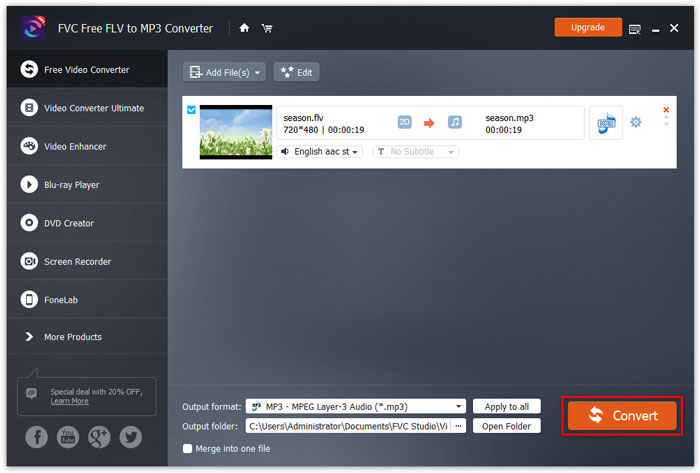
Apart from M4A, you can use it to convert MP4 to MP3, AAC, or other audio formats.
Parte 3. Como converter MP4 em M4A usando o iTunes
Para converter MP4 em M4A com o iTunes para Windows ou Mac, você precisa alterar as configurações de importação do iTunes e usar a opção de menu Converter para fazer uma cópia M4A.
Step 1. Open iTunes on your Windows PC or Mac.
Step 2. Choose Edit, then click on Preferences in the menu bar. Then, go to the General tab, and click Import Settings.
Step 3. Find and click the menu next to Import Using, and then choose the encoding format that you want to convert the video to. Then, click OK.
Step 4. Select the songs in your library that you want to convert. After that, choose File, then click on Create New Version, then create M4A version.
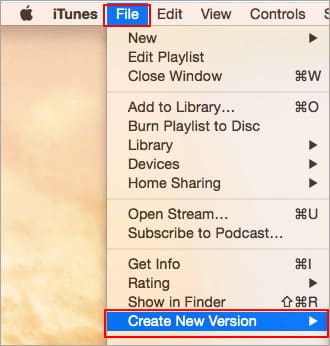
Os arquivos de áudio convertidos aparecerão em sua biblioteca ao lado dos arquivos originais.
Parte 4. Perguntas frequentes sobre conversão de MP4 em M4A
1. O que é arquivo M4A?
Um arquivo com a extensão M4A é um arquivo de áudio MPEG-4. M4A pode ser frequentemente encontrado na iTunes Store da Apple como o formato de downloads de músicas.
2. Como abrir arquivos M4A?
Os programas que abrem arquivos M4A incluem iTunes, QuickTime, Windows Media Player, etc. Os tablets e telefones Android, iPhone, iPad e iPod touch também suportam a reprodução de arquivos M4A.
3. Como mesclar arquivos MP4 online?
FVC Free Online Video Merger can help you merge or join various MP4 or other video formats like MOV, AVI, FLV, and more online.
4. O Windows Media Player pode converter MP4 em M4A?
Não. O Windows Media Player só oferece suporte à conversão de arquivos de vídeo em MP3 ou WAV.
Conclusão
As três maneiras acima podem ajudá-lo a transformar MP4 em M4A gratuitamente sem muito esforço. Se você preferir fazer a conversão online, o FVC Free Online Video Converter deve ser uma ótima escolha. Se seus arquivos MP4 forem grandes, o FVC Free Audio Converter ou iTunes será mais confiável para converter arquivos MP4 em M4A.
-
 Como converter MP4 em WMV para Mac / Windows
 Esta postagem mostra como converter vídeo MP4 para o formato WMV no Mac ou Windows. Também ofereceremos várias opções, incluindo software de desktop e conversores on-line baseados na web. Pronto para conhecer as melhores ferramentas de conversão de MP4 em WMV?
-
 Como converter WMV para MP3 no desktop e online
 Você pode encontrar qualquer software conversor de vídeo gratuito do FVC Studio. Qualquer formato de vídeo / áudio é compatível, incluindo MP4, MOV, TS, AVI, WMV, FLAC, MP3, etc.
-
 Como converter vídeos AVCHD para MP4 gratuitamente no Windows / Mac / Online
 Existem 5 maneiras fáceis de converter vídeos AVCHD para MP4 em seu computador. Você pode converter em lote vídeos AVCHD para MP4 sem perder qualidade com qualquer conversor aqui.
