


 Video Converter Ultimate
 Gravador de ecrã
 Reparo de vídeo
 Secure Download
Como converter MP4 para OGG grátis e online
MP4 é um contêiner de multimídia digital que armazena vídeo, áudio e legendas. OGG é um formato de contêiner gratuito e aberto para streaming e compactação de arquivos eficientes. Às vezes, você precisa converter o formato MP4 para OGG para tocar em alguns reprodutores de áudio. Este post irá compartilhar 3 conversores gratuitos de MP4 para OGG para converter MP4 para OGG sem complicações.

Parte 1. Maneira profissional de converter MP4 em OGG gratuitamente
If you want to find the best MP4 to OGG converter, you can try FVC Free FLV to MP4 Converter. It is the free and easy-to-use video converting software for Windows and Mac. You can convert various videos like MP4, FLV, MOV, MKV, MTS, M2TS, etc. to OGG with ease. Moreover, it offers editing features to add themes, adjust author, time, provider at the beginning/ending part.

- Converta vídeos em MP4, MKV, AVI, MOV, MP3, AAC, AIFF, etc. para OGG.
- Exporte vídeos OGG e arquivos de áudio sem perdas de arquivos MP4 com 1 clique.
- Permite aos usuários editar provedor, título, autor, tempo e adicionar tema.
- Converta em lote MP4 em OGG para reproduzir em alguns reprodutores de áudio portáteis.
Free DownloadFor Windows 7 or laterSecure Download
Free DownloadFor MacOS 10.7 or laterSecure Download
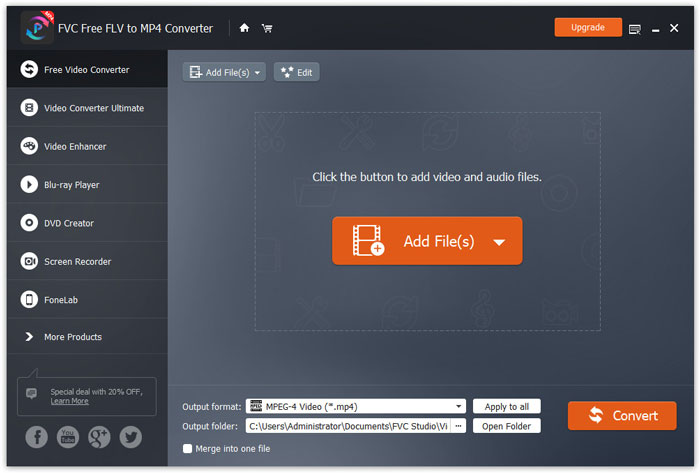
Step 1. After downloading, install and launch FVC Free FLV to MP4 Converter on your Windows or Mac. Click Add Files button to load the MP4 files from your computer. If you want to convert several MP4 files at one time, just upload them all.
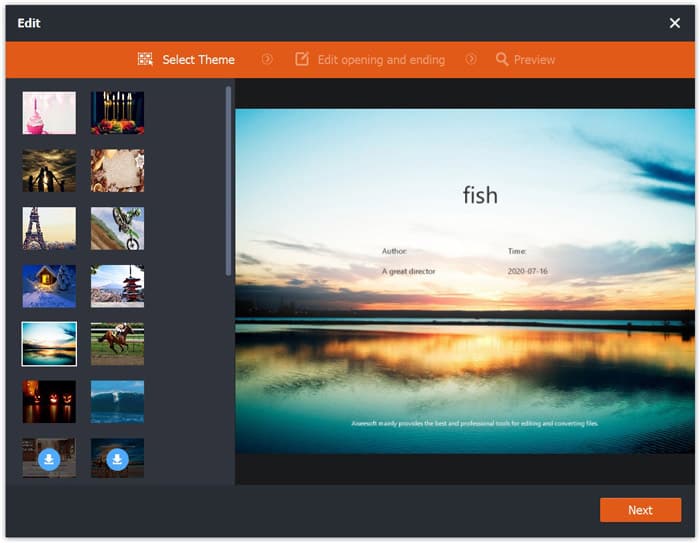
Step 2. Click on your MP4 file and click Edit button. You can add a theme to your MP4 file, and edit the opening and ending content. Then click Next to preview and save the changes.
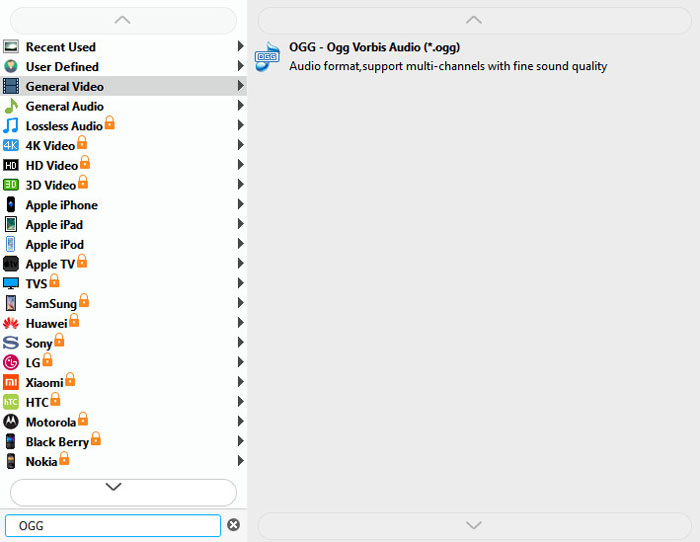
Step 3. Click the drop-down Output format button at the bottom, and search OGG format from the list. You can select OGG - Ogg Vorbis Audio (*.ogg) as the output format.
Step 4. Browse the output folder on your computer and click Convert button to start changing MP4 to OGG.
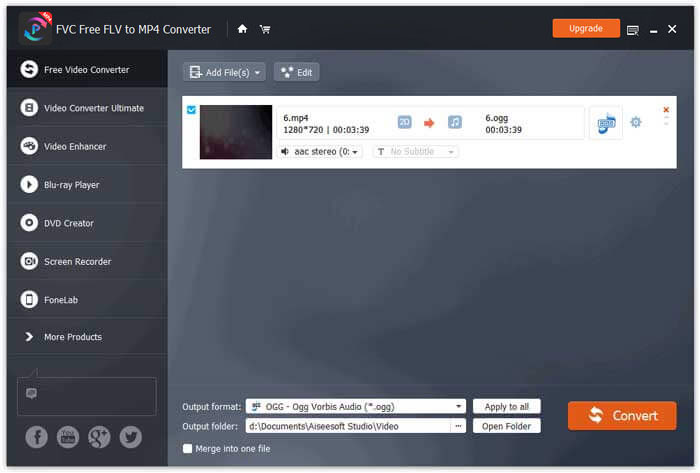
With FVC Free FLV to MP4 Converter, you can also combine several MP4 files into one.
Parte 2. Como alterar MP4 para OGG Online
Em comparação com um conversor de desktop, usar um conversor online é um método que economiza tempo para converter MP4 em OGG. Existem muitos conversores on-line de MP4 para OGG que você pode escolher. Nesta parte, compartilharemos 2 conversores MP4 para OGG para transformar seus arquivos MP4 em OGG online gratuitamente.
1. Zamzar
Zamzar é uma plataforma online multifuncional para conversor de vídeo, conversor de áudio, conversor de imagem e conversor de e-book. Com Zamzar, você pode facilmente converter MP4 para uma variedade de outros formatos, como OGG. Aqui estão alguns passos simples para converter MP4 em OGG com o Zamzar online.
Step 1. Go to www.zamzar.com/convert/mp4-to-ogg/, and click Add Files button to upload your MP4 files.
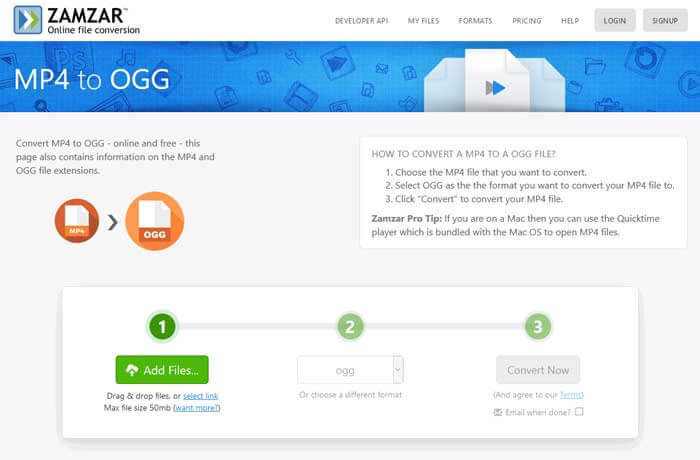
Step 2. The default output format has been set to ogg already. Click Convert Now button to start converting MP4 to OGG.
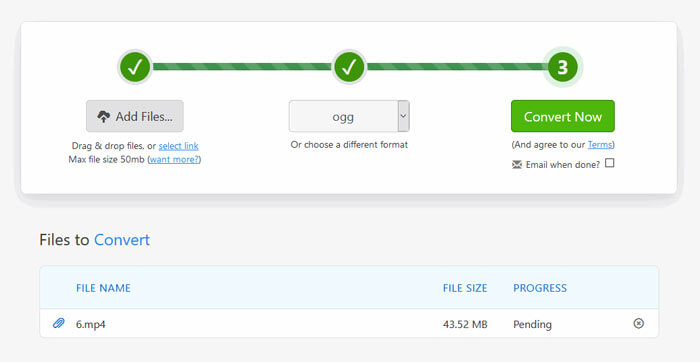
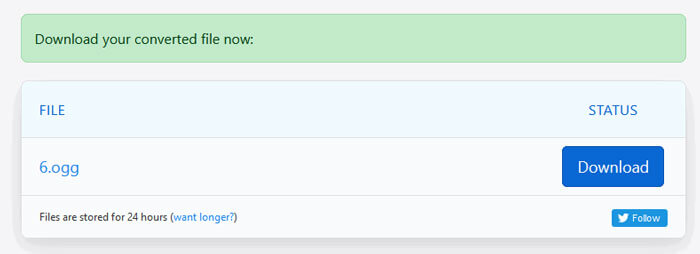
Step 3. Then it will jump to another page. You can click Download button to save the converted OGG file to your computer.
When you are converting a MP4 file in large size, the conversion may get stuck using Zamzar. You need to refresh the page and convert again. If you want a smooth conversion, FVC Free FLV to MP4 Converter can help you a lot. (See more MP4 players here)
2. Convertio
Convertio é uma ferramenta fácil para converter documentos, imagens, planilhas, e-books, arquivos de áudio e vídeo. Usando o Convertio, os arquivos MP4 podem ser convertidos para MP3 com excelente precisão. Siga as etapas abaixo para exportar OGG de MP4 com Convertio.
Step 1. Go to Convertio MP4 to OGG Converter (convertio.co/mp4-ogg/). Click Choose Files button to upload your MP4 files. You can also add MP4 files from Dropbox, Google Drive, or copy the URL.
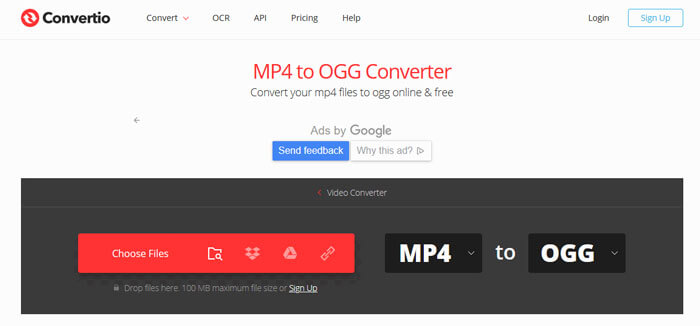
Step 2. Choose OGG from the drop-down icon, and then click the gear icon to set the codec, quality, audio channels, frequency, volume. You can cut the MP4 file to the wanted part.
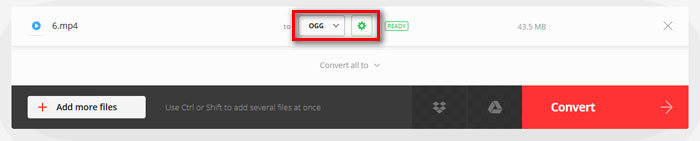
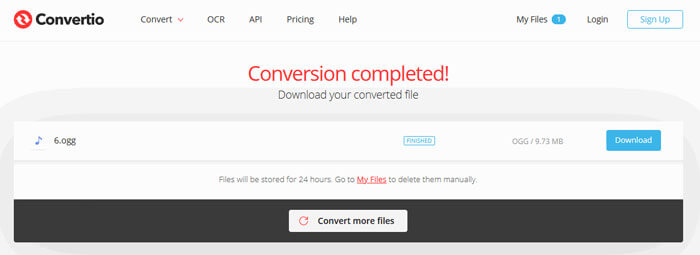
Step 3. After all is set, click the Convert button to convert MP4 to OGG. After conversion, click the Download button to save the converted OGG file to your computer.
Parte 3. Perguntas frequentes sobre a conversão de MP4 em OGG
1. O que é o formato de vídeo OGG?
OGG é um formato de contêiner livre e aberto que pode conter música, vídeo, texto como legendas e metadados.
2. Qual jogador pode reproduzir arquivos OGG?
Existem muitos reprodutores portáteis que podem reproduzir arquivos OGG como VLC, Windows Media Player, Adobe Audition, Audials, MPlayer e muito mais.
3. Como faço para converter MP4 para MP3?
With the help of FVC Free Online Video Converter, you can easily convert MP4 to MP3 online. Go to this online site and click Add Files to Convert button to install the launcher. Then select the MP4 files from computer, and check MP3 as the output format. Click Convert button to convert MP4 to MP3.
Conclusão
Nós introduzimos principalmente 3 MP4 para OGG convertidos para converter MP4 para OGG arquivos online e offline. Com o FVC Free FLV to MP4 Converter para desktop, você pode exportar facilmente o arquivo OGG de código aberto do MP4. Se você tiver soluções melhores, por favor, não hesite em deixar um comentário.
-
 WebM para MP4 | Converter grátis WebM para MP4
 Como assistir a arquivos WebM sem navegador da web? Você precisa converter WebM para MP4. Aqui estão os 10 principais conversores de WebM para MP4 gratuitos para alterar o WebM para MP4 online e em computadores Mac e Windows.
-
 MP4 para FLV | 3 principais conversores gratuitos
 Esta postagem é o guia detalhado para a conversão de MP4 para FLV. Você pode usar os 3 principais conversores gratuitos para mudar de MP4 para FLV online, no computador Windows ou Mac com facilidade.
-
 6 maneiras principais de combinar arquivos MP4 no Windows / Mac / Online
 Quer mesclar seus arquivos MP4 brutos para o seu projeto? Esta postagem reúne as 6 melhores maneiras de ajudá-lo a combinar vídeos MP4 no Windows, Mac e online com facilidade.
