


 Video Converter Ultimate
 Gravador de ecrã
 Reparo de vídeo
 Secure Download
Como converter MP4 em WMV para Mac / Windows
Before introducing a suggested list of MP4 to WMV converters, let me ask you something about video formats.
To save digital video data on a computer system, we need to use a file format designed for video. So what kind of video formats do you know? MP4? WMV? FLV? AVI? Well, these truly are commonly used video formats while storing digital video data. But have you ever wondered why are there so many video file formats? What’s the difference between MP4 and WMV?
Geralmente, o MP4 é compatível com quase todos os tipos de dispositivos no mercado, o que significa que você pode reproduzir MP4 em qualquer lugar, até mesmo no reprodutor de vídeo padrão do seu computador ou telefone. No entanto, se você usa dispositivos Windows, acredito que o WMV pode atendê-lo melhor. Não só porque é desenvolvido pela Microsoft, mas porque pode salvar o vídeo HQ em um pequeno espaço de disco.
So today you’re gonna learn how to change a MP4 file to WMV with the best video converters that we recommend.

Parte 1. Como converter MP4 para WMV online gratuitamente
Além de instalar softwares clássicos de desktop, usar conversores baseados na web também é uma opção hoje em dia. Embora simples, muitos conversores online são ligeiramente lentos durante a conversão. Alguns até limitam o tamanho e a quantidade dos arquivos que você carrega e não podem garantir a qualidade dos vídeos de saída.
Thus, we here introduce you FVC Free Online Video Converter, a free, fast and efficient video converter which can assist you in converting a bunch of videos or audio losslessly.
As a multifunctional free online MP4 to WMV converter, FVC Video Converter supports almost every type of video formats. You can convert large MP4 files to/from MKV, MOV, WMV, AVI, TS, etc. You can also edit your video according to your need. It is a breeze to adjust video bitrate, sample rate, frame rate, resolution and volume on FVC. And there’s no watermark on your video after converting.
Agora você pode se preocupar que, com todos esses recursos, pode ser difícil entender como operar este conversor. Na verdade, a verdade é totalmente contrária. São necessários apenas alguns passos para você dominar este conversor de MP4 para WMV.
Step 1. Click here to navigate to FVC Free Online Video Converter. Then Click Add Files to Convert to download FVC Launcher first.
Download the Desktop Version to convert files in batch.
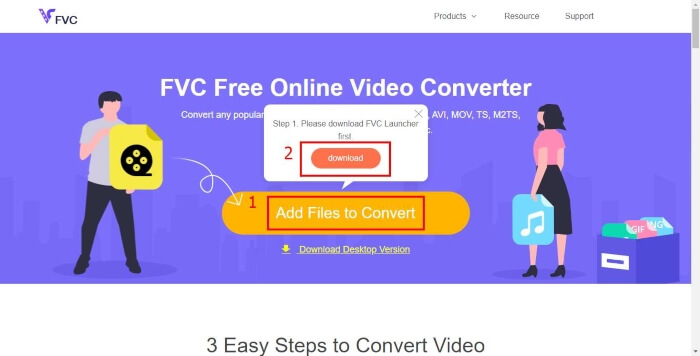
Step 2. After installing the launcher, the Open File window will pop up. Just find the MP4 file you want to change.
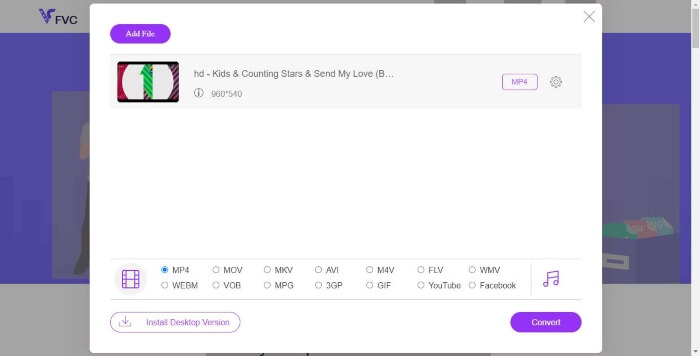
Step 3. Then in the converting page, choose output format WMV. By the way, if you want to change the video parameters, just open the Settings window by clicking the Setting icon. Click the Convert button and pick a destination to store the converted video.
Parte 2. Converter MP4 para WMV com software de desktop
1. RealPlayer
RealPlayer has become one of the most popular media player since 1995. It can not only help you easily manage your videos, music and pictures, but convert videos into multiple formats and transfer them to other mobile devices.
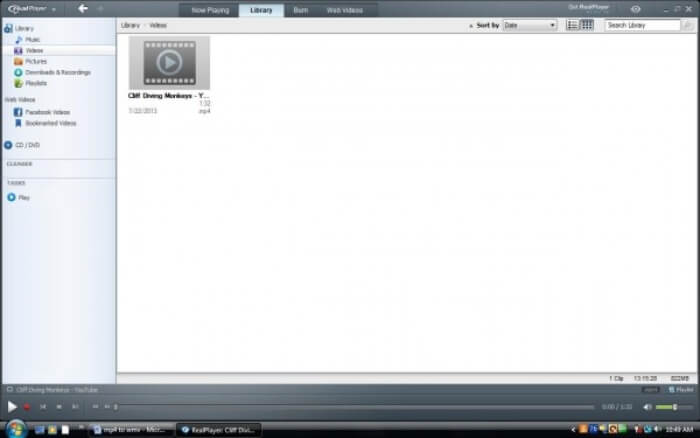
Step 1. If RealPlayer has been installed to your computer, save the MP4 file into the RealPlayer library. Select Library after launching RealPlayer. Find your file in the Video list.
Step 2. Click the file and select the More option from the popup menu. Then select the Convert option.
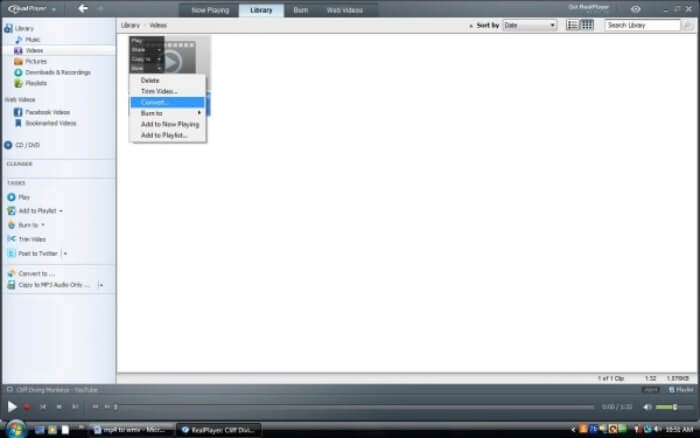
Step 3. Choose WMV from the Select a Device menu and click OK. Now click the Start button. In a few seconds, your video will be in the RealPlayer library.
2. VLC Media Player
VLC is an open source, cross-platform player that can play videos in different formats. It also supports file conversion to many popular formats. Follow these steps below to export WMV file from MP4.
Step 1. Open VLC Media Player and click Convert / Save in the menu of Media.
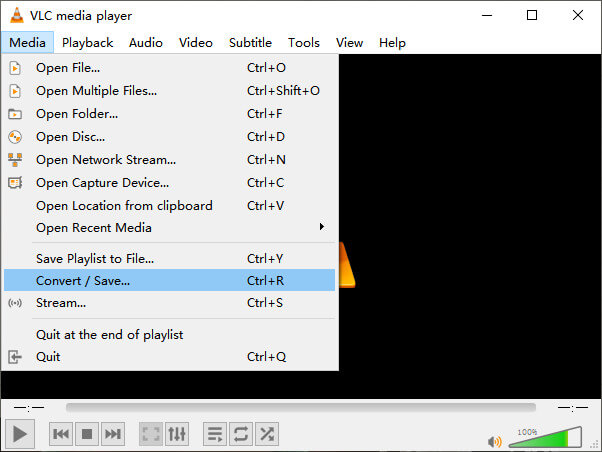
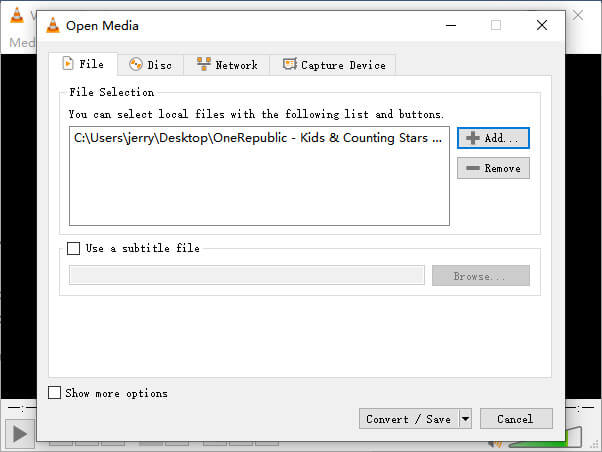
Step 2. Add the file to VLC. Then click the Convert / Save button.
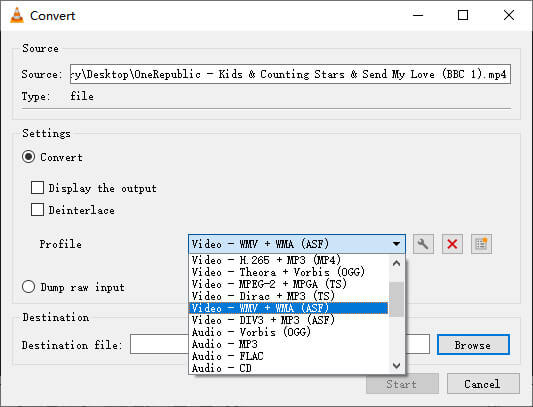
Step 3. Find WMV from Profile and select a folder as the saving destination of the output file. Then click Start.
MP4 vs. WMV
Lançado pelo Moving Picture Experts Group (MPEG) em 2001, o formato MP4 pode ajudá-lo a salvar dados de vídeo, áudio, legenda e imagem em faixas separadas. É a abreviação de MPEG-4 Part 14. Além disso, é um dos formatos mais populares usados para streaming e compartilhamento de vídeos.
Produzido pela Microsoft, o WMV era um dos formatos de vídeo mais comuns nos anos 2000. Ele pode ser visto na web e reproduzido por vários players de mídia no Windows. E também é o formato de arquivo de vídeo padrão do Windows Media Player. Mas foi assumido por outros formatos recentemente.
Parte 3. Perguntas frequentes sobre conversão de MP4 em WMV
1. O Handbrake pode converter MP4 para WMV?
After doing a research, unfortunately the latest Handbrake cannot convert MP4 to WMV.It is true that Handbrake supports most common multimedia files. But that’s for input sources. The options for output formats are MP4(.M4V) and MKV.
2. Posso converter um arquivo MP4 com mais de 100 MB para WMV online gratuitamente?
It depends. Different free online video converters have different limitations. Some converters like FVC Free Online Video Converter allow you to change over 100MB. But some other converters may charge you for that.
3. O Windows Media Player pode converter MP4 em WMV?
You can’t convert MP4 file to WMV with Windows Media Player. That’s because it is just a player, not a converter. If you want to convert MP4 to WMV, you should use an efficient video converter.
4. Posso reproduzir arquivos WMV no Mac?
The built-in video tools on Mac cannot play WMV files. But you have other ways to play WMV videos on MacOS. You can convert WMV to other format that is supported by Mac. Or install Windows Media Player for Mac to play WMV files.
Conclusão
Even though MP4 and WMV both have their similarities, they also have their own characteristics. So you should make decisions in accordance with specific conditions.Hope that after reading this post, the issues of converting MP4 to WMV will no longer be your problem. Next time when you need a WMV file, just follow the guide above and convert the file with ease.
-
 Como converter seus arquivos de vídeo MP4 em imagens GIF animadas sem perda de qualidade
 Procurando a melhor maneira de converter seu vídeo MP4 em GIFs animados? Aqui está um guia detalhado para fazer isso no Photoshop, Windows Movie Maker, conversor de vídeo online e muito mais.
-
 Como converter seus arquivos de vídeo FLV para MP4 sem pagar um centavo
 Este guia compartilha quatro métodos gratuitos para converter seus arquivos de vídeo FLV para o formato MP4 no Windows 10/8/7 / XP e Mac OS X, para que você possa desfrutar dos vídeos em qualquer dispositivo.
-
 Como converter MOV para MP4 sem perder qualidade
 Quer converter arquivos MOV (Apple QuickTime Movie) para MP4? Esta postagem compartilha 4 métodos gratuitos para converter seus arquivos de vídeo MOV para o formato MP4 no Windows 10/8/7 / XP e Mac OS X.

