


 Video Converter Ultimate
 Gravador de ecrã
 Reparo de vídeo
3 Conversores de MPG para MP4 online e offline que você deve tentar para converter arquivos MPG
MP4 is one of the most common file formats you will see on the internet nowadays. Although MPG and MP4 have a lot of similarities, they also have their differences. And if you want to convert your MPG file to MP4 file format, we have tested video converters that are popular nowadays. Moreover, we've chosen the best MPG to MP4 converters for you to check out!

Parte 1. Por que você precisa converter MPG para MP4
What is the significance of converting MPG to MP4? MPG and MP4 are formats that are often used for videos that are on the internet. But what difference do they have? MPG or MPEG is the original format that uses MPEG codec. It is an encoder that provides high-quality video outputs.
Por outro lado, o MP4 é um dos formatos de arquivo de vídeo mais comuns e usa compactação de vídeo moderna. Então qual é o melhor? A alta capacidade de compactação do MP4 permite que os arquivos sejam compactados em tamanhos menores do que qualquer outro formato de arquivo de vídeo como o MPG.
Parte 2. 3 maneiras de converter MPG para MP4
Aqui estão os excelentes conversores de vídeo que você pode usar online e offline e aprenda como mudar MPG para MP4.
1. Use o Video Converter Ultimate
Video Converter Ultimate is a media file converter that lets you convert your MPG file to MP4 file format easily. This converter has an easy-to-use interface but produces impressive outputs. It has features that let you edit, enhance, and compress your MPG file. Moreover, you can batch convert your MPG to MP4 in this converter.
O Video Converter Ultimate também tem uma opção onde você pode fazer colagem de imagens e vídeos. Além disso, se você deseja criar um GIF, este conversor possui esse recurso. Além disso, ao usar este conversor, você pode converter arquivos grandes sem prejudicar sua qualidade. Mesmo que seus recursos pareçam profissionais, você pode usá-los rapidamente porque eles são fáceis de usar.
Step 1. For you to download this converter, click the download button below. Follow the installation process, then open the application.
Free DownloadFor Windows 7 or laterSecure Download
Free DownloadFor MacOS 10.7 or laterSecure Download
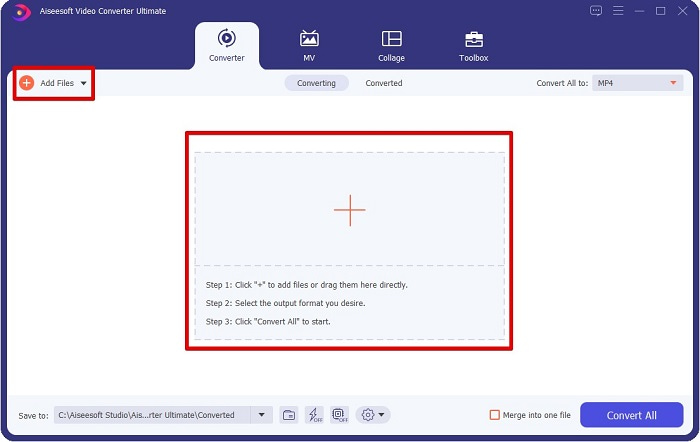
Step 2. After launching the converter, click the Add Files button or the + button to upload your MPG file. Your computer files will appear, where you will locate your file on your folders. Then click Open to add your file to the queue.
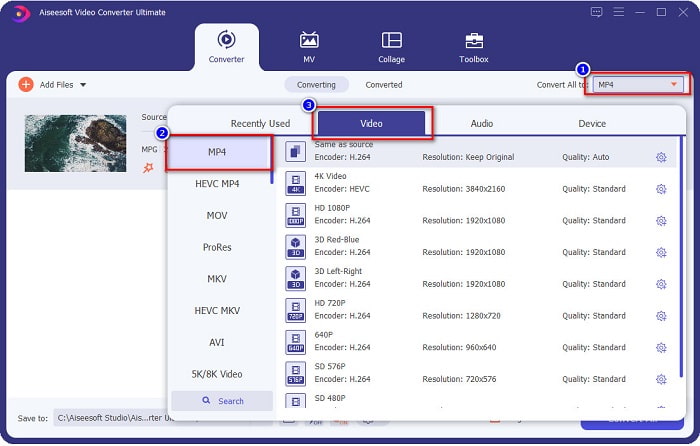
Step 3. To change the format of your MPG file, click Convert All to at the upper right corner of your screen. After you see a list of file formats, select the MP4 file format.
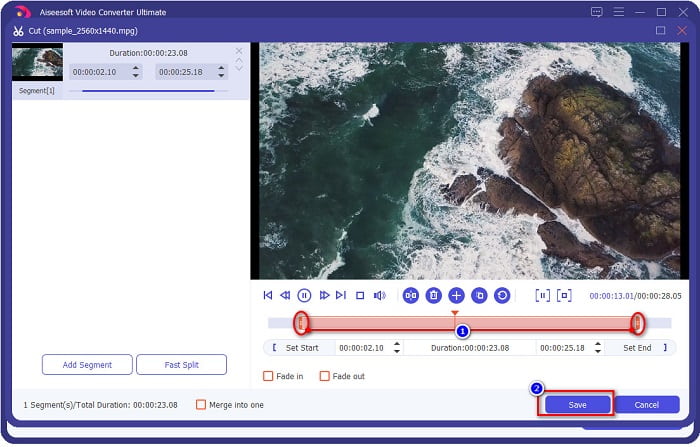
If you want to cut the length of your video, click the scissor button to trim your video. By dragging the play head buttons, you can adjust the length of your video. To finish, click Save.
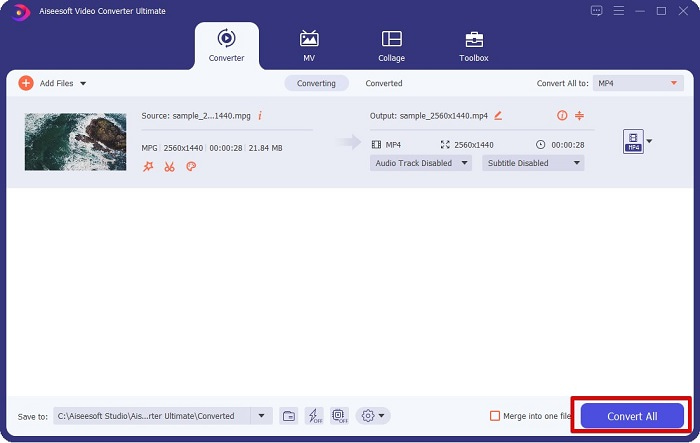
Step 4. When you have chosen the file format you want, click Convert All to convert your MPG file to an MP4 file. Just wait a little bit, then your MPG file will be converted to an MP4 file. With those simple steps, you have converted your MPG file to MP4 easily.
2. Use o Conversor Online Gratuito
FVC Free Online Video Converter allows you to convert your MPG file to MP4 file format for free with no signup. It is a free online video converter that lets you convert without limitations. Moreover, you can convert large files online with this converter. You also do not need to download anything because you can access it online. However, its downside is that it is internet reliant, meaning it depends on the internet on how fast your conversion will be. Nonetheless, many users have used this converter, and it is proven to be a fantastic video converter.
Aqui está a lista de etapas para converter em FVC Free Online Video Converter:
Step 1. Go to your browser and search FVC Free Online Video Converter.
Step 2. When you are already on the webpage, click Add Files to Convert. A textbox will appear, where you need to download the launcher first. You will be directed to your files when the launcher has downloaded, select the MPG file you want to convert.
Download the Desktop Version to convert files in batch.
Step 3. After selecting your MPG file, you will see the first interface to see the setlist of video formats. Choose MP4 before you convert your MPG file to MP4 online.
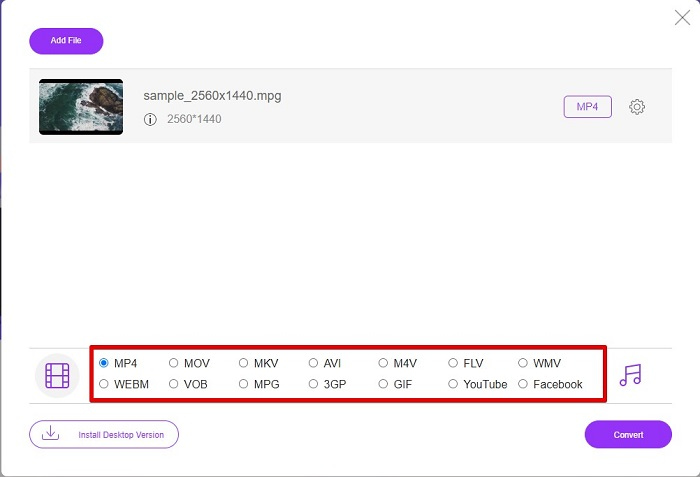
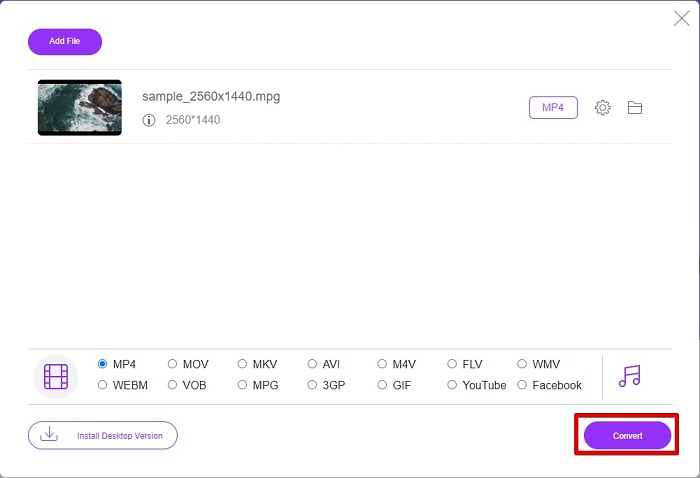
Step 4. Click the Convert button to start the conversion. A new tab will appear where you will choose where you want to store your converted file in your computer files, then click select folder.
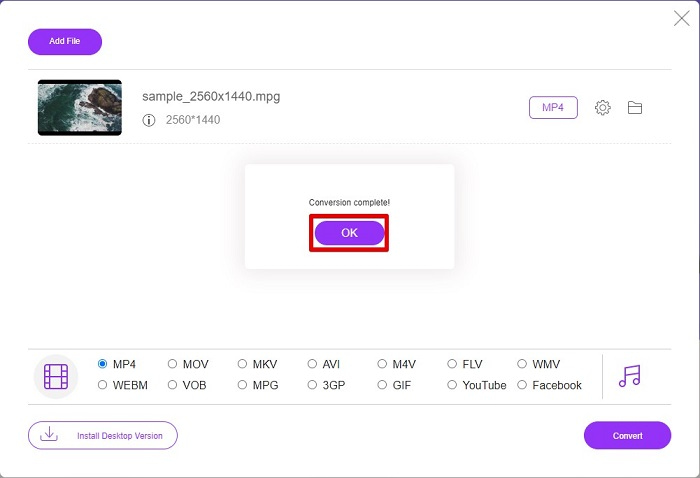
Step 5. Lastly, your file will begin to convert when it is done converting; click OK to finish. And that’s it! You are done converting as easy as 1-2-3!
3. Use ConvertFiles.com
ConvertFiles.com é um aplicativo conversor online gratuito para converter seu arquivo MPG para MP4. Ele permite converter formatos de arquivo, até 300 variedades de formatos de arquivo. E se você estiver procurando por um conversor de MPG para MP4 online que permitirá converter documentos, desenhos, vídeos, apresentações e muito mais. No entanto, ao usar este conversor online, você encontrará muitos anúncios perturbadores. No entanto, este conversor online ainda vale a pena tentar e provou ser promissor.
Aqui está como você converterá seu arquivo MPG para o formato de arquivo MP4:
Step 1. In your browser, search ConvertFiles.com. to directly visit the webpage.
Step 2. Select your MPG file by clicking the rectangular button or the Browse button beside the Choose a local file. Locate your MPG file, then select it.
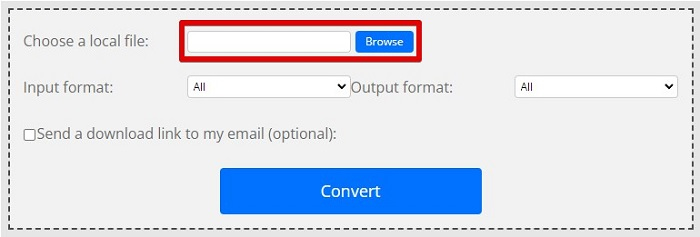
Step 3. After selecting the MPG file that you want to convert, in the output format, choose .mp4 format by clicking the drop-down button.
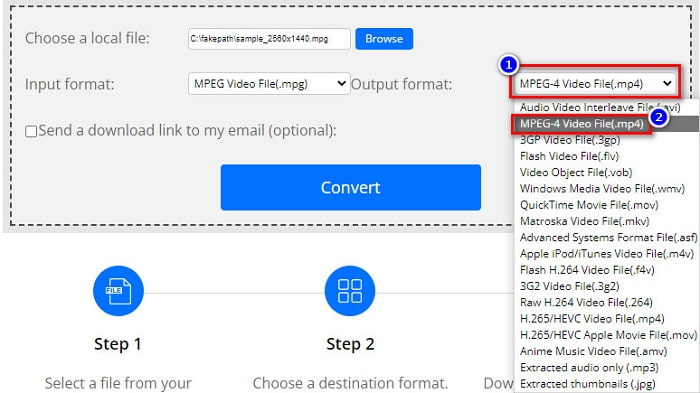
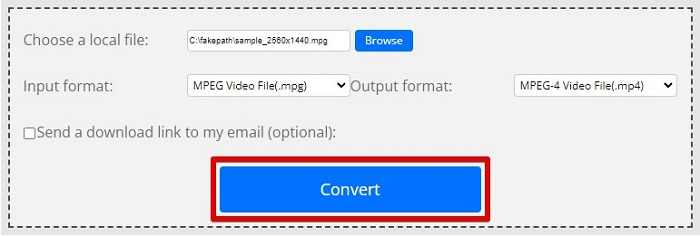
Step 4. When you have selected the file format you want, you can now convert your file by clicking Convert.
MPG vs. MP4
Feito pelo Moving Picture Experts Group (MPEG), o MPG é um formato de vídeo digital comum para armazenar informações de vídeo, áudio e metadados. É bastante útil ao criar filmes para compartilhar na Internet. Esses arquivos em MPG geralmente contêm compressão de vídeo/áudio MPEG-1 ou MPEG-2.
Lançado pelo Moving Picture Experts Group (MPEG) em 2001, o formato MP4 pode ajudá-lo a salvar dados de vídeo, áudio, legenda e imagem em faixas separadas. É a abreviação de MPEG-4 Part 14. Além disso, é um dos formatos mais populares usados para streaming e compartilhamento de vídeos.
Parte 3. Perguntas frequentes sobre o formato MPG e MP4
Posso converter arquivos MPG para MP4 sem perder sua qualidade?
sim. Video Converter Ultimate permite converter seu formato MPG para MP4, sem perder sua qualidade, apesar do tamanho do arquivo.
Onde posso reproduzir arquivos MPG?
MPG files are widely supported. Therefore, many media players can open this file format, including Microsoft Windows Media Player and VideoLAN VLC Media Player. You can check this article for more information. Best 4 MPG/MPEG Players for Windows/Mac/Android/iPhone [2021]
Posso converter MP4 para MPG?
sim. Você pode converter o formato de arquivo MPG para MP4 usando os conversores de arquivo listados acima.
Conclusão
The converters that we listed above are proven to be reliable converters. They are easy to use and free! But if you want to have a file converter that can convert your MPG file to MP4 file format, and has fantastic features that can enhance your file, then Video Converter Ultimate is the best choice. Moreover, if you want an online converter free from ads and can also convert large files with ease, try FVC Free Online Converter.
-
 3 maneiras fáceis de converter MPG para MOV em seu Mac / Windows / online
 Quer converter seus arquivos MPG e depois transportá-los em seu iOS, iPod, iPad ou Mac? Este artigo ajudará a descobrir como converter MPG para MOV com etapas.
-
 Como converter MPG para FLV sem perder qualidade [comprovado]
 Você deve assistir ao seu filme favorito neste media player, mas ele não suporta MPG. Tente converter seu arquivo MPG para FLV usando esses conversores que este artigo apresenta.
-
 2 conversores finais de MPG para converter MPG para WMV gratuitamente
 Deseja converter MPG para WMV gratuitamente? Nesse caso, você tem sorte porque descobrimos que existem duas ferramentas que você pode usar para converter seus arquivos MPG.

