


 Video Converter Ultimate
 Gravador de ecrã
 Reparo de vídeo
 Secure Download
Melhores conversores de MP4 para aumentar o conteúdo - Ferramentas para conversões perfeitas
A conversão de arquivos de vídeo para o formato MP4 tornou-se essencial para quem deseja desfrutar de uma reprodução perfeita em vários dispositivos. Embora inúmeras ferramentas estejam disponíveis para converter vídeos para MP4, nem todas oferecem a mesma qualidade e desempenho.
That is the reason why we have taken the time to review and compare the best MP4 converters on the market, so you can make an informed decision and streamline your video workflow. Whether you're a professional videographer, a content creator, or just looking to convert some videos for personal use, our comprehensive review of the top-rated MP4 converters will help you find the perfect tool for your needs.

Parte 1. Comparação dos Programas
Se você deseja saber rapidamente o melhor programa para suas necessidades, pode dar uma olhada na tabela comparativa dos programas mencionados neste post. Todos esses programas garantem ajudá-lo a converter para MP4.
| Programas | Conversão em lote | Aceleração GPU | Características adicionais |
| Conversor de vídeo grátis online | sim | Não | Personalização do formato de saída, conversão em lote |
| Online-Convert.com | sim | Não | Conversão de vários tipos de arquivo |
| CloudConvert | sim | Não | Integração com serviços de armazenamento em nuvem |
| Convertio | sim | Não | Integração com serviços de armazenamento em nuvem, conversão de vários tipos de arquivo |
| FVC Video Converter Ultimate | sim | sim | Edição de vídeo, criador de GIF, criador de 3D |
| VLC Media Player | Não | Não | Media player, streaming de vídeo, conversão de áudio |
| HandBrake | sim | Não | Edição de vídeo, digitalização em lote |
Parte 2. Os 4 melhores conversores de MP4 online
Com conversores de arquivos online, você pode facilmente converter seus arquivos de qualquer dispositivo sem precisar baixar nenhum software adicional. Os conversores de arquivos online também são geralmente muito rápidos, gratuitos e seguros, garantindo que seus dados sejam protegidos contra acesso não autorizado. Portanto, se você deseja converter para MP4 ou converter de MP4, pode conferir esses programas online.
1. Conversor MP4 Gratuito Online
Converting files online is very convenient as you can do it from any device with an internet connection without needing to download any additional software. That is what Free MP4 Converter Online is made for. That means you do not have to install anything on your device to convert files to MP4. One of its outstanding features is its customization option. Users are able to edit the video resolution, bit rate, frame rate, etc. Besides, the process is simple and straightforward.
Key Features:
◆ Converta vídeos para muitos formatos de saída rapidamente.
◆ Não limita o tamanho do arquivo que os usuários podem baixar.
◆ Acessível a partir de qualquer navegador e dispositivo com acesso à internet.
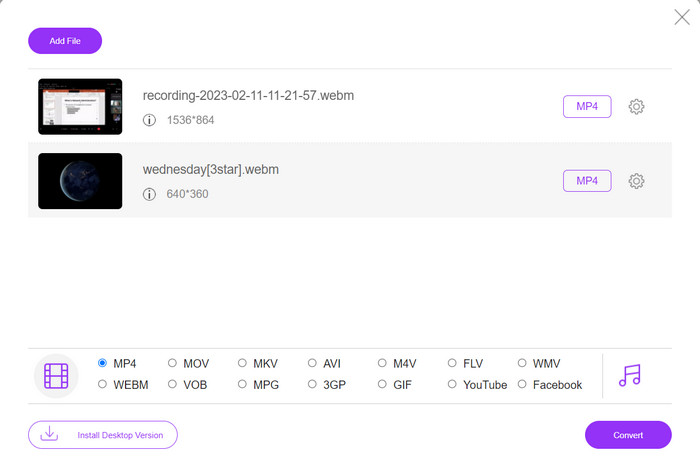
Step 1. You can use this MP4 video converter by visiting its official website. Simply open any browser on your computer and instantly visit its website.
Step 2. Immediately install the bit-sized launcher and upload the video(s) you wish to convert to MP4. From the format selection below, choose MP4 by ticking on its radio button.
Step 3. Finally, hit the Convert button to initialize the process of converting files.
2. Online-Convert.com
O Online-Convert é um conversor de MP4 online fácil de usar e versátil que oferece suporte a uma ampla variedade de formatos de entrada e saída, incluindo personalização de configurações de saída, como resolução, taxa de bits e taxa de quadros. A ferramenta é rápida e confiável, com integração de armazenamento em nuvem e recursos de segurança como criptografia SSL para proteger seus arquivos durante o processo de upload e conversão. Além disso, é totalmente gratuito para usar sem custos ocultos, tornando-o uma opção acessível para quem precisa converter arquivos de vídeo com orçamento limitado.
Key Features:
◆ Ele vem com uma ampla variedade de formatos de vídeo.
◆ Interface amigável.
◆ Conversão rápida e confiável.
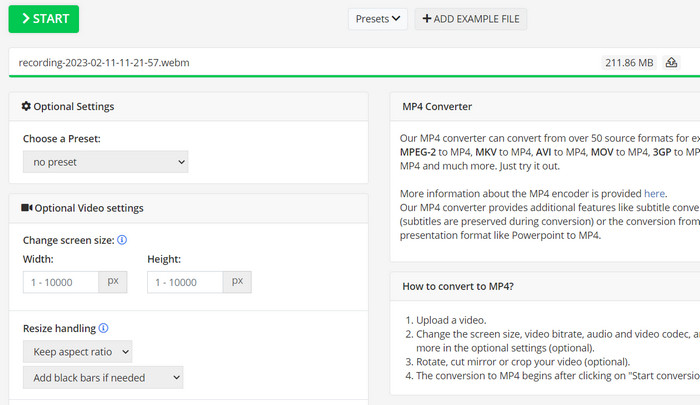
Step 1. Go to Online-Convert.com and choose Video Converter from the list of tools.
Step 2. Click Choose Files to add the video file you want to convert. You may also drag the file and drop it into the box.
Step 3. You can also change the resolution, bitrate, and frame rate of the result if you want to. The settings will be available underneath the conversion area.
Step 4. To start the conversion process, click the Start button. A progress bar will show how far along the conversion is on the page.
3. CloudConvert
CloudConvert é um conversor de MP4 online que oferece uma gama abrangente de recursos para seus usuários, incluindo suporte de formato abrangente, configurações de saída personalizáveis, interface amigável, integração de armazenamento em nuvem, segurança e privacidade, integração de API e opções gratuitas e pagas. Além disso, este conversor de vídeo para MP4 é uma ferramenta confiável e versátil para converter arquivos de vídeo para o formato MP4. Suas configurações de saída personalizáveis o tornam uma ótima opção para usuários que precisam ajustar a qualidade e o tamanho de seus vídeos para atender às suas necessidades específicas.
Key Features:
◆ CloudConvert oferece integração de API para integração de fluxos de trabalho.
◆ Ele usa criptografia SSL para proteger os arquivos do usuário.
◆ Suporta integração de armazenamento em nuvem.
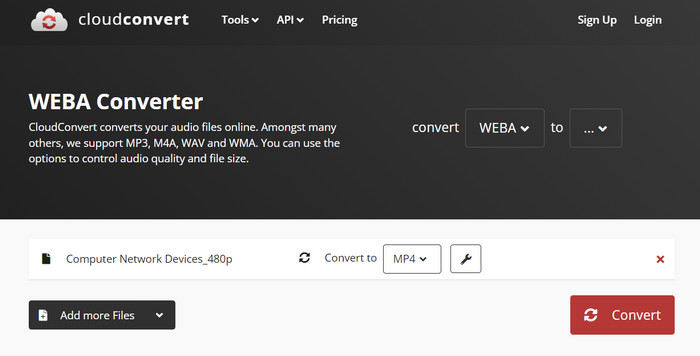
Step 1. Go to the CloudConvert website and make a free account if you haven't already.
Step 2. Click on Select Files to add the video file you want to convert. You can also just drag and drop the file into the upload box. Choose MP4 from the drop-down menu for the output file.
Step 3. Change the output choices, such as resolution, bitrate, and frame rate, if you want.
Step 4. Click the Convert button to begin the conversion process.
4. Convertio
O Convertio é uma ótima opção se você deseja uma maneira rápida de transformar seus arquivos de vídeo para o formato MP4. Com sua interface fácil de usar e tempos de conversão rápidos, é fácil alterar seus filmes para que possam ser vistos em uma ampla variedade de dispositivos e plataformas. Convertio é uma ferramenta versátil que pode lidar com todas as suas necessidades de conversão de vídeo. Funciona com armazenamento em nuvem e permite usar uma ampla variedade de arquivos de entrada e saída. Descubra como funciona este conversor MP4 gratuito.
Key Features:
◆ Conversão em lote para vários arquivos.
◆ Integração com serviços como Google Drive, Dropbox, etc.
◆ Recursos avançados como OCR para conversão de documentos digitalizados.
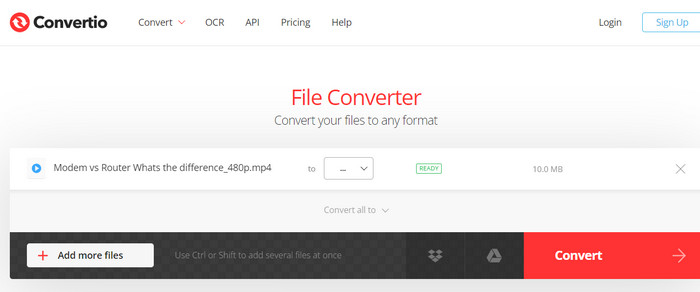
Step 1. Click Choose Files on the Convertio website (https://convertio.co/) to add the video file you want to convert. You may choose to drag the file and drop it into the upload area.
Step 2. From the drop-down box, choose MP4 as the format to use. You can also change the resolution, bitrate, and frame rate of the result if you want to.
Step 3. To start the conversion process, click the Convert button. A progress bar will show how far along the conversion is on the page.
Step 4. Once the process is done, you can click Download to save the MP4 file to your computer.
Parte 3. Os 3 melhores conversores de MP4 offline
Agora, se, em alguns casos, você não tiver acesso à Internet, poderá optar por programas off-line nesses casos. Portanto, aqui estão as ferramentas nas quais você pode confiar.
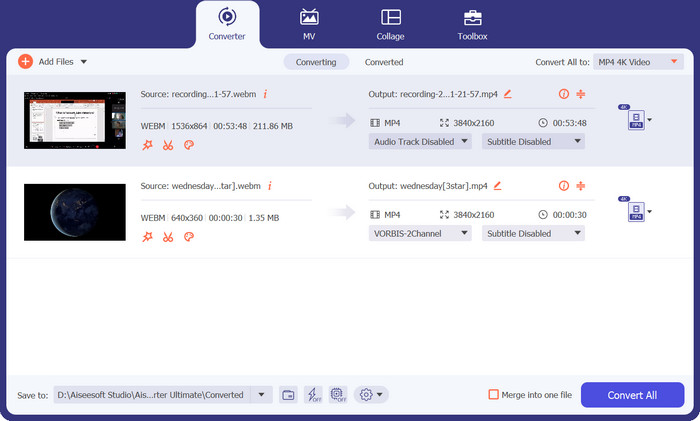
1. FVC Video Converter Ultimate
FVC Video Converter Ultimate is a powerful software that provides a comprehensive solution for converting video files to MP4 format. It supports a wide range of input and output formats, including support for HD and 4K video, and offers customizable output settings to ensure high-quality output. Additionally, this MP4 converter offers batch conversion for multiple files at once and includes editing tools for trimming, cropping, adding watermarks, and more. With its fast conversion times and high-quality output, FVC Video Converter Ultimate is a reliable and versatile tool for all your MP4 conversion needs.
Key Features:
◆ Inclui suporte para vídeos HD e 4K para reter vídeos de alta qualidade.
◆ Suporte de aceleração de hardware para GPUs NVIDIA e AMD.
◆ Suporta vários dispositivos de saída.
Step 1. The first thing you need to do to use this converter is to get its installer. Then, install it on your device. You may get the app using the Free Download buttons below.
Free DownloadFor Windows 7 or laterSecure Download
Free DownloadFor MacOS 10.7 or laterSecure Download
Step 2. Then, launch the tool and load any video by ticking the Plus sign button from the main interface of the program.
Step 3. Next, go to the Profile menu and select MP4 from the Video tab. Finally, hit the Convert All button and get all your videos transformed to MP4 files.
2. VLC Media Player
O VLC Media Player é um reprodutor multimídia gratuito amplamente reconhecido por sua capacidade de reproduzir praticamente qualquer formato de arquivo de áudio ou vídeo. O que muitas pessoas podem não saber é que o VLC Media Player também é um poderoso conversor de vídeo que pode converter seus vídeos para o formato MP4 com facilidade. Abaixo estão algumas de suas principais características para saber mais sobre este programa.
Key Features:
◆ Pode editar codec de vídeo e áudio, resolução e taxa de bits.
◆ It has the ability to add subtitles to videos.
◆ É capaz de visualizar vídeos antes de converter.
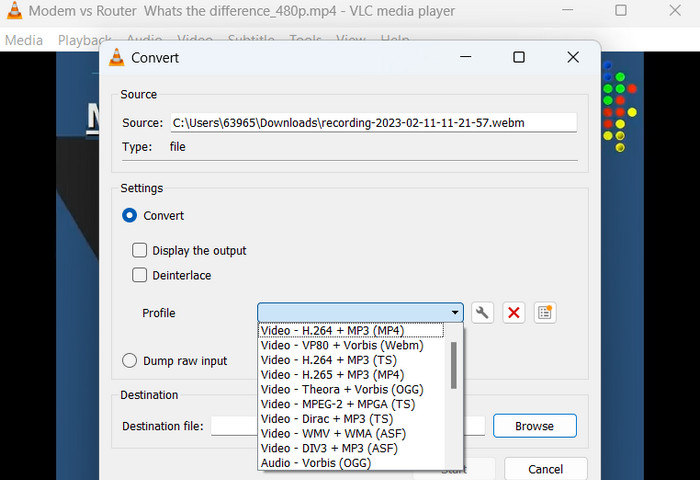
Step 1. Open VLC Media Player on your computer. Click on Media in the top menu bar and select Convert/Save from the drop-down menu.
Step 2. Click on the Add button to select the video file you want to convert. Once you have added the file, click on the Convert/Save button.
Step 3. In the Profile section, select Video - H.264 + MP3 (MP4) as the output format. Click on the Start button to begin the conversion process and wait for the conversion to complete.
3. Travamento de mão
O HandBrake é um transcodificador de vídeo de código aberto que permite converter seus arquivos de vídeo em vários formatos, incluindo MP4. É uma ferramenta popular entre os entusiastas de vídeo por sua facilidade de uso e recursos poderosos. Da mesma forma, este conversor de vídeo MP4 também oferece processamento em lote, para que você possa converter vários arquivos de uma vez, e possui uma variedade de predefinições que facilitam a otimização de seus vídeos para diferentes dispositivos e plataformas.
Key Features:
◆ Software gratuito e de código aberto.
◆ Suporta legendas e criadores de capítulos.
◆ Predefinições para otimizar a saída de vídeo.
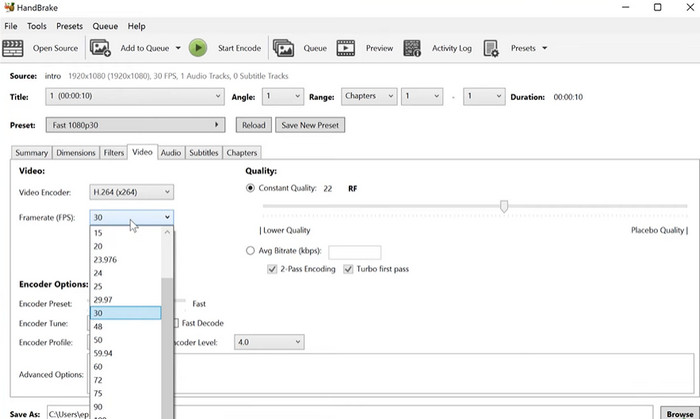
Step 1. Download and install HandBrake from the official website. Open HandBrake and select the video file you want to convert by clicking the Open Source button in the top left corner of the window.
Step 2. Choose a preset for your output file by selecting one of the options from the Presets menu in the top row of the window. If you're unsure which preset to use, you can choose Fast 1080p30 for a good balance between speed and quality.
Step 3. Click the Start Encode button in the top menu to begin the conversion process.
Parte 4. Perguntas frequentes sobre conversores de MP4
Posso reproduzir arquivos MP4 no meu iPhone?
Yes. MP4 is already a supported format on iPhone devices. MP4 is a universal video format that is compatible with most devices, including iPhones. Therefore, you will not have to use an MP4-to-iPhone converter. You can simply use the pre-installed player of iPhone or find a 3rd-party video player for iPhone.
Posso fazer upload de arquivos MP4 para o TikTok?
Sim. Você não precisa encontrar um conversor de MP4 para TikTok para fazer upload porque o TikTok aceita arquivos de vídeo MP4 como um dos formatos suportados para fazer upload de vídeos para a plataforma.
Posso converter arquivos MP4 para formatos compatíveis com o iTunes?
Sim. Não há necessidade de você encontrar um conversor de MP4 para iTunes. Você pode usar conversores, como o HandBrake, para ajudá-lo com isso.
Conclusão
MP4 converters are essential tools for anyone looking to watch or share their videos across different devices or platforms, and they provide a convenient and reliable way to ensure compatibility and high-quality video playback. Therefore, we have compiled and compared the best programs available to help you choose the right-fit app.
-
 O melhor editor de MP4 para Windows e Mac em 2023
 Esteja você usando seu computador para edição de vídeo MP4 ou apenas trabalhando em seu telefone, você encontrará ótimas opções aqui, incluindo o melhor editor de MP4 para Windows e Mac.
-
 Como compactar um vídeo MP4 para um tamanho menor
 O vídeo MP4 é muito grande para ser enviado? Quer reduzir o tamanho do vídeo? Aqui estão 3 maneiras eficientes de compactar um arquivo MP4 em um tamanho menor sem limite.
-
 5 principais editores de metadados MP4 [atualizado em 2023]
 Como posso alterar meus metadados MP4? A melhor maneira de alterar os metadados do seu MP4 é usar um editor de tags que suporte o formato MP4, como o exemplo que listamos abaixo.
