


 Video Converter Ultimate
 Gravador de ecrã
 Reparo de vídeo
 Secure Download
Maneiras grátis e online de converter RMVB para MP4
RMVB (RealMedia Variable Bitrate) is a RealMedia video file that is not supported by all applications. Many people wish to change the file’s format from RMVB to MP4 for easy playback on mobile phones. This guide will show you three free and online ways to convert RMVB files to MP4 fast so that you can continue enjoying your videos without any hassle.

Parte 1. Como converter RMVB para MP4 com RMVB para conversor de MP4
To convert RMVB to MP4 on your Windows 10 or Mac, an RMVB to MP4 converter is quite fast and reliable. Free RMVB to MP4 Video Converter is a functional and free video converter to make the fast conversion from RMVB to MP4. It also supports to convert RMVB to AVI, FLV, MOV, or other formats. Below are the steps to change RMVB to MP4.
Free DownloadFor Windows 7 or laterSecure Download
Free DownloadFor MacOS 10.7 or laterSecure Download
Step 1. Before start, you need to download and install this freeware on your computer. Then, launch the Free RMVB to MP4 Converter, and import the RMVB files to the program by clicking on the Add File(s) button. By the way, it allows you to make a batch conversion at a time so that you can convert multiple RMVB files simultaneously.
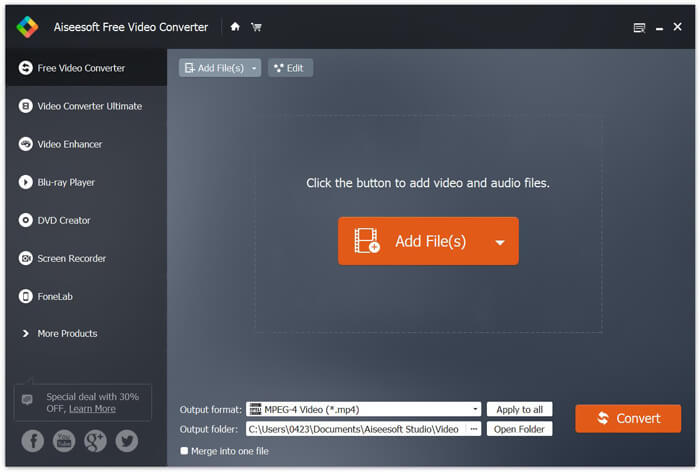
Step 2. After adding your files to the program, navigate to Output format and then choose the MP4 format.

Step 3. Click on the Convert button. Wait for a few minutes, and you’ll get your desired MP4 files.
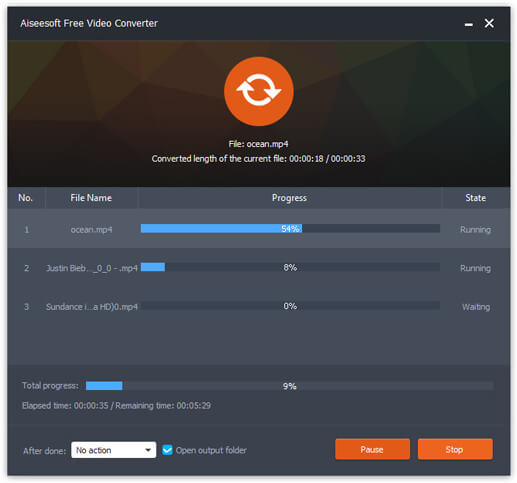
When you get the MP4 files, you can play it on your computer or mobile devices. In addition, you can also use this Free RMVB to MP4 Converter to turn RM to MP4, or convert WMV to MP4.
Parte 2. Como converter RMVB para MP4 com VLC
O VLC também funciona como uma ferramenta prática de conversão de vídeo, e você pode converter facilmente seus arquivos RMVB para MP4 em alta qualidade. Vamos ver como usar o VLC para fazer este trabalho.
Step 1. To begin with, you need to download and install the VLC Media Player program on your computer, and then run it.
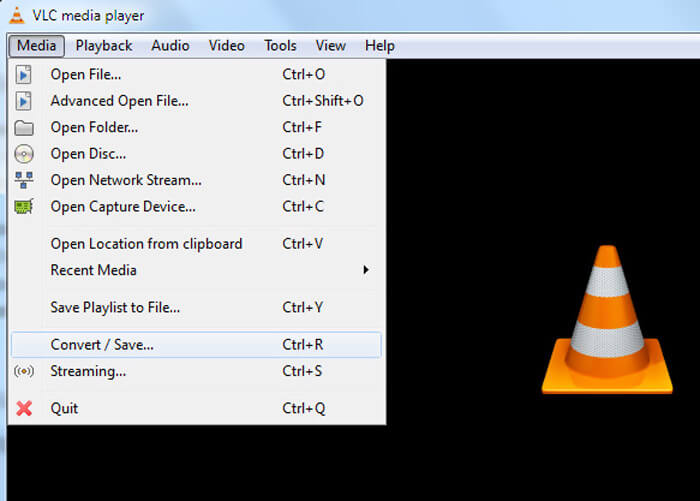
Step 2. Navigate to the Media tab, and then choose Convert/Save to proceed.
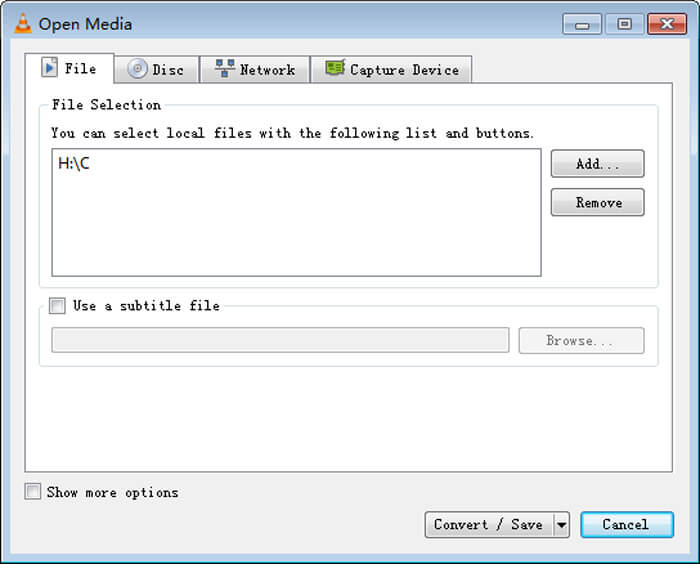
Step 3. When you see the Open Media window, you need to add your RMVB files to VLC by clicking the Add… button from the File option. Then, click the Convert/Save button at the bottom of the window.
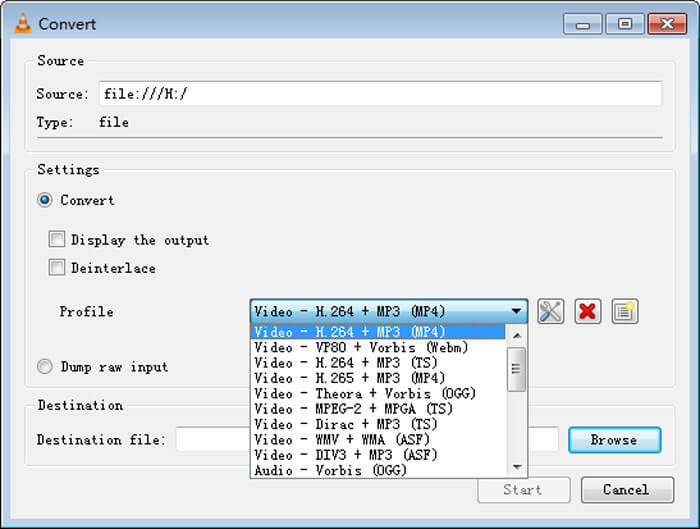
Step 4. Then, you will come to the Convert window. Here you need to find Settings, go to Profile, and then choose MP4 as the output format from the drop-down menu. In the end, click Start to convert your RMVB to MP4 for easy playback.
Parte 3. Como alterar RMVB para MP4 online
The online video converter also supports to convert RMVB videos to MP4 at fast speed. Free Online Video Converter is a web-based video converter that can convert any popular video or audio files to MP4, MOV, FLV, AVI, MP3, AAC, and many more for free. It allows users to change files from RMVB to MP4 through the browser with ease.
Step 1. Visit https://www.free-videoconverter.net/free-online-video-converter/ and click on the Add Files to Convert button to activate the launcher.
Download the Desktop Version to convert files in batch.

Step 2. After that, import your RMVB files to this online tool. Then, choose the MP4 format under the Video tab. When you are ready to make the conversion, hit on the Convert button to start the conversion. Once the conversion is over, the converted files will be saved to your computer automatically.

RMVB vs. MP4
RMVB, uma variação mais recente do formato Real Media (.RM) padrão, é um formato de arquivo de vídeo Real Media compactado usando uma taxa de bits variável. É um formato popular para filmes e animes asiáticos. Os arquivos RMVB são menores em tamanho e têm taxas de bits mais baixas, mas melhor qualidade.
Lançado pelo Moving Picture Experts Group (MPEG) em 2001, o formato MP4 pode ajudá-lo a salvar dados de vídeo, áudio, legenda e imagem em faixas separadas. É a abreviação de MPEG-4 Part 14. Além disso, é um dos formatos mais populares usados para streaming e compartilhamento de vídeos.
Parte 4. FAQs de RMVB para MP4
O que é um arquivo RMVB?
RMVB (RealMedia Variable Bitrate) é um formato de arquivo de vídeo Real Media que usa a taxa de bits variável. Já foi popular na distribuição de animes asiáticos, filmes, episódios, torrents, etc. na web, uma vez que o tamanho do arquivo é menor e a qualidade é muito melhor.
Como abrir um arquivo RMVB?
O RealPlayer oferece suporte à reprodução de arquivos RMVB no Windows, Mac OS X e Linux. Ou você pode usar o VLC para reproduzir arquivos RMVB.
O HandBrake pode converter RMVB para MP4?
HandBrake é uma ótima ferramenta para converter vídeo para funcionar em uma série de dispositivos compatíveis. É uma ótima opção para qualquer pessoa transformar RMVB em MP4.
Então, é assim que você converte arquivos RMVB para MP4. Você encontrou algum problema ao seguir as etapas mencionadas acima? Sinta-se à vontade para nos dizer sua opinião.
-
 3 etapas fáceis para gravar arquivos / pastas de vídeo _TS em DVD no Mac / Windows
 Como faço para converter e gravar arquivos TS em um disco DVD? Este guia passo a passo mostrará como copiar arquivos e pastas TS para DVD no Windows / Mac para que você possa assistir arquivos TS no DVD player ou TV.
-
 6 maneiras fáceis de converter TS para AVI / MKV / MOV / WMV no Windows / Mac
 Quer converter arquivos TS para AVI / MKV / MOV / WMV rapidamente? Este artigo mostra conversores de vídeo online e offline com guia completo. Talvez você possa obter o melhor conversor TS grátis aqui.
-
 Como converter MP4 em M4A no Windows / Mac (grátis e online)
 Como faço para converter MP4 para M4A online? Posso extrair o áudio de arquivos MP4? Leia esta postagem e você obterá todas as respostas sobre a conversão de MP4 para M4A.

