


 Video Converter Ultimate
 Gravador de ecrã
 Reparo de vídeo
 Secure Download
Conversor WTV para MP4: como converter WTV para MP4
WTV, como o sucessor do formato DVR-MS, é desenvolvido pela Microsoft para armazenar conteúdo de TV gravado pelo Windows Media Center. Codificado com o padrão MPEG-2 e MPEG-4 e MPEG-1 Layer II ou Dolby Digital AC-3, o WTV é compatível com poucos softwares como FFMPEG, Windows Media Center, CyberLink PowerDVD 12, Nero 12, HandBrake, CCextractor, etc.

If you want to watch or share WTV files conveniently, you had better convert WTV to MP4, the most popular format for almost any device.
We’ve searched the Internet in a quest for WTV to MP4 converter and found the top 2 free WTV to MP4 converters to turn WTV to MP4.
Parte 1. Free Video Converter - Converta WTV para MP4 Online
Well, it is very easy to convert WTV to MP4. The easiest way to change WTV to MP4 is to finish it online. Free Online Video Converter is the freeware to convert WTV to MP4 and other mainstream video and audio formats. This free online tool is compatible with Windows 10/8/7 and Mac OS X 10.7 or above, and you can easily transcode WTV to MP4 within steps.
Para agilizar o processo, você pode seguir o guia:
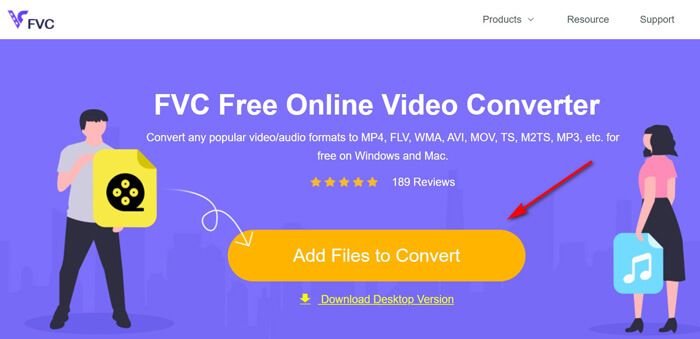
1. Click Add Files to Convert button to upload WTV files from PC.
2. Select MP4 from the checkbox.
3. Click Convert to convert and download WTV files automatically.
Agora, estamos aqui para orientá-lo sobre como converter WTV para MP4 em detalhes.
Step 1. Add WTV files
Open this free online WTV to MP4 converter via your browser. Click Add Files to Convert button, and a pop-up window prompts to tell you to download and install the launcher. Just download it and the open-source window will appear after the successful installation. Then you can select the WTV recordings on your computer for uploading. This freeware supports batch conversion and you can add more than one WTV files online.
Step 2. Select MP4
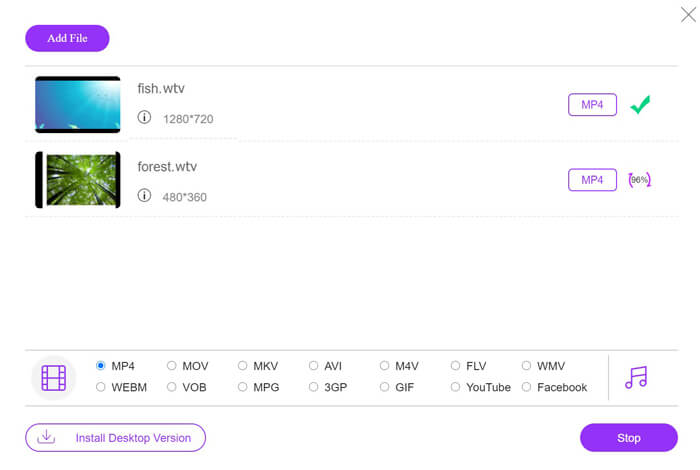
Tick the checkbox of MP4 on the bottom, where you can find various output options like MKV, AVI, M4V, FLV, VOB, GIF, YouTube, Facebook, MP3, AAC, WMA, WAV, FLAC, etc.
In addition, you can click the Settings icon next to the output MP4 pane to adjust the encoder, frame rate, resolution, bitrates, and other parameters.

Step 3. Convert WTV to MP4
After everything is done, click the Convert button and a window appears that requires you to select the destination to store the converted MP4 files. Choose the destination and return to this free online converter, click Convert again to start converting and downloading the MP4 files automatically. You can see the conversion progress percentage directly.
Parte 2. HandBrake - Converter WTV em MP4 no PC / Mac
Outra forma gratuita de converter WTV para MP4 é usando o HandBrake. HandBrake é o único software que pode ler arquivos WTV. Além disso, ele também pode transcodificar WTV para MP4 / MKV em seu computador Windows e Mac.
HandBrake é o software de desktop de código aberto, então você deve baixar este conversor grátis primeiro em seu computador.
Novamente, as etapas simples de conversão de WTV em MP4 no HandBrake são as seguintes:
1. Adicione os arquivos WTF ou a pasta inteira no HandBrake.
2. Perfil MP4 personalizado no HandBrake.
2. Visualize e converta WTV em MP4.
Aqui está o guia completo para alterar WTV para MP4 no HandBrake.
Step 1. Add WTV files into HandBrake
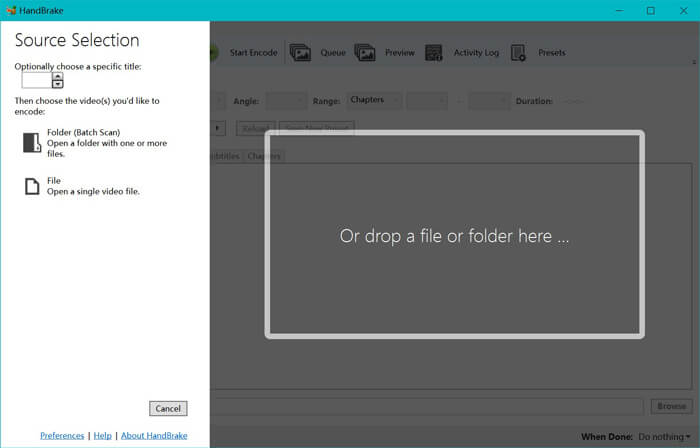
Once you have installed HandBrake on your computer, HandBrake will present the open-source dialog by default. Here you can click Folder or File to select the WTV files or folder into main window. Alternatively, you can also drag and drop the WTV files into this software.
Step 2. Select MP4 format
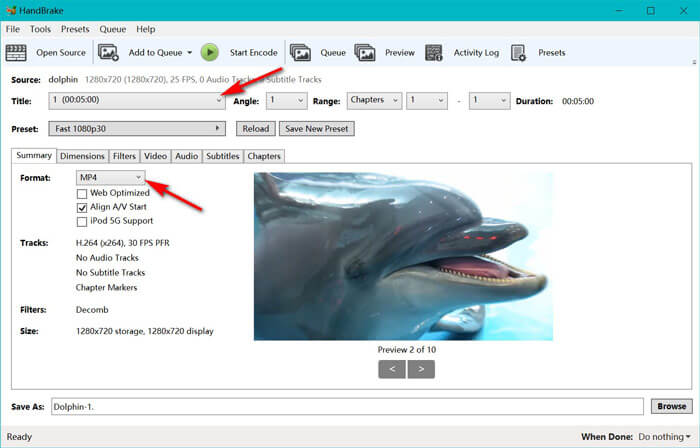
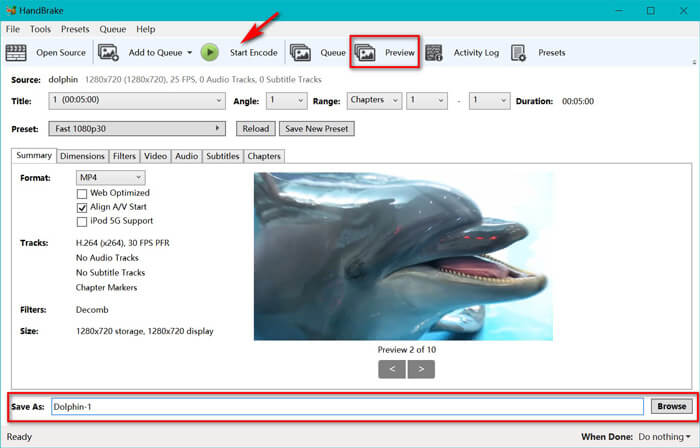
Once you have loaded the WTV files, you can select the exact WTF file from the Title drop-down option. Then select MP4 in the tab of Summary as the output for the selected WTV file. Besides, HandBrake allows you to adjust the dimensions, filters, video codec/quality, audio track, etc. Not only MP4, it can also convert other formats like AVI, MOV, M2TS, etc., to MKV.
Step 3. Preview and convert WTV to MP4
HandBrake’s Preview on the toolbar feature allows you to see what your new MP4 video will look before encoding it. After all your settings are just right, give the name of the converted MP4 files and select the location of your new videos by clicking the Browse button at the bottom. Finally, just click Start Encode button on the toolbar to convert WTV to MP4.
Parte 3. FAQs de WTV para MP4
Por que o HandBrake salva MP4 como M4V?
Para arquivos MP4, o HandBrake irá os arquivos MP4 automaticamente usando a extensão M4V, quando você escolher áudio AC3 e legendas SRT ou tiver marcadores de capítulo para personalizar o arquivo MP4. Mas você pode alterar a extensão .m4v para .mp4 diretamente.
O VLC player pode reproduzir arquivos WTV?
O VLC não pode reproduzir arquivos WTV diretamente. Você deve instalar o K-Lite Code Pack para instalar o pacote de códigos WTV e, em seguida, reproduzir os arquivos WTV no VLC.
Posso converter arquivos WTV protegidos?
Sim você pode. No entanto, apenas o MCEBuddy suporta a edição e conversão de arquivos WTF comerciais protegidos. Você deve usar este software para copiar e converter os arquivos WTV protegidos.
Conclusão
Para usar arquivos WTV gravados pelo Window Media Center de maneira conveniente, você deve primeiro converter WTV para MP4. Esta postagem compartilha 2 maneiras gratuitas de converter WTV para MP4 online por meio do Free Online Video Converter e do HandBrake. O Free Online Video Converter permite converter WTV para MP4 e outros formatos populares, enquanto o HandBrake oferece mais controles de edição com opções de formato de saída limitadas.
Qual caminho é o seu preferido?
Ou talvez você tenha um conversor de WTV para MP4 melhor?
De qualquer forma, gostaria de ouvir de você. Então, vá em frente e deixe um comentário abaixo.
-
 Como converter MXF para MP4 via conversor grátis
 Este post é o guia detalhado para converter MXF para MP4 no computador. Você pode obter 4 conversores MXF para MP4 gratuitos para transcodificar a camcorder MXF para MP4 em etapas simples.
-
 As 3 principais maneiras de converter gratuitamente MP4 em MOV
 Como converter MP4 para MOV no Mac? Existe alguma maneira gratuita de converter MP4 em MOV sem perda de qualidade? Esta postagem compartilha 3 maneiras simples de ajudá-lo a fazer a conversão de vídeo MP4 para MOV no Mac, PC com Windows e online.
-
 Como converter M2TS em WMV no Windows / Mac / Online (totalmente grátis)
 Aqui estão 3 maneiras fáceis de converter vídeos M2TS em WMV. Você pode alterar o formato de vídeo de M2TS para WMV gratuitamente no Windows, Mac e online rapidamente. A conversão em lote é compatível.
