


 Video Converter Ultimate
 Gravador de ecrã
 Reparo de vídeo
 Secure Download
Como compactar arquivos PDF para e-mail 3 maneiras eficazes de escolher
Indeed, sending large files via email can be a hassle. In fact, it may cause you some problems, or it may not be delivered at all. Also, many email providers restrict attachments to specific file sizes, which is easy to exceed with a complex PDF. This can be especially true for PDFs with lots of images or lengthy documents. To address this, most people in this situation resort to file-sharing services like Dropbox or Google Drive. However, they almost forget a handy trick, and that is via file compression. Many free online tools can do this, and some are quite popular. But how to compress a PDF for email effectively? That is what you are about to learn as you continue reading the entire content below.

Parte 1. Qual é o melhor tamanho de PDF para e-mail
Aqui está um fato: não há um número mágico para o tamanho ideal de PDF para e-mails. O que você deve observar é o limite de anexos da sua plataforma de e-mail. Serviços populares limitam anexos em torno de 20 MB, o que pode ser surpreendentemente fácil de alcançar, especialmente com PDFs que contêm muitas imagens ou são documentos muito longos. Portanto, se o seu PDF for maior do que o limite de 20 MB, seu e-mail provavelmente não será enviado e você receberá uma mensagem de erro. Dito isso, em vez de mirar em um tamanho específico ou no melhor tamanho de PDF para e-mail, é melhor jogar pelo seguro e mantê-lo abaixo de 20 MB. Dessa forma, você pode ter certeza de que ele será anexado e enviado com sucesso.
Parte 2. Um clique para compactar arquivos PDF para e-mail
Here’s a great and quick way to compress email files. Get ready to experience this free tool called FVC Free PDF Compressor, which can shrink your hefty PDF files without messing them up. Now, since most email services only allow attachments of around 20MB, PDFs with pictures or lots of text can easily reach that limit. This compressor can get your PDF way smaller, even under 100 kilobytes! You don’t need to worry about how it shrinks PDFs for email dramatically because it still maintains the quality of the files. In fact, you probably won't even notice a difference between the original and the shrunk version.
Além disso, essa ferramenta incrível é super fácil de usar, e qualquer pessoa com qualquer nível de conhecimento pode usá-la. Tudo o que você precisa fazer é arrastar e soltar o arquivo PDF no programa, e ele o encolhe automaticamente. Então, com apenas um clique, você pode salvar o PDF menor no seu computador. Dessa forma, você pode rapidamente compactar o PDF para o tamanho de e-mail online para um tamanho perfeito para enviar por e-mail ou fazer upload de tudo sem nenhuma marca d'água no documento final. Para entender melhor o processo, veja as diretrizes detalhadas abaixo.
Step 1. On its main interface, click the Add PDF File tab and choose the PDF file that you need to compress.
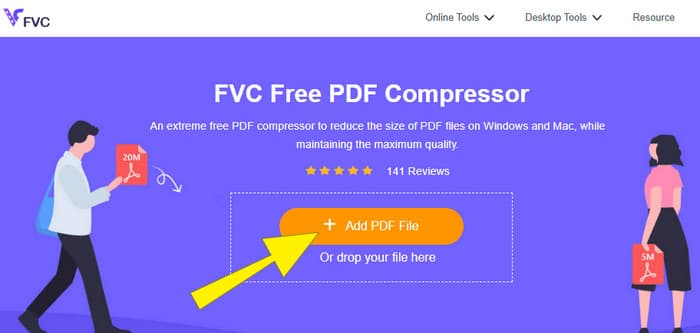
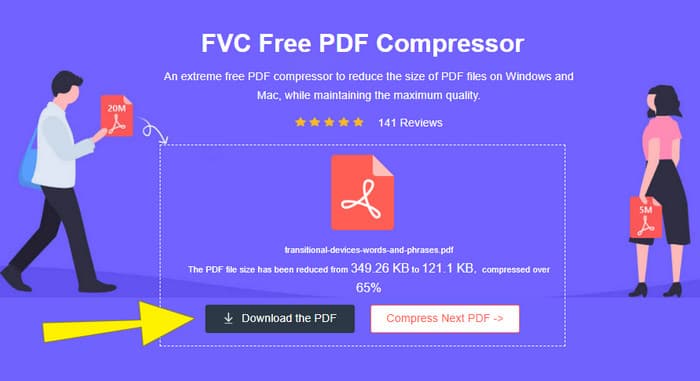
Step 2. While the PDF file is uploading, the tool is also working for its compression.
Step 3. Once done, click the Download the PDF button.
Parte 3. Compactar arquivos PDF para e-mail com recursos de edição
If you prefer a tool that comes with editing features, then Adobe Acrobat is what you need for this task. Adobe Acrobat is a program known for creating, editing, and managing PDF files. It's like a powerful toolkit specifically designed for working with PDFs. One of its handy features is PDF compression, which you can use when you have a bulky PDF that won't fit into your email because of size limits. Adobe Acrobat, which comes with an online and desktop version, can help you compress large PDF files for email without messing with the quality too much. Well, it does this in a few ways, like reducing the size of images within the PDF or getting rid of unnecessary fonts. However, knowing Adobe and its suits, you must not be surprised if you find its learning curve steep. Hence, here are the steps to help you ease the process.
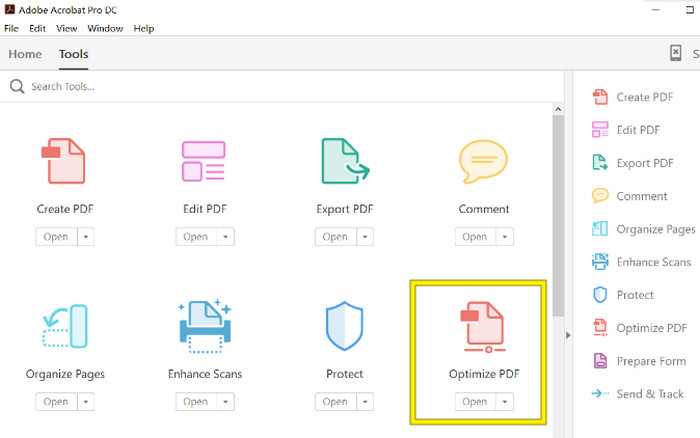
Step 1. Launch the Acrobat and open the PDF file that you need to work on. To do so, go to Tools-Optimize PDF-Open.
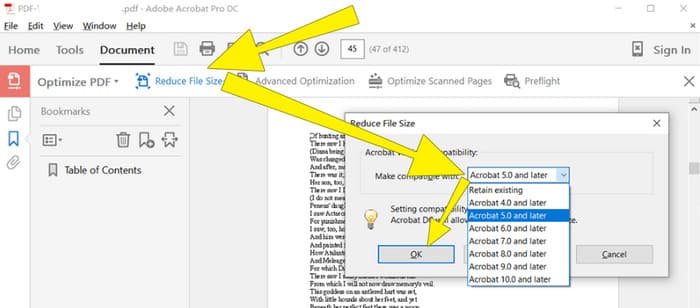
Step 2. Once you open the PDF file, click the Reduce File Size option from the new navigation shown. Then, set or use the editing options given to achieve your desired compression and optimization.
Step 3. After that, save the compressed PDF file.
Parte 4. Compactar arquivos PDF para e-mail convertendo
Want to learn a new trick on how to compress a PDF to send via email? Let’s convert the file to JPG. This conversion trick can be done perfectly using PowerPoint. PowerPoint is a program you likely use to create presentations. Imagine a slideshow with text, pictures, and maybe even videos. PowerPoint lets you build these presentations with individual slides that you click through to show your audience. It's a popular tool for teachers, students, business people, and anyone who wants to share information visually.
Agora, inserir um PDF na sua apresentação do PowerPoint pode ser prático, mas pode não ser o processo mais intuitivo. Mas, depois que você fizer isso, produzir um arquivo JPG será moleza. Mas não se preocupe! Podemos orientá-lo passo a passo, o que você precisa seguir para ter seu PDF incorporado em pouco tempo.
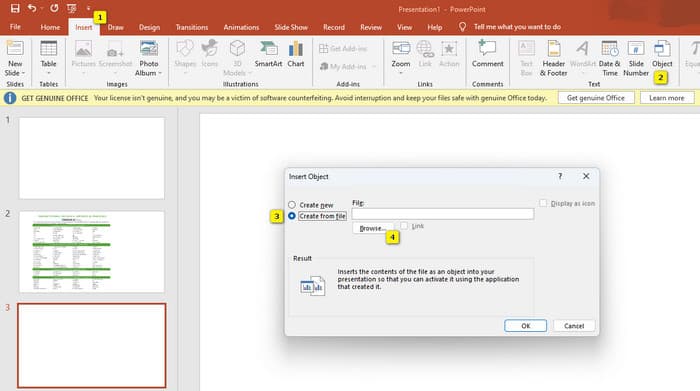
Step 1. Launch the PowerPoint on your PC and select the correct slide where you can open the PDF file.
Step 2. Now, navigate to the Insert tab menu and look for the Object option from the Text selection. Click the option, and a new window will pop up. From that window, toggle the Create from the File option, which is located on the left side of that interface. Then, click the Browse button, which will enable you to import the PDF file onto the slide.
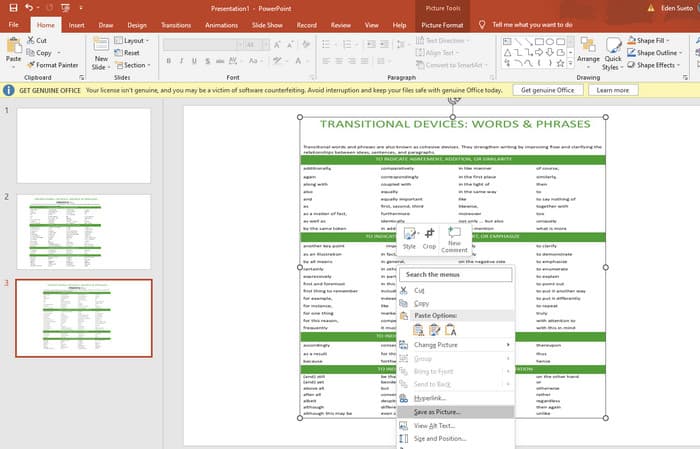
Step 3. Once the PDF file is uploaded, you can convert it to JPG. To do so, right-click the PDF on the slide, select Save As Picture, and save it as a JPEG.
Parte 5. Perguntas frequentes sobre PDF e compactação
Qual é o tamanho máximo de um anexo em PDF que você pode enviar por e-mail?
Isso depende do seu provedor de e-mail, mas a maioria limita os anexos a cerca de 20 MB.
Qual é o melhor compressor de PDF gratuito?
Existem compressores de PDF gratuitos disponíveis, mas o melhor sempre depende das preferências dos usuários. Até agora, o FVC Free PDF Compressor é a ferramenta online gratuita mais recomendada.
Como compactar arquivos PDF para enviar por e-mail?
Na verdade, compactar funciona para PDFs porque eles já são arquivos compactados.
Conclusão
This article talks about how to compress PDF files for email in the best ways. You can now ensure a smoother and better way to send your PDFs via email as long as you reduce them properly to achieve the file limitation.
-
 3 melhores soluções sobre como remover marcas d'água de vídeos facilmente
 Quer remover a marca d'água irritante do vídeo? Com este blog, você pode aprender as diferentes ideias sobre como remover a marca d'água em um vídeo.
-
 4 melhores maneiras de como adicionar marca d'água em qualquer vídeo rapidamente
 Vamos aprender como adicionar marca d'água a qualquer vídeo no Windows, Mac, Online, iOS e Android com etapas detalhadas se você ler este artigo.
-
 3 maneiras mais fáceis de adicionar marca d'água a um GIF online e offline
 Adicionar uma marca d'água a um GIF pode ser tão fácil quanto 1-2-3 se você usar corretamente a ferramenta certa. As ferramentas no mercado são muito amplas, mas apresentaremos as três ferramentas nas quais você pode confiar.
