


 Video Converter Ultimate
 Gravador de ecrã
 Reparo de vídeo
 Secure Download
3 maneiras de reproduzir DVDs no PC com Windows 10/8/7
Why does my DVD not play on Windows Media Player?
If you are using Windows 7 or Windows 8, you can handily watch DVD movies with the default player, Windows Media Player. However, Microsoft has neutered WMP in Windows 10. So, you can’t directly open the DVD disc on Windows Media Player any more.

This post will show you how to play DVD on Windows Media Player. Whether you are using a computer with Windows 10, Windows 8, Windows 7 or an early version, you can get 3 DVD players to watch DVDs with ease.
Parte 1. Como reproduzir DVD no Windows Media Player
Windows Media Player is pre-installed and available for Windows-based computers. It is mainly used to play video, audio, and viewing images in Windows system. Also, it supports the playback of audio CDs, data CDs, VCDs and DVDs in Windows 7 and Windows 8. This part tells how to play DVDs on Windows Media Player.
Step 1. First, you should open Windows Media Player on your PC. You can press Windows key to arise the search box, input WMP or Windows Media Player to locate the player tool. Windows Media Player will appear as the first option. Here you can press Enter key, or double click on the option to open it.
Step 2. Insert the DVD disc into the disc drive of your computer. Considering that most modern laptops don’t carry a DVD drive, you may need to connect an external drive.
Step 3. The DVD video will automatically start playing. If not, you can go to the Windows Media Player, choose the DVD disc under the Player Library. Here you can select a DVD title or chapter name. Then the player will automatically switch to Now Playing mode.
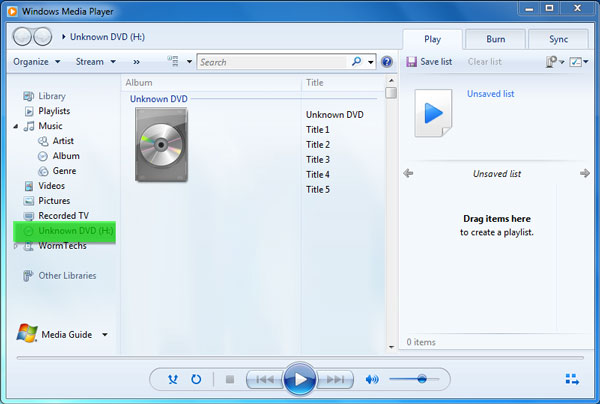
You need a DVD drive and a compatible DVD decoder for the DVD playing on Windows Media Player. If you see an error message, you can go to Web Help to determine how to obtain a decoder. Note that, Windows Media Player can only play DVDs in Windows 7 and Windows 8 PC.
Parte 2. Melhor maneira de reproduzir DVDs no PC com Windows 10/8/7
As it mentioned above, you are no longer able to play DVDs in Windows 10 with the Windows Media Player. Instead, you need to buy a Windows DVD Player app which costs $15 for the DVD playback. Surely you prefer a free way to get the DVD playing on your computer.
FVC Free DVD Player is a totally free DVD playing tool that allows you to watch any DVD discs, DVD folders, and ISO image files on Windows 10/8/7 PC and Mac. It is actually an online DVD player. You can directly use it on any web browser like IE, Chrome, Firefox and Safari. With the advanced video encoding technology support, it can play DVD movies smoothly with high quality. What’s more, it supports DTS-HD and Dolby TrueHD to give you lossless sound effect.

Step 1. Open your browser and go to this free DVD player site. Click on the Play Now button to quickly install a small-size launcher file for the DVD playing. After that, the main DVD playing window will appear on the screen.
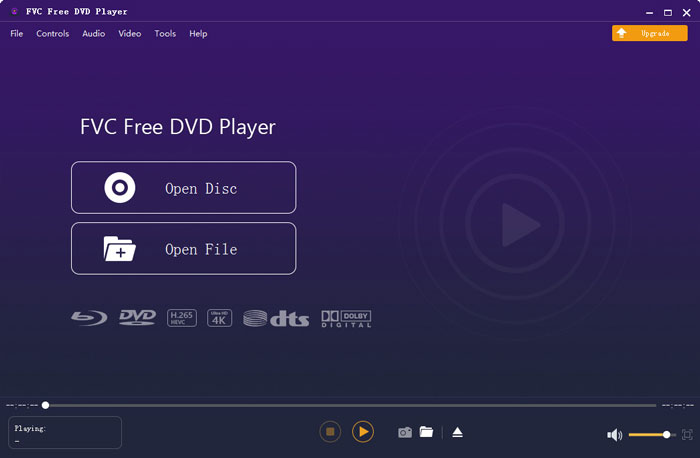
Step 2. Insert your DVD disc into the disc drive of your computer. Then click on the Open Disc button to locate and play your DVD movie. You have all controls of the playback. For instance, you can play, pause, backward, forward, adjust volume and playing window as you like.
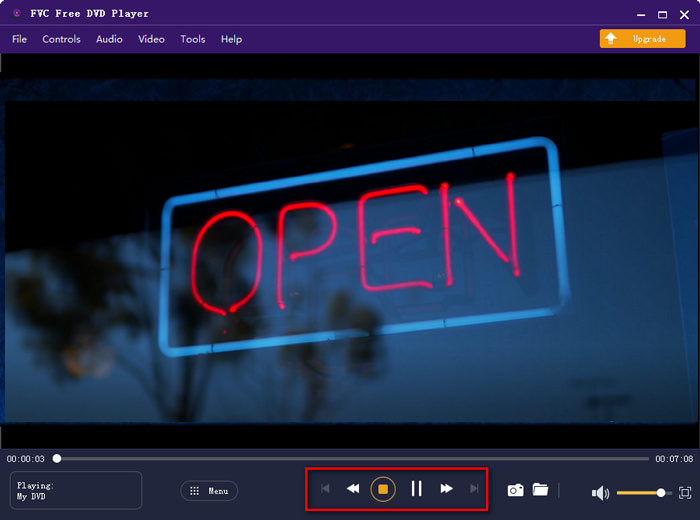
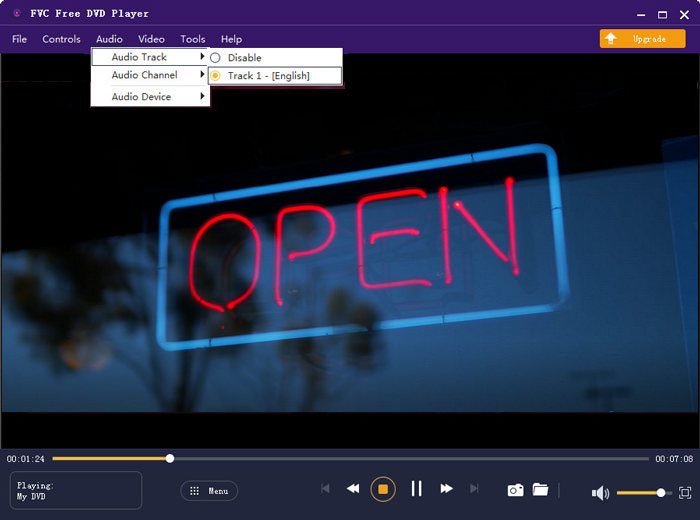
Step 3. Besides the basic playing feature, this free DVD player enables you to add and change subtitle and audio track. Moreover, you are able to screenshot at any moment of the DVD playing.
Parte 3. Como Assistir DVDs em PC Windows 10/8/7 com VLC Media Player
VLC media player is one of the most popular video players which also support DVD playback. As a cross-platform media player, VLC allows you to play DVD on Windows 10/8/7, macOS and Linux computer. It has the capability to play DVDs, VCDs and Audio CDs. For the DVD video playing, VLC can easily access DVD menu, chapters, and other related contents. Besides DVDs, VLC also supports Blu-ray discs.
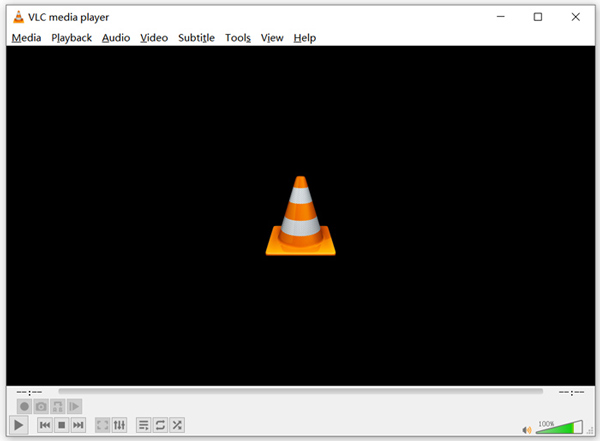
Step 1. First, you should free download a right version of VLC on your computer. Insert your DVD disc into the disc drive on your laptop.
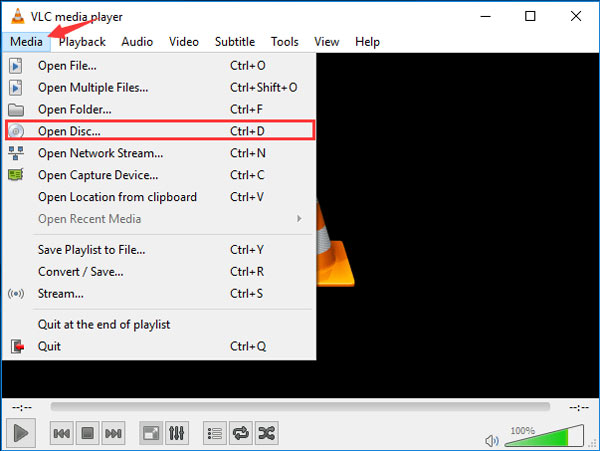
Step 2. Open VLC media player and then click the Media on the top menu bar. From the drop-down list, choose the Open Disc option
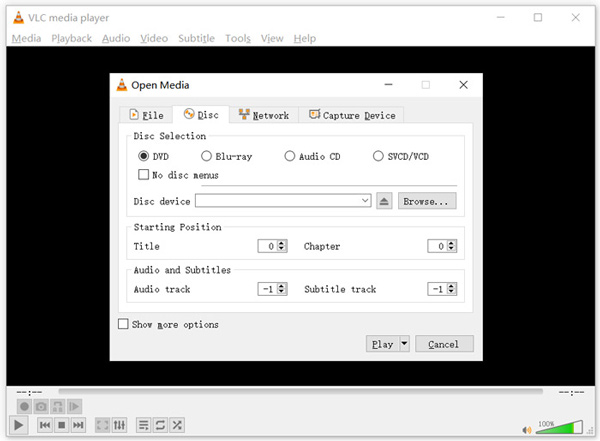
Step 3. In the new Open Media window, click Disc tab, check DVD and then click Browse button to select and load the DVD movie you want to play.
Após essas operações, você pode assistir facilmente ao filme em DVD no Windows 10/8/7 PC ou Mac com VLC media player.
Parte 4. Perguntas frequentes sobre como reproduzir um DVD no Windows Media Player
Pergunta 1. Como você copia um CD no Windows Media Player?
Para copiar um CD no Windows Media Player, você deve inserir o CD na unidade de disco do computador. Abra o Windows Media Player e escolha CD na lista de pastas. Agora você pode escolher copiar o CD com as configurações padrão. Aqui você também pode personalizar as configurações de ripar de acordo com sua necessidade.
Pergunta 2. Por que não consigo reproduzir DVDs no Windows 10?
A Microsoft removeu o suporte embutido para reprodução de DVD no Windows 10. Portanto, você não pode abrir filmes em DVD diretamente em um PC com Windows 10.
Pergunta 3. Como copiar um DVD para MP4?
To rip DVD to digital video like MP4, MOV or AVI, you can download DVD converter to rip DVD without quality loss.
Conclusão
Why is DVD not playing on Windows Media Player? If you are using a PC with Windows 10, you can rely on the recommended Free DVD Player or VLC to watch DVD movies. For Windows 8 or Windows 7 users, you can directly get DVD playback on Windows Media Player. If you still have any questions about the DVD playing in Windows 10/8/7, you can leave us a message.
-
 10 melhores tocadores de música MP3 grátis de 2025
 Qual é o melhor reprodutor de música MP3? Como coloco música em um MP3 player? Como fazer o download do reprodutor de música MP3? Esta postagem oferece uma análise detalhada dos 10 melhores MP3 players gratuitos para Windows PC e Mac.
-
 7 melhores reprodutores Xvid para Windows e Mac
 Obtenha o FVC Free Video Player - o melhor reprodutor Xvid para todas as plataformas. Aqui também mencionamos os outros 6 reprodutores Xvid para Windows e Mac.
-
 5 melhores reprodutores de VOB para Windows 10/8/7 PC e Mac 2025
 Como reproduzir arquivos VOB no Windows 10? Qual é o melhor jogador VOB? Esta postagem faz uma revisão dos 5 melhores jogadores VOB para computadores com Windows 10 e Mac.
