


 Video Converter Ultimate
 Gravador de ecrã
 Reparo de vídeo
Descubra maneiras de como reproduzir arquivos MKV no PS4
Not Only Xbox One S supports playback of movies. Now PS4 is trying to cope up with the trend. With the use of USB cable and via DLNA PS4 can now play MKV, MP4, AVI, and a lot more. This means MKV is part of the files you can play. To see a list of the full formats supported, visit the official website of PS4. Furthermore, you wouldn't keep on reading this article if you're not interested in playing an MKV file to PS4. Keep it going, as you progress you will discover ways on how you can play MKV on PS4.

Parte 1. Todos os arquivos MKV podem ser reproduzidos no PS4?
Posso reproduzir arquivos MKV no PS4? Certamente você pode. O formato de arquivo MKV é suportado pelo PS4. Mas nem todos os arquivos MKV podem ser reproduzidos corretamente. Você pode experimentar uma falha em jogá-lo. Isso ocorre porque você precisa atender ao padrão definido pelo PS4. Principalmente, H.264/MPEG-4 AVC são suportados. As mesmas regras se aplicam se você for reproduzir arquivos MKV de uma unidade USB. Enquanto isso, para áudio MP3, AAC LC, AC-3 são suportados. A maioria desses formatos são formatos Dolby Digital. Se você acha que atendeu ao padrão, pode seguir as etapas sobre como jogar MKV no PS4 diretamente.
Step 1. Download and install DivX Media Server and launch the player. Then enable the sharing on your computer.
Step 2. Upload or import the MKV file to the server.
Step 3. Prior moving to the next step, make sure both the computer and PS4 are connected under the same Wi-Fi network. Next download and install the DivX media player on your PS4. Afterwards, open the media player app of the Ps4 and choose DivX media server from the list of devices that will appear.
Step 4. Finally, look for Video then tick the video you want to play and start streaming it.
Parte 2. Guia passo a passo sobre como reproduzir MKV no PS4 a partir de USB
Enquanto isso, se você estiver usando um armazenamento USB, verifique se ele está formatado em FAT ou exFAT, ou então não será detectado. Se você acha que está pronto e o pendrive é compatível, confira o passo a passo abaixo.
Step 1. Turn on PS4 and insert the USB. Go to the main Menu. Now, select Video and keep looking for your USB Drive name.
Step 2. Once you see the list of the file name, click on Display All to see the entire list of files you saved on your USB. Copy the file and transfer it to the PS4.
Step 3. Finally, make sure you still have enough storage to complete the transfer.
Parte 3. Maneira alternativa de jogar MKV no PS4 via Plex Server
Aside from the DivX there is also an alternative player that you can use to play MKV on PS4. There is a streaming media server named Plex. This media server allows you to stream high-quality videos, music, TV shows, and podcasts from your computer. Although some people experience problems in playing some MKV files, you can still use it as an alternative. Meanwhile, if you really feel like using Plex and play the incompatible file you should consider converting the video. Some converters are capable of turning your MKV files into Plex supported format. By adjusting the video codec, frame rate, bitrate and other parameters, it is possible. Is there a tool that is capable of doing that? Yes there is, you can try Video Converter Ultimate. Yes, this tool is capable of doing that. Try using it to solve this problem.
Step 1. Download and install Video converter Ultimate on your PC.
Free DownloadFor Windows 7 or laterSecure Download
Free DownloadFor MacOS 10.7 or laterSecure Download
Step 2. Add the files that you want to convert by clicking Add files or simply drag and drop the file in the interface.
Step 3. Afterwards, choose the format that is supported by Plex by clicking Convert to All dropdown.
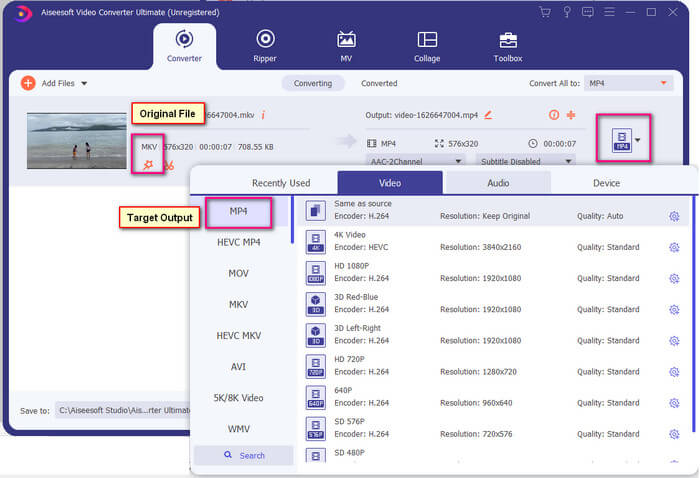
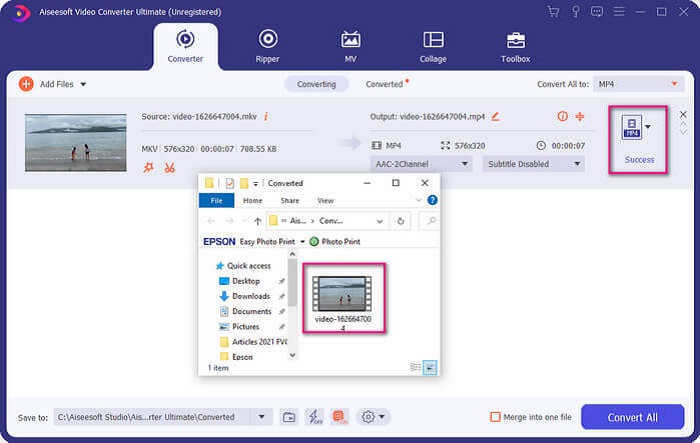
Step 4. Once format is set, click the Convert All button to start the process of conversion. Once the conversion is done, the folder where the file is saved will pop-up.
Há mais com o conversor de vídeo Ultimate. Você pode conferir a lista de vantagens e desvantagens abaixo para conhecer outros bons recursos que ele oferece.
● Esta ferramenta converte em apenas três segundos.
● Possui tecnologia de aceleração que pode aprimorar o arquivo convertido.
● Suporta qualidade HD.
● Possui recursos de edição como adicionar filtros e efeitos básicos.
● Você pode ajustar as legendas e a faixa de áudio.
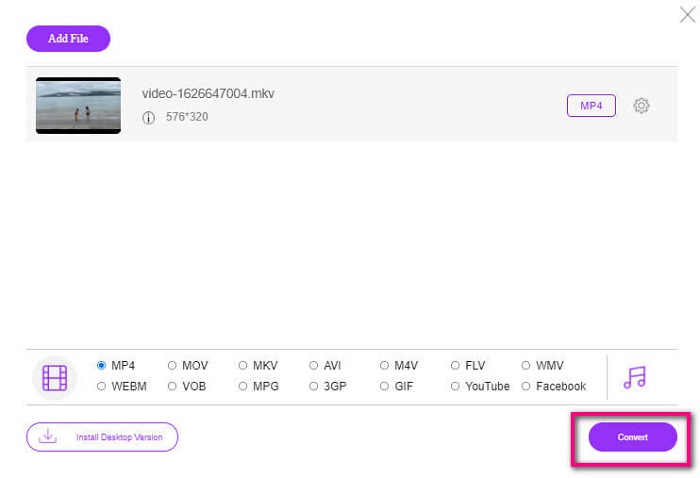
In any case that you are looking for a free converter, you can also consider FVC Free Online Video Converter. It may not be as good as the Ultimate Video Converter, it is to still cope up with it. Certainly, it can convert the file and make it compatible with Plex or DivX. All you have to do is…
Step 1. Launch the tool by visiting the official page in the description.
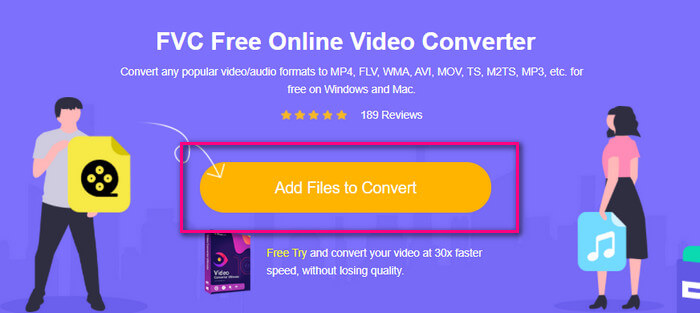
Step 2. Upload the video by clicking Add Files to Convert.
Step 3. Change the format by highlighting the circle below.
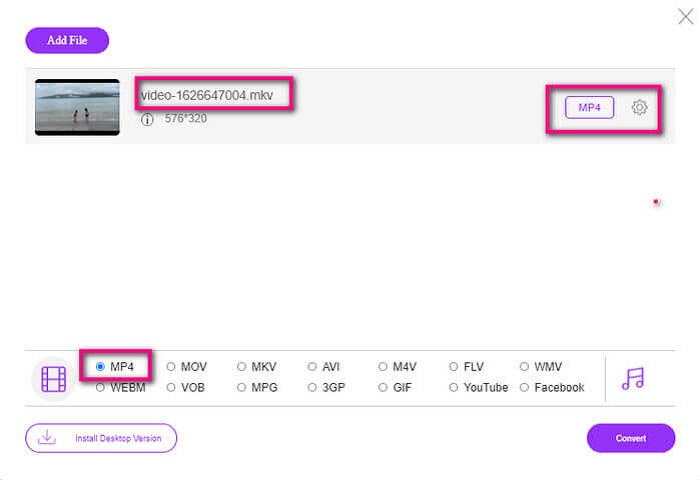
Step 4. Finally, click the Convert button and select the file location where you want the file to be saved. From there click Okay. You can click the Folder icon to see the converted file.
Further Reading
Play MKV in Windows Media Player
Parte 4. Mais informações sobre como reproduzir arquivos MKV no PS4
Quanto custa um PS4?
O preço de varejo no mercado é de 399,99 USD nos Estados Unidos e no Canadá é de CAD 399,99. Os preços podem variar dependendo do preço de varejo em seu país.
Existe a possibilidade de jogar CC ou Close Caption MKV no PS4?
Yes there is. It is in the Accessibility Settings. The path is, go to your PS4 Settings, Accessibility and then select Display Closed Captions. From there click Options to activate the closed caption.
Se o PS4 suporta MKV, por que meus arquivos não estão sendo reproduzidos?
Como mencionado acima, você precisa garantir que o arquivo MKV atenda ao padrão do player que você está usando. Você só precisa verificar o requisito do PS4 ou outro servidor de streaming de mídia. A maioria dos servidores de mídia também possui classificação para reproduzir arquivos MKV.
Quais são os formatos suportados pelo PS4?
Existem vários formatos de arquivo que o PS4 suporta. Mas você notará que a maioria dos formatos não é compactada e contém um arquivo grande. Embora também suporte os descompactados como Mp4. Enquanto isso, aqui está a lista de formatos de que estamos falando: MKV, AVI, MPEG-2 PS, MPEG-2 TS, AVCHD e XAVC e MP4.
Conclusão
Para concluir, existem muitas maneiras de reproduzir direta ou indiretamente arquivos MKV no PS4. O que foram listados são os médiuns mais usados. DivX Stream Server e Plex são apenas algumas alternativas que você pode usar. É altamente recomendável converter o arquivo para evitar problemas e muito processo.
-
 [Resolvido] O VLC Player não reproduz MKV, como corrigi-lo
 O VLC player suporta arquivos MKV? Por que o VLC não reproduz MKV? Este post compartilha 4 dicas úteis para você consertar o VLC player que não reproduz arquivos MKV.
-
 Como reproduzir arquivos MKV no iPad 2025
 Como reproduzir arquivos MKV no iPad 2? Posso converter MKV em MP4 para jogar no iPad Pro / Air / 2? Esta postagem compartilha 2 maneiras fáceis de jogar MKV no iPad.
-
 Como baixar o codec MKV no Windows Media Player para uma reprodução suave
 Não é possível reproduzir vídeo MKV no Windows Media Player? Você pode baixar gratuitamente o codec MKV para o Windows Media Player. Ao contrário, converta o MKV para torná-lo reproduzível no Windows Media Player.
