


 Video Converter Ultimate
 Gravador de ecrã
 Reparo de vídeo
Maneiras fáceis e profissionais de como você pode reproduzir arquivos MKV no Xbox One S
Microsoft has recently released its new game console called Xbox One S. This is additional to the generations of Xbox consoles already released. Faster loading times, switch games easily and storage expansion are just some of the best features taken forward to. More than those great improvements, there is one feature infused you might find useful. The built-in media player. Most people would have to play videos here directly especially some video and movie streaming apps are also accessible here. So as to speak, some might look at how to play MKV files on Xbox One S from external drive or form source incorporated. Keeping this in mind, we listed some of the solutions you can take if in any case the video you are playing is not supported.

Parte 1. 4 maneiras de converter formatos e codecs compatíveis de MKV para Xbox One
Entre os formatos cobertos pela ferramenta, o MKV infelizmente é um dos formatos que o Xbox One não suporta. Os formatos suportados por ele são áudio 3GP, vídeo 3GP, 3GP2, AAC, ADTS, GIF animado, .asf, AVI DivX, DV, AVI, AVI não compactado, AVI Xvid, BMP, JPEG, GIF, H.264 AVCHD, M -JPEG, MKV, MOV, MP3, MPEG-PS, MPEG-2, MPEG-2 HD, MPEG-2 TS, H.264/MPEG-4 AVC, MPEG, SP, PNG, TIFF, WAV, WMA, WMA sem perdas , MA Pro, WMA Voice, WMV e WMV HD. Por isso, sugeriu converter o arquivo para o formato suportado do Xbox One Player. Você não precisa se preocupar, porém, listamos alguns dos conversores que você pode usar.
Conversor de vídeo online gratuito Way-FVC
The first on the line is FVC Free Online Video Converter, a free converter that can be accessed online. In three easy steps you can get your conversion done. As fast as 3 seconds you can get things done. The conversion process is smooth as long as your internet connection is stable. Some of the formats supported by it are MP4, FLV, MKV, MOV, M4V, MTS, TS, M2TS, WMV, ASF, VOB, MP3, AAC and a lot more. Aside from that you can also customize the video by altering and polishing your video. Some of the settings you can change are bitrate, frame rate and download it as a lossless file. To see how useful this tool is, please be guided below.
Step 1. To use it, to gain access to the tool you have to visit the official site of FVC Free Online Video Converter by clicking the link.
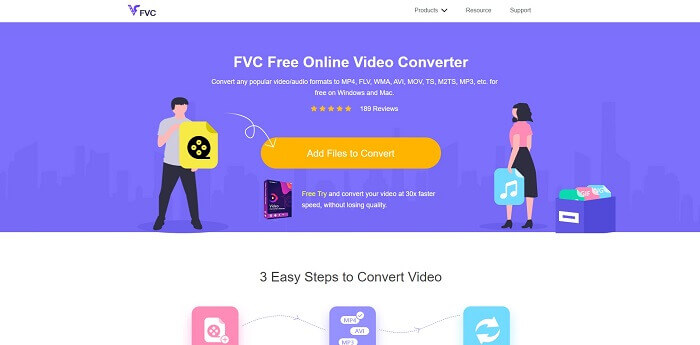
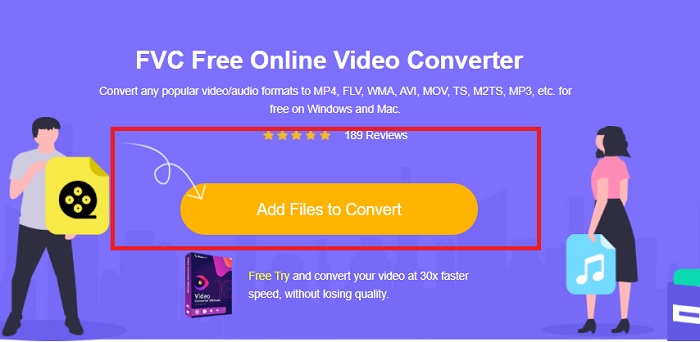
Step 2. Once landed on the page, click the Add Files to Convert. Locate the file that you want to convert. Then click Open.
Step 3. The video will then be uploaded on the tool, change the format of the video to MP4 by ticking the circle beside MP4 from the options.
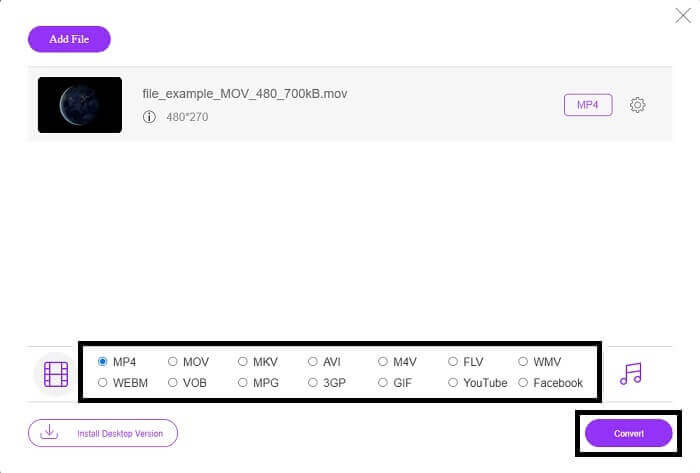
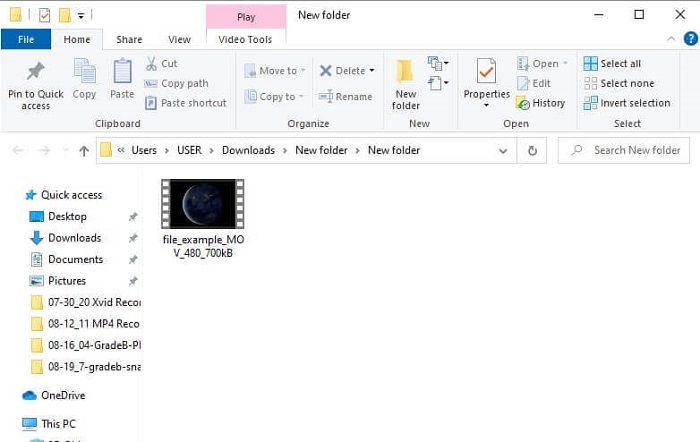
Step 4. Finally, click on Convert and choose the folder location where the file will be saved. Wait for the file to be converted. Once done, the folder will pop-up where the video is saved. Click the video to do a preview of the converted file.
Modo Profissional - Video Converter Ultimate
Dealing with conversion the professional way must be under the use Video Converter Ultimate from Aiseesoft. This is an absolute and compact tool that works on Mac and Windows computers. Ease your worries for any video format that is not playing with your Xbox One S because Video Convert Ultimate got you covered. The converted adopted the best video encoding technology that produces only the best quality. Also, there is a video enhancer that you can use to improve the video quality. Most importantly, it supports more formats compared to a free tool. One edge also is the video quality. You can convert a video into 4k Quality and the lowest is 1080p. Converting MKV videos is just a piece of cake with Video Converter Ultimate.
Step 1. Get the app downloaded on your desktop and install the app.
Free DownloadFor Windows 7 or laterSecure Download
Free DownloadFor MacOS 10.7 or laterSecure Download
Step 2. Next, upload the file by clicking the Add Files button or drag and drop the file on the main interface.
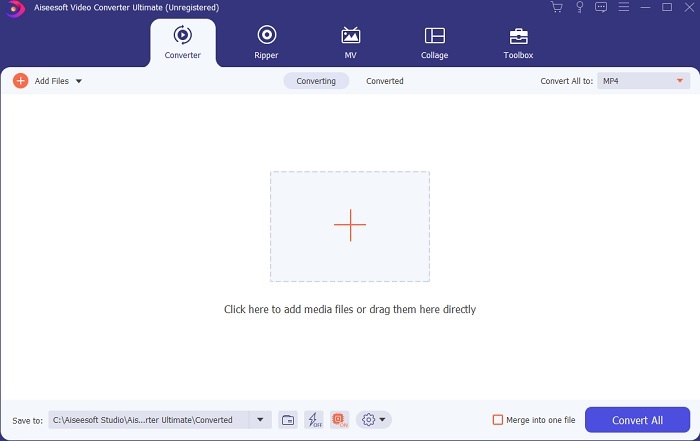
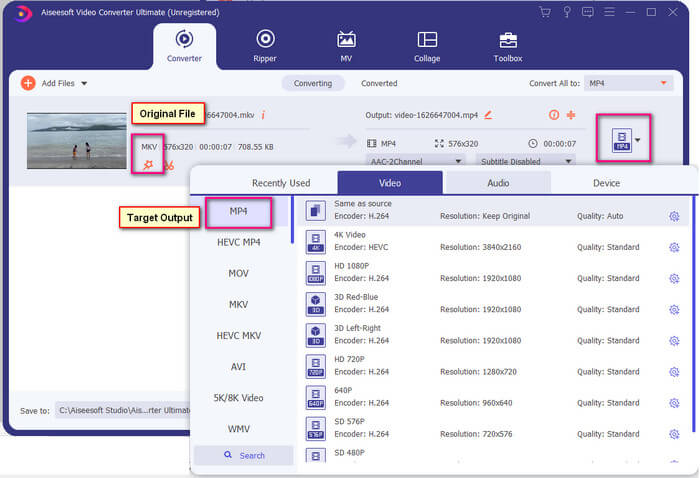
Step 3. Now, change the format of the file by clicking the one that says MP4 located at the upper right side of the interface.
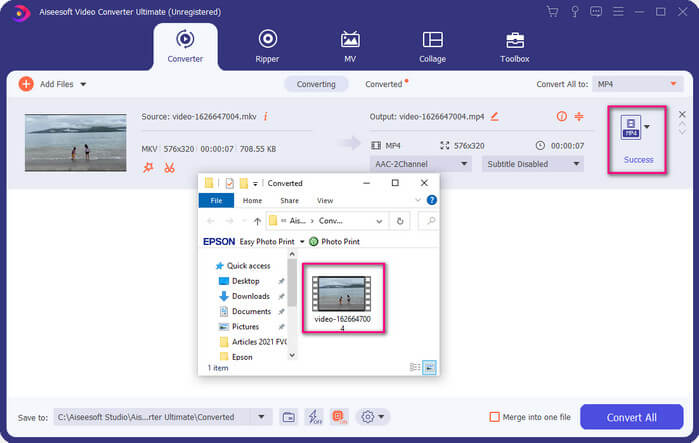
Step 4. Finally, click the Convert button to render the file. Once the file is rendered, the folder where it is saved will pop-up.
Parte 2. Como transmitir e reproduzir arquivos MKV no Xbox One
Tecnicamente, você não pode reproduzir vídeos MKV no Xbox One porque o próprio player integrado não o suporta. Portanto, antes de reproduzi-lo, você precisa converter o vídeo primeiro. Consulte as soluções acima para converter o arquivo antes de jogar. Enquanto isso, aqui estão várias maneiras de reproduzir vídeos no Xbox One.
Como reproduzir arquivos MKV no Xbox One via USB Flash Drive
O Xbox One S suporta três portas para USB. No entanto, é necessário ter uma unidade USB para jogar no Xbox One S. A unidade deve estar em FAT16, FAT32, NTFS ou exFAT. Para saber se a unidade USB funcionará, tente abri-la no seu Mac ou PC com Windows. Se funcionou, as chances de ser lido pelo Xbox serão altas. Após a verificação, agora você pode copiar o arquivo em seu PC e salvá-lo em sua unidade. Ejete-o e conecte-o em uma das portas da parte frontal ou traseira do console. São dois na parte de trás e um na frente. Uma vez conectado, você verá que sua unidade aparecerá como uma das opções. A partir daí, abra o media player e comece a reproduzi-lo.
Como reproduzir arquivos MKV no Xbox One por transmissão
There is a built-in feature on Windows 10 that allows you to cast your device to any compatible receivers like Xbox One S. It is the counterpart of Play To on Xbox. This process is DNLA dependent. This means you need to have Wi-Fi to make it work. All you have to do is, go to the Settings of your Xbox choose preferences and click the Game DVR then enable Allow Play to Streaming to enable it. This time go to the Windows PC and click the Cast to Device. Next, right click on the file that you want to play then choose XboxOne. The video will then be played.
Related
● How to Play Music on Xbox One
Parte 3. Perguntas mais frequentes sobre como reproduzir arquivos MKV no Xbox One
Falha no Xbox One S, como corrigi-lo?
First, restart it. Using the controller, press and hold the Xbox button and choose Turn console off or Restart Console. If that did not work, next is to turn off the box itself. Finally, if all of the options did not work, you can then do a master reset to it.
Posso jogar usando meu Xbox One S sem internet?
Para uma primeira configuração, você precisa da conexão com a Internet. Depois de configurar, você pode ficar offline e usá-lo. Apenas certifique-se de configurá-lo antes de poder usá-lo offline. Enquanto estiver offline, aqui estão algumas das coisas que você pode fazer, assistir TV, jogar, salvar clipes ou capturas de tela e ganhar conquistas, mas com limitações.
Qual é a desvantagem da série Xbox One S?
Apesar de todos os ótimos recursos oferecidos pelo console de jogos, há uma coisa que você certamente encontrará em um dispositivo multitarefa. Provavelmente procure uma unidade de disco. Infelizmente, isso não é suportado. Isso significa que usar os outros jogos que você tem com o console antigo não funcionará aqui.
Conclusão
Embora não haja uma maneira direta de reproduzir arquivos MKV diretamente no Xbox One, você sempre pode converter o vídeo maximizando a lista de conversores acima. Todos eles suportam todos os formatos que você pode usar no media player do Xbox One S. Se você quiser saber como corrigir alguns problemas do Xbox One S, você pode ler as perguntas mais frequentes listadas.
-
 Como converter arquivos MKV para jogar no PS3 sem problemas [Resolvido]
 Quer reproduzir vídeos MKV no seu PS3? No entanto, o PS3 não pode reproduzir arquivos MKV diretamente. Este artigo mostrará maneiras de converter vídeos MKV para formatos de vídeo compatíveis com PS3 para reproduzir no PS3 sem problemas.
-
 As 5 melhores alternativas do Windows Media Player para celulares Android
 Como não é possível baixar o Windows Media Player para Android, você deve ler este artigo e aprender sobre as 5 melhores alternativas para o Windows Media Player.
-
 Os 5 melhores reprodutores de vídeo para iPhone que você não deve perder em 2025
 Para reproduzir vídeos em todos os formatos e ter uma melhor experiência de visualização em seu iPhone, você deve ler este artigo e aprender sobre os 5 melhores reprodutores de vídeo para iPhone 12/11 / X / 8/7/6.
