


 Video Converter Ultimate
 Gravador de ecrã
 Reparo de vídeo
 Secure Download
Error Code 101102: What It Means & How to Resolve It in 2026
Nothing is more frustrating than encountering an error code just when you’re trying to get something done. Error Code 101102 often appears without warning, interrupting your workflow and leaving you unsure of what went wrong or how to fix it.
Well, in most cases, error code 101102 happens when watching or playing a video, especially when the media player or streaming platform fails to load the video properly. But the good news is, this error can be easily fixed.
In this article, we’ll break down what Error Code 101102 really means, why it happens, and the most effective solutions to resolve it quickly. By the end, you’ll know exactly how to troubleshoot the error and prevent it from happening again.

Part 1. What is Error Code 101102?
Digging deeper, error code 101102 is a common glitch in online video streaming. This error occurs when the video player is unable to start or play the requested content, resulting in interrupted or failed video playback.
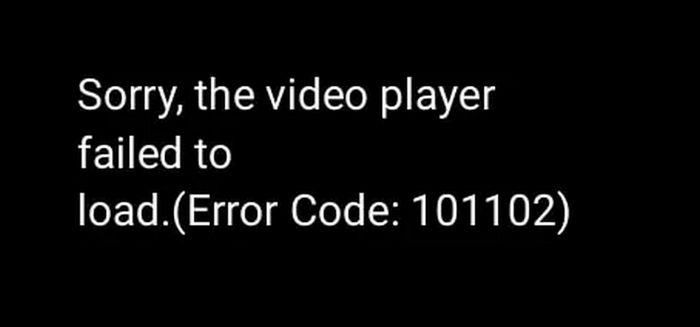
In most cases, Error Code 101102 indicates that something is preventing the video player from communicating properly with the system or the streaming server. These disruptions can stem from various reasons, like incompatible video formats, corrupted video files, unstable internet connection, and conflicting browser extensions.
Error Code 101102 can significantly affect your viewing experience by causing videos to lag, freeze, or fail to load entirely. Beyond playback interruptions, unresolved issues may lead to deeper conflicts within software or hardware components. Understanding the root causes of this error is the first step toward fixing it and restoring smooth, uninterrupted video streaming.
Part 2. Why Does Error Code 101102 Happen and How to Fix it?
As said, there are various reasons why error code 101102 happens. It can be due to incompatible video formats, corrupted video files, and more. Below are the common reasons why this error code appears and how to fix them easily:
Formatos de vídeo incompatíveis
Error Code 101102 can occur when the video format or codec is not supported by the browser, media player, or streaming platform. While a file may appear to be a common format, such as MP4, it may actually use a codec that the player cannot decode. This mismatch prevents the video player from initializing playback, causing the error to appear. Compatibility issues are especially common when videos are uploaded from different devices, encoded with outdated software, or played on older browsers or systems.
In order to fix this, you can use the FVC Video Converter Ultimate. This tool is designed to make videos compatible with most browsers and media players. It supports a wide range of video and audio formats, allowing you to convert unsupported files into commonly accepted formats without compromising quality. Moreover, it ensures that videos are encoded using widely supported codecs, which helps eliminate playback errors caused by format mismatches. By converting the video into a compatible format. With this, you reduce the risk of Error Code 101102 and ensure smoother playback across different platforms and devices.
Main Features:
- • Supports a wide range of video formats and codecs.
- • Converts videos to browser- and player-compatible formats.
- • High-speed conversion with minimal quality loss.
- • Preserves original video resolution and clarity.
- • Simple, user-friendly interface.
- • Works on both Windows and macOS.
Steps on how to use FVC Video Converter Ultimate:
Step 1. First, you need to install and download the tool on your computer. Take note that this is compatible with Windows and macOS.
Free DownloadFor Windows 7 or laterSecure Download
Free DownloadFor MacOS 10.7 or laterSecure Download
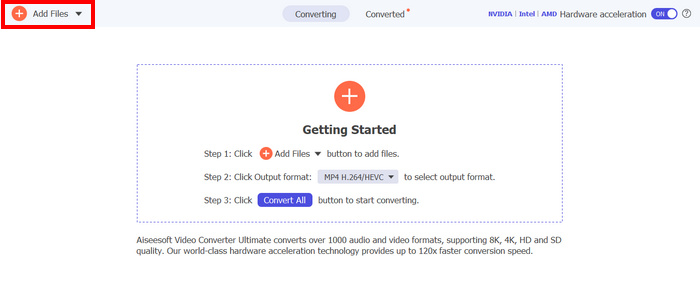
Step 2. Now, to import the video files you want to convert to MP4. After that, click the Add Files button.
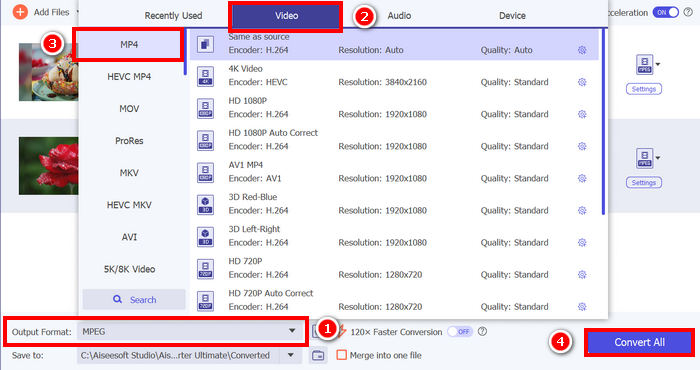
Step 3. Lastly, click on the Output Format below and go to the Video tab. From there, select the MP4 from the list. Once selected, click the Convert All button to convert your video files to MP4.
Arquivos de vídeo corrompidos
A corrupted video file is another major cause of Error Code 101102. Corruption can happen when a video download is interrupted, a recording stops unexpectedly, or a file transfer is incomplete. Missing metadata, broken headers, or damaged frames prevent the video player from reading the file structure correctly. When the player cannot interpret essential video information, it fails to load the content and triggers the error.
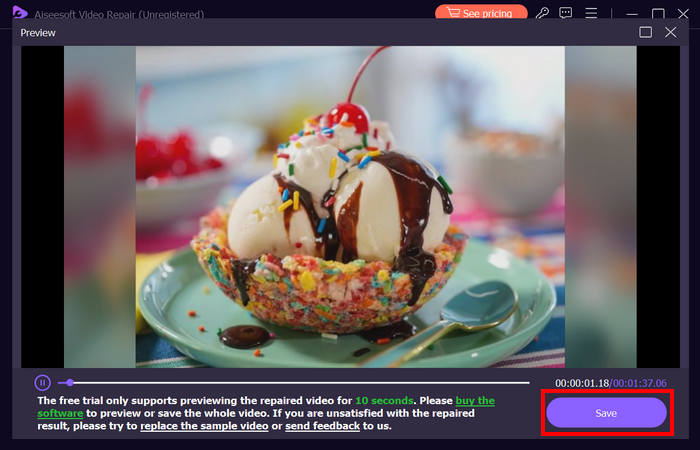
In order to fix this, you can use the FVC Video Repair. This tool helps in repairing videos that have encountered the error code 101102. This tool works by simply uploading the corrupted videos, and then the tool will automatically start detecting information about the video files. Once the problem happens it will just continue repairing the video until it is restored.
Principais características:
- • Uses the newest AI algorithm for a fully automatic repair.
- • Corrija vídeos de vários dispositivos, incluindo telefones, câmeras, discos rígidos, etc.
- • Visualize o vídeo restaurado.
- • Suporta formatos de vídeo como MP4, MOV e 3GP.
- • Pode reparar vídeos danificados e não reproduzíveis.
- • Restaura arquivos de vídeo corrompidos.
- • Mantém a resolução do vídeo restaurado, a taxa de quadros e a taxa de bits.
Here’s how you can use FVC Video Repair:
Step 1. First, visit their official website. Then, Download the tool and Install it on your device.
Free DownloadFor Windows 7 or laterSecure Download
Free DownloadFor MacOS 10.7 or laterSecure Download
Step 2. Next, add the damaged video by clicking the Red Plus button the same thing with the Blue Plus button to add the sample video. After that, to start the repair process just simply click the Repair button.
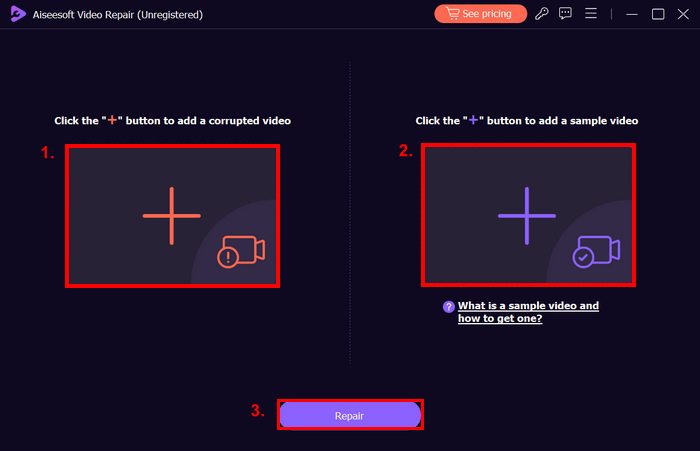
Step 3. Lastly, click the Preview button to preview the video that was processed. When the repair process is successful, you can save it by clicking the Save button.
Unstable Network Connection
Online video streaming requires a continuous and stable data flow. If the internet connection is slow, unstable, or frequently drops packets, the video player may fail to retrieve the required data to begin playback. Buffering interruptions, timeouts, and incomplete data requests can all cause error code 101102 to appear. Network congestion, weak Wi-Fi signals, or temporary ISP issues are common contributors to this problem.
To fix this, you just need to ensure that you have a strong and stable internet connection when streaming videos online.
Cache and Cookies Issues
Browsers store cache files and cookies to improve loading speed, but over time, these stored files can become outdated or corrupted. When this happens, the browser may load incorrect or conflicting data related to the video player. As a result, scripts responsible for initializing video playback may fail, causing error code 101102. Cached errors from previous sessions can also persist and repeatedly trigger the issue.
Conflicts With Browser Extensions
Some browser extensions, such as ad blockers, VPNs, privacy tools, or security extensions, can interfere with video playback scripts. These extensions may block essential requests, modify webpage behavior, or restrict media access without the user realizing it. When critical video components are blocked or altered, the video player cannot load properly, leading to error code 101102.
Part 3. FAQs about Error Code 101102
What does Error Code 101102 mean?
Error Code 101102 usually appears when a video player or streaming platform fails to load or play a video properly. It often indicates issues such as incompatible video formats, corrupted video files, unstable internet connections, or conflicts with browser extensions.
How can I fix Error Code 101102 caused by an incompatible video format?
You can use FVC Video Converter Ultimate to convert your video into a compatible format like MP4. This tool supports a wide range of formats and codecs, ensuring smooth playback on most browsers and media players without quality loss.
What should I do if Error Code 101102 is caused by a corrupted video file?
Use FVC Video Repair to automatically detect and fix corrupted videos. Simply upload the damaged file, start the repair process, and preview the restored video before saving it. This tool supports formats such as MP4, MOV, and 3GP, preserving your original resolution and frame rate.
Conclusão
Error Code 101102 can be frustrating, but it’s usually easy to fix. Whether it’s due to incompatible formats, corrupted files, or connection issues, using the right tools and following simple troubleshooting steps can restore smooth video playback. However, with the right tool like the FVC Video Repair, there is still hope to restore the video. So, if you’re currently facing this problem, try all the methods mentioned in this article. Let’s get started!More Readings
-
 Como corrigir facilmente o problema de erro 5 de impossibilidade de reprodução de vídeo
 Você já reproduziu um de seus vídeos baixados, mas foi interrompido por uma mensagem de erro 5 que não consegue reproduzir o vídeo? Aqui está tudo o que você precisa saber.
-
 Soluções rápidas para corrigir o erro 150 de impossibilidade de reprodução de vídeo
 Você já encontrou a frustrante incapacidade de reproduzir o erro de vídeo 150 durante sua experiência de exibição de vídeo? Não se preocupe porque nós explicamos como consertar isso.
-
 Como corrigir o código de erro de vídeo 224003: seu guia de correção definitivo
 Saiba como solucionar este vídeo que não pode ser reproduzido, código de erro 224003 e resolva o problema para uma experiência de usuário perfeita. Volte aos trilhos com nosso guia!
