


 Video Converter Ultimate
 Gravador de ecrã
 Reparo de vídeo
 Secure Download
Corrigir vídeo pixelado online gratuitamente: dominando o reparo de pixel
Pixelation occurs when individual pixels become visible, creating a blocky and distorted video appearance. Common causes include low resolution, compression artifacts, and video transcoding. Pixelation in videos can be a frustrating obstacle, affecting the overall viewing experience and diminishing the quality of your content. The good news is that you don't need to be a video editing expert or invest in expensive software to tackle pixelation issues. In this article, we will guide you through fixing pixelated videos online for free, empowering you to master the art of pixel repair. Fix pixelated video and explore our crystal-clear method for a professional result today!

Parte 1. O que causa o vídeo pixelado
A pixelização em vídeos pode ocorrer devido a vários fatores, e compreender essas causas é essencial para abordar e prevenir o problema de forma eficaz. Aqui estão alguns motivos comuns pelos quais a pixelização pode ocorrer em vídeos:
1. Low Resolution. Low-resolution videos are devoid of detail since they have fewer pixels. Pixelation occurs when these films are stretched or watched in bigger sizes, making individual pixels more evident. (Learn how to change video resolution here.)
2. Incorrect Codec or Format. Pixelation can occur while recording or exporting video in an unsuitable codec or format. Pixelation may become more noticeable when using certain codecs that compromise image quality in favor of reduced file sizes.
3. Poor Bitrate. The bitrate is the volume of data processed in one second. Pixelation can result from insufficient bitrate during video reduction, particularly in situations with a lot of action or intricate features.
4. Uploading/Downloading Compression. Pixelation may occur on platforms that compress videos while uploaded or downloaded. For instance, social networking sites frequently use their own compression methods.
5. Camera Quality. One important factor is the caliber of the camera used to record the video. Videos with low-quality cameras may have intrinsic pixelation, which is more noticeable on bigger displays.
Parte 2. Corrija vídeos pixelados online gratuitamente
Consertar filmes pixelados online gratuitamente é possível com várias ferramentas e plataformas. Sem a necessidade de software caro, siga estas etapas para melhorar a qualidade de seus vídeos pixelados:
◆ Flixier Vídeo mais claro
◆ Clideo Vídeo Mais Claro
◆ Clareador de vídeo VEED.IO
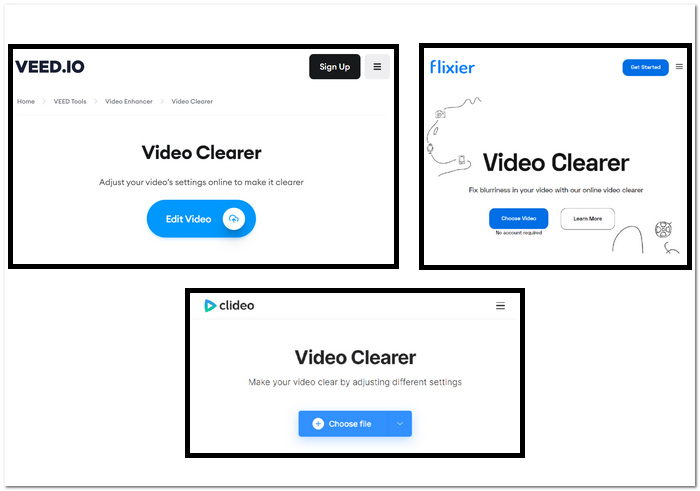
Steps in fixing pixelated videos using web-based tools:
Step 1. Choose your web-based tools above and go to their website.
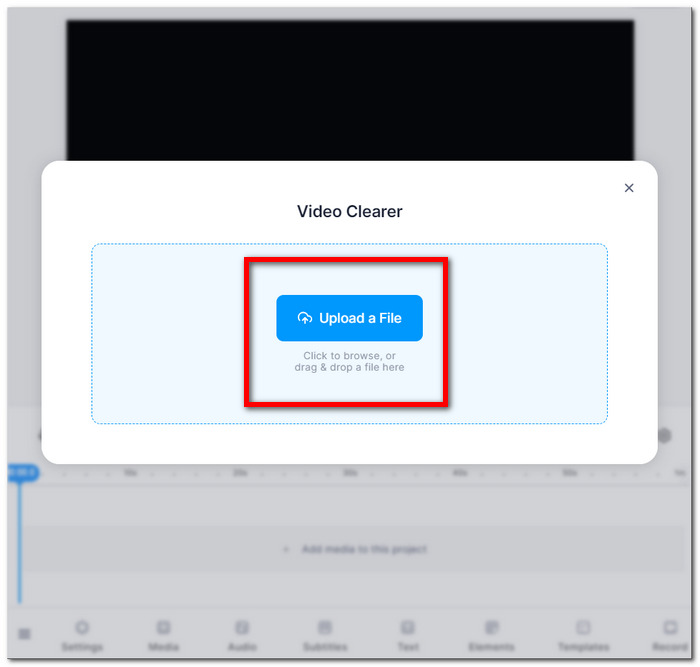
Step 2. Drag and drop your MOV or MP4 video or upload it from your local folders.
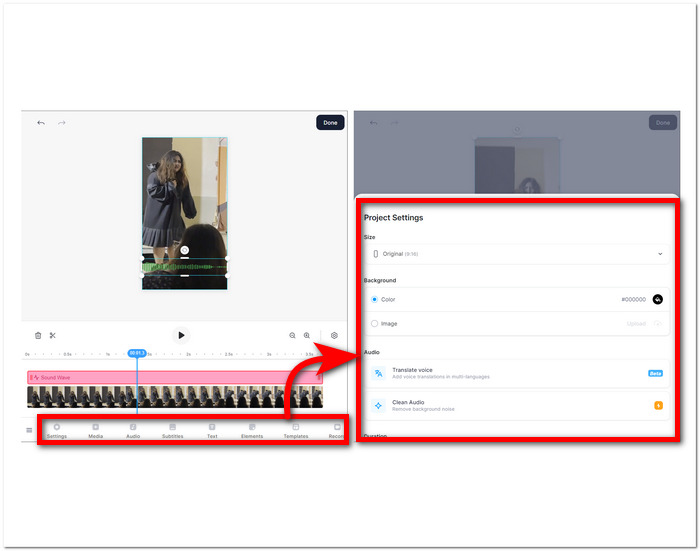
Step 3. Adjust your video settings, brightness, contrast, saturation, etc.
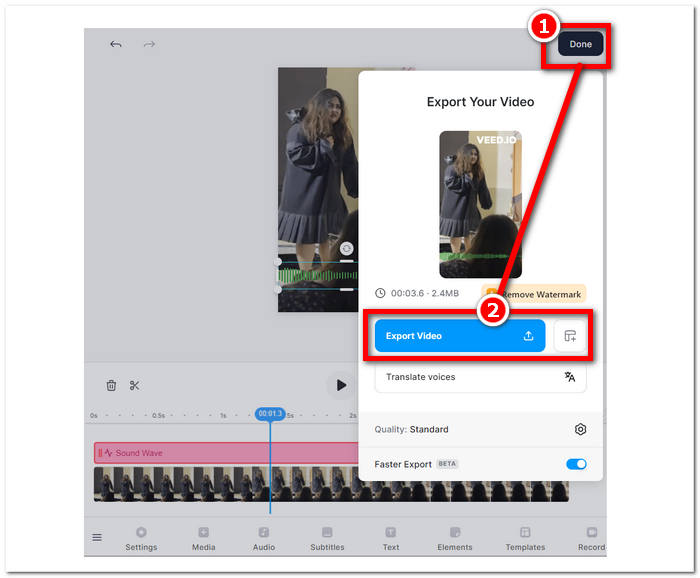
Step 4. When you’re satisfied with your edits, click Done and proceed to click the Export or Download button to save your video.
Estas instruções irão ajudá-lo a melhorar a qualidade de seus filmes pixelados sem pagar por software adicional. Experimente várias técnicas para ver qual se adapta melhor aos seus objetivos de melhorar a qualidade e a especificidade dos seus vídeos.
Parte 3. Como tornar o vídeo menos pixelizado no Windows e Mac
1. Video Converter Ultimate
Introducing Video Converter Ultimate, an all-in-one video toolbox designed to revolutionize your multimedia experience. This powerful tool allows you to seamlessly convert, enhance, compress, and edit videos and audio files, and all at an ultrafast speed. Whether you're looking to transform the format of your videos, enhance visual and audio quality, reduce file sizes without compromising on quality, or add that professional touch through seamless editing, our comprehensive video toolbox has you covered. Experience the convenience of a single, versatile platform that caters to all your multimedia needs, ensuring efficiency without compromising speed or quality.
Steps to use Video Converter Ultimate:
Step 1. Set up and run the software on your computer.
Free DownloadFor Windows 7 or laterSecure Download
Free DownloadFor MacOS 10.7 or laterSecure Download
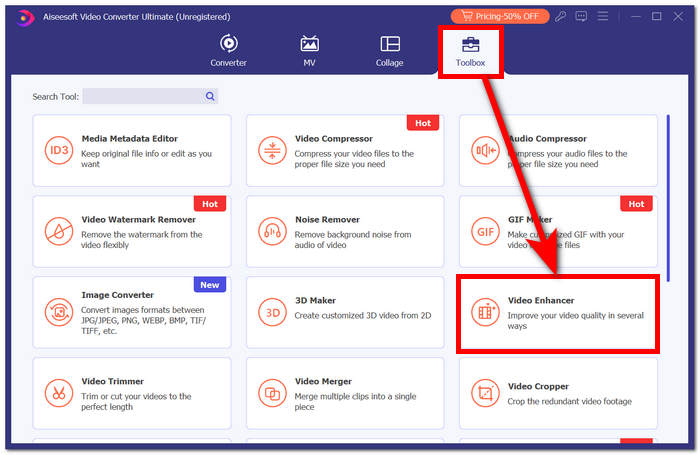
Step 2. On the main interface, locate the Toolbox section, and under that, click on Video Enhancer.
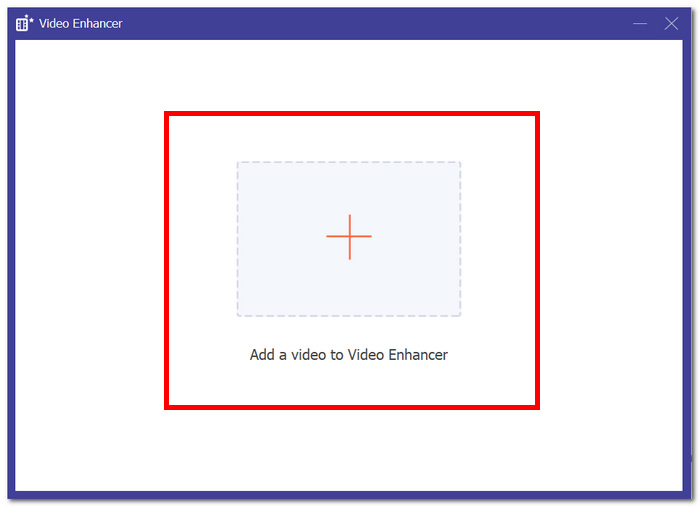
Step 3. Click + to add a video to Video Enhancer.
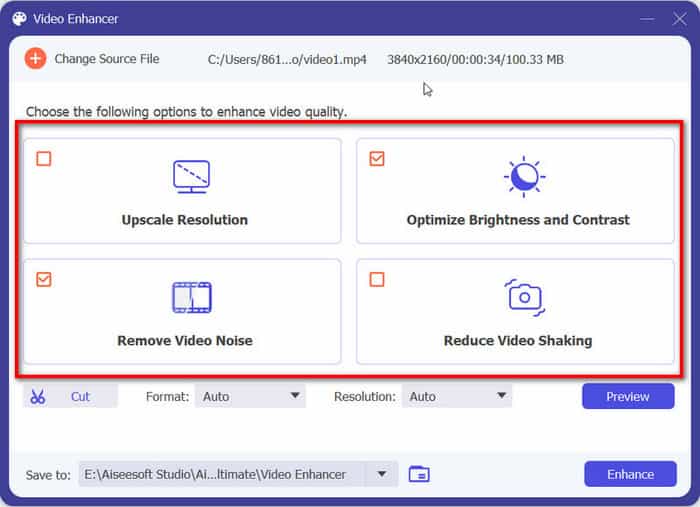
Step 4. The last step would be adjusting your settings to enhance your video. You can Upscale Resolution, and Preview. When satisfied with your changes, click the Enhance button to export and save your unpixlated video on your computer.
Com a experiência FVC Video Converter Ultimate, a conveniência de uma plataforma única e versátil atende a todas as suas necessidades multimídia, garantindo eficiência sem comprometer a velocidade ou qualidade.
2. Reparo de vídeo Aiseesoft
Aiseesoft Video Repair is a robust solution for recovering videos plagued by lost, corrupted data and pixelated video. This powerful program requires only a sample video in the same format for restoration. The software is easy to use and can repair a variety of video formats, including MP4, MOV, AVI, WMV, and FLV. It can also repair videos that have been corrupted, pixelated, virus attacks, and file system errors. Aiseesoft Video Repair is a great tool for anyone who has accidentally corrupted a video or needs to repair a video damaged due to a hardware or software issue.
Steps to use Aiseesoft Video Repair:
Step 1. From their website, download the software and get it up and running on your computer after installation.
Free DownloadFor Windows 7 or laterSecure Download
Free DownloadFor MacOS 10.7 or laterSecure Download
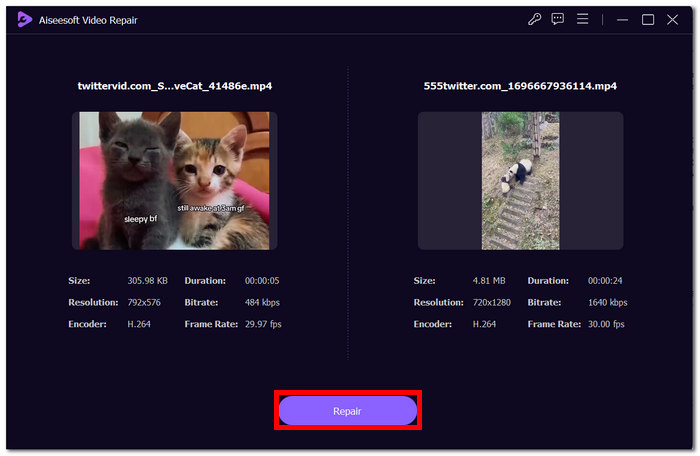
Step 2. In the software interface, add your pixelated video file by clicking the red + button on the left, then add a sample video by clicking the purple + button on the right.
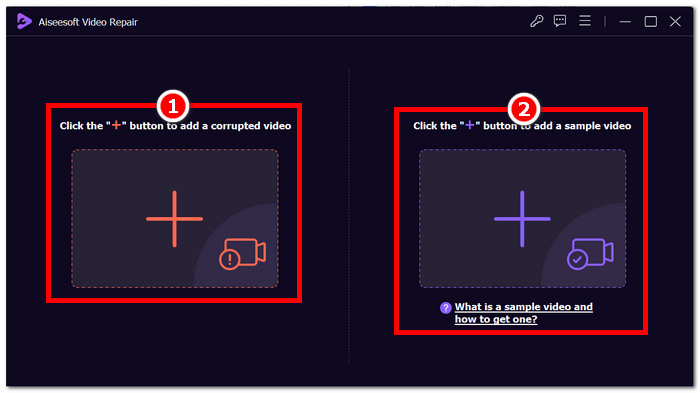
Step 3. After adding your pixelated and sample videos, click Repair to start the process, then click Preview to check quality.
Step 4. Once happy with the results, click Save to save your now-fixed video.
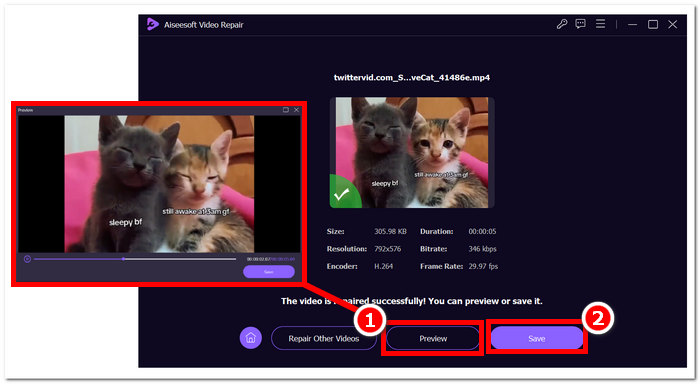
Sua interface amigável e recursos avançados oferecem uma maneira rápida e eficiente de reviver vídeos comprometidos, tornando-o uma ferramenta indispensável para reparo de vídeo.
Parte 4. Perguntas frequentes sobre como consertar vídeo pixelado
A pixelização pode ser corrigida?
Sim, a pixelização muitas vezes pode ser corrigida usando vários métodos e ferramentas. Seja por meio de plataformas online, software de edição de vídeo ou algoritmos especializados, existem maneiras de lidar com a pixelização e melhorar a qualidade geral de um vídeo. A eficácia da solução pode depender da gravidade e da causa raiz da pixelização.
Por que ocorre a pixelização?
A pixelização ocorre devido a vários fatores, incluindo Vídeos com resoluções mais baixas têm menos pixels, tornando os pixels individuais mais perceptíveis, especialmente quando esticados ou visualizados em formatos maiores. Vídeos com resoluções mais baixas têm menos pixels, tornando os pixels individuais mais visíveis, especialmente quando esticados ou visualizados em formatos maiores. A conversão de vídeos entre diferentes formatos ou codecs pode causar pixelização se não for feita corretamente, pois algumas informações podem ser perdidas. Compreender a causa específica da pixelização é crucial para determinar o método mais eficaz para corrigi-la.
Melhorar a qualidade do vídeo corrige a pixelização do vídeo?
Yes, improving overall video quality can often help fix pixelation issues. By addressing factors such as resolution, compression, and transcoding, you can enhance the clarity and reduce the visibility of individual pixels. Increasing the video resolution, adjusting compression settings, and using higher-quality recording equipment during video production are all effective strategies to improve video quality and mitigate pixelation. However, the success of these methods depends on the initial quality of the video and the extent of pixelation present.
Conclusão
Corrigir vídeos pixelados online gratuitamente é uma habilidade acessível que pode elevar a qualidade do seu conteúdo. Quer você escolha plataformas fáceis de usar, como o Google Fotos, ou ferramentas especializadas, como o Fix. O reparo de pixel de masterização de vídeo permite que você produza vídeos com visuais nítidos. Lembre-se de compreender as causas da pixelização, explorar diversas ferramentas online e implementar técnicas manuais para garantir a qualidade ideal de vídeo em projetos futuros. Diga adeus à pixelização e olá a uma experiência de visualização mais suave e agradável!
-
 Os 7 principais reparos de vídeo gratuitos: restaure seus vídeos corrompidos
 Descubra os 7 melhores reparos de vídeo gratuitos online para consertar arquivos de vídeo corrompidos ou danificados. Reviva suas memórias preciosas com essas ferramentas de reparo de vídeo de alta qualidade.
-
 Como consertar vídeo desfocado: vídeos cristalinos aguardam
 Como tornar claro um vídeo desfocado? Não deixe que vídeos borrados entorpecam seu conteúdo; encontre soluções para uma visualização nítida e obtenha imagens com aparência profissional.
-
 Guia sobre como reparar vídeos que não estão sendo reproduzidos em telefones Android
 Quer saber os motivos pelos quais os vídeos no seu dispositivo Android não podem ser reproduzidos? Nesse caso, para resolver o problema sozinho, continue lendo para saber mais.
