


 Video Converter Ultimate
 Gravador de ecrã
 Reparo de vídeo
4 dos melhores gravadores AIFF que suportam qualidade de áudio sem perdas
Most people think that iPhone devices carry perfection from phone's security, video and audio quality and consistent performance. That we can say it is true. So as with screen quality. As much as possible, Apple is developing features that are compatible on iOS devices. Similarly with the formats, codecs and video configuration. Just like when they developed the AIFF format. To deliver high-quality and uncompressed audio format. When you say uncompressed, it is more likely to produce good quality because it is not limiting it. That said, you might also see the need to use a free aiff sound recorder to produce this kind of format. Producing this kind of file is not a problem. There are apps and free access tools that you can use over the web. Moving forward, this article is just right for you. See our list of the best AIFF recorders below to know more.

Parte 1. 2 principais gravadores online AIFF
FVC Free Audio Recorder
With the use of FVC Free Audio Recorder, you can now achieve flawless audio quality just like AIFF. Although this tool cannot produce the same file format, the quality it produces is as good as it is. This tool is accessible via browser and can be used anytime of the day as long as you have an internet connection at home or everywhere you are. So if you are on the go and you need to record for your vlog, this is a good option. Even when you are outside, you can record without worrying about background noise of your surroundings. Plus you can hear seamless recording on your iPhone device. That being said, get started with it now and try the tool and follow the guide below.
What's in it for you?
● É um site de acesso gratuito.
● Você pode gravar arquivos de música até mesmo do YouTube para criar listas de reprodução em sua galeria de música.
● Grave áudio sem limite de tempo e sem limite de duração.
● Acesse a qualquer hora e em qualquer lugar.
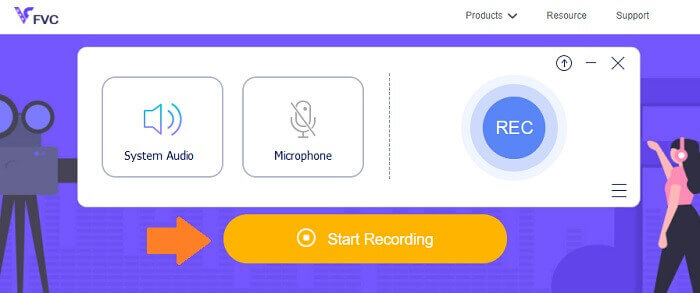
Step 1. Access and activate the tool by visiting FVC Free Audio Recorder and click the Start Recording button.
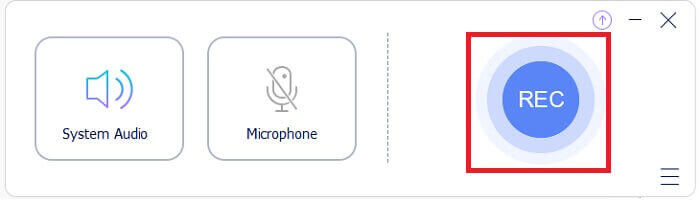
Step 2. Then enable the audio just in case it is not. But by default, it should be enabled. Now to start recording, click the REC button.
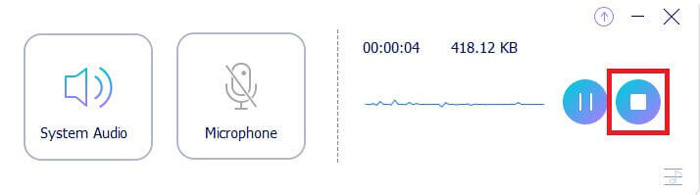
Step 3. When you are done, click the blue Square button and the file will be automatically saved on your PC.
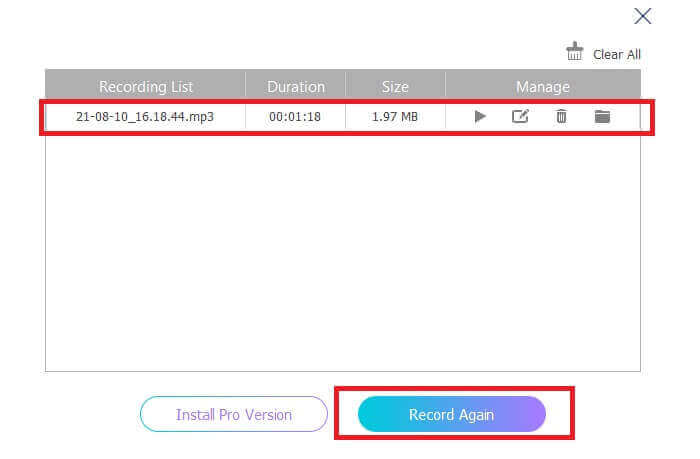
Step 4. Now to preview the file, click the list below the floating bar.
Screencapture.com
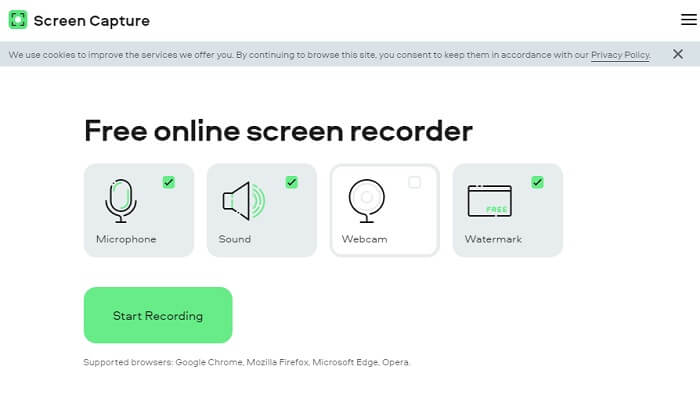
Another tool that you can consider to record audio online is Screencapture.com. Similarly, it is a free access site that directly allows you to record audio and screen without registering for an account. As you click the start recording button, the tool will automatically record the screen and the system sound of the computer. As soon as you land on the main page there will be four tabs that you need to tick according to your need. Since we are recording audio, uncheck everything and leave the audio enabled. From there click the Start Recording button and download it afterwards.
What's in it for you?
● Acesso gratuito.
● Site acessível e confiável.
● Protegido.
● Pode gravar, áudio, vídeo e ambos ao mesmo tempo.
Parte 2.Top 2 Software de Gravador AIFF para Windows e Mac
Gravador de tela FVC
Ao falar sobre ferramentas principais, o FVC Screen Recorder é o seu software para gravação de tela e gravação de áudio. Ele é desenvolvido especialmente para atender esse tipo de necessidade. Em apenas três passos simples, você poderá produzir uma qualidade de áudio semelhante ao AIFF e ao próprio formato. Com o FVC Screen Recorder, você pode gravar sem ser limitado e ter a liberdade de ajustar a taxa de bits para obter a mais alta qualidade desejada. Mais do que isso, não há limite de quantas vezes você o usa por dia. Uso ilimitado desde que você esteja registrado para isso.
What's in it for you?
● Bom atendimento ao cliente.
● Com um bom suporte técnico que pode resolver seus problemas.
● Continua atualização da ferramenta.
● Com o recurso de bloqueio de janela que permite gravar uma janela específica sem atrapalhar o que você está fazendo.
Step 1. Download and install the app by using the buttons below.
Free DownloadFor Windows 7 or laterSecure Download
Free DownloadFor MacOS 10.7 or laterSecure Download
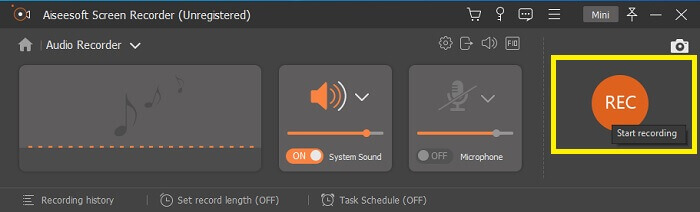
Step 2. Launch the app and enable the system sound. Now click the REC button to begin recording.
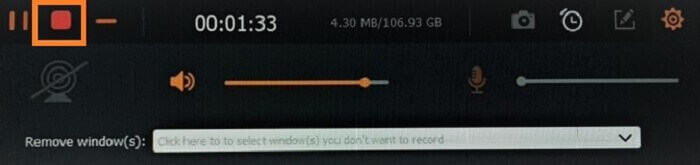
Step 3. Once done recording, click the stop button to stop it. The icon is the red square button.
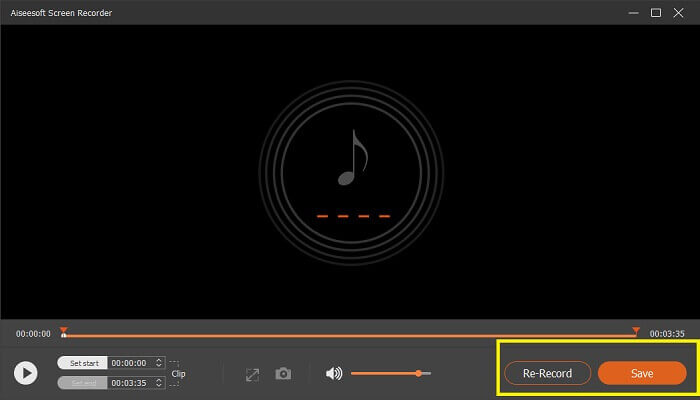
Step 4. Then the tool will give you an option to save or re-record.
Audácia
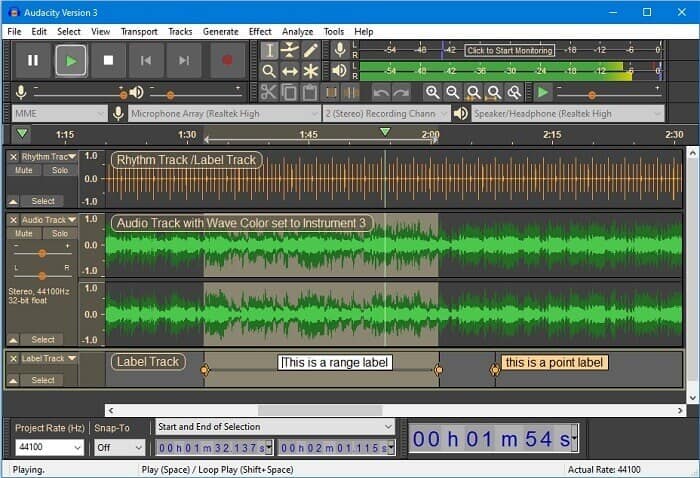
Finalmente temos o Audacity. É considerado um dos gravadores de áudio mais procurados há algum tempo. Isso se deve à flexibilidade da ferramenta. A maioria dos profissionais usa essa gravação devido à sua confiabilidade na gravação de áudio, mesmo com conexões de terceiros, como sons de mixers, computadores, fitas cassete e muito mais.
What's in it for you?
● É um software de código aberto.
● É um gravador e editor.
● Compatível com a maioria dos sistemas operacionais.
Parte 3. Gráfico de comparação
| Recursos | FVC Free Audio Recorder | Gravador de tela FVC | Screen Capture.com | Audácia |
| Plataforma | Baseado na web | Aplicativo de desktop | Baseado na web | Aplicativo de desktop |
| Preço | Livre | Pago | Livre | Pago |
| Suporta alta qualidade de áudio |  | | | |
| Taxa de bits ajustável | | |  | |
| Recomendado | | | | |
| Uso ilimitado | | | | |
| Sem limite de duração | | Sim mediante assinatura | | Sim mediante assinatura |
Parte 4. Perguntas frequentes sobre o Gravador AIFF
Qual é a diferença entre AIFF e WAV?
Como mencionado, o AIFF é usado principalmente por usuários da Apple. No entanto, isso não significa que seja uma limitação. Porque este formato de arquivo também é suportado por outros players de mídia. Enquanto isso, o WAV é desenvolvido especificamente para PCs. Ele é limitado apenas a PCs desktop. Ao falar sobre tecnicidade e tipo de codificação, ambos têm tamanhos de arquivo relativamente grandes. Então eles são exatamente o oposto de MP3 e MP4.
AIFF, é sem perdas?
A resposta é que é sem perdas, mas não compactado. Este formato de arquivo não é compactado. Não perde qualidade e puramente como é desenvolvido para trazer bons resultados de áudio ao invés de comprometer a qualidade.
O Windows Media Player pode reproduzir arquivos AIFF?
Para responder sua pergunta, sim! Você também pode reproduzi-lo usando o VLC player e outros players de música.
AIF e AIFF, existe alguma diferença?
O que for usado, não importa, e eles são exatamente os mesmos. Se você adicionar um sufixo ou afixo.
Conclusão
Para concluir, o AIFF é um bom formato para computadores Mac, pois é feito especificamente para Mac. Embora este arquivo seja bom, não podemos negar o fato de que ele consome muita memória do seu computador. Os aplicativos revisados acima podem suportar e não suportar, mas alguns têm ótimas alternativas para esse tipo de arquivo. Enquanto isso, se você realmente deseja ter esse tipo de arquivo, também pode considerar usar um conversor gratuito.
FVC also has this Free Audio Online Converter. You can just simply add the files and wait for the conversion process to be done and boom you have your audio converted. You can get to know more about it if you visit the official page of it. To give you a sneak peek, here are some of the formats supported: MP3, WMA, AAC, WAV, AC3, AIFF, and FLAC.
-
 O melhor gravador 3GP para capturar um 3GP em um novo formato no Windows e Mac
 O formato de arquivo 3GP armazena multimídia de 3ª geração e é desenvolvido pelo Third Generation Partnership Project. Para obter informações mais detalhadas, prossiga abaixo.
-
 7 dos melhores gravadores AAC para Windows e Mac [2021]
 Descubra o que é AAC e os gravadores AAC mais avaliados que você pode usar gratuitamente e baixar em computadores Mac e Windows.
-
 Guia Spot-On: Quais são os melhores gravadores M4A para Windows e Mac
 M4A são contêineres de arquivo ACA e ALAC codificados para compactação com perdas. A lista abaixo contém as ferramentas do gravador M4A que você pode usar. Leia o seguinte com atenção.
