


 Video Converter Ultimate
 Gravador de ecrã
 Reparo de vídeo
 Secure Download
Os 3 melhores gravadores de chamadas do Facebook - Como gravar videochamadas do Facebook
How to record Facebook video calls to remain the precious time between you and your friends and families? After Facebook equips the feature of video calling, more and more users are likely to contact others through Facebook calls rather than phone calls. But as an additional communication function of a social media platform, it doesn’t have the recording feature as the phone call. However, the derived standalone app—Facebook Messenger doesn’t have a built-in recorder. In this case, you can learn about 3 easy-to-use Facebook call recorders for computers, iOS devices, and Android mobile with the detailed guidelines in this article.

Parte 1: O melhor gravador de chamadas online do Facebook para Windows / Mac
Without downloading any third-party software, you can use FVC Free Screen Recorder to record Facebook video calls online for free. It is a user-friendly Facebook call recorder that has a concise interface with multiple features you need.
- 1. Grave chamadas do Facebook e vídeos online gratuitamente com etapas simples.
- 2. Gravação sem perdas de áudios e vídeos para manter os vídeos de alta qualidade.
- 3. Nenhuma marca d'água para proteger sua propriedade.
- 4. As gravações serão salvas automaticamente na biblioteca de mídia e você pode optar por excluir, baixar e compartilhar no SNS gratuitamente.
Step 1: Navigate to the website of FVC Free Screen Recorder on any browser. Click the Start Recording button to install the launcher in a few seconds, and then click the Start Recording button again to launch the recorder.

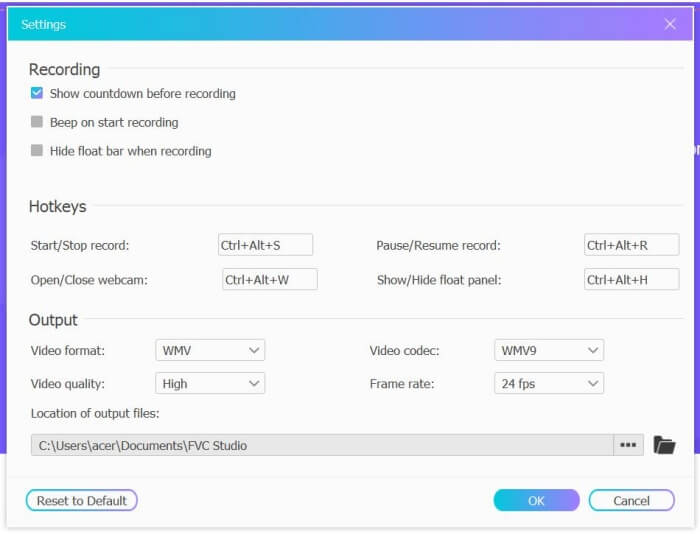
Step 2: Click the Recording Area menu to choose the full screen or select region freely. Then turn on the Microphone and the Speaker voice. As for adjusting the video settings, you can click the Setting icon. And you can choose the MP4 format, High quality, and 24 fps to keep the high quality of the recordings. Then click the REC button to start recording Facebook calls.
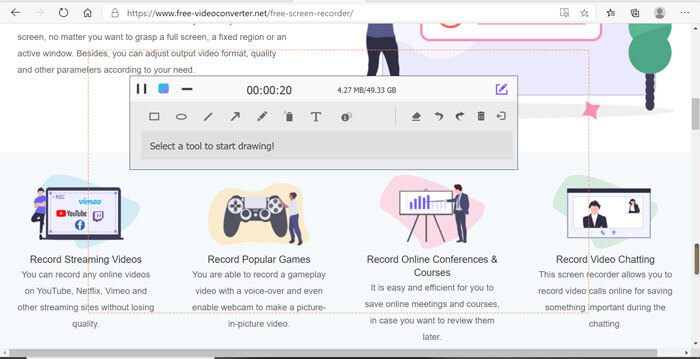
Step 3: There will pop up a toolbox with multiple editing tools. You can choose to add shapes, words, and lines according to your need. Then click the Stop icon to save your recording in the cloud. You can click the right mouse to choose to download it on your computer.
Usar este gravador de vídeo chamadas online gratuito do Facebook é a melhor maneira para os usuários de computador gravarem chamadas de vídeo online do Facebook. Ajustando as configurações de gravação com antecedência, ele pode salvar as chamadas do Facebook no formato MP4 com tamanho pequeno e alta qualidade. Se você está acostumado a receber chamadas do Facebook no celular, continue lendo este artigo.
Parte 2: Como gravar uma chamada do Facebook para iOS por meio do gravador padrão
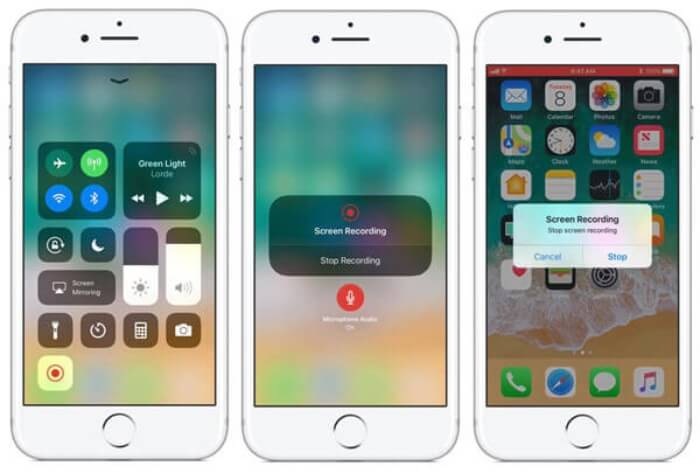
A versão atualizada do iOS 11 ou superior tem um novo gravador padrão em seu iPhone e iPad que é a melhor escolha para capturar chamadas de vídeo do Facebook sem baixar nenhum aplicativo. Aqui você pode aprender como adicionar o gravador de chamadas do Facebook aos atalhos na central de controle e como usá-lo.
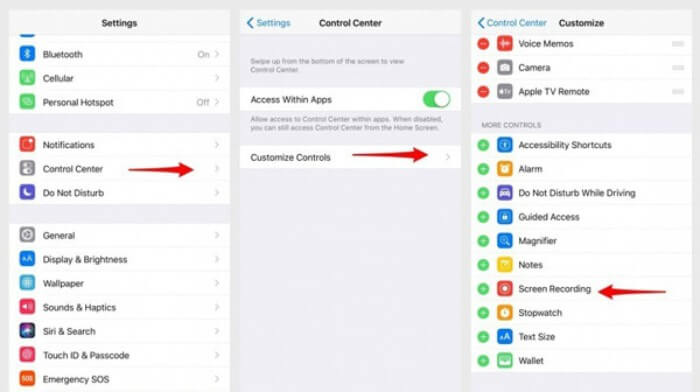
Step 1: Tap the Settings app on your iPhone/iPad and scroll down to choose the Control Center option. Then tap the Customize Controls tab and find the Screen Recording function. Tap the Plus icon to add this feature to the control center.
Step 2: Pull down from the top of the phone screen to open the control center and you will find the recording app at the bottom. Tap the Screen Recording icon to start the recording, and you can choose to capture the videos or only record the audio track. If you want to finish it, tap the red Status Bar at the top and tap the Stop option in the pop-up window.
Parte 3: Um Gravador Fácil do Facebook Messenger para Android
Alguns telefones Android não têm gravadores embutidos e há muitos gravadores de videochamada do Facebook para o Android escolher. Assim, você pode aprender um dos melhores gravadores para celulares Android com as etapas detalhadas na parte a seguir.
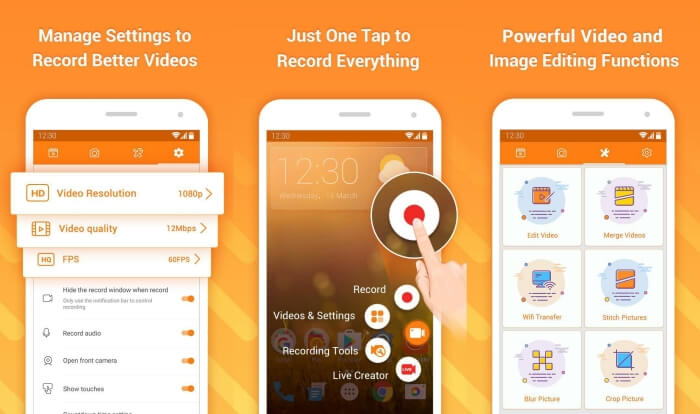
DU Recorder is an easy-to-use Facebook call recorder for Android and it’s famous for its smooth recording. Without root, everyone can use it to record Facebook Messenger calls in one tap.
Step 1: Launch the recorder and there are four menus including recordings, screenshots, editing tools, and settings. Firstly, tap the Settings menu to adjust the video parameters. To keep high quality, you can choose 1080p resolution and 30 fps frame rate.
Step 2: Don’t close the recorder and just launch Facebook Messenger. Then you can see the recorder icon. Tap the icon and choose the Recording icon to start capturing the screen and voice. And you can tap it again to stop the recording. Then you can tap the Editing icon to clip the recording and add music to it.
Here you may like:
Parte 4: FAQs do Gravador de Chamadas do Facebook
1. Dose Facebook tem o gravador padrão para gravar vídeo chamadas no PC?
Não, não importa. Portanto, você precisa contar com outros gravadores de chamadas profissionais do Facebook. Se você não quiser baixar outro software que ocupará o espaço de armazenamento do seu computador, o FVC Free Screen Recorder é a sua melhor escolha.
2. Como iniciar um bate-papo com um amigo no aplicativo Facebook Messager?
Em primeiro lugar, abra o Facebook Messenger no seu celular e, em seguida, escolha a caixa de bate-papo do amigo para o qual deseja fazer uma chamada no Facebook. E agora você pode ver o ícone de vídeo, para que possa clicar nele para iniciar uma chamada de vídeo.
3. Qual formato devo escolher para salvar as gravações ao usar os gravadores do Facebook Messenger?
Esteja você usando um gravador de chamadas do Facebook em um computador ou celular, o melhor formato para salvar chamadas de vídeo do Facebook é MP4. Pode economizar mais espaço de armazenamento e é compatível com todos os dispositivos.
Conclusão
The above article has introduced 3 Facebook video call recorders. For iPhone, iPad, and some Android mobiles, you can use the built-in recorder on your phone easily. Otherwise, you can choose any recorder including the DU recorder on Google Play. As for PC, FVC Free Screen Recorder is your best choice to capture Facebook calls. If you encountered other problems when using Facebook call recorders, please leave your comment below.
-
 Revisão Snagit 2021 - Prós, Contras e a Melhor Alternativa
 Qual é a melhor alternativa ao Snagit? Existe uma ferramenta de captura de tela como o Snagit? Esta postagem revisará o Snagit e compartilhará a melhor alternativa ao Snagit para capturar a tela.
-
 6 melhores gravadores WAV que você não deve perder no computador e online
 O melhor software de gravação WAV que compartilhamos neste artigo tem uma variedade de recursos úteis, que o ajudam a capturar áudio e voz como profissionais.
-
 Os 4 principais gravadores de som AIFF gratuitos que produzem áudio de alta qualidade
 Este artigo fala sobre AIFF e algumas das ferramentas mais populares que você pode usar para produzir o formato AIFF de alta qualidade.
