


 Video Converter Ultimate
 Gravador de ecrã
 Reparo de vídeo
 Secure Download
How to Record NFL Sunday Ticket and Live NFL Games for Later Viewing
It's irritating not to watch the NFL game you were looking forward to, especially if it was a spectacular touchdown or winning game play that everyone ends up discussing. I can't always watch games live, so having a way to save them for later really helps. Can you record NFL Sunday Ticket games? Well, it mainly depends on the service or the recording method you are using. The great news is that there are a few legal options available that allow you to watch games anytime you want. So, in this article, I will talk about different ways to record NFL games, including using screen recording software or streaming services with built-in DVR features, so that you do not miss any important play.

Can You Record NFL Sunday Ticket Games
You can record NFL Sunday Ticket games if you want, but different platforms offer different record options. Some streaming services, for example, come with the cloud DVR option by default, whereas others don't have a screen recorder so that those who want to save a game visually for their personal use can do so. Still, checking the platform's terms of service and ensuring your practice is in line with copyright laws before recording is a wise move. Let’s say, can you record NFL games on YouTube TV? Yes, of course! YouTube TV offers an unlimited Cloud DVR feature, which allows you to store the NFL games that are eligible in your library and watch them later. Other services may also have similar DVR facilities, whereas screen recording software can be another way of creating a physical copy of a live stream if personal use is allowed.
In the paragraphs that follow, we'll talk about several of the top ways to record NFL games so you don't have to worry about missing a single play.
Option 1: FVC Screen Recorder – Record Any NFL Stream
Viewers who want to capture every touchdown or the game-winning drive will find that FVC Screen Recorder gives them an easy way to save live NFL games in top-notch quality. If you are into this, I’m sure you’re wondering how to record NFL games on YouTube TV or any other supported streaming platform. This software is designed to give you flexible recording features, customizable settings, and great video quality while keeping the setup simple.
Principais características
• Get the sound from the system and the microphone recorded either separately or mixed.
• You can make recording sessions start and stop on their own.
• You can change the frame rate of recording, the resolution, and the format of output.
• Edit the undesirable parts of your recording before saving it.
• You can draw a custom region to record on the screen, record your entire screen, or record a particular window.
Free DownloadFor Windows 7 or laterSecure Download
Free DownloadFor MacOS 10.7 or laterSecure Download
Steps to Record an NFL Stream with FVC Screen Recorder
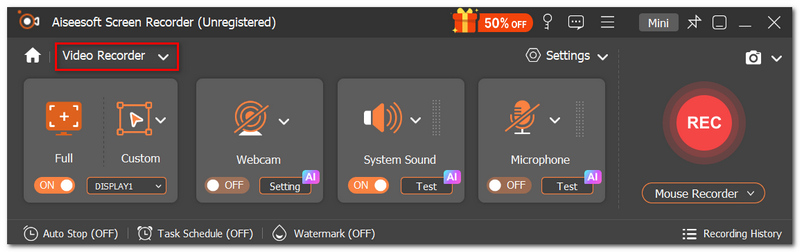
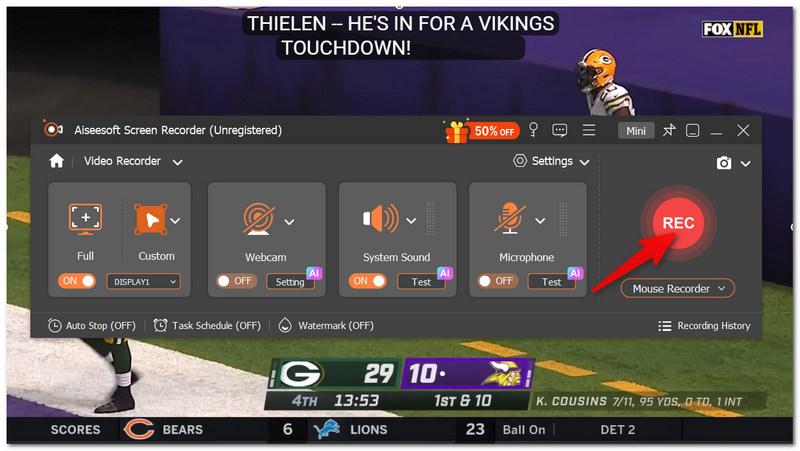
Step 1. First of all, install the latest version of FVC Screen Recorder on a computer running Windows or Mac. Open the tool and click Video Recorder.
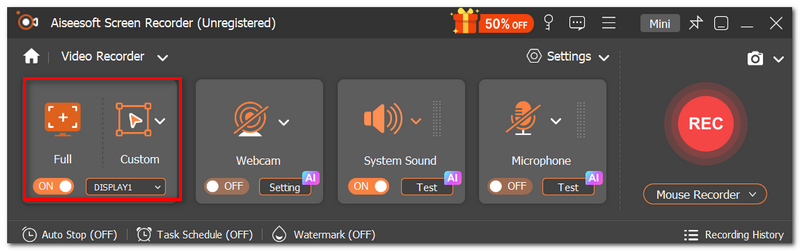
Step 2. Choose Full Screen or Custom if you want to decide the recording region.
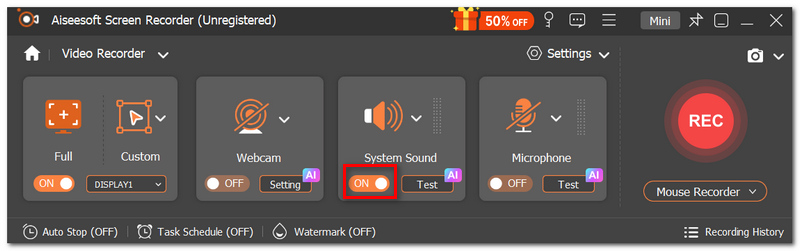
Step 3. Enable System Sound if you require the game audio to be captured. A microphone is highly recommended only if you comment while playing the game.
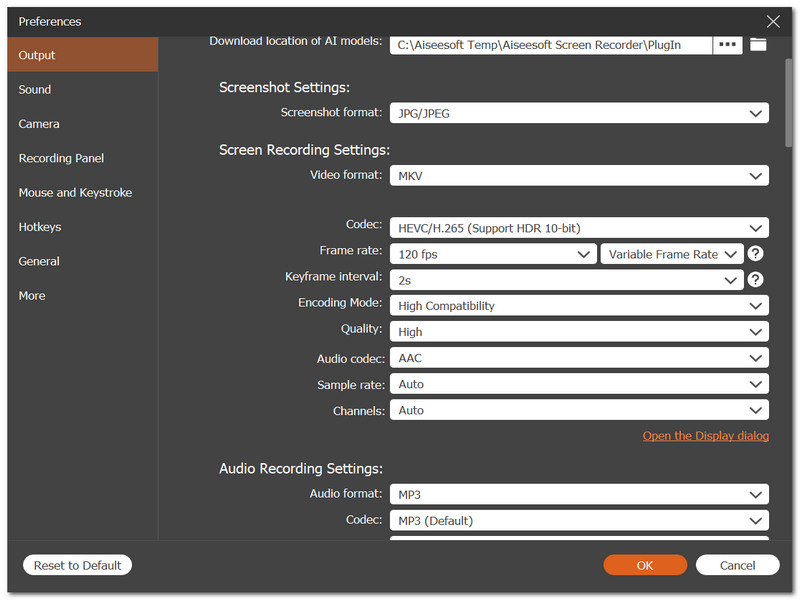
Step 4. Hit the Settings button to change the output format, resolution, frame rate, and location of the saved files.
Step 5. Open the NFL game or live stream using a web browser or a supported streaming app. Go back to FVC Screen Recorder and click REC to start recording.
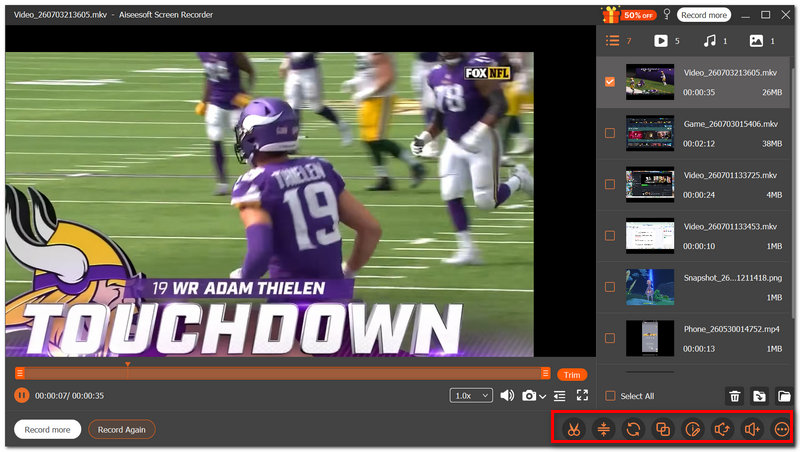
Step 6. Continue playing the game as the program records the video and the audio concurrently. To get a recording of the entire game or the game time you want to keep, simply hit the Stop button.
Step 7. Get a quick look at the video, cut the extra parts, if any, and finally hit Save to store the video for later offline watching.
Option 2: FuboTV (Best for Hardcore Sports Fans)
For fans who follow every game throughout the season, FuboTV is one of the most convenient options. Besides offering access to a wide range of sports channels, it includes a built-in Cloud DVR, so you can save eligible live games and watch them whenever it's convenient. If you're asking, can I record games on the NFL Sunday Ticket, FuboTV is a solid alternative for recording games available through its own supported NFL coverage.
Step 1. Get yourself a FuboTV subscription first and sign up for it. Then, you can access your account after that. Go to the Live Guide or Search feature to locate the NFL game you would like to view.
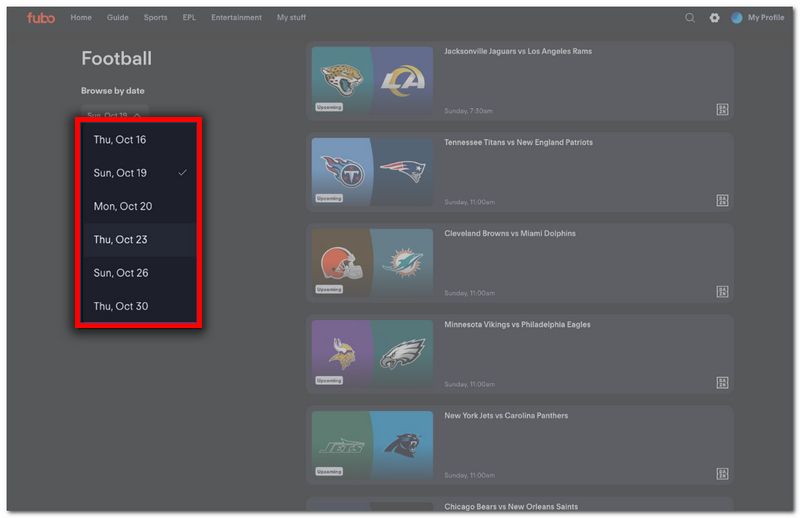
Step 2. Click on the game to view detailed info about it. Hit the Record button to include the game in your Cloud DVR buffer.
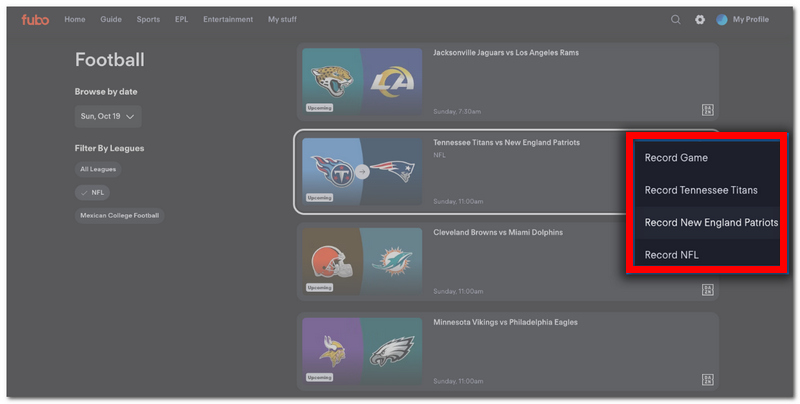
Step 3. Make a note that the recording has been set. Make sure your account is active during the game broadcast. FuboTV will take care of recording the event for you.
Step 4. When the game is over, navigate to the My Stuff or Recordings area. Pick the recorded NFL game and revel in it at your leisure.
Among the various legal options to record NFL games, FuboTV's Cloud DVR stands out as an incredibly simple method that does not require additional recording software.
Option 3: YouTube TV (Unlimited Cloud DVR & Catch-Up Feature)
YouTube TV has a great feature of Unlimited Cloud DVR, which enables you to record any live events you want without having to worry about running out of storage space. This can be very helpful, mainly for football fans who are very busy and can't always watch the games live. In fact, if you are looking for a guide on how to record games on the NFL Sunday Ticket, YouTube TV is the perfect solution, as it allows you to add any eligible game to your library, and the system will automatically record it for you so that you can watch it later.
Step 1. First, log in with your YouTube TV details. Locate the NFL game or team you like either by typing in the Search box or using the Live tab.
Step 2. Navigate to the relevant page with game details. Schedule a recording by hitting the + Add to Library button.
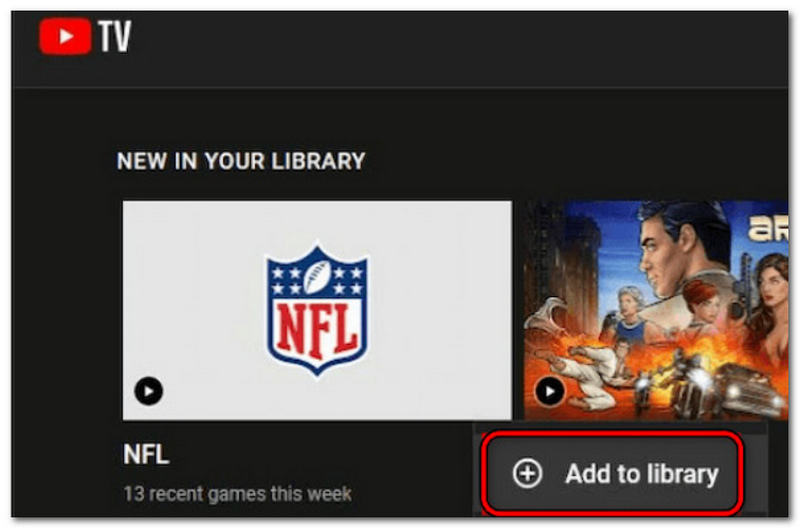
Step 3. Check if the game is properly listed in your library. Make sure your subscription is running when the game is broadcast. YouTube TV will record the game for you automatically.
Step 4. When the airing is over, head to the Library section. Pick out the NFL game you've recorded and enjoy watching it at your convenience.
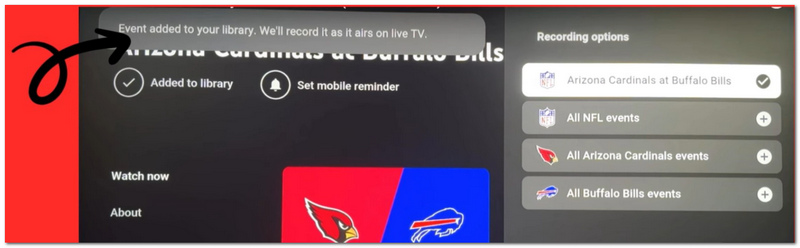
The Unlimited Cloud DVR feature on YouTube TV is great for automatically saving your favorite live sports to your library, giving you the freedom to watch these games on your own schedule without worrying about the storage space on your device.
FAQs about Recording NFL Games
Can I transfer NFL games that I've recorded to a different device?
If you made screen recordings and saved them on a local drive, you can normally move them to another computer or a compatible external storage device. But Cloud DVR recordings are usually linked to your streaming account only.
Should I record NFL games in 1080p or 4K?
The best option will depend on what quality is available for the stream and how much free storage space you have. Recording at the stream's native resolution is generally the best compromise between quality and file size.
Can recording the stream affect my live chat or interactive features?
No. Recording only grabs your screen, so it won't alter the stream or any of its interactive features.
Conclusão
Having found out how to record NFL games on YouTube TV and more legal ways, you can decide which one suits you the best as you watch football. If you like cloud DVR or screen recording software, you will be able to save your favorite NFL games and watch them later without missing any major moments.
-
 Descubra sites de download de jogos grátis para PC: 6 opções para você
 Se você está pronto para curtir jogos de computador emocionantes, mas não sabe onde baixar recursos, confira este guia. Aqui estão 6 sites gratuitos para baixar jogos de PC.
-
 [Análise completa] Gravador de jogos FBX: vale mesmo a pena experimentar?
 Se você deseja usar o FBX Game Recorder, mas não sabe por onde começar, este artigo aborda tudo o que você precisa saber, incluindo sua melhor alternativa.
-
 Como obter qualidade 4K no OBS: descrição mais detalhada
 Se você joga um jogo de alta resolução e quer gravar suas ações com a maior nitidez possível, leia este guia. Ensinaremos como obter qualidade 4K no OBS.
