


 Video Converter Ultimate
 Gravador de ecrã
 Reparo de vídeo
 Secure Download
Melhor gravador de áudio MP2 com etapas e dicas confiáveis para PC e Mac
MP2 is another lossy compressed audio file. Although MP3 format is very popular other than the other audio formats, the standard is always the MP2. Because it is the standard audio format it is prone to lost data. So, transferring data over the internet will be no problem to you. In some cases, users have trouble deciding what is the best MP2 recorder that fits their demands. In that case, the list below provides detailed steps and information that you may like to use. Continue reading this article to tackle what are these audio recorders that can produce the MP2 file format.

Parte 1. Melhor gravador MP2 para Windows e Mac
FVC Free Audio Recorder
One of the best online audio recorders may help you. FVC Free Audio Recorder as it is mentioned in its name, is a free tool used by many users over the internet. If the internet is not a problem to you, then you can rely on this online VHS MP2 recorder to produce a good output format. Not to mention, this tool is developed by the FVC so it is 100% malware free, so you're good-to-go if you use the tool. Moreover, here is the list of steps below so make sure you follow it thoroughly.
Step 1. Click this link provided to go to the website.
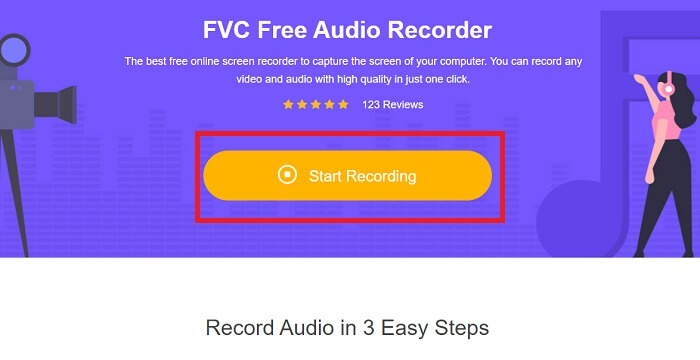
Step 2. Click Start Recording to launch the recorder.
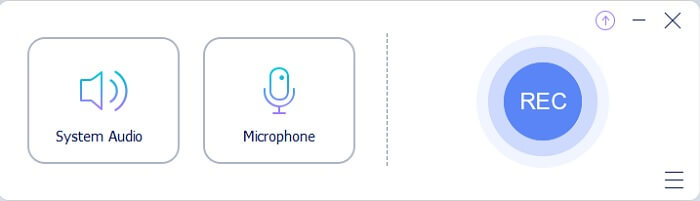
Step 3. A floating toolbar like this shows on your screen.
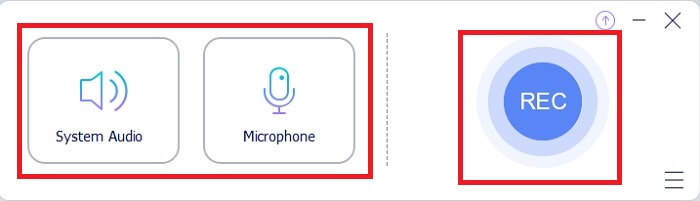
Step 4. Click the System Sound and Microphone to add system sound and your voice. If it is done then click the round REC to start recording.
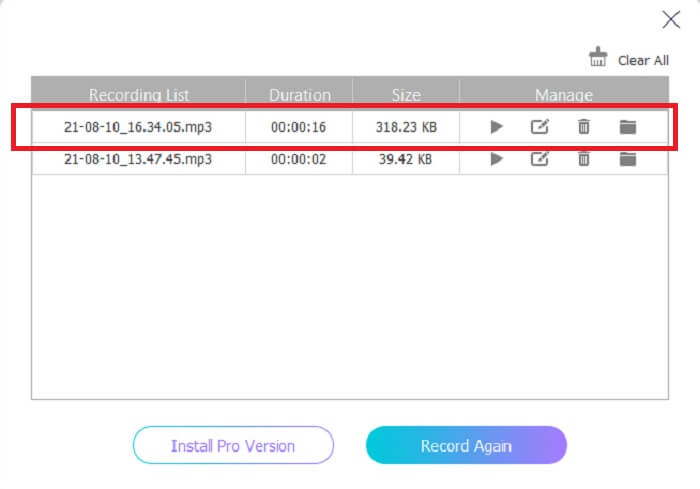
Step 5. If recording is already done, click the cube like button to stop recording. It automatically saves it to your pc and enjoys it.
Parte 2. Gravador MP2 estendido e fácil de usar para gravar áudio MP2
1. Gravador de tela FVC
If the online tool makes you say wow, then this tool will make you say excellent. Unlike the online tool recorder, the FVC Screen Recorder is a multifunctional tool that never limits your creativity. While improving your audio recording that takes you to another level that the other tools can’t provide. Maybe you’re still wondering if this tool can be your MP2 recorder, let’s just say it is for you to find out. Without any more delays, let us proceed to prove to you that this tool is what you’re looking for. Read carefully the provided steps below.
Step 1. Download the tool on your PC or Mac. Install the tool to your desktop and modify the Preferences and if everything is already settled, click Finish to launch the tool.
Free DownloadFor Windows 7 or laterSecure Download
Free DownloadFor MacOS 10.7 or laterSecure Download
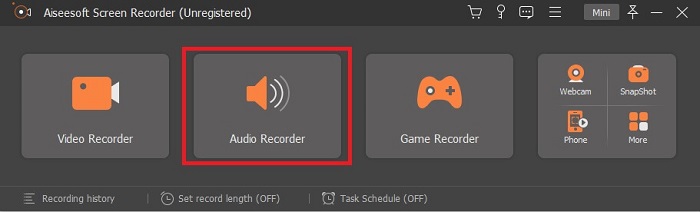
Step 2. The tool will automatically launch. A toolbar like this will show into your display. Click the Audio Recorder to proceed.
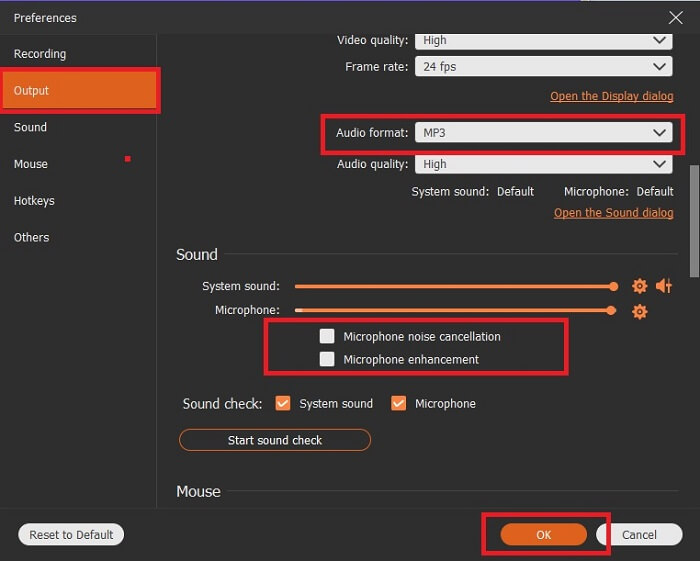
Step 3. Look for the gear icon and click it. Change the Output settings based on your wants. Click the OK to save the changes.
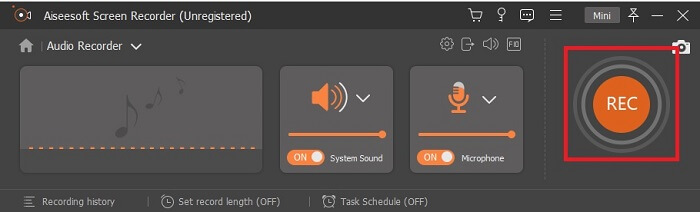
Step 4. Check if the System Sound and Microphone is on before recording. If it is already done click the disk-shape button to start recording.
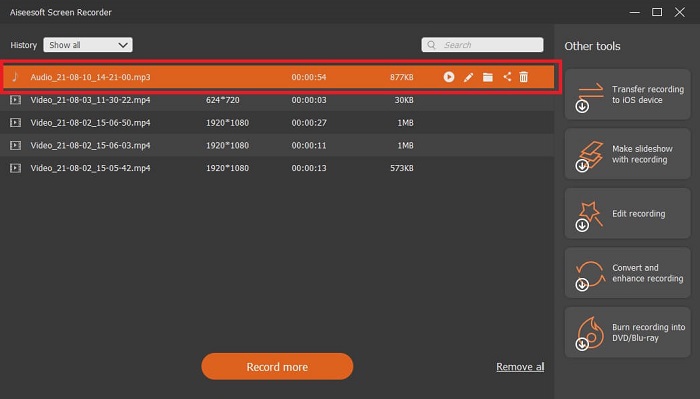
Step 5. If you're ready to end the recording click the box like button to stop. Then Save it and click Next to produce the recording. If you want to re-listened to the recording then click the parallel line button to check the recording you just made. The first file will be your latest recording and the last is the oldest recording.
2. Áudio Boo
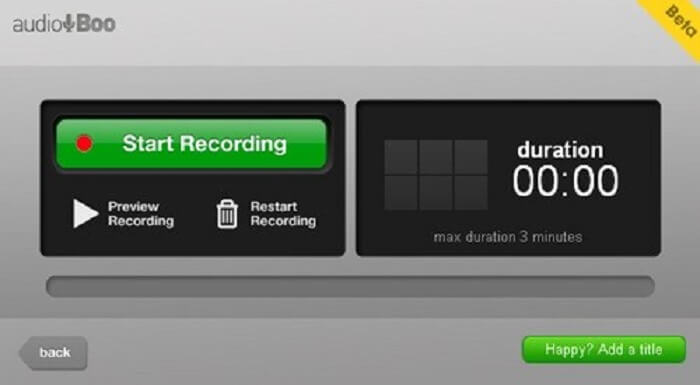
Another tool you may use in short recording is the Audio Boo. It allows the user to do a short type recording. For example, singing for your loved ones then sending it to them, audio diary, audio short reminder, and many more. But because of the limitation it gives you can record a full conversation, long jamming sessions, and etc. So, if you’re wondering how long is the available recording, 3 minutes is the maximum.
3. Adobe Audition
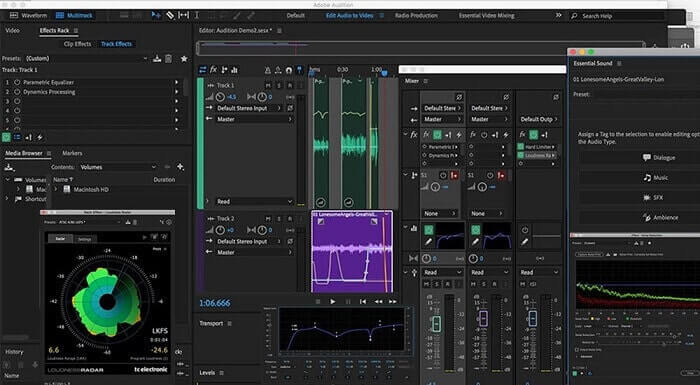
Uma ferramenta que permite ao usuário gravar uma gravação de qualidade. Além disso, é suportado pela Adobe, portanto, espere uma saída de boa qualidade que ele produzirá. Isso é mais comumente usado pelo produtor musical, cantores, arranjadores musicais e como tal. Este é um gravador mais industrializado. É um pouco opressor para o novo usuário usar este tipo de gravador Mp2. Mas produz uma boa qualidade como os outros gravadores MP2.
Further Reading
Parte 3. Gráfico de comparação
| Recurso (s) da ferramenta | FVC Free Audio Recorder | Gravador de áudio FVC (Premium) | Audio Boo | Adobe Audition |
| Gravador de áudio | SIM | SIM | SIM | SIM |
| Cancelamento de ruído | NÃO | SIM | NÃO | SIM |
| Aprimoramento de microfone | NÃO | SIM | NÃO | SIM |
| Ferramentas de edição | NÃO | SIM | NÃO | SIM |
| Programa / s Disponíveis | Todos os programas são suportados | Todos os programas são suportados | iPhone, iPod touch e iPad. | Windows 7, Windows 8.1 ou Windows 10 OS X Yosemite, OS X El Capitan ou macOS Sierra |
| Formatos Disponíveis | MP3 e MP2 | MP3, MP2, WMA, AAC, M4A, FLAC, OGG, AMR, Opus e muitos mais. | MP3 | AC3, M4A, MAT, VOX, W64, WAV e muitos mais |
| Preço da ferramenta (se for a pagar) | Ferramenta online grátis | Por 1 mês: $25,00 Por um ano: $31.20 Licença vitalícia: $55.20 | Ferramenta para download grátis | $27.62 / momento, para anual $315.61 / anos, para anual $41.43 / plano mensal |
Parte 4. Perguntas frequentes sobre o gravador MP2
Posso converter meu MP2 para outro formato?
Yes, you can by using this MP2 Converter that is available online and you may as well want to try to use this ultimate converter for a much better output.
Qual é o melhor MP? 1, 2, 3 ou 4?
Esses formatos de arquivo MP são todos contêineres de áudio, vídeo e texto. Mas a principal diferença entre eles é o que contêm. MP1 é o primeiro a ser o primeiro a fazer um formato de cassete. MP2 suporta 1 a 2 canais e o padrão para a reprodução de televisão digital e estações de rádio. MP3 é o formato mais comumente usado para salvar gravação de áudio ou formato de áudio. MP4 contém formato de áudio, vídeo e texto.
Quero reproduzir meu vídeo, mas meu reprodutor de mídia não suporta o formato, o que devo fazer?
You may use this media player as it supports almost all different formats you may know.
Conclusão
At last, we now know the different tools over the web by the help of this article. So, if you are still having a hard time choosing which is the best tool for you. These tips might help you to decide what is the best. The recording tool you must use should be user-friendly, reliable, available to all platforms in case you change your device currently using, so it will not affect your audio recording, long-lasting, always receive updates, budget-friendly, and most of all malware free. If your guess is the FVC Screen Recorder then you are right. Because this tool never limits you, not so hard to use, and not too pricey. So, no need to look for another tool if this tool can do better than the others.
-
 Os 5 melhores gravadores de tela WebM para Windows / Mac
 Saiba mais sobre os arquivos de extensão do WebM lendo o artigo e descubra os aplicativos gravadores de tela do WebM que você pode usar para gravar vídeos do WebM.
-
 4 melhores gravadores de vídeo SWF acessíveis online para feed de comentários grátis
 Você já ouviu falar sobre o arquivo SWF? Saiba mais sobre esse formato de arquivo e descubra maneiras de gravar arquivos SWF usando ferramentas online gratuitas.
-
 Gravadores de vídeo MTV incompatíveis compatíveis com feed de comentários de computador Mac / Windows
 Este artigo o ajudará a aprender sobre o formato de arquivo MTV e uma lista de gravadores de vídeo MTV que você pode usar para gravar telas de computador com facilidade.
