


 Video Converter Ultimate
 Gravador de ecrã
 Reparo de vídeo
 Secure Download
FLAC vs. MP3: Introdução e Comparação de Formatos de Áudio
The debate between FLAC vs. MP3 file formats has been ongoing for years. While MP3 is one of the oldest and most widely-used formats, FLAC has gained popularity among audiophiles for its lossless audio compression. But which one is better? In this guide, we'll take a closer look at the differences between FLAC and MP3, including their sound quality, file size, compatibility, and more, to help you decide which format to choose for your music collection.

Parte 1. FLAC vs. MP3: introdução de formatos de áudio
MP3 Anecdote
MP3 é um formato popular para arquivos de áudio digital que tem sido amplamente utilizado desde a sua introdução na década de 1990. Ele usa uma forma de compactação com perdas para reduzir o tamanho dos arquivos de áudio, mantendo a boa qualidade do som. Os arquivos MP3 podem ser facilmente compartilhados, baixados e reproduzidos em vários dispositivos, tornando-os uma escolha conveniente para os entusiastas de música digital. A questão é: FLAC é melhor que MP3? Vamos descobrir lendo a descrição do FLAC.
FLAC Anecdote
FLAC (Free Lossless Audio Codec) é um formato de arquivo de áudio de alta qualidade que usa compactação sem perdas para preservar os dados de áudio originais sem sacrificar a qualidade. Isso significa que os arquivos FLAC são muito maiores que os arquivos MP3, mas mantêm o mesmo nível de fidelidade de áudio do material original.
Parte 2. Dispositivos/plataformas compatíveis de FLAC e MP3
Agora, vamos ver a comparação MP3 vs. FLAC para ver como eles se comportam em relação às plataformas ou dispositivos que suportam.
MP3 é um formato de arquivo de áudio amplamente suportado que pode ser reproduzido em diferentes plataformas, incluindo:
◆ Computadores executando os sistemas operacionais Windows, macOS e Linux.
◆ Portable media players, such as iPods and other MP3 players.
◆ Smartphones e tablets rodando iOS, Android e outros sistemas operacionais móveis.
◆ Auto-rádios com entrada USB ou auxiliar.
◆ Sistemas de home theater e receptores estéreo com USB ou conectividade de rede.
◆ Serviços de streaming de música, como Spotify e Apple Music, geralmente usam MP3 como formato padrão para streaming e download de músicas.
O FLAC não é tão amplamente suportado quanto o MP3, mas ainda pode ser reproduzido em várias plataformas, incluindo:
◆ Computadores executando os sistemas operacionais Windows, macOS e Linux.
◆ Alguns reprodutores de mídia portáteis, como o Astell&Kern AK Jr e o PonoPlayer.
◆ Alguns smartphones e tablets rodando Android e outros sistemas operacionais móveis.
◆ Alguns auto-rádios e sistemas de home theater com USB ou conectividade de rede.
◆ Alguns serviços de streaming de música, como o Tidal, que oferecem streaming FLAC de alta fidelidade e opções de download.
Parte 3. FLAC é melhor que MP3?
Desta vez, vamos listar a diferença entre FLAC e MP3 comparando de forma abrangente esses formatos de áudio.
Aqui está uma comparação abrangente de FLAC e MP3 com base em vários fatores:
Sound quality: FLAC offers better sound quality than MP3, for it is a lossless format that preserves all the audio data in the source material. On the other hand, MP3 is a lossy format that discards some audio data during compression, which can result in a loss of audio quality.
File size: MP3 files are much smaller than FLAC files, as MP3 uses lossy compression to reduce the file size. This makes MP3 a more practical choice for those with limited storage space or those who need to share or download music files quickly over the internet.
Compatibility: MP3 is widely compatible with various devices and software, including desktop and laptop computers, portable media players, smartphones, car stereos, and streaming music services. FLAC, on the other hand, may not be compatible with some devices and software due to its larger file size and lossless compression.
Bitrate: MP3 files can be encoded at a lower bitrate to reduce the file size further, but this also results in a loss of audio quality. FLAC files, on the other hand, always maintain the same bitrate as the original source material.
Editing: FLAC is a better choice for audio editing, as it offers a higher level of audio fidelity and doesn't introduce any additional compression artifacts. MP3 files, on the other hand, may introduce additional compression artifacts during editing due to their lossy compression.
Price: Both FLAC and MP3 are free and open-source formats, so there is no cost associated with using either format.
Parte 4. Converter FLAC para MP3 ou MP3 para FLAC
Agora que terminamos o processo de comparação de FLAC para MP3, passemos ao processo de conversão de MP3 para FLAC ou vice-versa.
Video Converter Ultimate is a powerful software tool that allows you to easily convert audio and video files from one format to another. One of the many formats supported by FVC Video Converter Ultimate is FLAC, a high-quality, lossless audio format that is often used by audiophiles and music enthusiasts. You can quickly and easily convert your FLAC files to MP3, allowing you to save space on your device and make your music more easily shareable. Video Converter Ultimate offers a user-friendly interface and a range of options for customization, making it a convenient and helpful tool for anyone who needs to convert audio and video files.
Para converter arquivos de áudio entre os formatos FLAC e MP3 usando esta ferramenta, você precisa seguir alguns passos simples.
Step 1. First, download and install the program on your computer by clicking on one of the Free Download buttons and following the setup wizard. Next, launch the program to access its user-friendly interface.
Free DownloadFor Windows 7 or laterSecure Download
Free DownloadFor MacOS 10.7 or laterSecure Download
Step 2. Next, add the audio file you want to convert by clicking the plus sign button from the main interface. Once added, you'll see a thumbnail of each file on the interface.
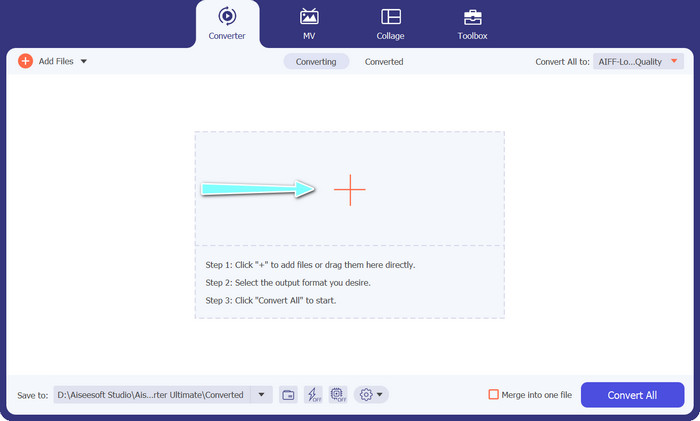
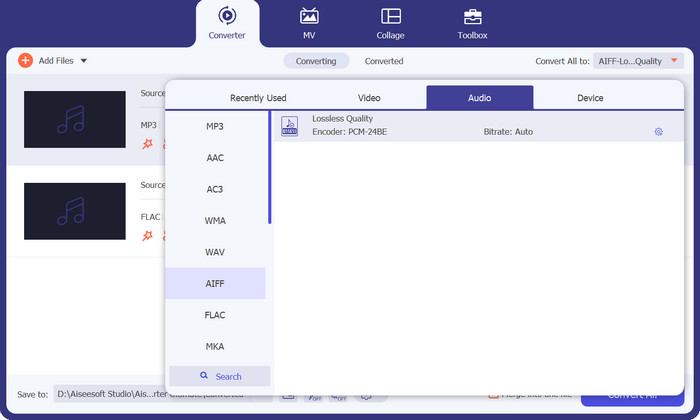
Step 3. Specify the output format by selecting the Audio tab from the Profile menu on the upper right side of the tool. Choose either MP3 or FLAC, depending on the direction of the conversion.
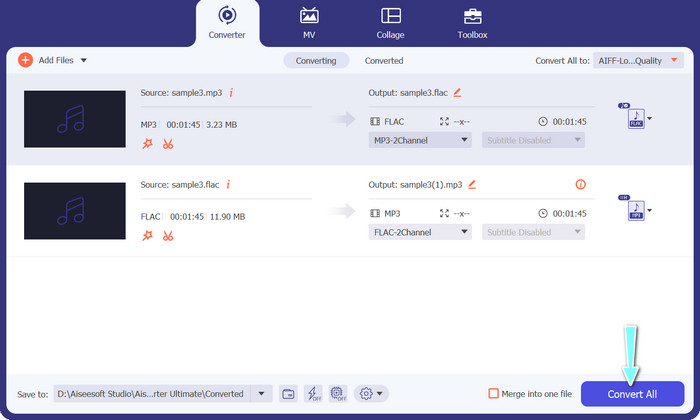
Step 4. Specify the output folder where you want to save the converted files by selecting the appropriate location at the bottom of the interface. Lastly, hit on the Convert All button to start the conversion process.
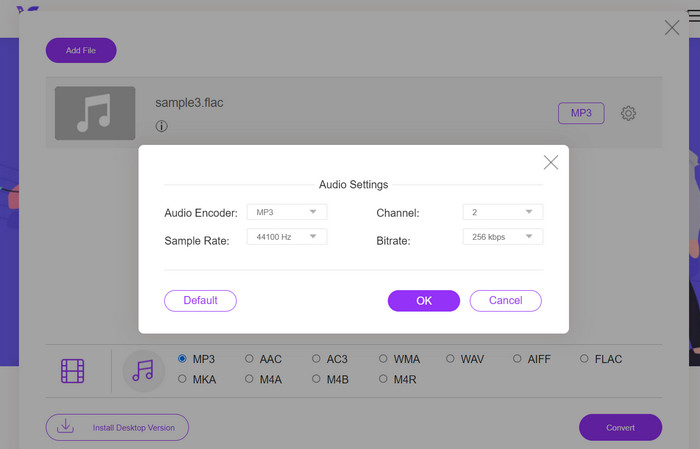
If you're in need of a free online tool to convert FLAC to MP3, look no further than Free Video Converter Online. This convenient program allows users to convert video and audio files without any cost and also offers the ability to customize output settings according to your preference. The conversion speed is also reliable, so long as you have an internet connection. To get started, follow these steps:
Step 1. Launch your preferred web browser and navigate to the Free Video Converter Online website.
Step 2. Click the Add Files to Convert button to upload the FLAC file you want to convert to MP3.
Step 3. Choose MP3 as the output format from the list of available formats under the Audio format menu. You can also select your desired bitrate or output quality for the MP3 file.
Step 4. Click the Convert button to start the conversion process.
Parte 5. Perguntas frequentes sobre FLAC x MP3
Qual é melhor entre FLAC de 16 bits ou MP3 de 320 Kbps?
A escolha entre FLAC de 16 bits e MP3 de 320 kbps depende da preferência pessoal e do uso pretendido do arquivo de áudio. Se você priorizar a qualidade do áudio e tiver espaço de armazenamento suficiente, o FLAC de 16 bits pode ser a melhor opção. Se você precisa de um tamanho de arquivo menor sem comprometer muito a qualidade do áudio, o MP3 de 320 kbps pode ser uma boa escolha.
Os arquivos FLAC são maiores que os arquivos MP3?
Sim, os arquivos FLAC são geralmente maiores que os arquivos MP3 devido à sua natureza sem perdas.
Todos os reprodutores de mídia suportam FLAC?
Não, nem todos os reprodutores de mídia suportam FLAC. No entanto, muitos reprodutores de mídia e software modernos oferecem suporte à reprodução FLAC, incluindo VLC, Foobar2000 e Winamp.
Conclusão
Choosing between MP3 and FLAC depends on your personal preference and specific needs. Therefore, FLAC vs. MP3 is a must for your decision-making. Ultimately, the decision on which format to use comes down to your priorities in terms of sound quality, file size, and compatibility.
-
 4 melhores métodos para converter MOV para MP3 no Windows e Mac facilmente
 Quando você deseja extrair os arquivos de áudio MP3 de arquivos MOV, você pode aprender mais sobre os 4 conversores MOV para MP3 mais eficientes para obter os arquivos desejados do artigo.
-
 Melhores conversores de MP3 para transformar arquivos de áudio em MP3 facilmente
 Converta sem esforço qualquer formato de áudio para MP3 com nossos conversores de MP3 online e offline fáceis de usar. Obtenha resultados de alta qualidade com apenas alguns cliques.
-
 Os 3 principais editores de metadados FLAC no Mac e no Windows [Atualizado em 2023]
 Deseja alterar os metadados FLAC? Nesse caso, você deve ler este artigo, pois fornecemos conhecimento suficiente sobre o editor de metadados FLAC mais recente que você pode usar.
