


 Video Converter Ultimate
 Gravador de ecrã
 Reparo de vídeo
 Secure Download
M4A vs. MP3 Análise aprofundada e comparação de dois formatos de áudio
Devido à proliferação da música digital, selecionar um formato de áudio apropriado é agora mais crucial do que nunca. Embora M4A e MP3 sejam amplamente usados, existem distinções importantes entre os dois. Embora o MP3 seja o padrão de fato para arquivos de música, o M4A é frequentemente usado para qualidade de áudio superior.
In M4A vs. MP3 comparison, we'll examine the finer points between the M4A and MP3 file formats so you can make an informed decision. We'll also present a comprehensive analysis of the differences and similarities between the two file types regarding audio quality, compatibility, file size, and more. If you're a music lover or a working musician, you'll want to read on to find out which format is ideal for you.

Parte 1. M4A vs. MP3
Aqui está uma tabela simples comparando esses formatos em diferentes aspectos importantes para uma decisão informada. Confira a tabela abaixo.
| M4A | MP3 | |
| Qualidade de som | Alto | Boa |
| Tamanho do arquivo | ampla | Pequeno |
| Compatibilidade | Limitado | Amplamente Compatível |
| Metadados | Com suporte | Limitado |
| Proteção DRM | sim | Não |
| Usos populares | Música, audiolivros, podcasts | Música, podcasts, toques |
Parte 2. M4A e MP3 Introdução
Chega de batalha MP3 vs. M4A. Vamos fazer uma pausa e aprender mais sobre esses formatos através de uma breve introdução de cada um deles.
M4A Introduction
O formato de áudio digital proprietário da Apple é MPEG-4 Audio (ou M4A para abreviar). É um ótimo formato de áudio para música, audiolivros e podcasts porque pode acomodar muitas taxas de bits e taxas de amostragem. Os arquivos M4A podem ser abertos no iTunes, QuickTime e outros reprodutores de mídia, tornando-os ideais para dispositivos Apple.
MP3 Introduction
MP3, que significa 'MPEG-1 Audio Layer 3', é um formato de áudio digital que se tornou o padrão para áudio compactado devido à sua ampla adoção e compressão de baixa taxa de bits. Os arquivos MP3 são ótimos para música, podcasts e toques por causa de seu tamanho compacto em comparação com outros formatos de áudio. Eles podem ser reproduzidos em muitos dispositivos diferentes e baixados de forma rápida e fácil da Internet. Os arquivos MP3, por outro lado, geralmente têm qualidade de áudio inferior a formatos alternativos como M4A.
Parte 3. M4A é melhor que MP3?
M4A e MP3 têm pontos fortes e fracos diferentes. O M4A é conhecido por sua qualidade de som superior e é preferido por entusiastas e profissionais da música. O MP3, por outro lado, possui um tamanho de arquivo menor e é amplamente compatível com vários dispositivos e reprodutores de mídia.
Escolher entre M4A e MP3 depende do que é mais importante para você: alta qualidade de som ou tamanho de arquivo menor e compatibilidade.
Parte 4. A diferença entre MP3 e M4A
Os formatos populares de música digital MP3 e M4A têm características distintas. A seguir está uma explicação detalhada das distinções entre MP3 e M4A:
Sound Quality: M4A is known for its superior sound quality compared to MP3. M4A uses a better compression algorithm and supports a broader range of bitrates and sample rates. M4A also supports lossless compression, which preserves the original audio quality, while MP3 uses lossy compression, which reduces the file size but also reduces the audio quality.
File Size: MP3 files are smaller in size compared to M4A files. This is because MP3 uses a more efficient compression algorithm that reduces the file size without significantly affecting the audio quality. M4A, on the other hand, uses a less efficient compression algorithm that results in larger file sizes but better audio quality.
Compatibility: MP3 is widely recognized as the industry standard for digital audio and is compatible with a wide range of devices and media players, including smartphones, tablets, and computers. M4A, on the other hand, is less widely compatible and is primarily used on Apple devices and software, such as iTunes and QuickTime.
Metadata: M4A supports a wider range of metadata compared to MP3. This means that M4A files can store more information about the audio, such as album art, lyrics, and track information.
DRM Protection: M4A supports Digital Rights Management (DRM) protection, which allows copyright holders to control the use and distribution of their audio files. MP3, on the other hand, does not support DRM protection.
Parte 5. Como converter M4A para MP3 ou MP3 para M4A
Mais do que comparar e revisar esses dois formatos de áudio, também é importante aprender como converter de M4A para MP3 ou vice-versa. Aqui estão alguns dos programas que você pode usar:
Whether you are online or offline, Video Converter Ultimate is a great tool you can use to convert between M4A and MP3. This utility comes with a lot of features you can take advantage of. The tool offers the capability to convert multiple files into batches, which means you can transform a collection of music files. What is intriguing is that it grants you access to the output settings of your audio files. Find out how this tool works by looking at the steps below.
Step 1. Initiate the download by clicking one of the Free Download buttons and then following the on-screen instructions. The next step is launching the app and getting used to its simple interface.
Free DownloadFor Windows 7 or laterSecure Download
Free DownloadFor MacOS 10.7 or laterSecure Download
Step 2. Click the add button on the main screen, then find the audio file you want to convert. A preview of an uploaded file will be displayed on the UI shortly after the upload. You can convert multiple M4As at once to MP3 by uploading a folder.
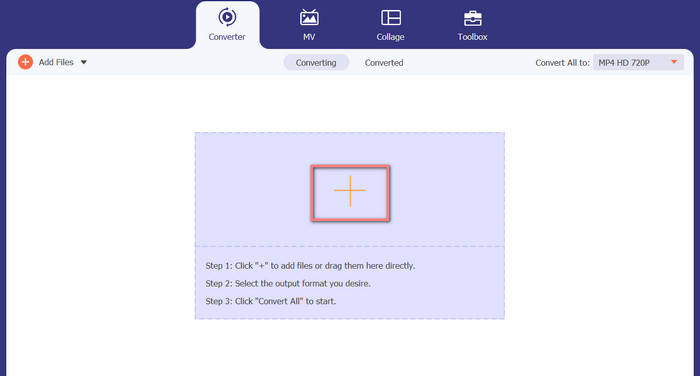
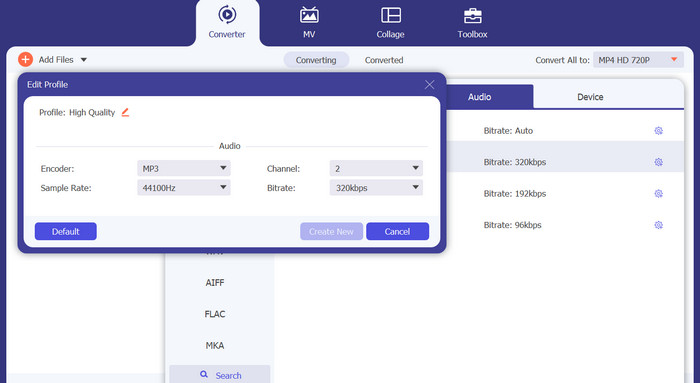
Step 3. To change the tool's output format, go to the Profile menu's Audio tab (found in the tool's upper right). You can change an M4a file into an MP3 file and vice versa.
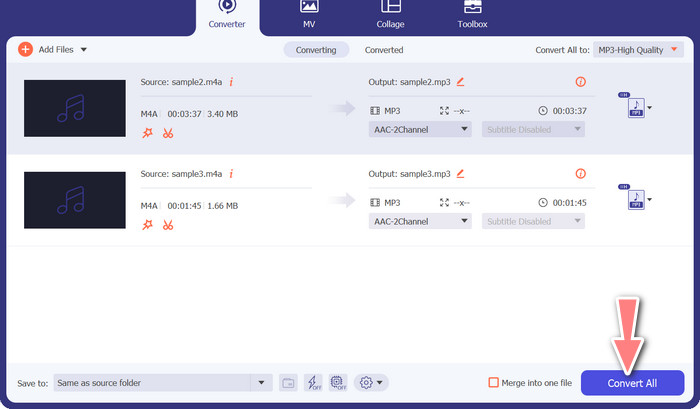
Step 4. Select the desired location at the very bottom of the screen. To get started with the conversion, select Convert All.
Conversor de Vídeo Gratuito Online (Online)
No room for another show to air? The good news is that using a web-based converter can prevent downloading software altogether. The Free Video Converter Online web tool allows for in-browser conversion. It also supports a wide variety of music and video file types. In addition, this web tool supports batch conversions. In addition, the user can alter the final audio file's settings. Learn how to convert MP3 to M4A online.
Step 1. First, fire up your preferred web browser and navigate the Free Video Converter Online website.
Step 2. Click the Add Files to Convert option, then navigate to the M4A file you want to convert and select it.
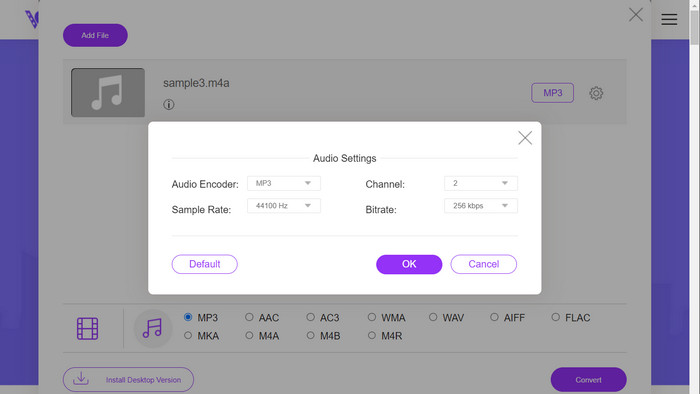
Step 3. Select MP3 as the output file type from the Audio format menu. It is also possible to adjust the bitrate, or output quality, of the MP3 file.
Step 4. To start the conversion process, click the Convert button. That's the procedure for changing M4A to MP3 on the web.
Further Reading:
Guidelines on How to Convert M4A to WAV [PC and Mac]
Best Tools that You Can Use to Batch Convert MP3 to M4R Files
Parte 6. Perguntas frequentes sobre M4A e MP3
O que é MP3 vs. M4A em termos de metadados?
O M4A suporta uma gama mais ampla de metadados do que o MP3, o que significa que os arquivos M4A podem armazenar mais informações sobre o áudio.
Posso editar arquivos MP3 ou M4A?
Você pode editar arquivos MP3 e M4A usando vários softwares de edição de áudio.
Qual é o melhor para podcasts, MP3 ou M4A?
O MP3 é melhor para podcasts devido ao seu tamanho de arquivo menor e maior compatibilidade.
Conclusão
Understanding the MP3 vs. M4A comparison can help you choose the best digital audio format. Whether you're streaming music or producing it, selecting the right format is crucial for ensuring the best possible audio quality and compatibility.
-
 MP3 VS MP4: Qual é a diferença entre MP3 e MP4
 MP3 ou MP4, o que é melhor? Qual é a diferença entre MP3 e MP4? Este artigo irá comparar o MP3 com o MP4 em todos os aspectos que você pode imaginar.
-
 M4A Player - 5 melhores jogadores M4A para Android e computador
 Como reproduzir arquivos M4A no telefone Android? Qual jogador pode jogar M4A? Esta postagem compartilha 5 melhores jogadores M4A gratuitos para Android, Mac e PC.
-
 4 melhores métodos para corrigir e editar metadados MP3 no Windows e Mac
 Quer conhecer os segredos da edição de metadados MP3 com facilidade? Este blog ensinará diferentes técnicas com as diferentes ferramentas que você acessa facilmente.
