


 Video Converter Ultimate
 Gravador de ecrã
 Reparo de vídeo
 Secure Download
Diretrizes fáceis de entender para converter 3GP para MKV
On 3G phones, the multimedia container format 3GP is used. This format can be used on 2G and 4G mobile devices. However, even though it is a great format, 3GP is still an old-fashioned video format. It implies that using other programs to play this file type is impossible. Your 3GP video must be converted to one of the newest and most popular formats available today, such as MKV if you wish to play it. With the MKV format, you can use its widespread compatibility and play videos on practically any software and hardware. You may easily convert 3GP to MKV with the help of this guide. So, what are you waiting for? Read the article carefully.

Parte 1: Método excelente para converter 3GP para MKV offline
You can use Video Converter Ultimate to convert 3GP to MKV in high quality. It can convert video files instantly because it allows you to do a batch conversion process, wherein converting multiple files is no longer a problem. Even though the 3GP format is not popular in this modern era, Video Converter Ultimate still supports this format. It is one of the reasons why you need to rely on this offline application. It supports over 100 video formats, including AVI, MP4, MOV, MKV, WMV, DV, MTS, VOB, and more. More importantly, you can access this converter whether you are an advanced or a beginner. It has an intuitive interface to understand each button and option on your screen. Also, this downloadable application is reachable on both Mac and Windows.
Features
◆ Converte mais de 100 formatos de vídeo, como 3GP, MKV, MP4, M4V, MTS, MKV, WMV, AVI, FLV, MOV, etc.
◆ O processo de conversão em lote está disponível.
◆ Edite vídeos usando um aprimorador de vídeo, compressor, aparador, rotador, reversor e muito mais.
◆ Crie uma colagem com filtros gratuitos e modelos prontos para uso.
◆ O criador de videoclipes está ao seu alcance, incluindo temas gratuitos.
◆ Converta formatos de imagem, como JPG, PNG, BMP e muito mais.
Prós
- Perfeito para todos os usuários.
- O processo de download e instalação é pouco exigente.
- Possui uma interface intuitiva.
- É gratuito para converter arquivos de vídeo ilimitados.
- Usuários de Mac e Windows podem utilizar este aplicativo.
Contras
- Para recursos mais excepcionais, use a versão pro.
As etapas simples abaixo oferecem a melhor maneira de converter 3GP para MKV usando o FVC Video Converter Ultimate.
Step 1: First, download the FVC Video Converter Ultimate on your computer. Click the Download button below. Then, open the application when the installation is done.
Free DownloadFor Windows 7 or laterSecure Download
Free DownloadFor MacOS 10.7 or laterSecure Download
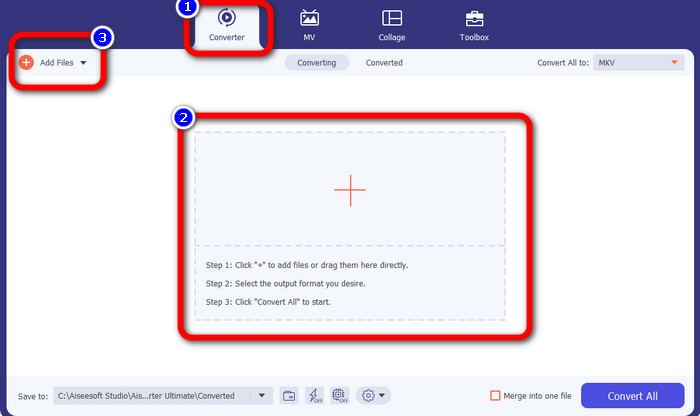
Step 2: Press the Plus icon or Add Files button from the Converter panel. The folder from your computer will pop up. Then, choose the 3GP file you want to convert.
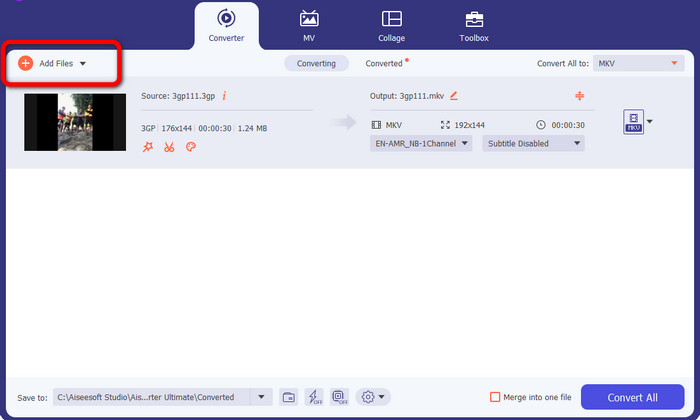
Step 3: Do you want to add another 3GP file? Then click the Add Files button.
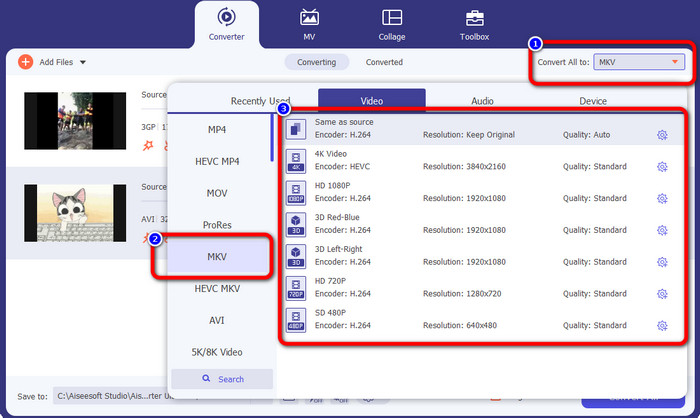
Step 4: To transform them into MKV file format, click the Convert All to button. Then, select the MKV format from the format options. Then, click your chosen video quality.
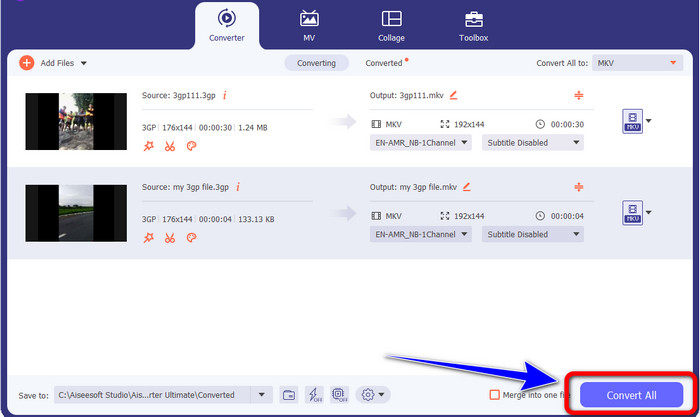
Step 5: Convert your videos by clicking the Convert All button. Then, save your final output after the installation process.
Parte 2: Maneira simples de converter 3GP para MKV usando FFmpeg
Outra maneira é usar o FFmpeg para converter 3GP em MKV. Esta ferramenta também é boa para converter arquivos. No entanto, o arquivo FFmpeg é complicado de usar, o que não é adequado para iniciantes. Existem muitos processos para configurar este aplicativo em seu computador antes que você possa usá-lo. Certifique-se de ter tutoriais para assistir ao operar este software.
Step 1: Download and set up the FFmpeg on your computer.
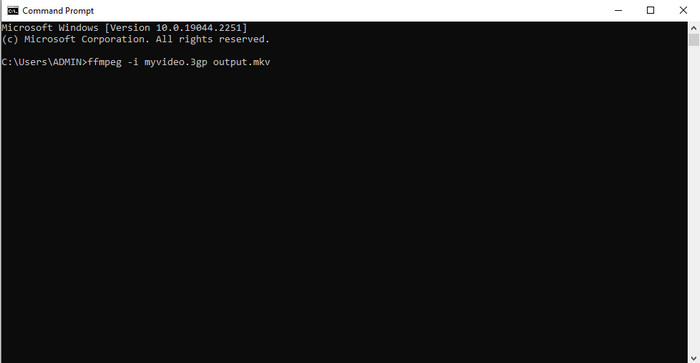
Step 2: Go to the command prompt, and type “FFmpeg -i .3gp out.mkv”. Then, after that, click Enter. That’s it! You can now play your final video. Besides, you can use FFmpeg to edit file metadata.
Parte 3: Melhor Solução para Converter 3GP para MKV Online
If you prefer converting files using a browser, use the FVC Free Video Converter Online. This web-based application can convert 3GP to MKV effortlessly. It offers simple methods for converting files, which is excellent for everyone. From the name itself, you can use this converter for free. You can enjoy its features, such as editing video and audio’s bitrate, frame rate, sample rate, resolution, and other parameters. Moreover, aside from 3GP and MKV formats, it supports various video formats, such as MOV, AVI, FLV, MP4, M4V, VOB, and more. You can also convert audio files like WAV, AC3, AAC, FLAC, WMA, etc. Follow the steps below to convert video files easily.
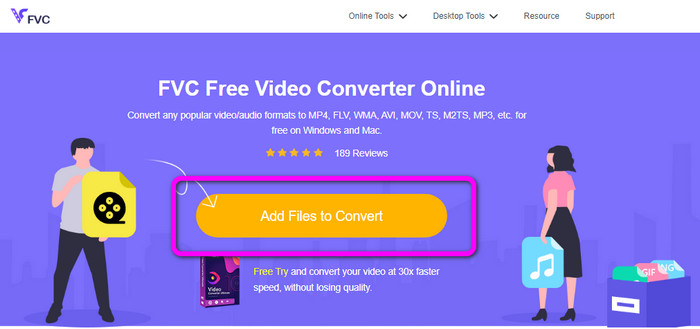
Step 1: Visit the FVC Free Video Converter Online website. Add the 3GP video by clicking the Add Files to Convert button.
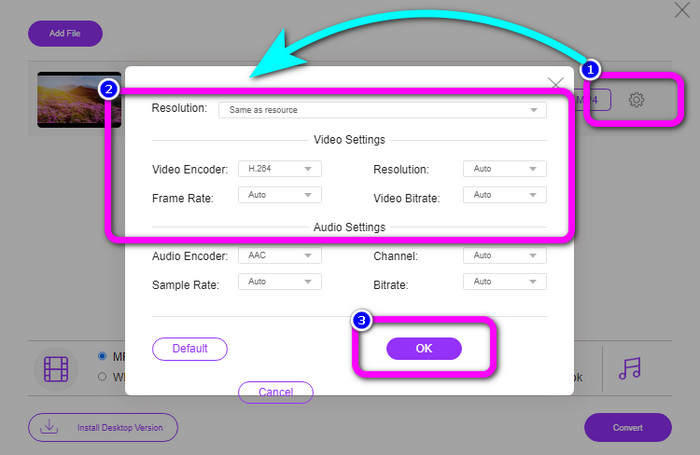
Step 2: You can change your video’s bitrate, frame rate, resolutions, and other parameters by clicking the Setting icon. Then click OK.
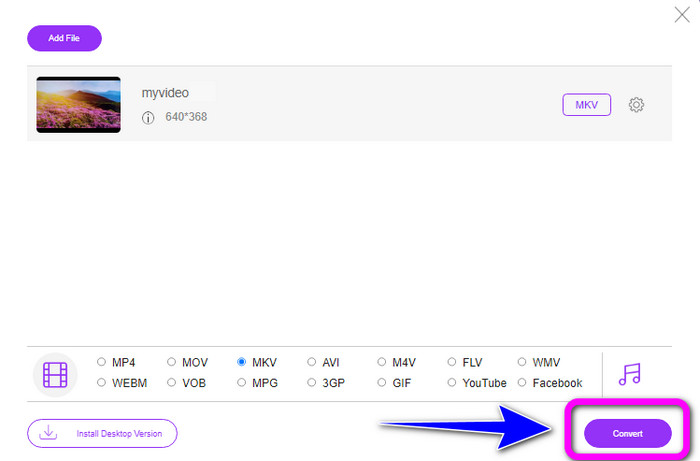
Step 3: On the bottom part of the interface, you will see the format options. Select the MKV format and click the Convert button. You also can use this online tool to change F4V to MKV.
Parte 4: 3GP vs. MKV
| Arquivo | 3GP | MKV |
| Extensão | .3gp | .mkv |
| Categoria | Vídeo | Vídeo |
| Descrição | Reproduzível em telefones celulares 3G e outros telefones, o 3GP é um formato de contêiner multimídia criado pelo Third Generation Partnership Project (3GPP). Em 1998, o 3GP foi inicialmente criado. Telefones celulares com redes baseadas em GSM normalmente cabem neste suporte (Global System for Mobile Communications). É adequado para telefones celulares porque utiliza uma pequena quantidade de largura de banda e ocupa menos espaço para arquivos que precisam de uma pequena quantidade de dados. | Um formato de contêiner multimídia de código aberto chamado MKV Matroska permite muitas faixas de áudio e legendas em um único arquivo. É o tipo de arquivo mais adequado para adicionar muito material, incluindo filmes, áudio, textos e fotos. É um formato RAW que você pode inverter e separar com base nas faixas de dados. |
| Desenvolvido por | Projeto de parceria de terceira geração | Steve Lhomme |
| Tipo MIME | vídeo/3gpp áudio/3gpp | vídeo/x-matroska |
| Programas Associados | Filmes e TV da Microsoft VLC Media Player Windows Media Player QuickTime Player | KMPlayer VLC Media Player MX Player GOM Player PotPlayer |
Parte 5: Perguntas frequentes sobre a conversão de 3GP para MKV
Qual é a qualidade do 3GP?
O formato de arquivo de vídeo 3GP tem duas resoluções de vídeo. Para os telefones que suportam o formato 3GP, a resolução é 176X144. Para os telefones com widescreen, PSP, MP4 Player e iPod, a resolução é 320X240.
Qual é a vantagem do formato de arquivo 3GP?
O tamanho do 3GP é seu principal benefício. É um arquivo de vídeo compacto criado para reduzir o uso de armazenamento. O tamanho compacto usa poucos dados, tornando-o ideal para baixar vídeos por meio de dispositivos móveis.
3GP é um codec?
Sim. Este arquivo é um formato de contêiner multimídia que oferece suporte a outros codecs, incluindo H.263, vídeo H.264 e MPEG-2.
Conclusão
These are great solutions to convert 3GP to MKV. But FFmpeg is complicated to install and takes a lot of procedures. So, if you want trouble-free methods, use Video Converter Ultimate and FVC Free Video Converter Online. These are the tools you can utilize without exerting too much effort!
-
 WebM para 3GP: maneiras mais eficazes de usar essas ferramentas
 Você está procurando um excelente conversor de WebM para 3GP? Este artigo irá garantir que você obtenha os melhores métodos eficazes para converter seu WebM para 3GP
-
 Aprenda o processo simples de como converter M4V para 3GP
 Aqui estão os procedimentos mais simples para converter M4V para 3GP no seu dispositivo. Se você está disposto a aprender, então vamos seguir em frente e prosseguir para este artigo
-
 Aprenda o processo simples de como converter M4V para 3GP
 Este artigo mostrará as melhores técnicas que você pode tentar para converter XviD para 3GP rapidamente. Portanto, fique atento e testemunhe as ótimas maneiras deste artigo
