


 Video Converter Ultimate
 Gravador de ecrã
 Reparo de vídeo
Guia abrangente sobre como converter AMV para WMV com etapas [Resolvido]
Want to enjoy watching AMV video files on your Windows or use it for online streaming? If so, you must read this article to know how to convert AMV to WMV, improve the quality, and make it compatible. In this list, you will learn the software you can use to convert your AMV files. So without further ado, you must now fasten your seatbelt and learn a lot more about AMV and WMV format.

Parte 1. Converta AMV para WMV com o FVC Video Converter Ultimate
FVC Video Converter Ultimate is our first choice for converting AMV to WMV because it allows you to transcode media and device-specific formats. And more, it is capable of converting not only one, two, or three files simultaneously but more. Furthermore, this converter is dedicated to its users to provide nothing but greatness on their conversion. Want to know why? Then read the key features below.

FVC Video Converter Ultimate
Mais de 4.355.888 downloads- Ele pode ajudá-lo com seu problema de conversão em AMV para WMV, AVI, FLV, SWF, MP4, AVI.
- Ele suporta conversão ultra-rápida para converter o formato ainda mais rápido.
- Edite seus vídeos AMV com os recursos exclusivos de edição que esta ferramenta oferece.
- Ajudá-lo a ser um especialista em poucos cliques.
- Ele suporta todas as plataformas como Windows e macOS.
Free DownloadFor Windows 7 or laterSecure Download
Free DownloadFor MacOS 10.7 or laterSecure Download
Você está surpreso com os recursos da ferramenta? Em caso afirmativo, vamos ler o procedimento para converter arquivos AMV e copiar as etapas para obter sucesso na conversão.
Step 1. Download the FVC Video Converter Ultimate on your computer drive by clicking the download button presented below. Proceed on clicking the installer to install and press Start Now to launch the tool.
Free DownloadFor Windows 7 or laterSecure Download
Free DownloadFor MacOS 10.7 or laterSecure Download
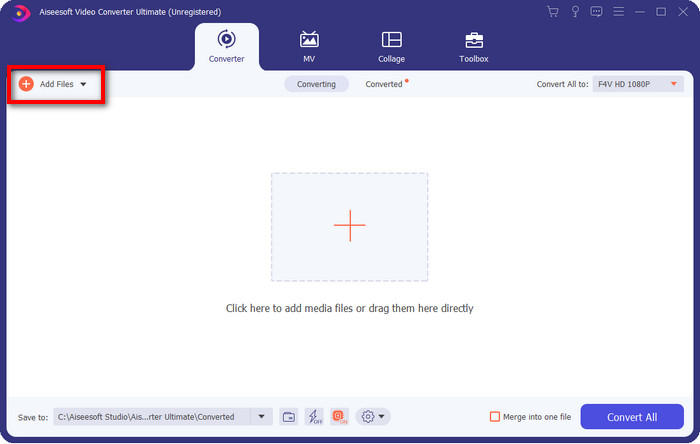
Step 2. After launching the software, you can add one or more files by clicking the Add Files option. The computer folder will show on your screen, select the AMV file, and press Open to upload it.
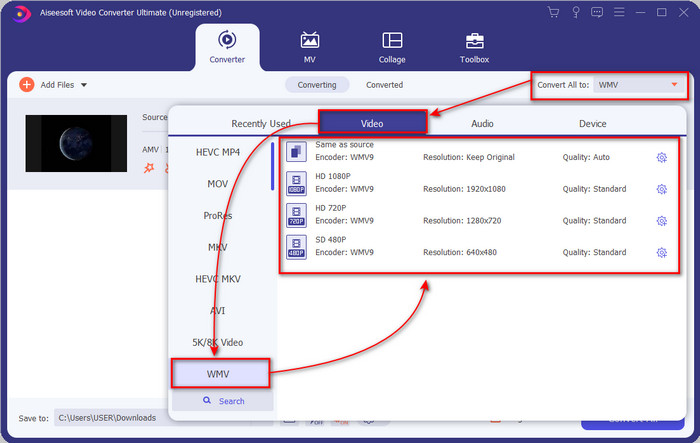
Step 3. By clicking the Convert All to option, a format list will show. Find the WMV format and choose the resolution, encoder, and quality you want to have.
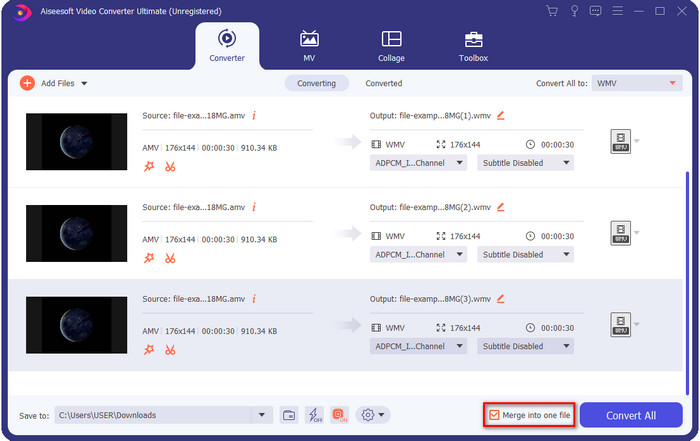
Optional. Want to make your AMV files into one WMV format? Then it would help if you ticked the box saying merge into one file.
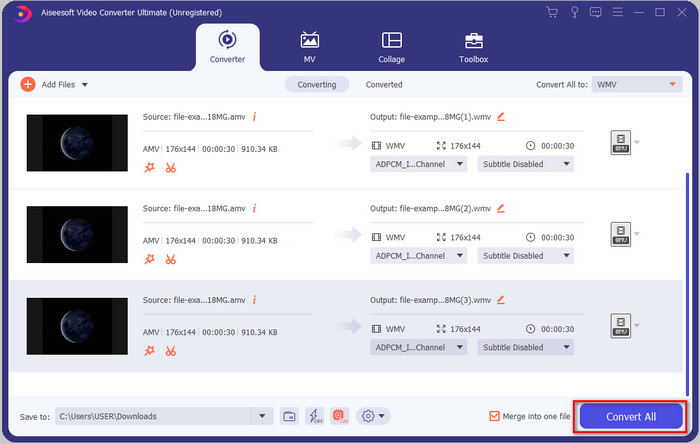
Step 4. Press the Convert All for the process of converting to start. After the process, a folder will display on your screen with the converted WMV file.
Parte 2. Converter AMV para WMV Online
Don't you want to download an offline converter because you don't have enough storage to download one? Then use the FVC Free Online Video Converter. Because you will not need to download the full converter; instead, you will need the launcher, but it is tiny and won't affect your computer storage. Moreover, this web converter converts AMV to WMV, adjusting the resolution. However, converting the file will depend on the speed of your internet. Do you have an internet connection? Then you must try to use this and experience online conversion.
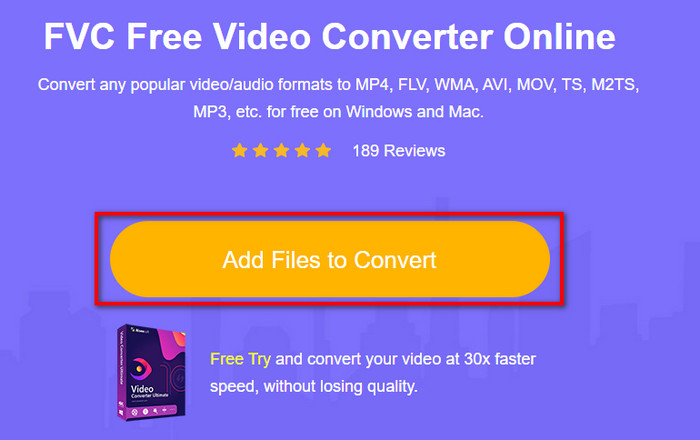
Step 1. Hit this link to open the main website of the converter.
Step 2. By clicking the Add Files to Convert, a folder will show where you can find the AMV file and press Open.
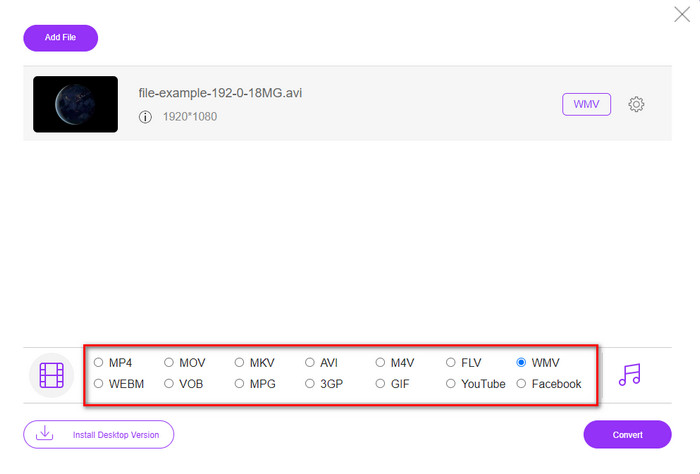
Step 3. Choose the WMV format that will display on the screen.
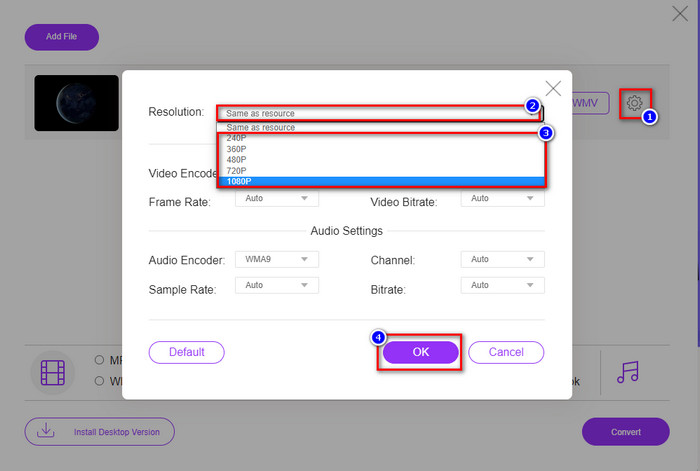
Optional. As we said earlier, you can adjust the resolution here. So now, let's modify the resolution by clicking the gear button. At the upper part, click the drop-down button, and a list of resolutions will show; choose one and press OK to proceed.
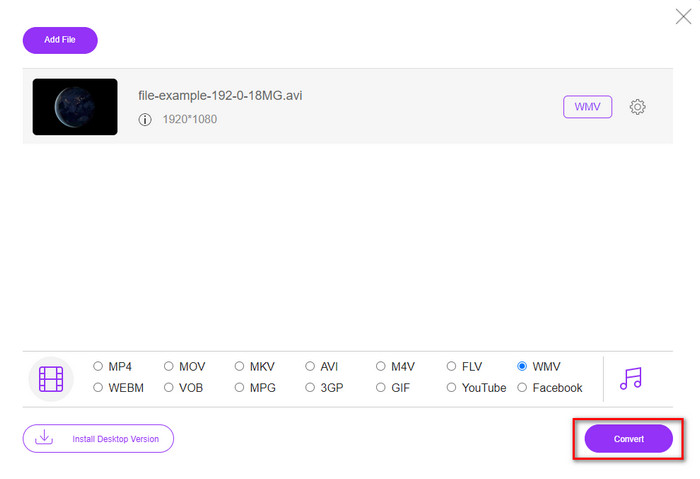
Step 4. So now, if you want to start the conversion, you can click the Convert button, and the process will begin.
Parte 3. Qual é a diferença entre AMV e WMV
Em primeiro lugar, esses dois contêineres de mídia se tornaram populares por causa de seus recursos exclusivos como formato. Mas hoje, vamos estudar sobre quais são as vantagens e desvantagens do formato em si. Além disso, especificaremos três aspectos, tornando uma questão de saber mais sobre AMV e WMV.
Qual formato tem melhor resolução de mídia?
Entre os dois formatos, sem dúvida, o WMV tem melhor qualidade. Um arquivo WMV pode armazenar e transmitir uma resolução de vídeo de até 300.000 pixels para uma saída visual mais detalhada. Mas você pode definir a taxa de resolução de tela de 528x576. E para AMV, a qualidade que ele pode conter é de 96x96 a 320x240, o que é bem baixo comparado à baixa resolução do WMV. Uma razão pela qual o AMV tem uma resolução menor é que ele precisa caber na tela do media player chinês.
Qual formato tem um tamanho de arquivo menor?
Essa vitória vai com o AMV porque esse formato é super compactado. Embora o WMV tenha um compressor, ainda assim o tamanho do AMV é mais econômico, especialmente na unidade do seu computador, do que o WMV.
Qual formato é mais compatível?
We can say that they have different strengths if we talk about compatibility because WMV is for Windows programs only. If you are a Mac user, you can't just use this format and play it on Quicktime or edit it on iMovie. Instead, you will need to convert WMV to MOV to make it compatible. In the case of AMV, this format uses a portable Chinese media player to play this format. But today, you can use a portable media player instead of buying an AMV media player. However, looking for an AMV media player is a pain in the ass because they are numbered players supporting this kind of format and the encoder. We can say that WMV has gained more compatibility than AMV, especially if we transfer the file to Windows.
E agora que sabemos o motivo, neste caso é necessário converter o arquivo em um novo formato. Por esse motivo, você deve aprender a converter AMV para WMV para tornar o arquivo de mídia compatível com o software Windows.
Parte 4. Perguntas frequentes sobre conversão de AMV e WMV
Como transformar meu AMV em MOV?
There are a lot of techniques and methods we can search and try on that are available if we query it on the web. But it is hard to choose which tool is better to use to convert AMV to MOV. So, to make it short, click this link and understand how to convert AMV to MOV and make it compatible with macOS.
Posso usar um media player VLC para assistir e reproduzir AMV?
Absolutely, you can download the VLC media player on your desktop to play your AMV files without needing to download an additional codec. But if you want to know more about the VLC and its alternative, try to read this article by clicking this link.
Por que preciso compactar o AMV?
We compress our media file and AMV because we need to free some space up on our hardware drive. So want to learn how to compress AMV files? Then click this link.
Conclusão
Essas duas soluções oferecem excelência para tornar sua conversão de AMV para WMV fácil e bem-sucedida. Além disso, estas são as melhores soluções que podemos encontrar na web. Então agora, está em suas mãos escolher qual conversor você usa para converter seu arquivo AMV em WMV. Para alcançar o sucesso, você deve usar as ferramentas FVC fornecidas acima.
-
 Melhor método a ser usado na conversão de AMV para AVI [aprovado]
 Você está tendo dificuldade em converter seu arquivo de vídeo no formato AMV para AVI? Aqui estão algumas dicas, desde que você só pode encontrar neste artigo.
-
 [Comprovado] 2 maneiras de converter AMV para FLV offline e online
 Você já pensou em experimentar um conversor para converter seus arquivos AMV para o formato de arquivo FLV. Para resolver seu problema em assistir a um vídeo AMV, leia este artigo para conhecer os conversores adequados que você deve usar.
-
 Grátis | 3 melhores métodos para converter MP4 em WMV sem perder qualidade
 Esta postagem mostra como converter vídeo MP4 para o formato WMV no Mac ou Windows. Também ofereceremos várias opções, incluindo software de desktop e conversores on-line baseados na web. Pronto para conhecer as melhores ferramentas de conversão de MP4 em WMV?
