


 Video Converter Ultimate
 Gravador de ecrã
 Reparo de vídeo
Como converter arquivos AVI para 3GP sem esforço
Third-generation mobile devices cannot play AVI files because 3G mobile devices do not support them. If you want to play your AVI file on your 3G mobile device, one thing to do is convert your AVI file to a 3GP file. Fortunately, we found out the best ways for you to convert AVI to 3GP files easily, using the top converters.

Parte 1. 2 melhores opções para converter seu arquivo AVI para 3GP na área de trabalho
Se você estiver procurando por um conversor que possa usar offline em sua área de trabalho, essas opções podem ser a solução para seu problema. Esta parte do artigo lista as 2 principais opções para converter o formato de arquivo AVI para 3GP.
Opção 1. Use o FVC Video Converter Ultimate [Ferramenta Offline]
Without a doubt, FVC Video Converter Ultimate is one of the best offline converters available in the market. This converter supports over 1000+ file-formats, including AVI, 3GP, MOV, MP4, WMV, WebM, and more. It also has the best features you can try, like adding effects to your video, compressing your file, and even merging multiple video files into one. Moreover, this tool is straightforward because it has an easy-to-use interface. Follow the steps below to convert AVI to 3GP using FVC Video Converter Ultimate.
Step 1. Download FVC Video Converter Ultimate on your desktop by clicking the Download button below. Follow the installation process, then open the app.
Free DownloadFor Windows 7 or laterSecure Download
Free DownloadFor MacOS 10.7 or laterSecure Download
Step 2. On the main interface of the converter, click the Add Files button, or you can drag and drop your AVI file to the + sign button to upload your AVI file.
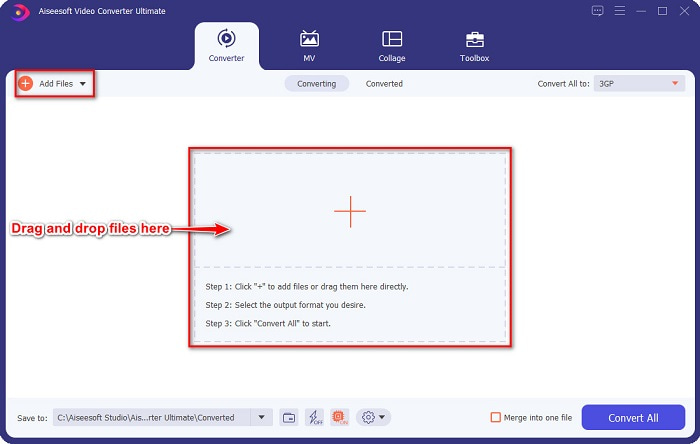
Step 3. Then, click the Convert All to button to select the output format you want. Click the 3GP file format.
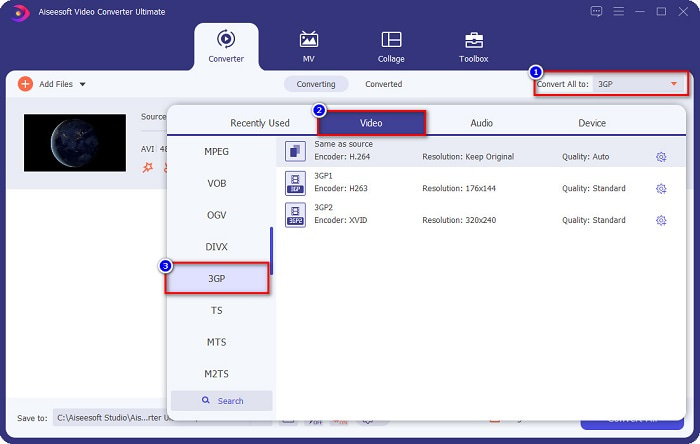
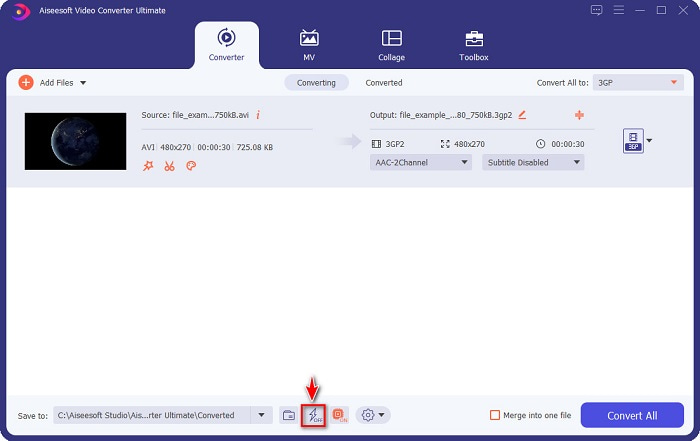
Enable the ultrafast conversion by ticking the lightning bolt sign below the software interface.
Step 4. After selecting your file output format, click the Convert All button to convert your AVI file to a 3GP file.
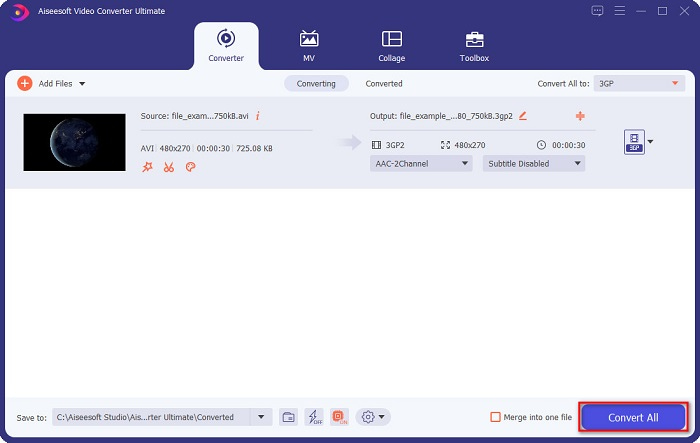
Depois é só esperar alguns segundos. E voilá! Você pode facilmente converter AVI para um arquivo 3GP tão simples quanto isso.
Prós
- Ele permite que você edite, aprimore e comprima seus arquivos.
- Oferece conversão em lote para mesclar vários formatos de arquivo em um.
- Pode converter arquivos tão rapidamente quanto um raio.
- Disponível em todas as plataformas, incluindo Windows e Mac.
Contras
- Para usar exclusivamente seus recursos, você precisa adquirir o aplicativo.
Opção 2. Conversor de Vídeo Prism [Ferramenta Freeware]
Prism Video Converter Software is a freeware converter that supports multiple file formats. In addition, this converter is just easy to use. However, it does not support many file formats like other converters. Nonetheless, many people use this converter for efficiency.
Aqui estão as etapas para usar o VLC Media Player como um conversor:
Step 1. Download Prism Video Converter, then open the app.
Step 2. Click the Add Files to upload the AVI file. On the Output Format, click the drop-down button, and choose the 3GP format.
Step 3. Lastly, Click convert to start the converting process.
Parte 2. Converta AVI para 3GP Usando o Melhor Conversor Online
Using an online converter is more convenient than an offline or freeware tool because you do not need to download it. And if you are looking for the best online converter available on the web, then FVC Free Online Video Converter is the answer for you. This online converter can convert many file formats like AVI, 3GP, MP4, MOV, FLV, WMV, MKV, etc. And if you want to change the frame rate of your video, this converter has that feature for you. Moreover, it can convert faster than any other online tool you will see on the internet. Therefore, follow the steps provided below to use this online converter.
Step 1. Type FVC Free Online Video Converter on your browser, or you can go directly to their webpage by clicking this link.
Step 2. Click the Add Files to Convert button. Your computer files will appear, then select the AVI file you want to convert.
Download the Desktop Version to convert files in batch.
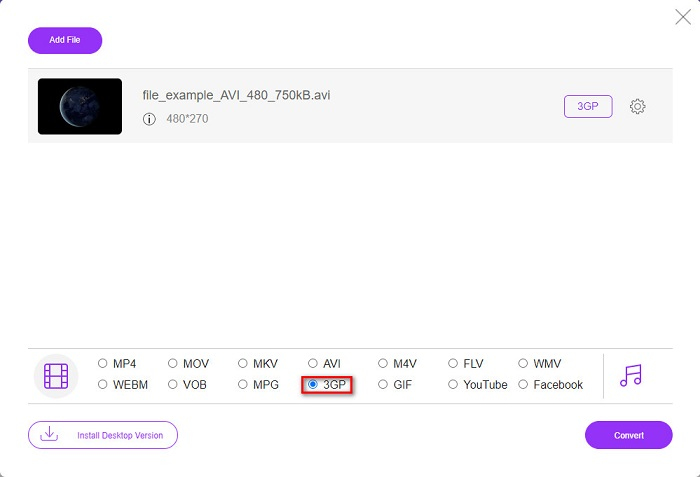
Step 3. Next, on the software's second interface, tick the circle of the 3GP file format.
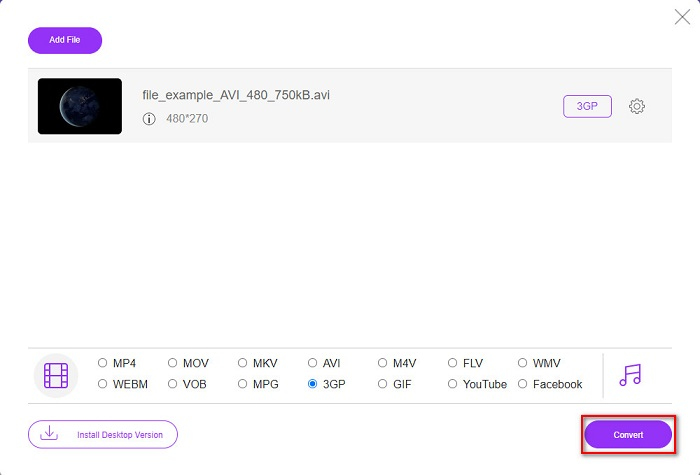
Step 4. And finally, click the Convert button to convert your AVI to 3GP file.
Parte 3. Conhecimento estendido sobre AVI e 3PG
Para mais conhecimento sobre esses dois formatos, leia as informações abaixo:
AVI ou Audio Video Interleave é um formato de arquivo difundido criado pela Microsoft. Este tipo de arquivo contém diferentes compactações de vídeo como DivX e XviD. Além disso, quase todas as plataformas de mídia podem reproduzir arquivos AVI, e o Windows o suporta amplamente. Também é conhecido como o padrão para armazenar filmes e arquivos de mídia.
Por outro lado, um formato de arquivo 3GP que os dispositivos móveis de terceira geração suportam. É desenvolvido pelo Projeto de Parceria de Terceira Geração (3GPP). Além disso, este tipo de arquivo tem apenas um tamanho de arquivo pequeno porque é feito para compartilhar dispositivos móveis 3G. Além disso, ambos os formatos de arquivo são ótimos, embora tenham suas diferenças.
| AVI | VS | 3GP |
| Descompactado | Comprimido/Descomprimido | Comprimido |
| Disponível em quase todos os dispositivos | Compatibilidade | Disponível em dispositivos móveis de terceira geração |
| Resolução de alta definição | Resolução suportada | Baixa resolução |
| Jogável | Jogável em dispositivos móveis 4g | Não reproduzível |
| Se você deseja ter um formato mais comum, compatível com quase todos os dispositivos, use este formato de arquivo | Vantagens de usar este formato de arquivo | Se você usa um dispositivo móvel de terceira geração e deseja um tamanho de arquivo menor, use este formato de arquivo |
AVI vs. 3GP
Baseado no Resource Interchange File Format (RIFF), o formato AVI foi introduzido pela Microsoft em 1992. Ele pode salvar vídeo/áudio de alta qualidade, pois usa menos compactação. Mas isso também causa o tamanho grande do arquivo AVI, o que pode ser um problema quando há espaço limitado.
O 3rd Generation Partnership Project (3GPP) produziu o formato 3GP/3GPP como um formato de contêiner multimídia. Na verdade, é baseado no formato de arquivo de mídia ISO. Costumamos usá-lo para salvar fluxos de vídeo/áudio que são transmitidos entre telefones celulares 3G e online.
Parte 4. Perguntas frequentes sobre a conversão de AVI para 3GP
Você pode reproduzir arquivos AVI no Mac?
Unfortunately, no. The native media player of Mac, QuickTime, does not support AVI. However, you can convert your AVI file to a file format that mac supports, MOV. To know how to easily convert AVI to MOV, click this link.
Posso converter AVI para 3PG sem perdas?
Yes. You can convert AVI to 3PG files without losing quality by using FVC Video Converter Ultimate. This ultimate converter can convert AVI to 3PG losslessly.
Você pode reproduzir arquivos 3GP em dispositivos móveis 4G?
Unfortunately, no. As the name implies, 3G mobile devices are the ones that can play 3GP files. But if you want to play a 3GP file on your 4G mobile device, you may want to convert your 3GP to MOV. To know how to convert 3GP files to MOV, read the article by clicking this link.
Conclusão
Se você está procurando soluções para converter arquivos AVI para 3GP, nós cobrimos suas costas. Procurar um conversor que tenha um alto padrão é difícil. Mas se você está procurando um conversor de alto nível, o FVC Video Converter Ultimate é a ferramenta mais adequada para você. Este conversor oferece os recursos mais exclusivos e úteis para você! Portanto, se você deseja usar este excelente conversor, baixe-o agora gratuitamente.
-
 As 4 maneiras mais eficazes de converter 3GP para o formato AVI [2021]
 Posso converter meus arquivos 3GP para AVI? Bem, você pode convertê-lo facilmente se experimentar essas ferramentas disponíveis, pois reunimos todas as soluções possíveis para o seu problema de conversão de 3GP em AVI.
-
 Melhor conversor 3GP para FLV a ser usado na conversão de 3GP para FLV [2022]
 Você já tentou converter 3GP para FLV, mas não sabe que tipo de conversor vai usar? Leia este artigo para saber todos os detalhes sobre a conversão de 3GP para FLV.
-
 2 melhores maneiras possíveis de converter 3GP não suportado para DivX [2022]
 Muitos usuários perguntam como converter 3GP para DivX. Então, agora, nós fornecemos um artigo para ajudá-lo a converter seu arquivo .3gp sem problemas.

