


 Video Converter Ultimate
 Gravador de ecrã
 Reparo de vídeo
Converta AVI para MKV sem esforço usando as 3 melhores ferramentas de conversão.
Converting AVI to MKV may sound complicated, especially if you are new to converting file formats. It is difficult to find tools that would help you convert your files. But worry no more! This article provides ways to easily convert your AVI file to an MKV file using three tools.

Parte 1. Arquivos AVI VS. Arquivos MKV
AVI ou Audio Video Interleave é um formato de contêiner de arquivo que a Microsoft desenvolve. Os arquivos AVI contêm dados de áudio e vídeo que permitem a reprodução de áudio com vídeo. Esse tipo de arquivo é o formato de vídeo padrão para Windows, não é à toa que é um dos formatos de arquivo mais comuns. Em contraste, MKV ou Matroska é um formato de contêiner multimídia. Esse tipo de arquivo armazena faixas de áudio, vídeo e legendas em um único arquivo. Além disso, é à prova de futuro, portanto, você não precisa se preocupar que esse arquivo esteja desatualizado. Mas por que convertemos arquivos AVI para formatos MKV? Simplesmente porque os formatos MKV podem lidar com vários fluxos de legendas e faixas de áudio em vários idiomas.
Parte 2. Melhor conversor de AVI para MKV que você deve experimentar
If you are looking for an offline AVI to MKV converter that has impressive features to use, FVC Video Converter Ultimate is the tool suited for you. This converter has special features that other converters do not have. Like, you can edit your video file, compress files, and even do batch convert multiple files into one. It can also do ultra-fast conversion to convert as quickly as lightning. Moreover, it supports numerous file formats to convert, including AVI to MKV, WMV, MOV, MP4, WebM, and many more.

Conversor de Vídeo FVC Ultimate:
Mais de 5.689.200 downloads- Você pode adicionar ou remover uma marca d'água em seus vídeos.
- Possui um processo de conversão ultrarrápido integrado e aceleração de hardware.
- Possui uma GUI amigável.
- Você pode fazer uma conversão em lote para converter vários arquivos em um.
- Disponível em todas as plataformas, como Windows e Mac.
Free DownloadFor Windows 7 or laterSecure Download
Free DownloadFor MacOS 10.7 or laterSecure Download
Portanto, se você estiver interessado em usar este conversor, siga as etapas simples abaixo.
Step 1. First, download the software application by ticking the Download button below for Windows/Mac. Follow the installation process further, then run the app.
Free DownloadFor Windows 7 or laterSecure Download
Free DownloadFor MacOS 10.7 or laterSecure Download
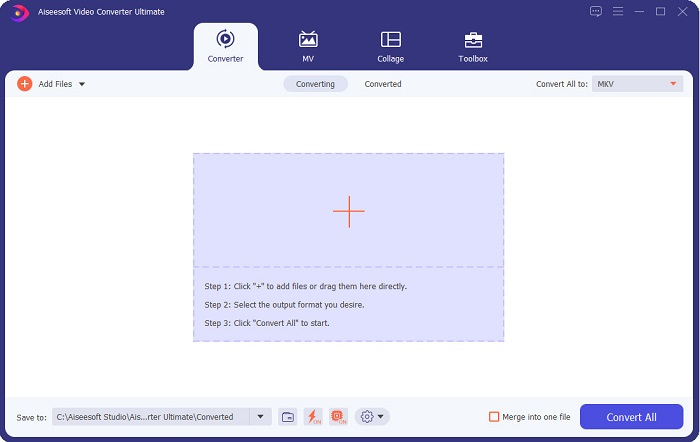
Step 2. After opening the application, you will see the first interface of the converter. Here is the tool's first interface.
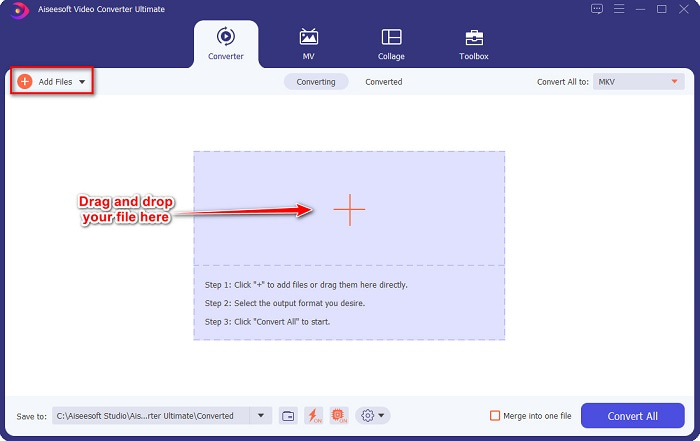
Step 3. Click the Add Files button or drag and drop files to the + sign button to upload your AVI file.
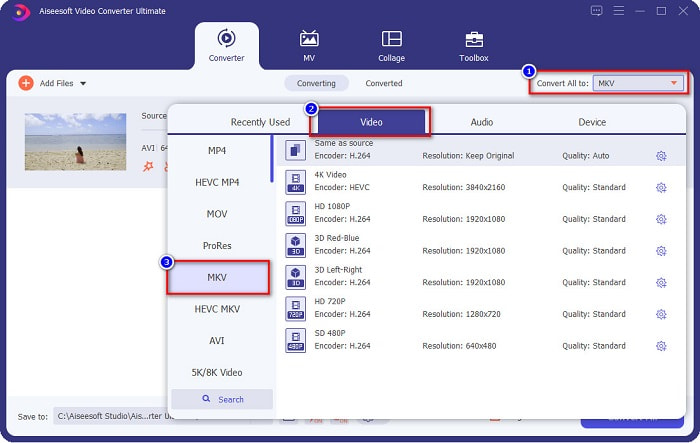
Step 4. After uploading your AVI file, click the Convert All to button to select MKV as your output format.
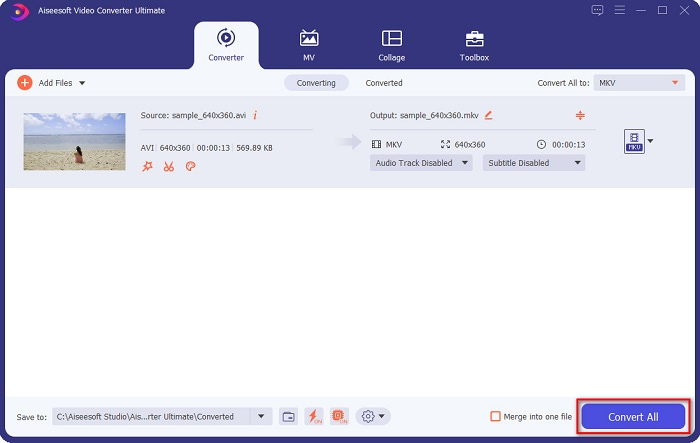
Step 5. Lastly, click the Convert All button to convert your AVI file to an MKV file format. Then wait for a few seconds. And voila! Your AVI file is now changed to MKV.
Seguindo os passos simples acima, você pode converter AVI para MKV facilmente.
Parte 3. Melhor maneira de converter arquivos AVI para arquivos MKV online
FVC Free Online Video Converter is one of the best online converters available on the web. This converter allows you to convert many file formats like AVI to MKV, WMA, MOV, TS, MP4, etc. This converter is also easy-to-use making it a beginner-friendly converter. Moreover, you can edit your file's resolution, video bitrate, and frame rate. However, this converter is internet-dependent; therefore, you may experience having a slow conversion.
Aqui estão os passos sobre como você pode converter AVI para MKV Free Online:
Step 1. Click this link to be directed to the FVC Free Online Video Converter’s webpage.
Step 2. Then, click the Add Files to Convert button, then launch the application.
Download the Desktop Version to convert files in batch.
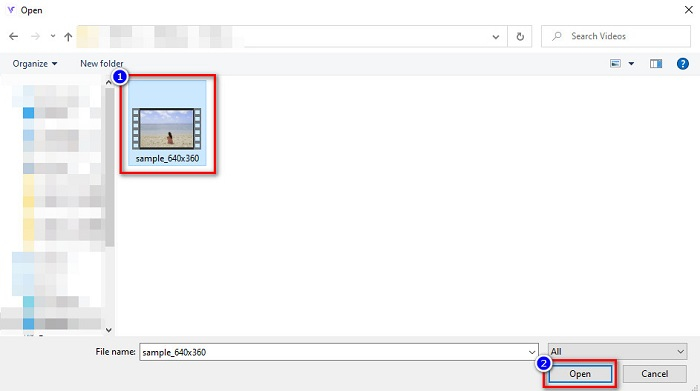
Step 3. After launching the app, you will be directed to your computer files. Then select your AVI file, and click Open.
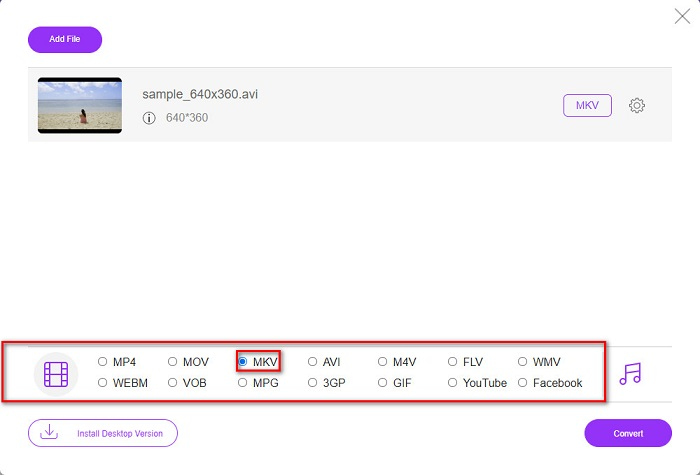
Step 4. Below the software's interface, you will see the list of file formats. Select MKV as your file output. Then proceed to the last step.
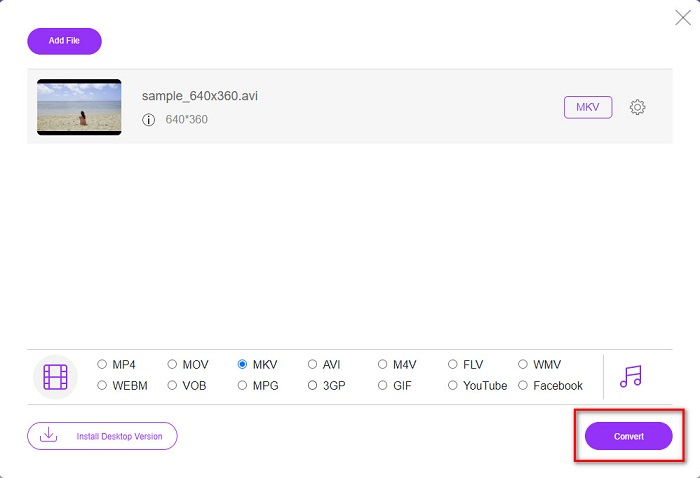
Step 5. Click the Convert button to start converting your AVI file to MKV for the last step.
É assim que você pode converter facilmente seus arquivos AVI para MKV usando um conversor online.
Parte 4. Converter AVI para MKV usando um conversor de freeware
What’s good about using freeware as your converter is downloading it free of charge. One of the best freeware tools available is VSDC Free Video Converter. This converter is fast, powerful, and has an easy GUI. It supports standard file formats like converting AVI to MKV, MPEG, WMV FLV, MP4, and more. However, it has limited features when it comes to converting files.
Um guia rápido sobre como usar o VSDC Free Video Converter
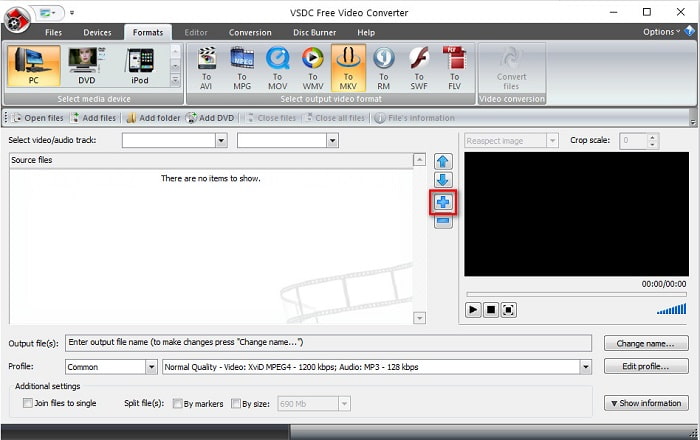
Step 1. Download the freeware converter by searching VSDC Free Video Converter on your browser. Follow the installation process, and open the app. After running the application, click the + sign button to upload your AVI file to the software's interface.
Step 2. Next, select your desired output format from the file formats above the software's interface. In your situation, click on MKV.
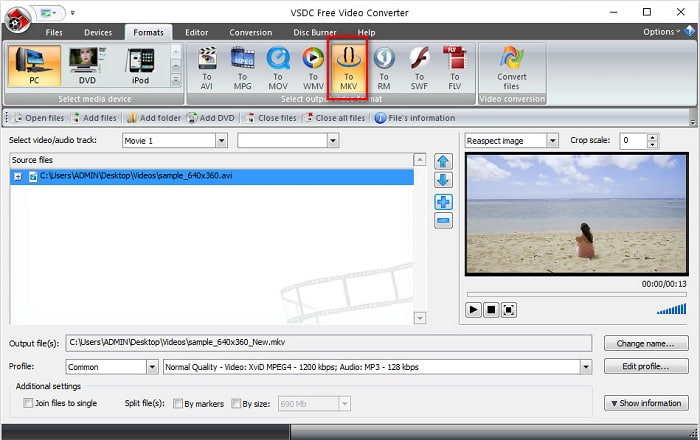
Step 3. For the last step, click the Convert Files button. Then your AVI file to MKV file will start to convert.
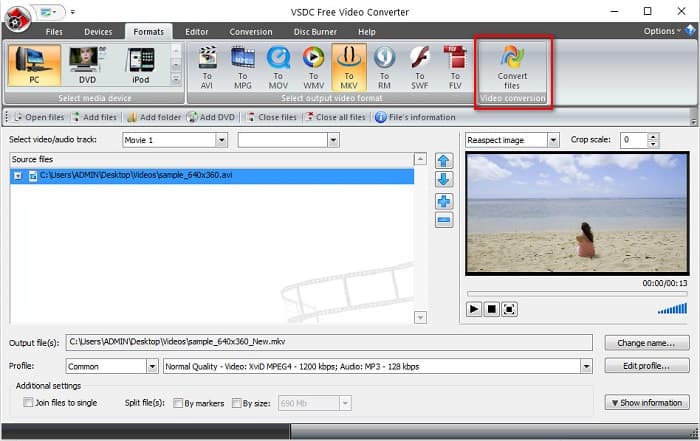
Seguindo este guia rápido, você pode converter facilmente seu arquivo AVI para arquivo MKV usando um conversor freeware.
AVI vs. MKV
Baseado no Resource Interchange File Format (RIFF), o formato AVI foi introduzido pela Microsoft em 1992. Ele pode salvar vídeo/áudio de alta qualidade, pois usa menos compactação. Mas isso também causa o tamanho grande do arquivo AVI, o que pode ser um problema quando há espaço limitado.
O formato de contêiner multimídia Matroska, lançado em 2002, é um formato de código aberto que pode incluir várias faixas de vídeo, áudio, imagem e legendas. Assim, você pode usá-lo para armazenar clipes de vídeo curtos, programas de TV e filmes facilmente. É bastante popular para legendas de fãs de anime.
Parte 5. Perguntas frequentes sobre a conversão de AVI para MKV
Quais são as desvantagens de converter AVI para MKV?
Como AVI é um formato mais usado que MKV, se você converter seu arquivo AVI para MKV, não poderá reproduzir seu arquivo em outros players de vídeo que não suportem arquivos MKV.
Qual tem melhor tamanho de arquivo maior, AVI ou MKV?
O MKV tem um tamanho de arquivo grande em comparação com o AVI porque o MKV contém muitos vídeos, áudio e faixas de legendas. Ele também armazena um filme inteiro com legendas.
Como posso reproduzir arquivos AVI no Mac?
Mac computers cannot natively play AVI videos. However, there are specific ways to play your file on Mac still. One is by converting your AVI file to a file that Mac can play, MP4. To know more about converting AVI to MP4, click this link.
Conclusão
Em suma, os conversores apresentados acima podem converter arquivos AVI para MKV sem esforço. Todos eles têm uma GUI fácil de entender, o que não dificultará seu uso. Eles também possuem recursos exclusivos que outros conversores não possuem. Mas se você deseja um conversor que traz o melhor do seu arquivo, onde possui recursos que podem editar e converter ultra-rápido, você pode querer usar o FVC Video Converter Ultimate como a primeira linha de escolha. Faça o download agora e experimente seus recursos exclusivos para você usar.
-
 Decida qual é o software ideal de conversão de AVI para MP3 [PC e Mac]
 Você quer saber como converter AVI em um formato de áudio MP3? Na lista abaixo, você encontrará diferentes ferramentas e etapas que atenderão às suas necessidades.
-
 Como converter AVI em MOV com etapas e ferramentas fáceis
 Você quer saber como converter AVI em um MOV jogável? Você deve seguir este artigo para saber como fazê-lo e dicas para ter uma conversão bem-sucedida.
-
 Importar e converter AVI para formato compatível com o iMovie [2021]
 Tendo um problema porque você não pode importar seu arquivo AVI no iMovie? Se você leu este artigo, já escolheu o remédio certo para esse problema.

