


 Video Converter Ultimate
 Gravador de ecrã
 Reparo de vídeo
Como converter AVI para WMV usando conversores gratuitos [Passos rápidos]
AVI or Audio Video Interleave files, developed first by Microsoft Corporation, have a high-end video format. This file format has a high-quality resolution, but its file size is too big. One common way to play your video or use your file on any platform is to convert your AVI file to a WMV file. Therefore, if you want to know more about how to convert AVI to WMV, try to proceed further as we tackle the different converters, provided with steps.

Parte 1. Converta seu AVI para WMV no Windows 10/11
Windows 10 Operating System supports various files that you can find online. Files like AVI and WMV are both supported by Windows 10. Therefore, converting your AVI file to a WMV file will be easy, primarily if you use this lightning-speed converter, FVC Video Converter Ultimate. This converter is one of the reliable converters that trends today. Moreover, this converter allows you to edit, enhance, and compress your file. It is also easy-to-use and can quickly convert AVI files to WMV on Windows 10.

FVC Video Converter Ultimate
Mais de 5.689.200 downloads- Permite converter vários formatos de arquivo, incluindo AVI para WMV, MP4, MOV, VOB, etc.
- Possui recursos que permitem mesclar vários arquivos em um.
- Você pode editar, aprimorar e compactar seu arquivo.
Free DownloadFor Windows 7 or laterSecure Download
Free DownloadFor MacOS 10.7 or laterSecure Download
Aqui estão as etapas sobre como converter seu arquivo AVI para o formato de arquivo WMV:
Step 1. To install FVC Video Converter Ultimate on your Windows 10, click the download button below. Then follow the installation process, and run the app.
Free DownloadFor Windows 7 or laterSecure Download
Free DownloadFor MacOS 10.7 or laterSecure Download
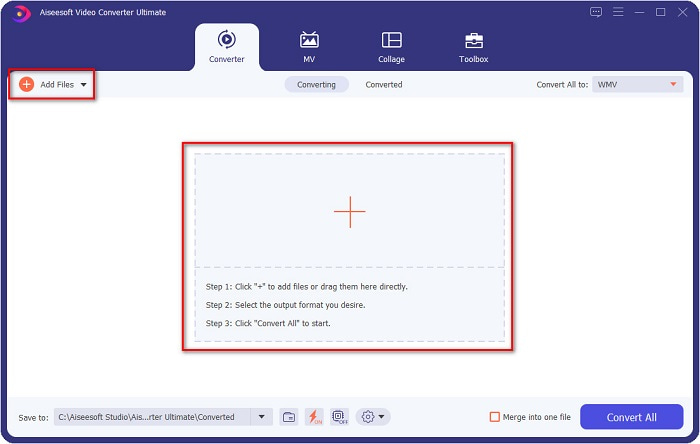
Step 2. After you open the application, click the Add files button located at the upper left of your screen, or the + button, to add your AVI files on the software's main interface. Your computer files will appear, then select your AVI file that you will convert as WMV. Click the Open button to upload your file.
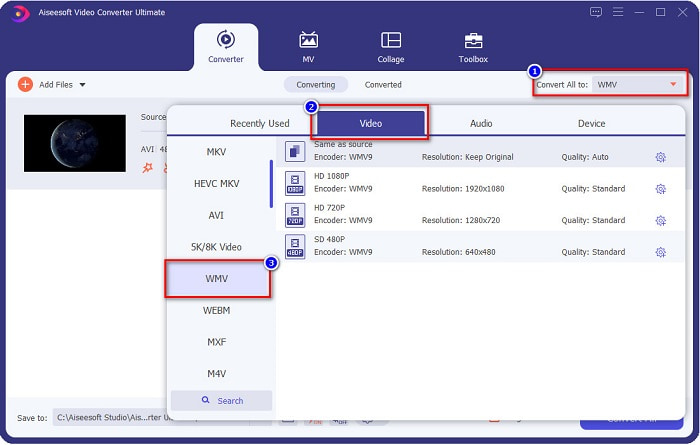
Step 3. For you to change the file format, click the Convert All to button at the upper right corner of the software's interface. A list of file formats will appear, then select WMV from the category of Video.
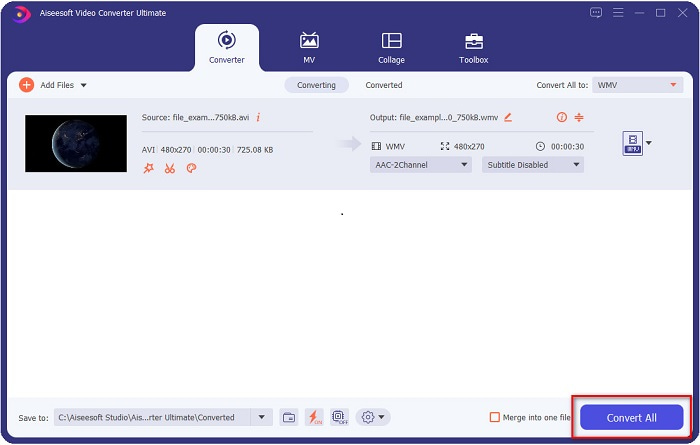
Step 4. After choosing the WMV file format, click the Convert All button to convert your AVI to a WMV file. Wait for a few seconds, and that is it! As simple as that, you can easily convert your AVI file to WMV.
Parte 2. Como converter AVI para WMV gratuitamente
When converting your AVI files to WMV, you can also use free downloadable converter tools. One well-known converter is Freemake Video Converter. This offline converter allows you to convert for over 500+ formats like AVI to WMV, MP3, MP4, DVD, and more. However, the Graphics User Interface or GUI is not that good, and its interface is also not easy to use. Nonetheless, it is still being used by many users when it comes to converting files.
Guia rápido sobre como converter seu arquivo AVI para arquivo WMV usando o Freemake Video Converter:
Step 1. Download the app by searching Freemake Video Converter in your browser. After downloading, open the application.
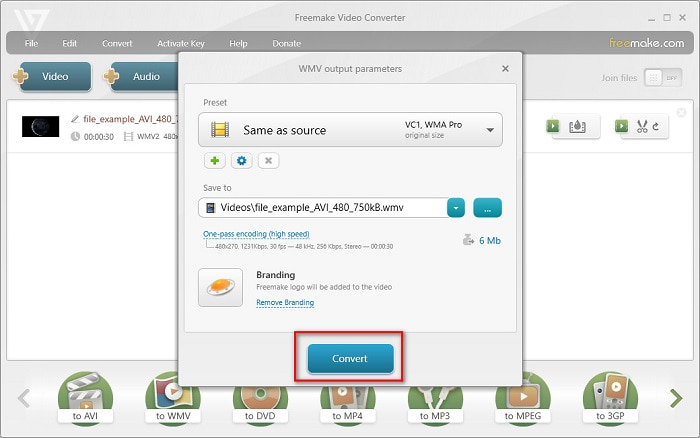
Step 2. After opening the application, click the Video button; select your AVI file when your computer files appear. Press Open to add your AVI file to the queue.

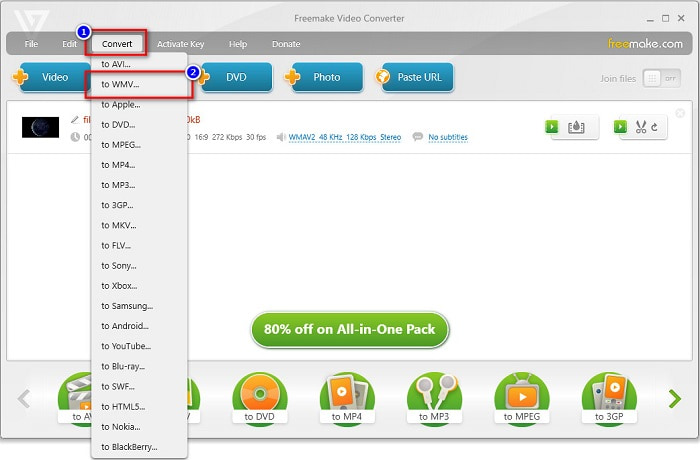
Step 3. After choosing your AVI file, click the Convert option located at the upper part of the software’s interface. A list of file formats will appear, then select WMV.
Step 4. A new interface will appear where you will now convert your file. Click the Convert button to start converting your AVI file to WMV.
Parte 3. Convertendo Arquivos AVI para Arquivos WMV Online
We could not deny that it is more convenient to convert files online. Therefore, we tried some online converters to convert AVI to WMV online and chose FVC Free Video Converter Online as the best to recommend. This converter allows you to convert large files without limitations. However, you may encounter slow conversion because this converter is internet-reliant. It means that it depends on the internet connection on how fast you can convert. Nevertheless, FVC Free Video Converter Online has been used by many and proven to be one of the best online converters.
Steps on how to Convert your AVI file to WMV using FVC Free Video Converter
Step 1. In your browser, search FVC Free Video Converter Online.
Step 2. When you are already on the webpage, click the Add Files to Convert button. Then download the launcher that will appear when you click the Add Files to Convert button. And then, select your AVI file.
Download the Desktop Version to convert files in batch.
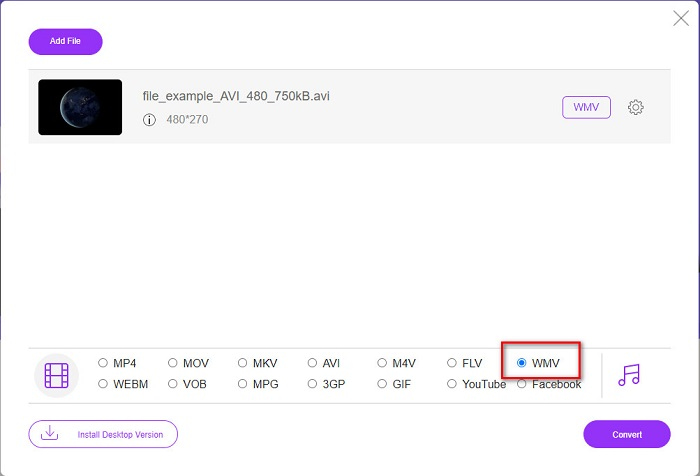
Step 3. After you select your file, in the second interface of the software, you will see the list of file formats, then click WMV.
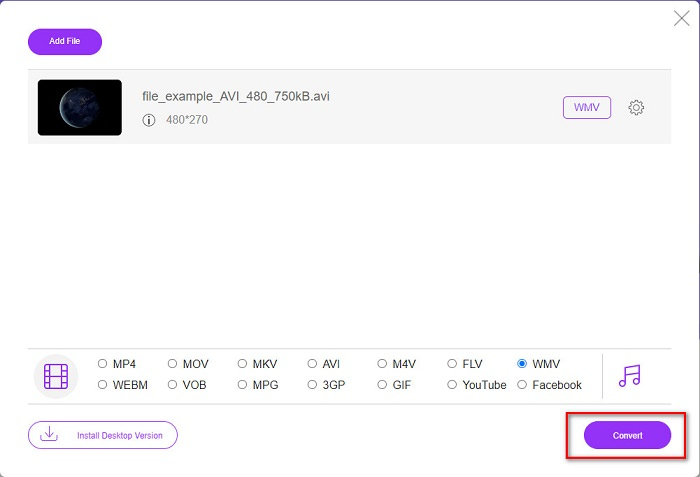
Step 4. Lastly, click the Convert button at the bottom right part of the software's interface. Your computer files will appear, where you can select the destination of your converted file. Then your AVI to WMV file will start to convert.
Parte 4. Mais sobre AVI e WMV
AVI or Audio Video Interleave files are the standard video formats for Windows machines. These files contain audio and video and use various codecs, including DivX and XviD. However, this file format is minimally compressed. Therefore, the file size of it is quite huge. On the other hand, WMV or Windows Media Video supports many software devices, and the Windows Media Player compresses these types of files. Moreover, Windows System usually plays this type of file. Read on Best WMV Players, if you want to play WMV files with ease.
AVI vs. WMV
Baseado no Resource Interchange File Format (RIFF), o formato AVI foi introduzido pela Microsoft em 1992. Ele pode salvar vídeo/áudio de alta qualidade, pois usa menos compactação. Mas isso também causa o tamanho grande do arquivo AVI, o que pode ser um problema quando há espaço limitado.
Produzido pela Microsoft, o WMV era um dos formatos de vídeo mais comuns nos anos 2000. Ele pode ser visto na web e reproduzido por vários players de mídia no Windows. E também é o formato de arquivo de vídeo padrão do Windows Media Player. Mas foi assumido por outros formatos recentemente.
Parte 5. Perguntas frequentes sobre como converter o formato de arquivo AVI para WMV
Mudar de AVI para WMV estraga a qualidade do arquivo?
Quando você converte AVI para WMV, a qualidade de seus arquivos não deve ser afetada. No entanto, alguns conversores não suportam vídeos de pixel de alta qualidade, fazendo com que a qualidade caia.
Você pode compactar arquivos AVI?
Yes. You can use video compressors available online. You can also convert your AVI file to WMV format to reduce the file size. Moreover, you can use FVC Video Converter Ultimate to compress your AVI files.
O tamanho do arquivo do meu arquivo AVI será alterado após a conversão?
Existem alguns casos no tamanho do arquivo AVI que podem ser diferentes do original. Porque quando os arquivos são convertidos, os arquivos compactados serão descompactados, resultando em uma pequena alteração no tamanho do arquivo.
Conclusão
Para resumir tudo, as ferramentas online e offline apresentadas acima mostram recursos de conversão promissores que podem satisfazer suas necessidades quando se trata de converter arquivos AVI para WMV. Mas se você estiver procurando por um conversor que contenha muitos recursos que o ajudarão a atender às suas necessidades, recomendamos o uso do FVC Video Converter Ultimate - ainda com dúvidas? Experimente agora e tire o melhor proveito de seus arquivos!
-
 Guia concreto para ajudá-lo a converter AVI em FLV gratuitamente
 Para converter AVI em FLV, você precisa de um conversor de vídeo poderoso. Felizmente, você pode aprender dois e seu guia passo a passo neste único artigo.
-
 Como converter vídeos AVI em arquivos GIF animados no Windows / Mac
 Quer selecionar os segmentos AVI interessantes para criar memes GIF? Este artigo apresentará os 2 melhores métodos para recortar os vídeos AVI e converter arquivos AVI em GIF animados gratuitamente.
-
 Decida qual é o software ideal de conversão de AVI para MP3 [PC e Mac]
 Você quer saber como converter AVI em um formato de áudio MP3? Na lista abaixo, você encontrará diferentes ferramentas e etapas que atenderão às suas necessidades.

