


 Video Converter Ultimate
 Gravador de ecrã
 Reparo de vídeo
 Secure Download
Maneiras mais rápidas de converter FLAC e WAV (offline/online)
Free Lossless Audio Codec, commonly known as FLAC, is an audio file format with a remarkable resemblance to MP3. It provides users an excellent audio quality while occupying a relatively small size on your disc space. Besides that, this type of format is lossless, which says that a large portion of your audio data is retained despite the compression process. On another note, there are cases when you need to convert FLAC files to another format like WAV if you want to make your listening experience to its optimum and superior quality. Should you choose between the two? Find out below how you can get both using the best FLAC to WAV conversion tools out there.

Parte 1. Converter FLAC e WAV offline
Video Converter Ultimate is a top-notch tool for transforming files to any audio format, including WAV and FLAC. This program offers a batch conversion feature that allows you to convert a collection of audio files in one sitting. Moreover, you can maximize the quality of every song you wish to work on since the program allows users to adjust output technicalities such as the sample rate and bitrate. If you wish to batch convert WAV to FLAC or vice versa, read the quick guide we prepare beneath.
Step 1. Launch the program on your device by selecting the appropriate Free Download button below. In the next step, follow the on-screen instructions to launch the program. You can get a hand with its interface once installed.
Free DownloadFor Windows 7 or laterSecure Download
Free DownloadFor MacOS 10.7 or laterSecure Download
Step 2. Hit the Add icon on the main screen and import the audio file you want to work on. Afterward, you will be directed to a preview of the imported file. You can upload a folder if you wish to convert in bulk. Choose from your directory the folder that contains all the audio files you need.
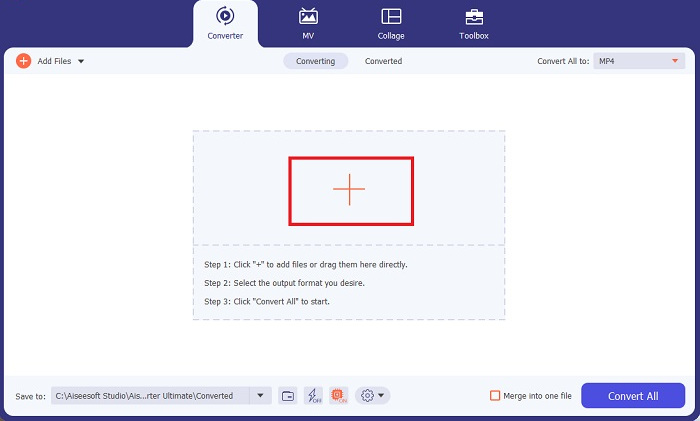
Step 3. Now, you can change the output format by clicking the Converter button above the program’s screen. From there, choose WAV from the Audio Output selection tab. Meanwhile, you can adjust the sample rate and bitrate of your output file to match your preferred quality.
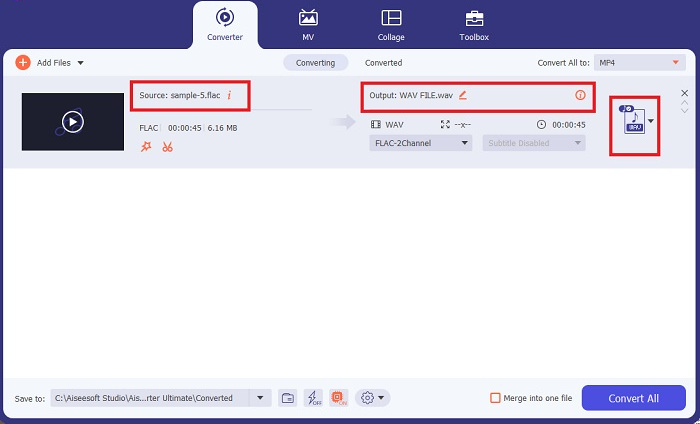
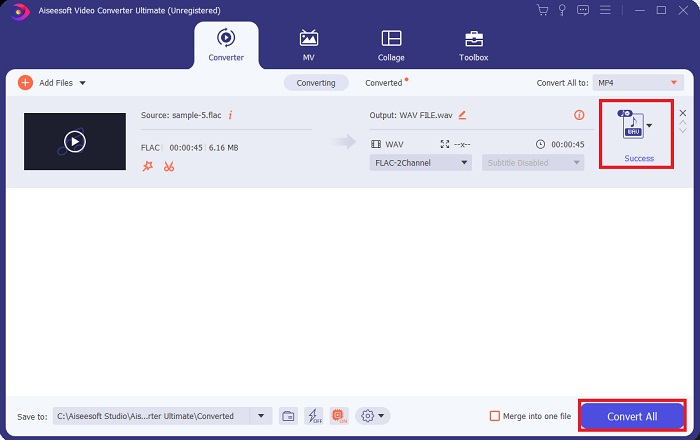
Step 4. For the final step, initialize the conversion process by clicking the Convert All button below. Afterward, the program will automatically open the output folder for you to check on your file’s new format.
Prós
- Ele pode converter em lote o formato de arquivo de áudio FLAC para WAV.
- O programa funciona bem com Windows e Mac OS.
- Tem uma velocidade de conversão rápida.
Contras
- Requer uma taxa de assinatura paga após o teste gratuito.
- O programa não funciona em dispositivos com sistema operacional Linux.
Parte 2. Converter FLAC para WAV ou WAV para FLAC Online
While your search engine may show you a plethora of FLAC to WAV or WAV to FLAC online converters, here is what we could do to ease your struggle. Free Audio Converter Online is an excellent option to exempt yourself from installing a desktop program. This online converter works seamlessly, providing safety and security for your personal data while accomplishing the conversion. Moreover, you can take advantage of the software's bulk conversion feature just as f you are using a desktop program.
Step 1. Click the link above to land on the Free Online Video Converter main website. Select the Add Files to Convert on the main screen and upload your audio file.
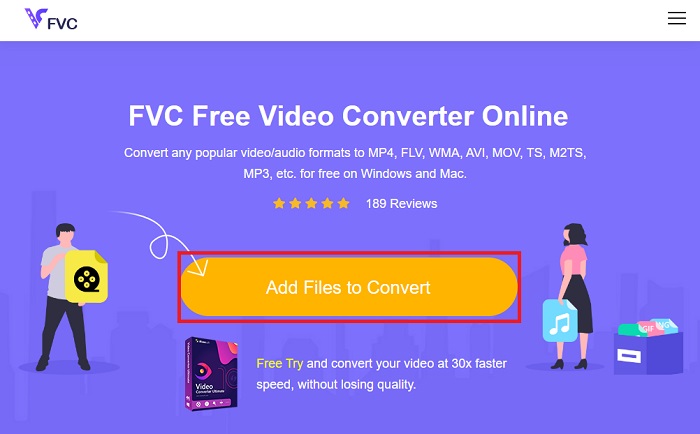
Step 2. The preview of your original file will show on the screen. From the same panel, turn below and choose your desired output format.
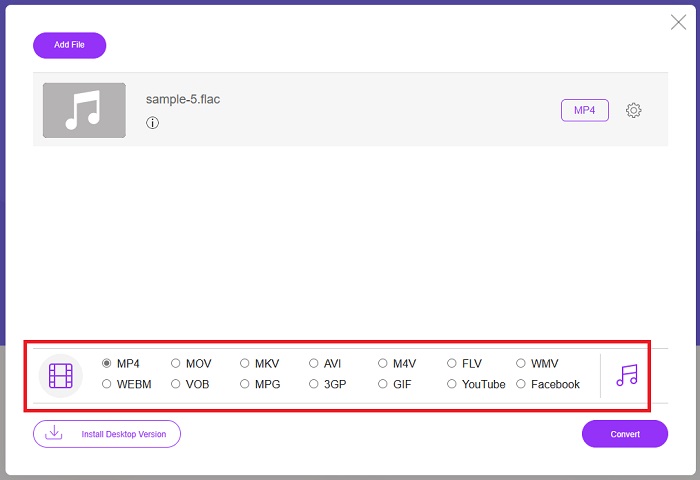
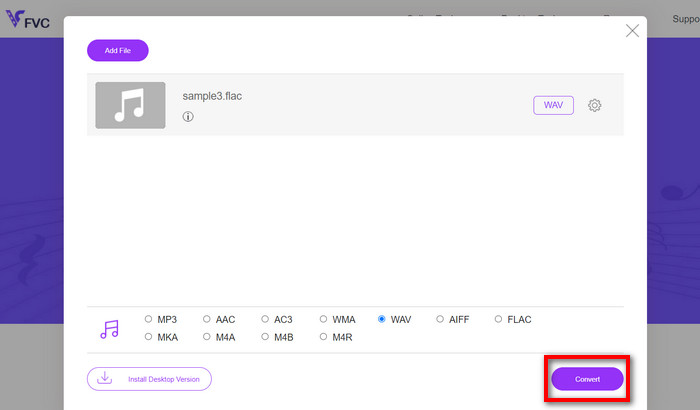
Step 3. Hit the Convert button to change FLAC to WAV format. If you wish to convert another file, repeat this guide from the start.
Prós
- Funciona em qualquer mecanismo de pesquisa, como Google Chrome, Safari, Firefox e muito mais.
- Ele oferece vários formatos populares de arquivos de áudio, como MP3, AAC e WMA.
- Os usuários podem desfrutar de conversões ilimitadas por dia.
Contras
- A velocidade de conversão depende da intensidade da conexão com a Internet.
Further Reading:
Convert FLAC to MP3 Conversion to Preserve Audio Quality
Easy Steps to Convert WAV to OGG for Optimal Audio Size
Parte 3. Perguntas frequentes sobre a conversão de FLAC e WAV
A conversão de um arquivo FLAC para WAV diminuirá a qualidade?
A conversão de seus arquivos de áudio de FLAC para WAV não degradará a qualidade, pois sua resolução não é compactada. No entanto, suponha que você converta um arquivo de WAV para FLAC. Nesse caso, você poderá notar pequenas mudanças, principalmente para quem tem ouvidos bastante atentos aos detalhes. Se você precisar de ajuda para decidir qual deles manter, aqui está uma perspectiva que você pode observar; Os formatos de áudio FLAC são uma boa escolha para armazenar um monte de músicas, enquanto o tamanho dos arquivos WAV são maiores, mas adequados para edição de áudio.
O WAV é o formato de áudio de maior resolução?
WAV é a abreviação do Waveform Audio File Format desenvolvido pela IBM e Microsoft. Este formato é considerado o formato de resolução mais alta na indústria da música digital porque contém frequências de áudio não comprometidas.
Qual é o melhor conversor online de FLAC para WAV?
Sem dúvida, o FVC Free Online Video Converter é o melhor conversor online gratuito de FLAC para WAV. Você não precisa adquirir habilidade técnica para transformar nenhum arquivo de vídeo e áudio usando o software. Ele pode fazer seu trabalho com eficiência porque é fácil de usar e tem velocidade de conversão incomparável. Além disso, este programa online fornece, se não todos, mas a maioria dos formatos de áudio populares que conhecemos.
Conclusão
Conversion can happen either way from FLAC to WAV and WAV to FLAC. Since both file formats are prevalent in digital music today, picking which one to choose may depend on the task you will use them for. With the tools mentioned above, you can switch back and forth between formats anytime. Follow the steps mentioned above to change FLAC to WAV or WAV to FLAC, and you should face zero difficulties.
-
 Descubra como converter MP3 para o formato WAV
 Você quer saber como converter MP3 para WAV? Determine quais ferramentas produzem a conversão de melhor qualidade que você pode obter.
-
 WAV Player - 5 principais aplicativos de player WAV para Android, iPhone, PC e Mac
 Como reproduzir arquivos WAV no telefone Android? Qual jogador pode jogar WAV? Esta postagem compartilha os 5 melhores reprodutores WAV gratuitos para Android, iPhone, Mac e PC.
-
 Os 3 principais editores de metadados FLAC no Mac e no Windows [Atualizado em 2023]
 Deseja alterar os metadados FLAC? Nesse caso, você deve ler este artigo, pois fornecemos conhecimento suficiente sobre o editor de metadados FLAC mais recente que você pode usar.
