


 Video Converter Ultimate
 Gravador de ecrã
 Reparo de vídeo
 Secure Download
MOV para MPG: o guia rápido sobre como converter esses formatos em 2023
For the record, MOV files acquire commendable reactions today for it is considered one of the suitable formats for storing movies. This file has been widely recognized as the default format for Apple products such as iPhones, iPad, and Macbooks. However, when you try to upload MOV files on the internet, you may have a hard time because it contains a larger size compared to other video formats. To overcome this, you can opt to convert MOV to MPG. That's why stay tuned on this guidepost, and we will help you learn how to pull it off.

Parte 1. Converter MOV para MPG
1. Video Converter Ultimate
Video Converter Ultimate is the ultimate offline solution to meet all your needs to convert MOV to MPG. In a few clicks, the program can't let you transform a file, whether big or small in its size. Moreover, this tool is geared with Output Customization settings, enabling users to experience high-quality output format and meet their preferences. Here is a breakdown of the simple guide to convert MOV to MPG quickly.
Step 1. Install the Program
To begin, click your device's appropriate Download button below. Afterward, click the installer and run it through to get the program launched on your screen.
Free DownloadFor Windows 7 or laterSecure Download
Free DownloadFor MacOS 10.7 or laterSecure Download
Step 2. Upload MOV Files to Convert
After installing the program, select the Plus button at the center of the interface. Once the computer directory appears, choose the MOV file to upload. Moreover, you can upload more than one file for bulk conversion.
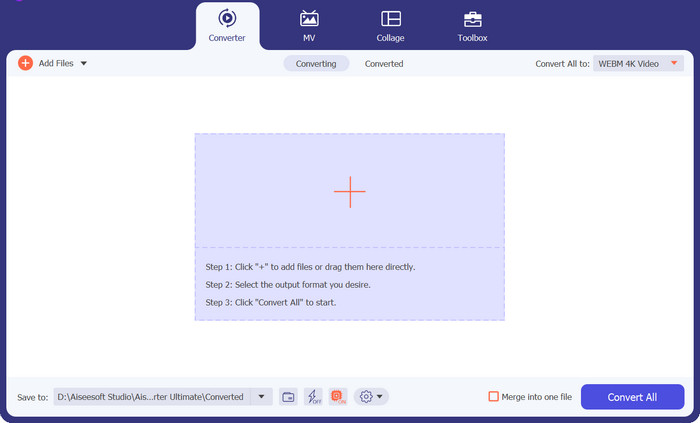
Step 3. Select Output
A thumbnail of your MOV file will show on the program, confirming the successful uploading process. To select your output format, expand the Output tab and click the Video panel. From there, scroll through and select MPG.
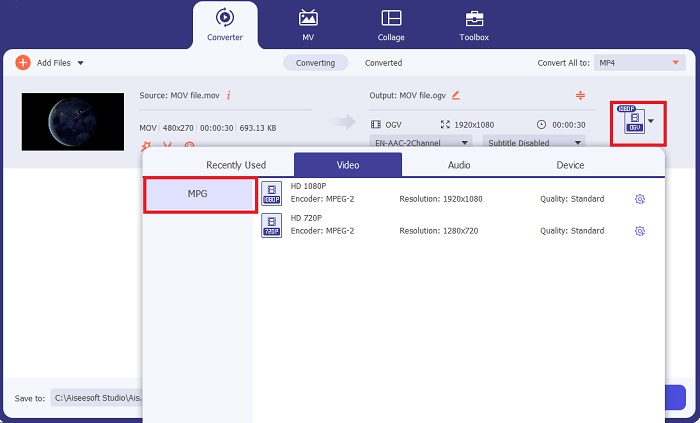
Step 4. Start the Conversion
Finally, modify your output quality requirements by adjusting output settings. Once done, hit the Convert button to process your MOV to MPG.
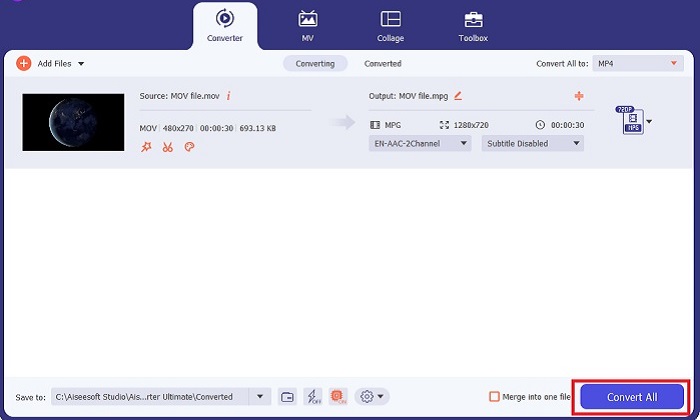
Key Features
◆ Conversão perfeita de MOV para MPG: Uma coisa que amamos no Video Converter Ultimate é sua interface amigável. Esta ferramenta é melhor para todos, seja um usuário iniciante ou experiente.
◆ Velocidade de conversão 50x mais rápida: Graças à ajuda da tecnologia de codificação GPU Acceleration, o Video Converter Ultimate supera qualquer outro conversor off-line devido à sua conversão rápida sem atrasos e travamentos.
◆ Recurso de conversão em massa: Com o Video Converter Ultimate, você também pode converter uma pasta de arquivos MOV em mais de 100o formatos diferentes de MPG.
2. Conversor de Vídeo Gratuito Online
Free Video Converter Online is another software that revolutionizes the format conversion activity. Although this online program does not offer comprehensive tools like the ones we find on offline software, it passes the test as a reliable program to convert MOV to MPG online. It offers a bulk-conversion feature and gives you complete control of your output.
Step 1. First, go to the main website of Free Video Converter Online. Before uploading the MOV file, hit the Add Files and you will be asked first to launch the online tool.
Step 2. To upload the file you wish to convert, select the Add Files button again and upload your file once. You can also use the drag-and-drop function.
Step 3. Once your raw file appears, select your output format in the lower corner of the screen. On the Video panel, you will see all the possible formats, and for our case, choose MPG. Finally, hit the Convert button and wait for your file to download.
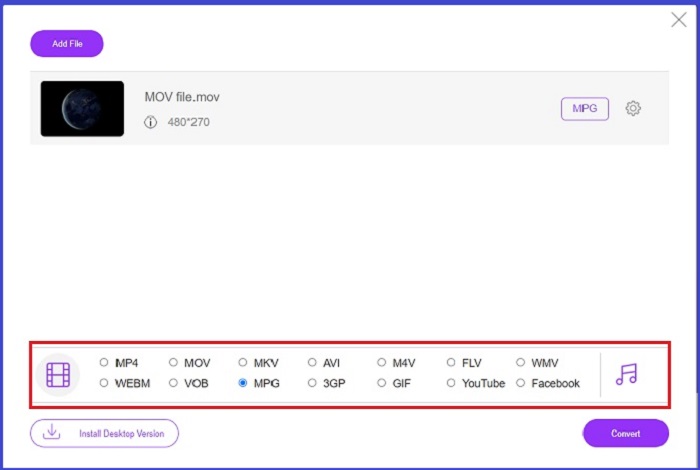
Key Features
◆ Conversor Online Multiplataforma: Esteja você em seu telefone, tablet ou computador, esta ferramenta funciona perfeitamente bem, o que torna possível a conversão de vídeo ou áudio.
◆ Garantia de privacidade: Quem quer ter informações privadas invadidas? Com o Free Video Converter Online, você deve enfrentar zero dilemas sobre esse problema. Esta ferramenta online permite que os usuários convertam MOV para MPG gratuitamente sem a necessidade de processos de inscrição.
◆ Sem Requisitos de Instalação: Esta ferramenta é outro conversor descomplicado para ajudá-lo a se livrar de instalações agitadas, especialmente se você ficar sem espaço digital.
Parte 2. Converter MPG para MOV
1. Video Converter Ultimate
Yet again, Video Converter Ultimate is still the best solution we can give you to convert MOV to MPG Mac and Windows devices. This tool contains more than 1000+ video and audio formats, including those uniquely made for devices such as Samsung, Apple, Sony, and more. Follow the guide beneath to transform any of your MPG files to MOV.
Free DownloadFor Windows 7 or laterSecure Download
Free DownloadFor MacOS 10.7 or laterSecure Download
Step 1. Hit the Add Files button to import MPG on the program.
Step 2. After your file loads on the screen, select the output by clicking Output > Video > MOV. For better quality, you can also modify the video parameters.
Step 3. Select the Convert button to command the program to convert files from MPG to MOV. You can check the output with the program once the conversion is finished.
2. AnyConv
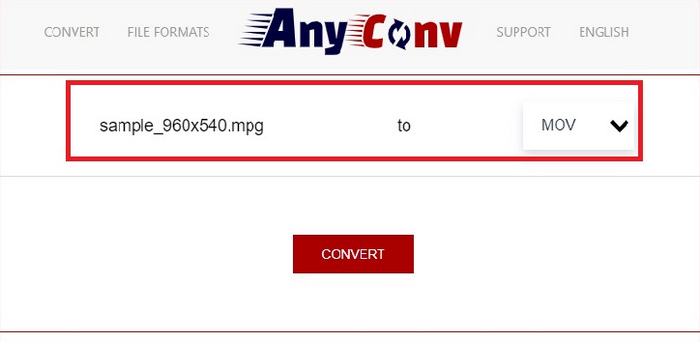
AnyConv é um conversor online gratuito de MPG para MOV. Este programa funciona bem em qualquer dispositivo e oferece um recurso de arrastar e soltar quando você carrega seus arquivos MPG. Além disso, esta solução online protege os dados dos usuários excluindo seus arquivos convertidos após uma hora. Além de MOV, você pode converter seus arquivos MPG para 3GP, AVCHD, MP4, MKV e muito mais.
Step 1. First, open the website of AnyConv. Once it appears on your screen, click the Choose File and select your target MOV footage to convert.
Step 2. Once your MOV file is uploaded, choose MPG from the list of output formats on the Output column at the center.
Step 3. At last, click the Convert button and wait for your file to download.
Further Reading:
3 Best Ways to Quickly Convert MPG to MP4
5 Best Ultimate MOV to 3GP Converters You Must Not Miss
Parte 3. Perguntas frequentes sobre como converter MPG para MOV
Existe um conversor gratuito de MOV para MPG?
Definitivamente sim! Os conversores online são sua melhor escolha para evitar o pagamento de taxas. Você pode escolher o Free Online Video Converter para converter MOV para MPG gratuitamente.
MPG é melhor que MOV?
MOV é melhor que MPG por causa de suas diferenças de tipo. MOV é um formato de contêiner que salva todos os seus dados originais. Ao mesmo tempo, o MPG é um codec compactado usado para reduzir o tamanho do arquivo de vídeo para uma transferência mais rápida de arquivos pela Internet.
Qual é a vantagem de um arquivo MOV?
Os arquivos MOV são adequados para edição e são considerados padrões para a escolha do melhor formato de vídeo. Uma desvantagem desse arquivo é que apenas alguns reprodutores de mídia abrem esse formato.
MOV para MPG reduz a qualidade?
Sim. Converter seus arquivos de MOV para MPG não apenas reduzirá o tamanho do arquivo do seu vídeo, mas também reduzirá a qualidade. Ambos os arquivos são ótimos em qualquer caso, você pode precisar deles.
Posso reproduzir MOV no Windows Media Player?
Felizmente, os arquivos MOV no Windows Media Player podem ser reproduzidos desde que estejam na versão 12 ou superior.
Conclusão
There you have the possible ways to convert MPG to MOV or vice versa. Both formats will best serve your different needs. With online converters, you can have a straightforward conversion. On the other hand, if you wish to furnish your files by modifying their quality and even editing it, Video Converter Ultimate is what we recommend.
-
 FLV para MPG - Como converter FLV para MPG no Mac, PC e online gratuitamente
 Como converter FLV para MPEG? Posso converter FLV para MPG gratuitamente? Este post compartilha 3 conversores de vídeo gratuitos para ajudá-lo a converter FLV para MPG sem perda de qualidade.
-
 Como converter MPG para M4V no Mac e usando a ferramenta online
 Você é um novo usuário de Mac e não sabe como converter MPG para M4V? Então você pode ler este artigo para saber mais e descobrir como converter arquivos usando seu Mac.
-
 8 melhores jogadores MOV para reproduzir arquivos QuickTime MOV com qualidade original
 Saiba mais sobre os 8 melhores reprodutores MOV disponíveis para Windows e Mac. Você pode escolher o desejado e apropriado para reproduzir arquivos MOV com a qualidade original.
