


 Video Converter Ultimate
 Gravador de ecrã
 Reparo de vídeo
 Secure Download
Reduzindo o áudio: como converter o formato WAV para OGG para tamanhos de arquivo menores
Large audio files may eat up a lot of memory on your computer or mobile device if you're dealing with them. Converting these files from WAV to OGGw format reduces their size greatly, making them easier to manage and transmit. In this post, we'll look at the advantages of converting WAV files to OGG format and show you how to do it step by step. We'll also go through some of the greatest programs for the job to ensure you get the best audio possible. So, whether you're a musician, podcaster, or simply someone who wants to organize their audio recordings, this article is for you.

Parte 1. Comparação de OGG vs. WAV
Aqui está um gráfico de comparação descrevendo as diferenças entre a conversão de WAV para OGG. Você pode verificá-los para sua referência.
| WAV | OGG | |
| Tamanho do arquivo | ampla | Pequeno |
| Compressão | Descompactado | Comprimido |
| Qualidade de áudio | Alta qualidade | Alta qualidade |
| Compatibilidade | Amplamente compatível | Menos compatível |
| Suporte de plataforma | Suportado em todas as plataformas | Suporte limitado em algumas plataformas |
| Editando | fácil de editar | Um pouco mais difícil de editar |
Parte 2. Melhor maneira de converter WAV para OGG ou OGG para WAV
1. FVC Video Converter Ultimate
FVC Video Converter Ultimate is a powerful video conversion software that can help you convert your WAV audio files to the compressed OGG format quickly and easily. With its intuitive and user-friendly interface, you can easily select your WAV files, choose the OGG format, and initiate the conversion process with just a few clicks.
Além disso, o FVC Video Converter Ultimate inclui recursos avançados de edição de vídeo, permitindo aparar, recortar, adicionar marcas d'água e aplicar vários filtros aos seus arquivos de áudio antes da conversão. Esse recurso pode ser útil se você precisar fazer pequenos ajustes ou melhorar a qualidade de seus arquivos de áudio antes de convertê-los para o formato OGG. Portanto, se você deseja converter em lote OGG para WAV ou vice-versa, siga as etapas abaixo:
Step 1. Install the program and import OGG or WAV files
FVC Video Converter can be downloaded and installed from the official website. Launch the application and select the Plus sign button to import the audio file to be converted.
Free DownloadFor Windows 7 or laterSecure Download
Free DownloadFor MacOS 10.7 or laterSecure Download
Step 2. Select OGG as the output format
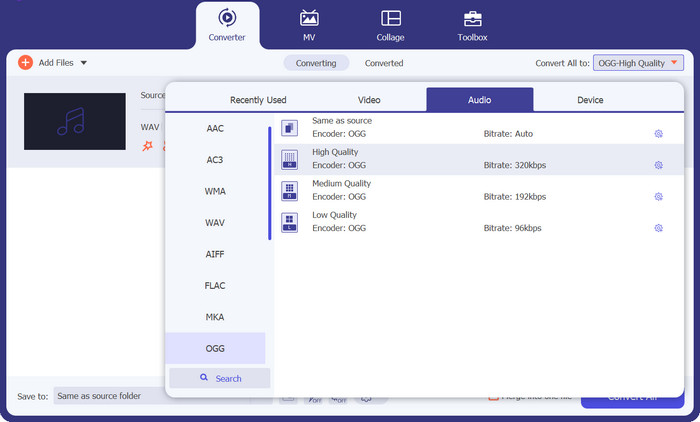
By clicking on the Profile dropdown menu and selecting OGG from the list of available formats, you can choose OGG as the output format. You can also change the output settings by selecting the Settings button if necessary. This allows you to change parameters like bit rate, sampling rate, and channels.
Step 3. Enter the output location
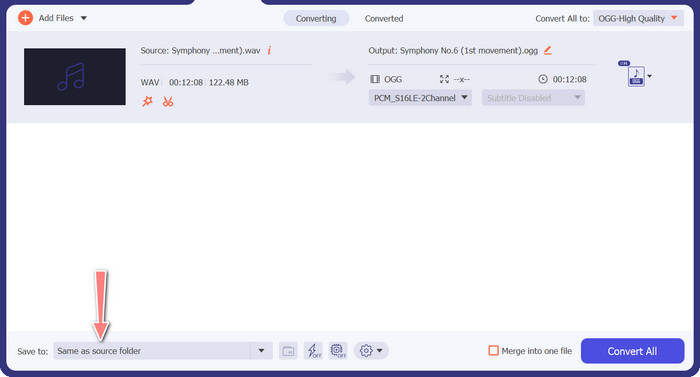
By selecting the Browse button next to the Output Folder field, you can select the output folder where you wish to save the converted file.
Step 4. WAV to OGG file conversion
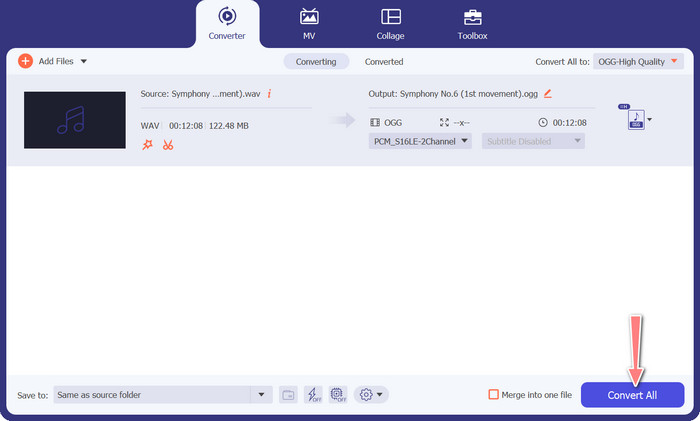
Once you're happy with your options, click the Convert All button to start the conversion. FVC Free Video Converter will start converting your WAV file to OGG format. The progress bar indicates how far along the conversion process is, as well as the projected time remaining.
2. Conversor de áudio online gratuito
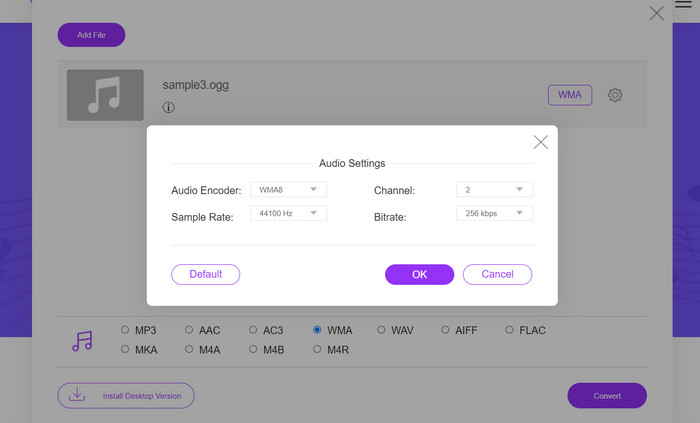
The Free Audio Converter Online is a powerful tool for converting WAV to OGG online. Users can rapidly add WAV or OGG files and convert them to OGG format using its simple interface. The converter also allows users to alter the output settings, such as the bit rate and sampling rate, to achieve the desired quality of OGG files. The conversion process is quick and simple, and consumers may download their modified files directly from the website.
Step 1. Navigate to the Free Video Converter Online website using your favorite web browser.
Step 2. Upload the OGG file you want to convert to WAV by clicking the Add Files to Convert button.
Step 3. Select OGG as the output format from the Audio format menu's list of supported formats. You can also specify the bitrate and output quality for the OGG file.
Step 4. To begin the conversion process, click the Convert button. That is how you convert OGG to WAV online.
Parte 2. Converter OGG para WAV ou WAV para OGG com o Audacity
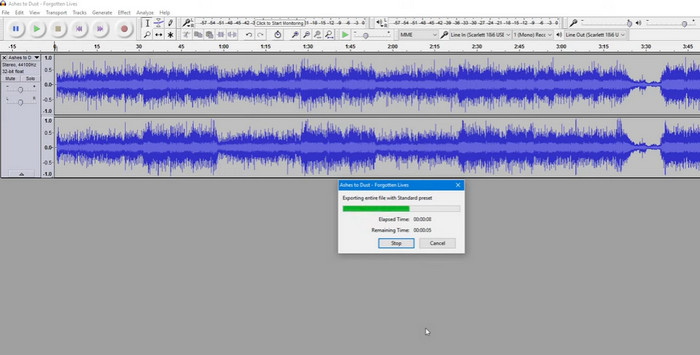
Esta ferramenta é um software de edição de áudio de código aberto que pode converter arquivos MP3 em arquivos OGG. O Audacity oferece uma variedade de ferramentas e efeitos de edição, além da conversão, permitindo que os usuários ajustem e aprimorem seus arquivos de áudio, tornando-o uma ferramenta versátil para operações de edição e conversão de áudio.
Além disso, o Audacity está disponível para Windows, macOS e Linux, tornando-o amplamente disponível. O Audacity é uma boa alternativa para quem deseja converter arquivos WAV para o formato OGG devido aos seus recursos sofisticados e facilidade de uso. Examine o guia abaixo para saber como funciona este programa.
Step 1. Download and install Audacity on your PC. Open Audacity, then the OGG or WAV file you want to edit. You can do this by selecting File > Open, then navigating to and selecting the WAV file on your computer.
Step 2. Once the WAV file is open in Audacity, click File, then Export. In the Export Audio dialog box, select OGG Vorbis Files as the file type.
Step 3. You can adjust the quality of your OGG file by dragging the Quality slider. Higher quality settings will increase file size, while lower quality settings will decrease file size but may reduce song quality.
Prós
- Ele tem a capacidade de converter em lote WAV para OGG.
- Converta OGG para WAV no Windows, macOS e Linux.
Contras
- O programa não tem uma comunidade de suporte dedicada.
Parte 3. Converter OGG para WAV ou WAV para OGG com VLC
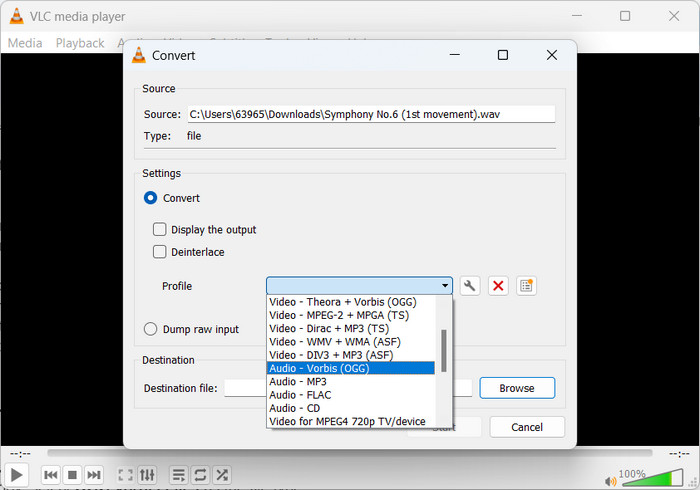
VLC media player é uma poderosa ferramenta multimídia amplamente usada para reproduzir vários tipos de arquivos de mídia. Muitos usuários podem não estar cientes de que este programa também funciona bem como ferramenta de conversão de OGG para WAV para Mac. Com sua ferramenta de conversão integrada, o reprodutor de mídia VLC pode converter arquivos WAV para o formato OGG de forma rápida e fácil, permitindo que os usuários desfrutem de suas músicas favoritas em vários formatos. Para todas as suas necessidades de conversão de áudio, o VLC media player oferece uma solução simples e fácil de usar, quer você esteja procurando converter um único arquivo ou um lote de arquivos. Siga estas etapas para aprender como converter um arquivo MP3 em um arquivo OGG:
Step 1. To play a video, run VLC and pick from the player's menu bar. The Convert / Save option will appear in a dropdown menu; select it.
Step 2. By clicking the Add button, choose the WAV file you wish to convert from the File Selection area. It's time to click the Convert / Save button when you're ready to convert or save the file.
Step 3. Click the Profile dropdown menu and choose Audio - Vorbis (OGG) as your preferred profile.
Step 4. Click the Browse button to the right of the Destination file section to specify a new location and filename for the converted file. The conversion can be kicked off by clicking the Start button at the window's bottom.
Prós
- Interface amigável.
- Ele suporta muitos formatos de vídeo e áudio.
Contras
- Possível perda de qualidade de áudio.
Further Reading:
Convert MP3 to OGG and Enjoy Superior Sound Quality
How to Free Convert MP4 to WAV on Desktop or Online [2023]
Parte 4. Perguntas frequentes sobre a conversão de OGG para WAV
Posso converter vários arquivos WAV para o formato OGG de uma só vez?
Sim, muitos softwares de conversão de áudio, incluindo o FVC Video Converter Ultimate, oferecem suporte à conversão em lote, que permite a conversão em lote do formato WAV para OGG simultaneamente.
É possível converter arquivos OGG de volta para o formato WAV?
Sim, é possível converter arquivos OGG de volta para o formato WAV usando um software de conversão de áudio. No entanto, lembre-se de que a qualidade do áudio pode ser afetada se o arquivo WAV original for compactado no formato OGG.
Posso converter meus arquivos WAV para outros formatos de áudio além de OGG?
Sim, a maioria dos softwares de conversão de áudio oferece suporte a uma ampla variedade de formatos de áudio, incluindo MP3, AAC, FLAC e muito mais.
Conclusão
Converting your WAV to OGG format can offer several benefits, such as reducing file size and maintaining high-quality audio. Meanwhile, with the right audio conversion tools and a bit of know-how, you can easily convert your audio files to the format that best suits your needs.
-
 Excelentes reprodutores OGG para Windows e Mac que você não deve perder
 Quando você deseja reproduzir seu áudio favorito no formato OGG, especialmente quando há menos espaço de armazenamento. Você pode aprender mais sobre os 5 melhores jogadores de OGG neste artigo.
-
 Descubra como converter MP3 para o formato WAV
 Você quer saber como converter MP3 para WAV? Determine quais ferramentas produzem a conversão de melhor qualidade que você pode obter.
-
 2 melhores maneiras de editar metadados OGG que você deve experimentar gratuitamente
 Precisa editar metadados OGG? Bem, você pode facilmente editar as tags usando o software correto. Se você não tiver um, a leitura deste artigo é obrigatória.
