


 Video Converter Ultimate
 Gravador de ecrã
 Reparo de vídeo
Aprenda como extrair áudio de um arquivo de vídeo com o Top Extractor
Everyone loves watching their favorite anime, k-drama, series, movies and more up to our hearts content. We watch them to be involved in a fantasy that the world can't bring to us. As they brought us the best catch phrases and music that bring roller coaster ride effects on what we watch. So, save those audio files into your drive and listen to them repeatedly. And now let us teach you how to extract audio from video while retaining the high-quality output. So, if you feel that extracting audio is hard then continue reading below as we presented different options and steps for you to choose and follow.

Parte 1. Aprenda a extrair áudio de vídeo com o Top Extractor [PC e Mac]
Topo 1. Video Converter Ultimate
The phenomenal converter in town is here to teach you how to extract audio from video. The Video Converter Ultimate has already been downloaded by millions of users all over the world. It is well known for being the safest and effective way of extracting your audio from the video. Also, the tool features presented here are a lot more advanced than any other tools you can use. But this tool needs to be paid and downloaded before you can access it. However, it is cheaper and smaller in file size than any other extractor you search. So, to know how to use this tool you must download it first into your desktop and let's proceed with steps provided below. Moreover, if you buy this tool, we will be going to provide a bonus step only for you, on how to use the Volume Booster to experience high-quality audio after the steps.
Passos sobre como extrair áudio do vídeo Windows 10 e Mac com a ajuda do Video Converter Ultimate
Step 1. After downloading the tool, install it and do a fast set-up. Then launch it immediately on your computer.
Free DownloadFor Windows 7 or laterSecure Download
Free DownloadFor MacOS 10.7 or laterSecure Download
Step 2. To add the video file, click the + button then locate it on your folder and click the Open to proceed.
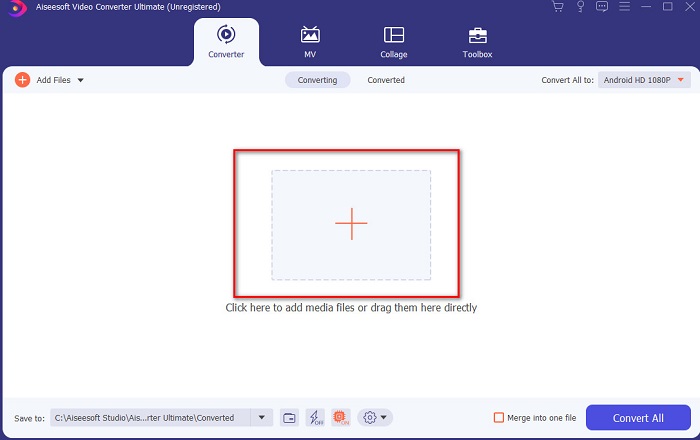
Step 3. To cut the video file click the scissor-shaped button. Then set the start and end of the audio you want to be extracted and click Save to keep the adjustment you made earlier.
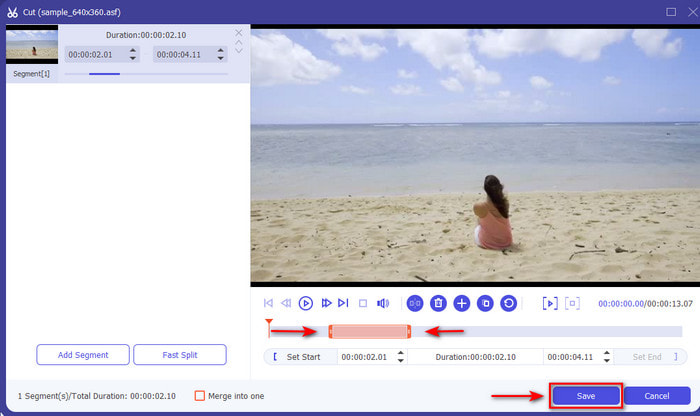
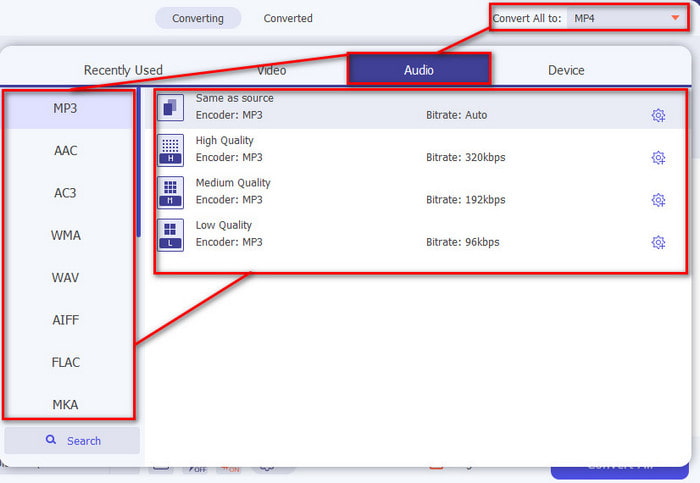
Step 4. Change the video format to an audio by clicking the Convert All to option and choose your desired audio format.
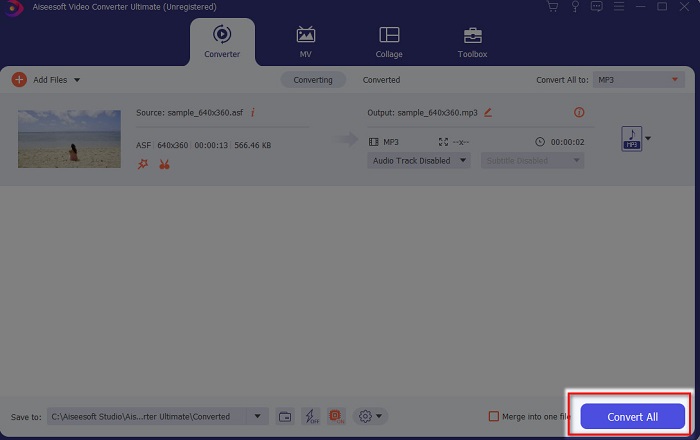
Step 5. To proceed, click the Convert All and the conversion will start immediately. If extraction is done, you can now find the extracted audio file in the folder and play the audio right away.
Etapa de bônus sobre como usar o impulsionador de volume do Video Converter Ultimate
One of the best features the ultimate converter provides is the Volume Booster. With the help of this feature, you can now adjust the audio to make it sound better than ever. Follow the steps indicated below to have the audio boost you ever wanted. Additionally, this tool is not working in an audio file only so before you extract audio from video Mac or PC use this first to add boosters on your audio.
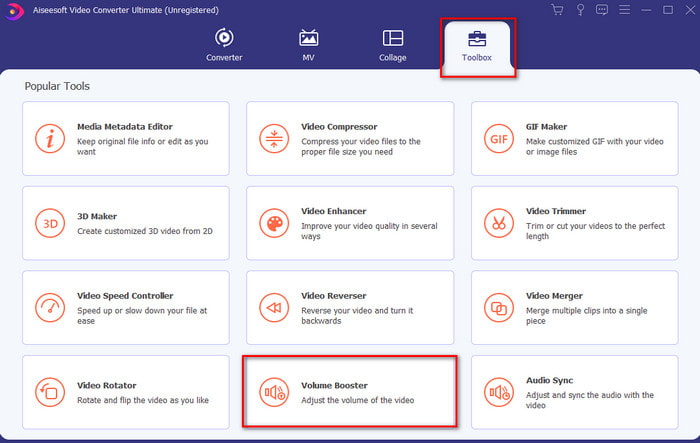
Step 1. Go to the Toolbox of the tool and locate the Volume Booster and click it.
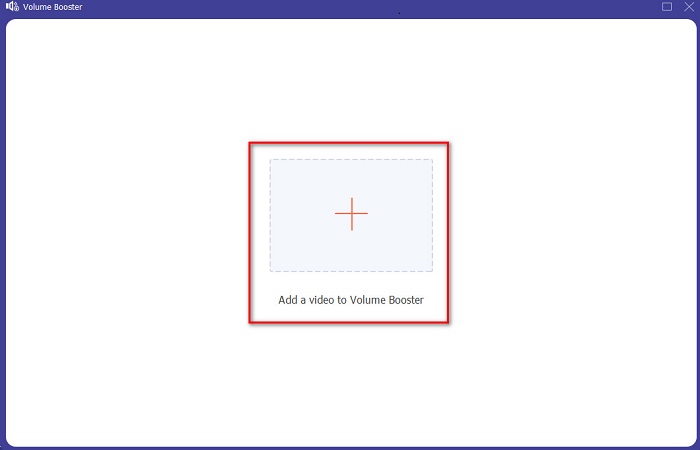
Step 2. Press the Plus button to choose the video file you want to be boosted and Open it.
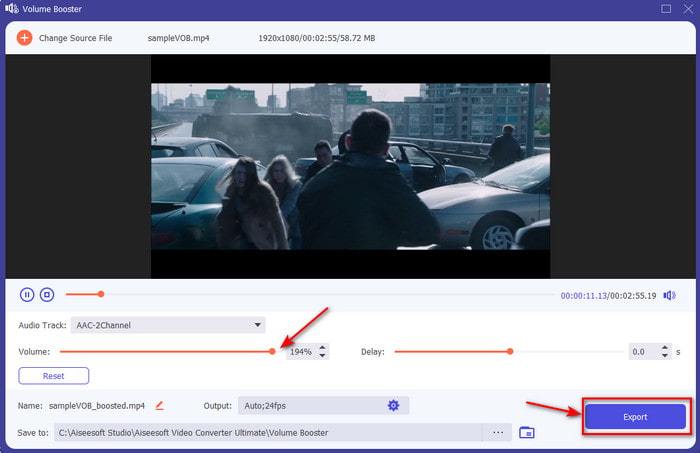
Step 3. Move the volume sliders to the right or left if you want, then click Export to save it now the best video with better sounds produced.
Prós
- Fácil de usar que produz toque profissional.
- Você pode aprender sem suar a camisa.
- Ele fornece muito mais recursos que você pode usar para extrair.
Contras
- Não é de graça, mas vale a pena ser comprado.
- Downloadable, o que significa que mesmo se você não tiver internet, você pode usá-lo.
Topo 2. Audácia
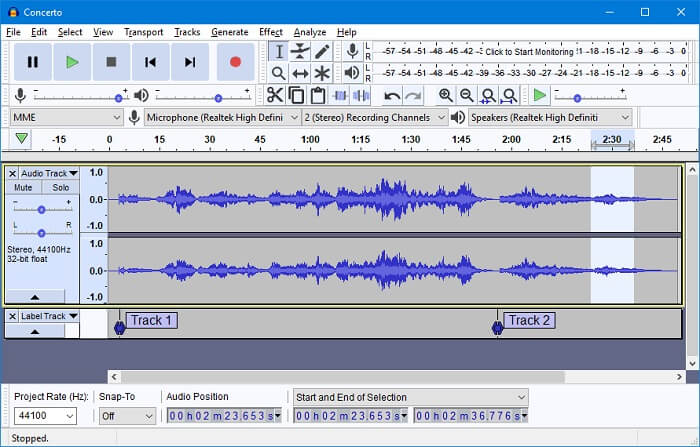
Audacity was developed by a group of volunteers and it is free also because it is under GNL. When users extract audio from video from Audacity, it is a big puzzle for the beginner who doesn't have experience using it hands-on. And yet it is still great to get used to Windows 10 and Mac OS. But there are still a lot of drawbacks to this tool. Such as the program is still not complete if you download it, basically you will need to download the installer and encoders separately. Overall, the tool is great but it is not user friendly to the new to extracting who wants to try it.
Prós
- Fornece extração detalhada.
- Os recursos desta ferramenta são ótimos para extrator de nível profissional.
Contras
- A interface da ferramenta está incompleta. Possui a pior interface em comparação com a ferramenta apresentada aqui.
- Não é a melhor escolha para iniciantes.
Top 3. iMovie
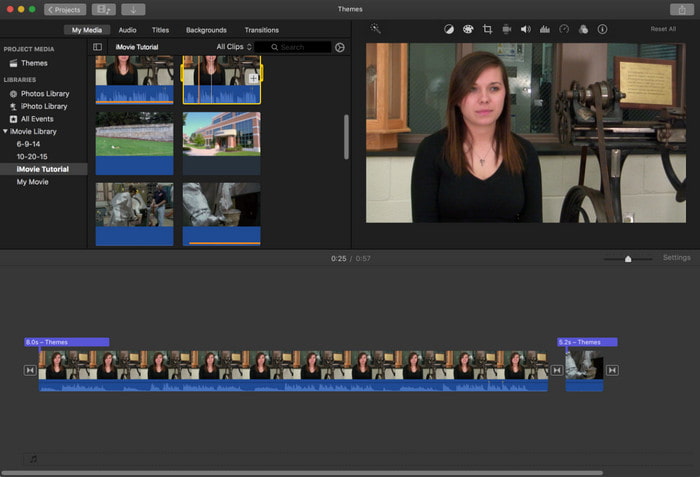
You can learn how to extract audio from video on iMovie easily if you are a Mac user. A lot of us know that iMovie is a media player that has been created by Apple Inc. to be their local player. But it also has an extraction function that the Apple user can have. However, this tool only supports limited extraction features they can use. Also, the process is slower than the other two tools at the top. So, if you are on a tight budget then try to use this tool on Mac while if you are a Windows user you can't access this tool.
Prós
- Nenhum download necessário.
- Amigo do usuário.
Contras
- Não possui diretório de arquivos onde o arquivo extraído está listado.
- Falta flexibilidade para edição profissional.
Parte 2. Como extrair áudio de vídeo no iPhone/Android
1. Ler documentos (para iOS)
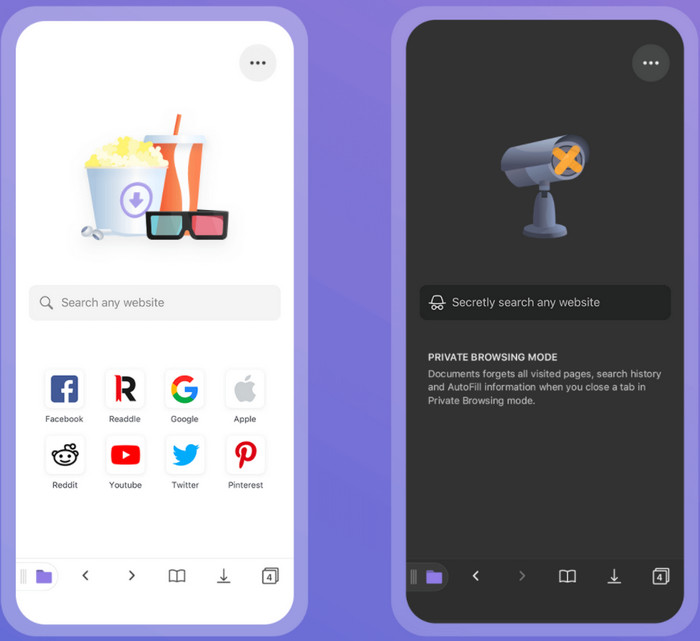
It is known as one of the powerful tools used to extract audio from video on iPhone, Readdle Documents. This tool is free and easy to use with a very interactive user interface presented. However, this tool needs a lot to improve, by adding basic editing features like cutting and trimming. But the performance of this is greater than the Android extractor below. Also, some minor and major bugs are still present here so be careful while using this tool. Although you can convert this doesn't track you to get information about you and leak the data.
2. Conversor de vídeo para MP3 (para Android)
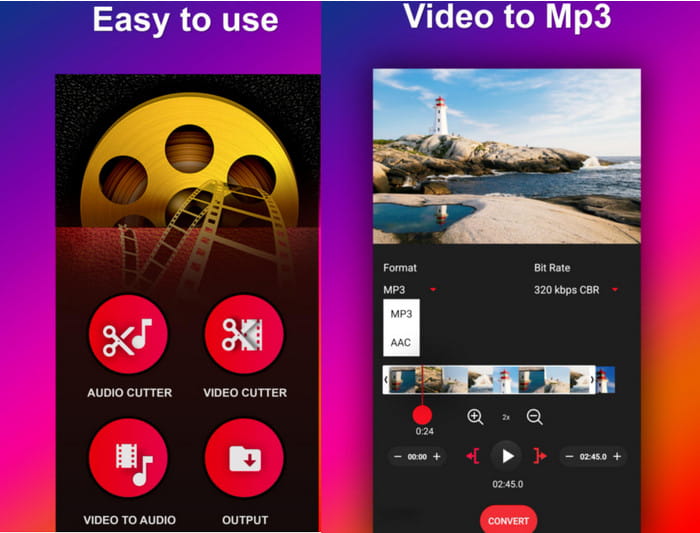
A consistent and very easy to use and extract audio from video on Android. Video To MP3 Converter has a great review from its user. Also, it has an easy-to-understand interface so even a beginner can use this at ease. But there's a lot of downsides if you use this tool, like when you convert a 4 minutes video to an audio the length of it becomes 20 minutes longer than the original. In that situation it is a bit weird because it is a lot longer than the raw video with a bigger file. And so, this is a type of bug presented only in this tool but overall, it is great to use and free.
Parte 3. Perguntas frequentes sobre extrair áudio do vídeo
Onde posso reproduzir meu arquivo MP3 extraído?
Although you can play MP3 files on your media player, still you don't have the option to make it sound better. So, here in this article you will know about what is the best MP3 player you can use to play your .mp3 file with better sounds.
Qual é o melhor formato; MP3 ou MP4?
Well, it depends on what you should use it for. For example MP3 is much better than MP4 to store audio because it is universally known as the universal audio format. While MP4 can store both high-quality video and audio because MP3 can't contain video. So, to know more about what is the difference between MP3 and MP4 then click this link to go to a new website that talks about more detailed information about the two.
Como corrigir meus vídeos não reproduzidos no meu dispositivo móvel?
There are a lot of reasons why videos can't be played on your mobile phones. So, to determine what are the reasons click this link if you have a problem not playing on Android. But if it is not playing on your iPhone then click this to know the problem and solve it immediately.
Conclusão
It comes now to the end, presented to you are different tools you can use to extract audio from video. But there is one tool that impresses us a lot more than the other in the list. And that tool is no other than the Video Ultimate Converter, as this tool presents a lot of functions and features you can use even if you are a beginner or pro. Also, we presented detailed and easy to follow steps for you to catch up. So, if extracting is the problem the only solution for it is the one and only the phenomenal Video Ultimate Converter.
-
 4 melhores conversores MP4 para M4V para transformar vídeos MP4 em M4V com facilidade
 Quando precisar alterar arquivos MP4 para M4V, você deve aprender mais detalhes sobre as diferenças entre os dois formatos, bem como os melhores conversores MP4 para M4V no artigo.
-
 AMV Converter - 3 melhores métodos para converter MP4 em AMV no Win / Mac
 Quais são os melhores conversores de MP4 para AMV para transformar os vídeos em Amine Music Video, você pode aprender mais sobre os 3 métodos mais eficientes para obter os vídeos desejados com facilidade a partir do artigo.
-
 4 melhores métodos para converter MOV para MP3 no Windows e Mac facilmente
 Quando você deseja extrair os arquivos de áudio MP3 de arquivos MOV, você pode aprender mais sobre os 4 conversores MOV para MP3 mais eficientes para obter os arquivos desejados do artigo.
