


 Video Converter Ultimate
 Gravador de ecrã
 Reparo de vídeo
 Secure Download
Métodos mais fáceis sobre como converter M2TS para formato de arquivo M4V
Many formats, like the M2TS, receive insufficient support as we move farther into the future. The original Blu-ray Audio Video container, which transports data using a MPEG-2 stream, is still used in this format. Some devices, including iPhones, iPods, and Android, can't read the format's structure. Therefore, you can't access this format on them. But if you still have this format, convert it to other file formats, like M4V. And if you wish to convert it, read this article. We will offer you the best methods you can learn on how to convert M2TS to M4V.

Parte 1: Maneira Gratuita de Converter M2TS para M4V
You don't have to worry about how to convert your M2TS files again if you use FVC Free M2TS Converter. You convert M2TS files with this free tool to a variety of standard video formats, including M4V, MP4 (HD H.264/MPEG-4 AVC video), MOV, AVI, TS, VOB, MKV, FLV, SWF, ASF, WMV, MP3, M4A, OGG, WAV, WMA, FLAC, and more. Also, this tool offers a batch conversion process. It means that you can instantly convert multiple files all at once. In addition, it has an ultra-speed conversion process. It can convert files up to 50x faster than other common converters.
Além disso, o FVC Free M2TS Converter não é apenas confiável na conversão de vários arquivos. Ele também oferece um editor de vídeo embutido. Isso torna simples carregar vários arquivos M2TS simultaneamente e mesclá-los em um. Além disso, você pode escolher um tema específico para cada arquivo de vídeo, como aniversário, família, comida, cenário, esporte ou um festival como o Halloween. Dessa forma, você pode garantir que obterá um vídeo atraente e fantástico. Por último, esta ferramenta é segura de usar. Isso garantirá evitar a perda de áudio e imagem durante o processo de conversão.
Features
◆ Converta vários arquivos de vídeo, como M2TS, M4V, MP4, MOV, AVI, FLV, WMV e muito mais.
◆ Oferece um processo de conversão de alta velocidade até 50 vezes mais rápido que a velocidade média de conversão.
◆ Converta vários arquivos simultaneamente.
◆ Oferece uma função de aprimoramento de vídeo para melhorar os vídeos.
◆ Mesclar vários vídeos para fazer uma única peça.
Siga o procedimento simples abaixo para aprender como transformar vários arquivos M2TS em um M4V usando o FVC Free M2TS Converter.
Step 1: Download the FVC Free M2TS Converter on your computer by clicking the Download button below. Then, proceed to the installation process and launch the application.
Free DownloadFor Windows 7 or laterSecure Download
Free DownloadFor MacOS 10.7 or laterSecure Download
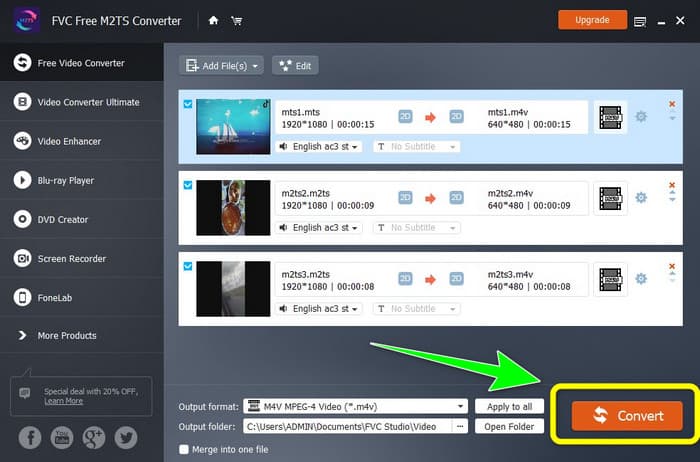
Step 2: Select the Free Video Converter option on the left part of the interface. Then, click the Add File button to attach the M2TS video file you want to convert.
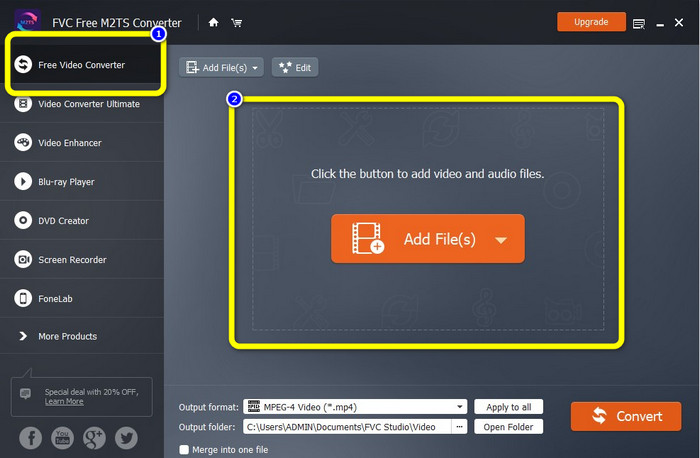
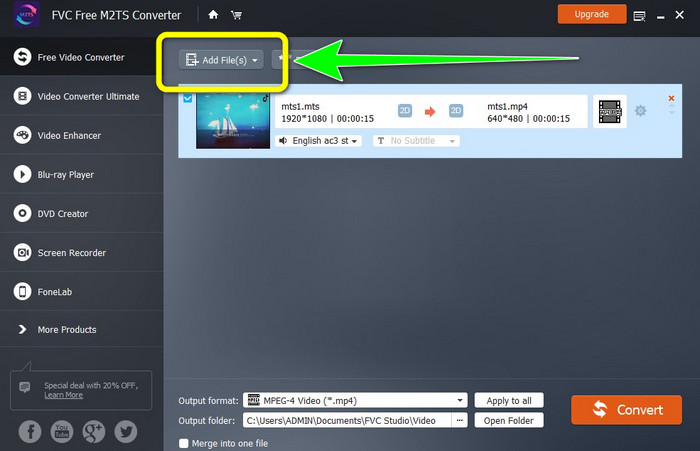
Step 3: If you want to insert multiple M2TS video files, click the Add Files button.
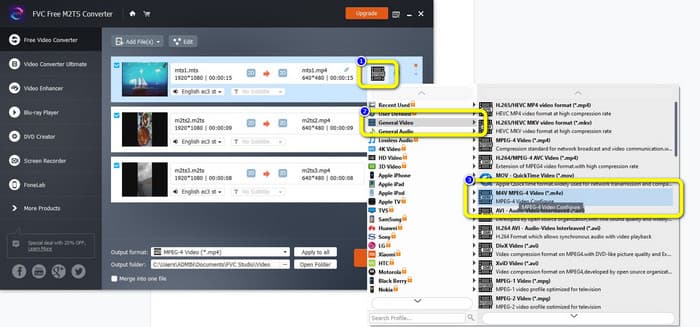
Step 3: Go to the Video symbol on the right part of the interface. Select the General Video option and choose your desired file format, which is the M4V.
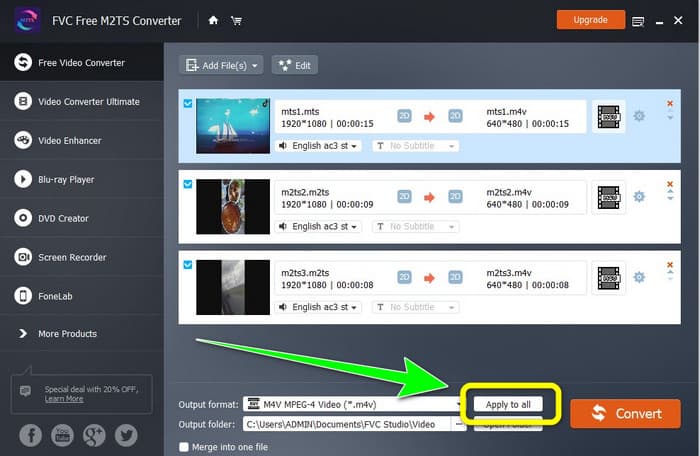
Step 4: You can do the same procedure to change the output format of other M2TS files. You can also click the Apply to all button to instantly change their output format to M4V.
Step 5: After changing all M2TS files to M4V file format, click the Convert button. Wait for the conversion process and save your videos to your desired location.
Parte 2: Melhor método para converter M2TS em M4V sem perdas
If you want another excellent way about how to turn multiple M2TS files into one M4V, you can try Video Converter Ultimate. With this downloadable application, you can easily convert M2TS to M4V losslessly because it offers a batch conversion process. In addition, it has a conversion speed of 30x faster than other converters. This way, you can convert more files without wasting more time. Moreover, Video Converter Ultimate has an intuitive interface and can provide simple steps to convert files, which is suitable for all users.
Além disso, este conversor também oferece mais recursos excelentes. Se você deseja combinar vários vídeos M2TS e transformá-los em uma única peça, pode usar este aplicativo porque possui uma ferramenta de fusão de vídeo. Dessa forma, você pode mesclar seus vídeos M2TS facilmente. Além disso, esta ferramenta permite criar uma colagem, na qual você pode combinar imagens e vídeos. Você também pode usar vários modelos e filtros gratuitos. Então você pode fazer uma bela colagem. Existem mais recursos que você pode aproveitar usando o Video Converter Ultimate.
Features
◆ Converta mais de 100 formatos de arquivo de vídeo, incluindo M4V, M2TS, MP4, AVI, FLV, MKV, WMV, VOB, MOV, SWF, etc.
◆ Crie uma colagem maravilhosa com filtros e modelos gratuitos.
◆ Oferecer criador de videoclipes.
◆ Fornece Toolbox para edição de vídeo.
◆ Oferece processo de conversão em lote com velocidade de conversão 30 vezes mais rápida.
Use as etapas detalhadas abaixo para converter vários arquivos M2TS simultaneamente usando o FVC Video Converter Ultimate.
Step 1: Download the Video Converter Ultimate on your computer. To download it, you can click the Download button below. After that, open the application.
Free DownloadFor Windows 7 or laterSecure Download
Free DownloadFor MacOS 10.7 or laterSecure Download
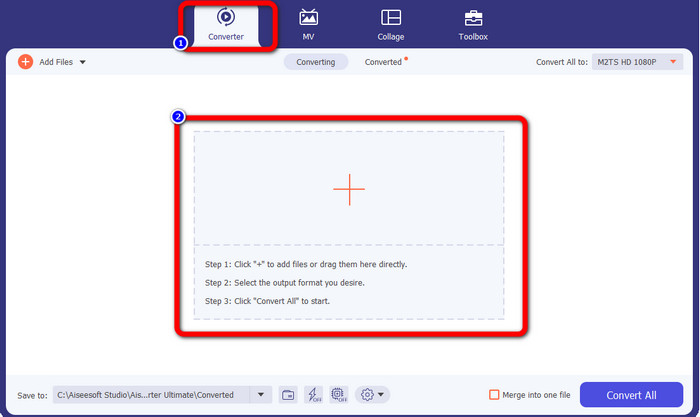
Step 2: Select the Converter panel and click the Plus sign button to add your M2TS files.
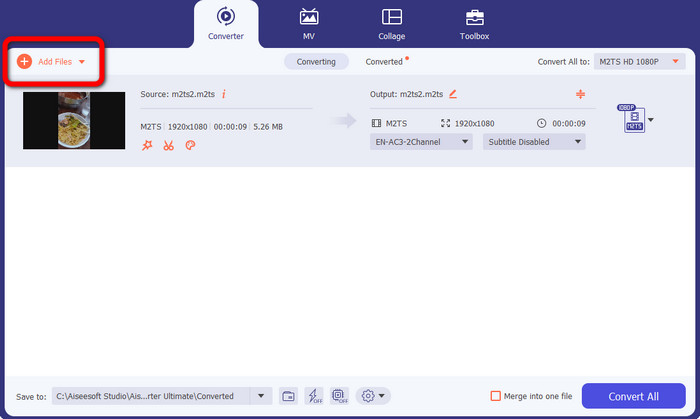
Step 3: Click the Add File button on the left part of the interface to insert more M2TS files.
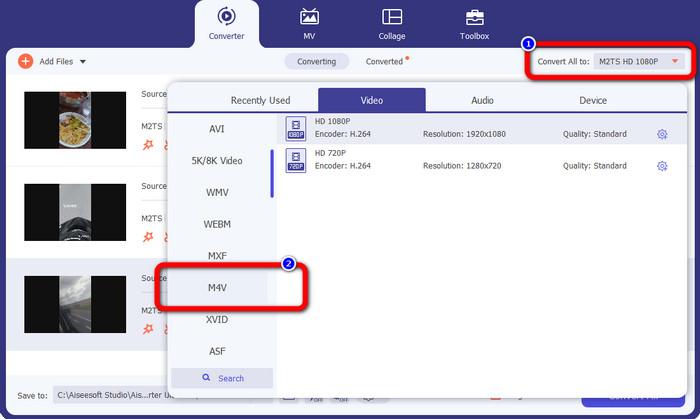
Step 4: To convert them into an M4V file, click the Convert All to button to see the format options. After that, select the M4V file format.
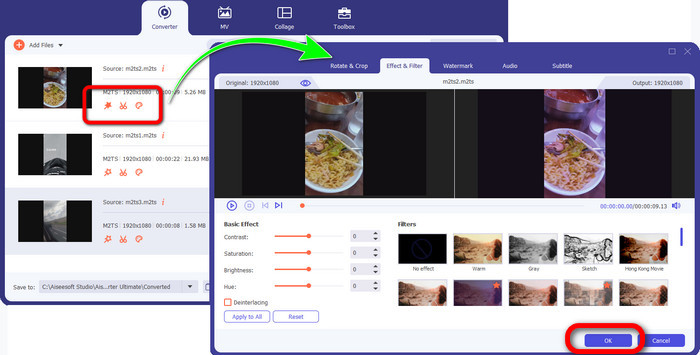
Step 4: To edit your videos, click these editing tools. You can enhance, edit, add filters and effects, and cut your videos. After editing your videos, click OK.
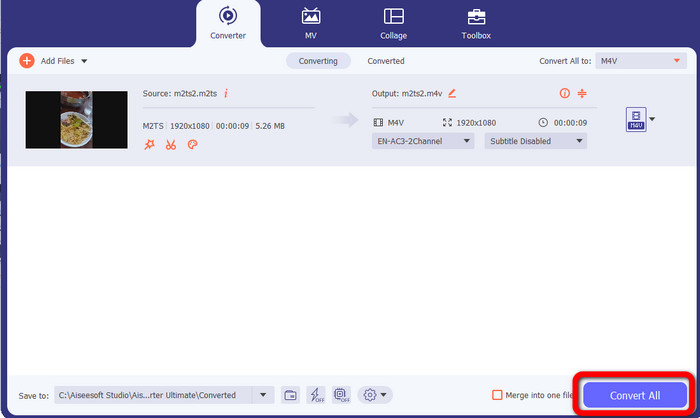
Step 5: After editing your video, you can convert them by clicking the Convert All button. Save your video after the conversion process.
Parte 3: O que é M2TS?
File Extension: .m2ts
O formato de arquivo contêiner Blu-ray Disc Audio-Video (BDAV) MPEG-2 Transport Stream (M2TS) usa a extensão de nome de arquivo M2TS. É empregado para vários fluxos de áudio, vídeo e outros. O contêiner de fluxo de transporte MPEG-2 serve como base. Em discos Blu-ray e AVCHD, esse tipo de contêiner é frequentemente utilizado para vídeo de alta qualidade. A Blu-ray Disc Association desenvolveu o M2TS. Todos os programas associados são All Player, VLC Media Player, Pot Player e MPlayer.
Parte 4: O que é M4V?
File Extension: .m4v
A Apple criou o formato de arquivo M4V, um formato de contêiner de vídeo semelhante ao padrão MP4. A principal diferença é que os arquivos M4V podem ter proteção contra cópia. Em sua iTunes Store, a Apple codifica arquivos de vídeo usando o formato M4V. Os programas associados a este formato são Apple QuickTime Player, Apple iTunes, Media Player Classic, KMPlayer, Real Player, Zoom Player e VLC Media Player.
Further Reading:
How to Convert M2TS to AVI with the Best Converters on Web & Desktop
Exceptional Approach to Convert M2TS to FLV Online & Offline
Parte 5: Perguntas frequentes sobre a conversão de M2TS para M4V
M2TS é melhor que MP4?
Como o M2TS economiza mais memória e é de alta resolução, ele requer mais espaço. MP4 é melhor que M2TS para economia de espaço de armazenamento.
Como usar o Handbrake para converter M2TS para M4V?
Baixar Handbrake. Em seguida, vá para o código aberto e adicione o arquivo M2TS. Em seguida, vá para a opção de formato e selecione M4V. Depois disso, clique no botão Iniciar codificação.
MTS é o mesmo que M2TS?
Em termos de funcionalidade, os arquivos MTS e M2TS são idênticos. Ambos os arquivos HD estão conectados ao formato de vídeo AVCHD. É possível alterar uma extensão de arquivo M2TS para uma extensão de arquivo MTS e vice-versa.
Conclusão
The discussion above helps you learn more about how to convert M2TS to M4V. The two downloadable applications are the best converter you can use to convert files. They can convert faster and losslessly.
-
 Vários métodos sobre como alterar o formato de arquivo MOV para M4V
 Você deseja um método eficaz para converter o arquivo MOV para o formato M4V? Então, este artigo irá conceder o seu desejo. Aqui estão os melhores conversores que você pode usar.
-
 Excelentes técnicas para converter GIF para M4V instantaneamente
 Este guia fornece as estratégias mais eficazes para converter GIF em M4V. Além disso, apresentaremos os dois melhores conversores que você pode experimentar.
-
 Processo direto para converter SWF para M4V com eficiência
 Não perca esta oportunidade de aprender os métodos simples de conversão de SWF para M4V online e usando um aplicativo para download. Leia este post para descobrir!
