


 Video Converter Ultimate
 Gravador de ecrã
 Reparo de vídeo
 Secure Download
Truques rápidos para converter M4V para 3GP facilmente
Do you want to convert M4V to 3GP? M4V is a container video format product exclusively for Apple products. So, if you have your M4V video file and you want it to play on your 3G-enabled devices, then the best solution is to convert it. This post will tell you about the simple process of converting your M4V file to a 3GP format quickly and effortlessly using your devices. So, read this article and absorb all the knowledge.

Parte 1: Excelente software para converter M4V para 3GP
The best offline converter for you is Video Converter Ultimate. This helpful application lets you convert M4V to 3GP easily and instantly. It supports more than 1000 formats, such as MP4, FLV, MTS, DIVX, XVID, VOB, MOV, MKV, etc. With the help of this offline software, you can convert files 30x faster than other converters. In addition, it has a simple interface and easy methods to convert M4V to 3GP, which is convenient for all users.
Além disso, o Video Converter Ultimate está disponível em quase todas as plataformas de mídia, como Windows e Mac. Além disso, tem outro recurso que você pode aproveitar. Você pode selecionar os recursos da caixa de ferramentas se quiser aprimorar seu vídeo M4V antes ou depois da conversão. Ele pode melhorar seu vídeo de várias maneiras. Se você quiser alterar a velocidade do seu vídeo, clique na função do controlador de velocidade do vídeo. Se você estiver interessado em corrigir a cor do seu vídeo, poderá usar a função de correção de cores.
Features
◆ Converta vários formatos de arquivo de vídeo, como M4V, MP4, FLV, AVI, TS, SWF, etc.
◆ Ótimo para criar um videoclipe e oferece vários temas.
◆ Oferece uma caixa de ferramentas para aprimorar o vídeo.
◆ Fazer uma colagem está disponível.
◆ Converta formatos de imagem como JPG, PNG, WEBP, BMP, TIF e muito mais.
◆ Combine vários videoclipes em uma única peça.
◆ Capaz de ajustar a velocidade de vídeo de um vídeo.
Prós
- Disponível para todos os usuários.
- Confiável na personalização de vídeo 3D a partir de 2D.
- Acessível em quase todas as plataformas de mídia, como Mac e Windows.
- A velocidade de conversão é 30x mais rápida.
- Melhore o vídeo de várias maneiras.
- Ele suporta mais de 1000 formatos de arquivo.
Contras
- Para aproveitar mais ótimos recursos, adquira a assinatura.
Siga estes passos simples abaixo para converter M4V para 3GP instantaneamente.
Step 1: Download the Video Converter Ultimate on your Windows or Mac. Then, proceed to the installation process and launch the application.
Free DownloadFor Windows 7 or laterSecure Download
Free DownloadFor MacOS 10.7 or laterSecure Download
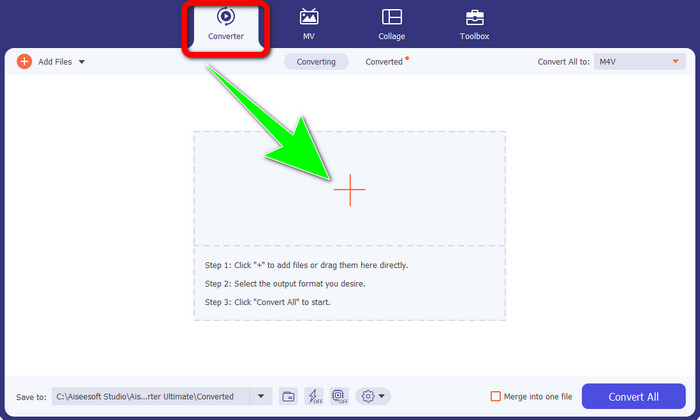
Step 2: After you launch the software on your Windows or Mac, select the Converter panel and click the + icon to insert the M4V file you want to convert.
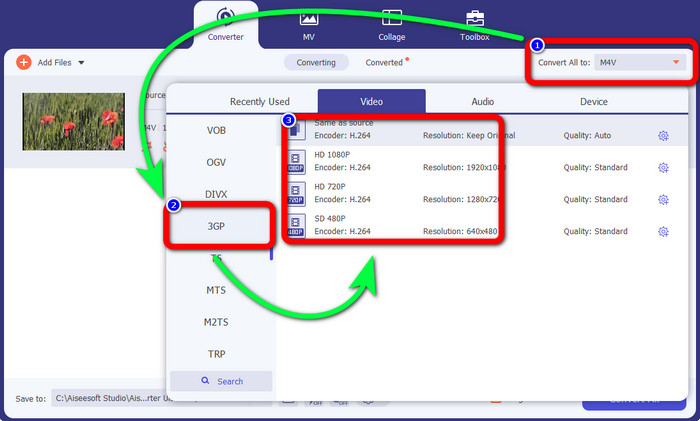
Step 3: Once you have inserted your M4V file, click the Convert all to button. The format options will show up, and select the 3GP file format. You can also choose what resolution you like.
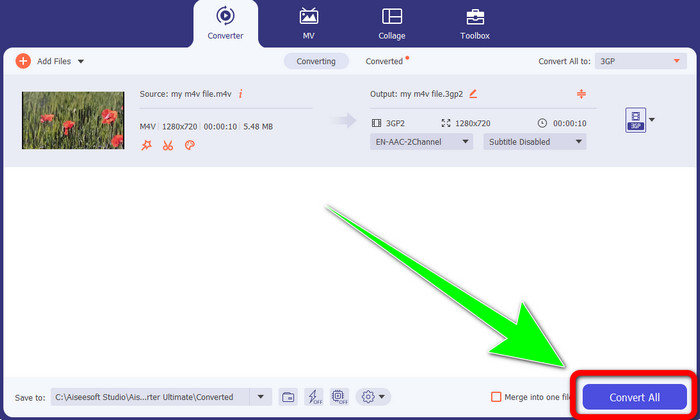
Step 4: Lastly, if you are done selecting the 3GP file format, click the Convert All button and save your final output. This application offers batch conversion, so you can also add more files and convert them at once.
Parte 2: Ferramenta online para converter M4V para 3GP
After knowing the best offline converter, we can proceed to the most excellent online converter for you. This online application is FVC Free Video Converter Online. This application allows you to convert M4V to 3GP effortlessly in just a few clicks. Also, it supports various video/audio formats, such as MP4, WMA, MOV, FLV, TS, MP3, etc. In addition, this online tool is free, and you can use it both on your Windows and Mac. If you like to convert your M4V file to 3GP format, follow these detailed guides below.
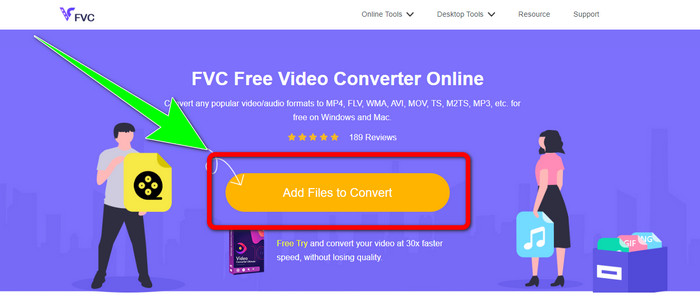
Step 1: Go to the website of FVC Free Video Converter Online. Click Add Files to Convert button and import your M4V file.
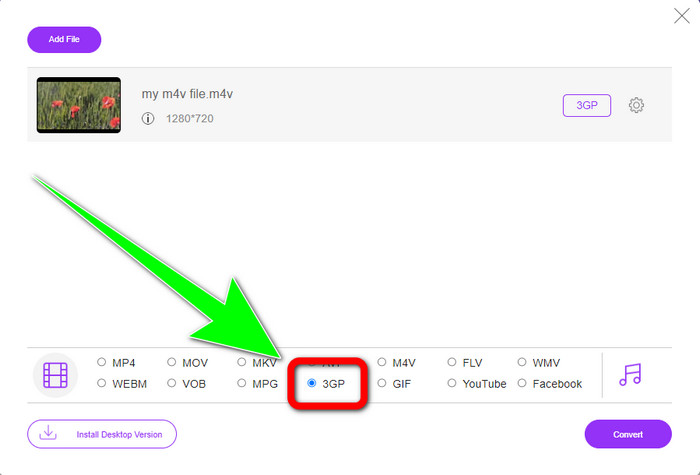
Step 2: Click the 3GP file format from the format options.
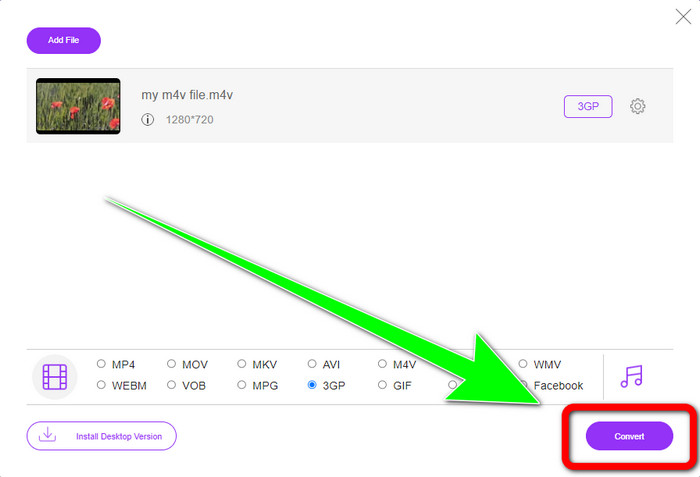
Step 3: After selecting the 3GP file format, you can already click the Convert button to convert your M4V file to 3GP format. Then wait for the conversion process and save your video.
Parte 3: Qual Conversor M4V para 3GP Escolher
Do you want to know which is the best application between the two? Honestly, they are both excellent. If you plan to download an outstanding video converter, the most suggested application you can use is the Video Converter Ultimate. It has a batch conversion process that allows you to convert multiple files in a single process. It also offers an intuitive interface suitable for non-professional users. Aside from converting, it also has more features you can enjoy, such as editing your video, making collages, music videos,s and more. On the other hand, if you prefer using an online converter, use FVC Free Video Converter Online. This software can also offer a batch conversion process. It is also perfect for beginners. You don’t need to pay because this converter is 100% free. With these details, we can say that both converters are excellent and reliable.
Parte 4: Tabela de comparação entre M4V e 3GP
| M4V | 3GP | |
| Tipo de arquivo | Vídeo MPEG4 | Formato multimídia 3GP |
| Descrição | M4V é um tipo de contêiner de vídeo usado para armazenar informações de áudio e vídeo para arquivos do iTunes. O Apple FairPlay DRM pode ser usado para proteger arquivos desse tipo contra visualização e cópia não autorizadas; neste caso, os arquivos de áudio ou vídeo devem ser adquiridos na loja do iTunes. Como o formato é baseado na estrutura MPEG-4, os players atuais quase sempre podem visualizar arquivos desprotegidos. | Um contêiner multimídia conhecido como 3GP foi criado em 1998 para telefones baseados em GSM (Global System for Mobile Communications). É melhor para telefones celulares porque o contêiner usa poucos dados, largura de banda e armazenamento. Para arquivos enviados via MMS, ele funciona como um contêiner padrão. |
| Desenvolvido por | Apple Inc. | Projeto de parceria de terceira geração |
| Prós | Anexado à proteção da Apple. | Compatível com quase dispositivos, |
| Contras | Compatível apenas com a maioria dos dispositivos e programas da Apple | Armazena vídeo em baixa resolução. |
Parte 5: Perguntas frequentes sobre a conversão de M4V para 3GP
Como faço para converter M4V para 3GP sem perder qualidade?
If you desire to convert your M4V file to a 3GP format without losing the quality, then you must use the Video Converter Ultimate. This application will ensure that your videos’ quality will never change. You also can use this tool to convert M4V to DIVX.
Os arquivos M4V são compatíveis com outros dispositivos/sistemas?
Absolutely, yes. You can use a host of M4V players to play this type of video on different devices. M4V players provide great benefits, like being compatible with several systems like Android, Linus, iOS, Windows, and Mac.
M4V é menor que MP4?
O tamanho depende do que está dentro. Como codec de áudio e vídeo, taxa de quadros, resolução e muito mais.
Conclusão
These are the methods to convert M4V to 3GP using offline and online tools. If you want to convert different file formats on your Windows or Mac, then you can use Video Converter Ultimate. Also, if you are looking for an excellent online tool, then FVC Free Video Converter Online is the best.
-
 Como converter DIVX para 3GP no Windows, Mac e Online
 Como converter DIVX para 3GP? Se você está procurando uma resposta, leia este artigo. Mostraremos ótimos procedimentos com a ajuda de diferentes conversores.
-
 4 melhores maneiras de converter SWF para 3GP no Windows, Mac e online
 Aqui estão os métodos mais úteis para converter SWF para 3GP instantaneamente. Além disso, esta postagem mostrará algumas ferramentas eficazes do Windows e on-line que você pode usar.
-
 Encontre os melhores e mais simples métodos para converter TS em 3GP
 Este artigo oferecerá um incrível download gratuito do conversor TS para 3GP que você pode experimentar em seu dispositivo. Leia este artigo para descobrir mais detalhes essenciais que você precisa.
