


 Video Converter Ultimate
 Gravador de ecrã
 Reparo de vídeo
Como converter M4V para AVI grátis com os 3 melhores softwares [online e offline]
Apple users already know iTunes as their local media player for playing movies, music, and even TV shows. In fact, they also use one of their default formats, and that is M4V. However, this format can't be played on your local Windows player, and some third-party doesn't support this format. But no need to be sad because you can still watch your M4V files even to the other device by converting it. Also, you can read the comparison between the two as well. So now, we will teach you how to convert M4V to AVI for free in the list below.
Parte 1. Breve Explicação dos Formatos M4V e AVI
Então agora, vamos dar uma olhada na diferença entre os dois formatos mencionados na introdução. À medida que avançamos, entenderemos os dois formatos, mas de uma perspectiva diferente. E antes de virar, você sabe qual é o melhor conversor gratuito de M4V para AVI. Vamos diferenciar os dois formatos primeiro lendo abaixo.
M4V
◆ Este formato de arquivo é proprietário do iTunes e é protegido pelo DRM que implementa questões de direitos autorais.
◆ Usado para codificar arquivos de mídia que também são usados para reproduzir vídeos, áudio, programas de TV e filmes.
◆ Armazenar e transferir arquivos com este formato é muito mais fácil e rápido.
◆ Tem quase a mesma estrutura do formato MP4.
◆ Como esse formato é protegido e limitado a dispositivos Apple, não é tão flexível com o outro reprodutor de mídia para jogar.
AVI
◆ Formato conhecido usado para reproduzir e armazenar um arquivo de vídeo e áudio detalhado.
◆ Um contêiner de arquivo para armazenar uma reprodução contínua.
◆ O tamanho do arquivo é muito maior em comparação com o outro formato de arquivo porque não é codificado.
◆ Necessidade de usar um compressor ou codec para tornar o arquivo menor.
Parte 2. Aprenda as 3 maneiras de como converter M4V para AVI
1ª Via. Conversor de Vídeo FVC Ultimate
FVC Video Converter Ultimate is one of the phenomenal M4V to AVI converters to download on your PC or Mac. Because of its high-end functionality and the advanced features it provides, while considering its users to avoid any hassle of converting. As opposed to the other converters, this software is far different in a lot of aspects. Like it supports a wide-scale of formats, editing features can be easily taken in place, performance wise it is faster and better, so on and so forth.
Embora a conversão aqui seja gratuita e não haja limitação, você precisará comprá-la antes de usá-la, mas é muito barato. Ao todo, vamos ver o que é preciso para converter um formato para um novo com este conversor. Se você quiser saber como fazer a conversão de um arquivo, siga as etapas síncronas abaixo.
Step 1. Download the software first on your PC or Mac. After the process of downloading is finished it is now the right time to install it and do the set-up.
Free DownloadFor Windows 7 or laterSecure Download
Free DownloadFor MacOS 10.7 or laterSecure Download
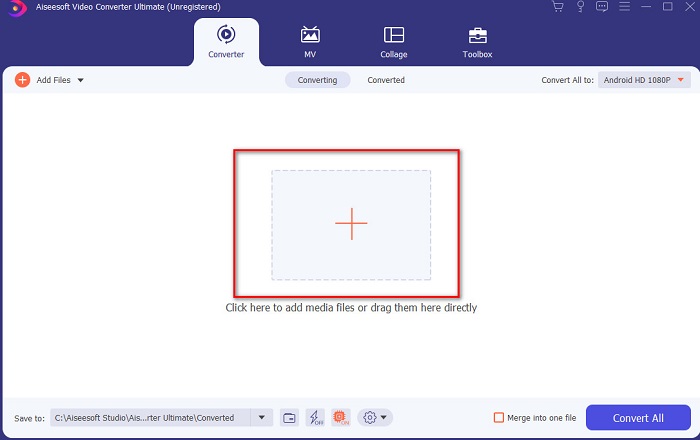
Step 2. Launch the tool and click the + button in the middle of the interface and a folder will show. Search the file on it to then click it and press Open to insert the M4V file.
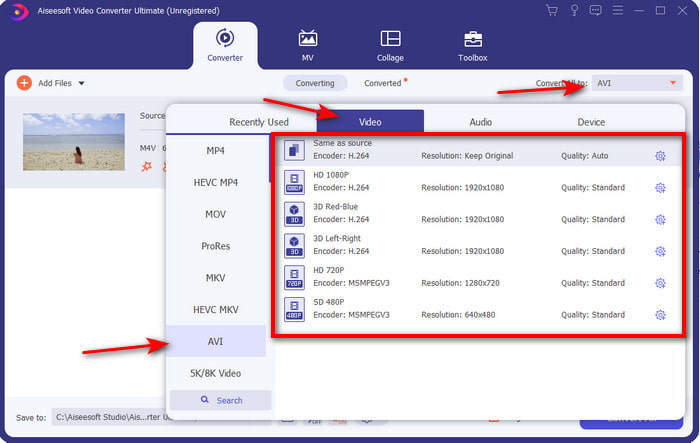
Step 3. Before you start the conversion of M4V to AVI on Mac or PC, you must first click the drop-down button and locate the AVI format.
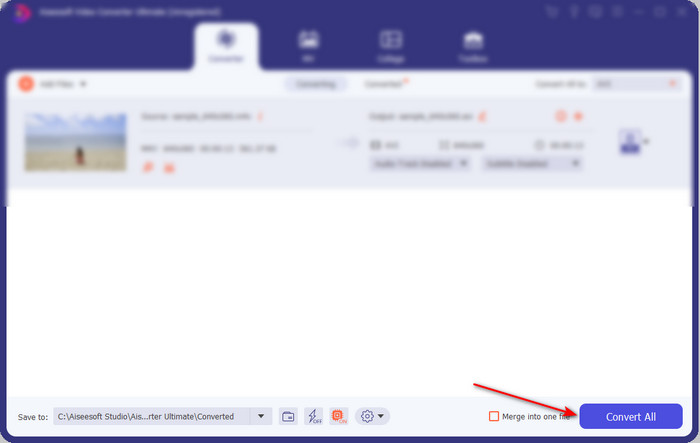
Step 4. After selecting the format, it is now the time to convert it. On the lower part of the interface click the Convert All button.
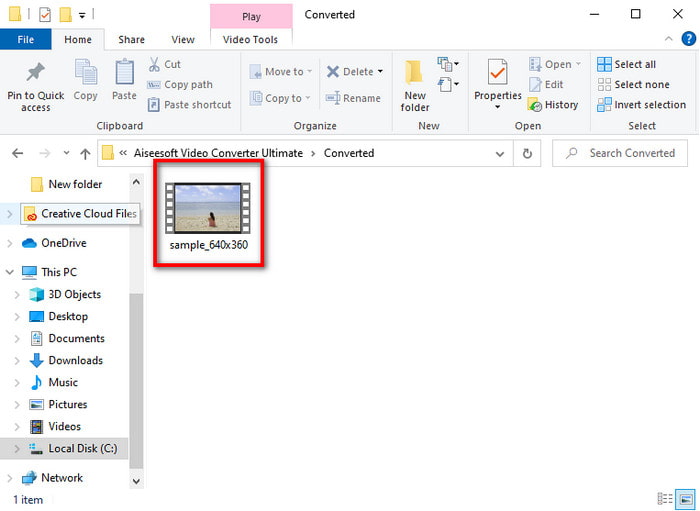
Step 5. Wait for several seconds for the process to take in place. After it is done, a file folder will show with the converted file you've made earlier, click it to watch it right away.
2ª Via. Conversor de Vídeo Gratuito FVC
If you don't want to buy the software above then it is a best choice to use this free M4V to AVI converter that is available on your web, the FVC Free Video Converter. And if you want to achieve the best conversion like the FVC Video Converter Ultimate then this must be your choice. Although this tool provides a proper conversion, still this web tool supports small-scale formats, no editing features, and much slower in converting compared to the desktop tool. Also, this will be going to need internet connectivity if you want to use it. But if you're looking for an online converter then this is the right choice. So now, follow the steps provided below to know how to do it.
Step 1. Click this link to go to the main web of the FVC converter.
Step 2. If this is your first time using it, click the Add Files to Convert to download the launcher. After it has already been downloaded, click it again to launch, select the file on your folder and click Open.
Download the Desktop Version to convert files in batch.
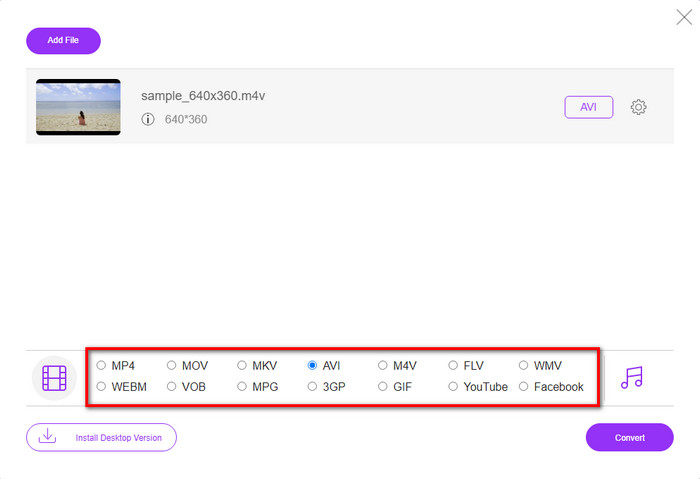
Step 3. Choose the format available below by clicking it before the process of converting is performed.
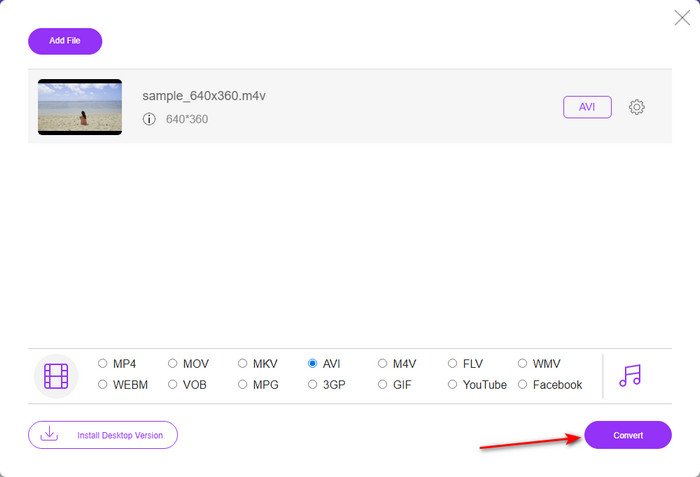
Step 4. After selecting the format, click Convert to proceed with the process of transforming the format.
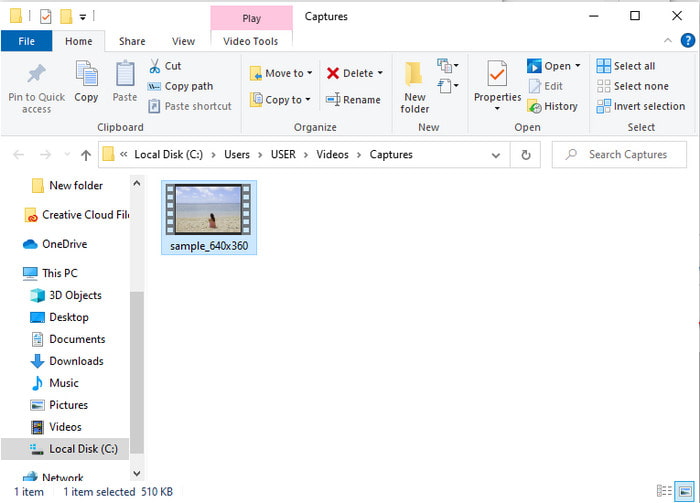
Step 5. Wait for several minutes, and after the file is done, a file folder with the converted file will show; next click it to watch.
3ª Via. Conversor de Vídeo WinX Grátis
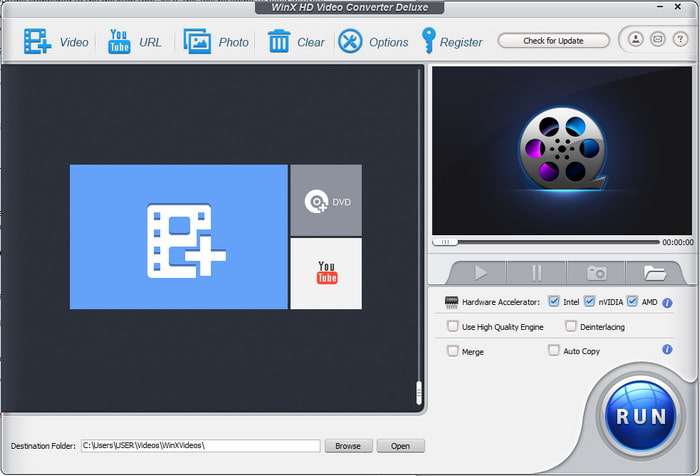
Another software we select that will help you convert a file format is the WinX Video Converter Free. As this tool provides a great conversion and also it supports a lot of different formats as well. Although the performance of it is pretty great to download this M4V to AVI converter on Mac or even PC. However, unlike the tool. So, if you want to try it then follow the steps.
Step 1. Download the software on your PC or Mac
Step 2. Then click Video to insert the file, then locate the PC General Manager and click the AVI Video then OK.
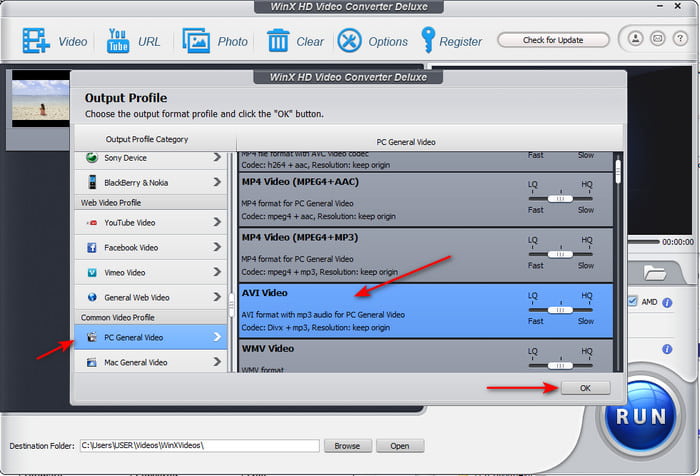
Step 3. Click Run to start the conversion.
Parte 3. Tabela de Comparação do Conversor 3 M4V para AVI
| Recursos | FVC Video Converter Ultimate | FVC Free Video Converter | Conversor de Vídeo WinX Grátis |
| Convertendo Formatos |  | | |
| Conversão múltipla | |  | |
| Aceleraçao do hardware | | | |
| Conversão ultrarrápida | | | |
| Programa suportado | Disponível em todas as plataformas | Disponível em todas as plataformas | Disponível em todas as plataformas |
M4V vs. AVI
O M4V é desenvolvido pela Apple, que também usa MPEG 4. Os arquivos M4V são frequentemente usados para armazenar os vídeos baixados da loja Apple iTunes, como videoclipes, episódios de TV, etc. Você pode encontrar alguns arquivos M4V protegidos contra cópia, pois usa Proteção de direitos autorais FairPlay DRM da Apple.
Baseado no Resource Interchange File Format (RIFF), o formato AVI foi introduzido pela Microsoft em 1992. Ele pode salvar vídeo/áudio de alta qualidade, pois usa menos compactação. Mas isso também causa o tamanho grande do arquivo AVI, o que pode ser um problema quando há espaço limitado.
Parte 4. Perguntas frequentes sobre os formatos M4V e AVI
Por que preciso converter para o formato M4V?
M4V format is only available on Apple devices only so if you transfer this file format to Windows or any other devices it can't be played. So, it is better to convert the M4V file into a new format like MP4 or AVI to play it.
Depois de converter M4V perde a qualidade?
Na verdade, é menos provável que a perda de qualidade aconteça com o M4V ou qualquer outro formato que tenha sido transformado em um novo formato. No entanto, isso também pode causar um mau funcionamento do software ou do conversor. Portanto, é melhor você escolher o conversor que funciona perfeitamente bem e é fácil de usar.
A conversão de M4V reduz o tamanho do arquivo?
Bem, depende do formato que você estava prestes a escolher. Assim como se você convertê-lo em um AVI, espere que ele fique um pouco maior porque o arquivo está descompactado. Ao contrário, se você convertê-lo em MP4, o tamanho do arquivo ainda será mantido ou será menor. Embora o tamanho do arquivo ainda mude qualquer formato que você escolher, você receberá uma ótima saída no final.
Conclusão
To conclude, all of the 3 web and desktop tools work perfectly well and they really do their job as a converter. As we explore each and every software that is enlisted in here, we found out that the FVC Video Converter Ultimate is the best choice for everyone. Because of how easy it is to use, affordability and flexibility of it, advanced features it provides and many more. So now, if you are still wondering what to choose this time then try to use the phenomenal converter and enjoy the fast and easy conversion process.
-
 Conversor M4V para MP3 - 4 melhores métodos para extrair MP3 de arquivos M4V
 Quando você deseja extrair o áudio MP3 de vídeos M4V com facilidade, você pode aprender mais sobre os 4 melhores conversores de M4V para MP3 para obter os arquivos de áudio desejados do artigo.
-
 Qual é a melhor maneira de converter GIF em AVI [Open-source e Premium]
 Quer converter seu GIF para o formato AVI sem perder a qualidade do vídeo? Continue lendo para aprender como converter seu arquivo GIF para AVI.
-
 4 maneiras eficientes de converter MOV em AVI no PC e Mac [2021]
 Você quer saber qual é o melhor conversor de MOV para AVI da web? E por que o FVC Ultimate Video Converter pode ser a pessoa certa para você.

