


 Video Converter Ultimate
 Gravador de ecrã
 Reparo de vídeo
[Gratuito e pago] Domine a arte de converter para o formato MKV para AVI
Matroska developed the MKV format to preserve files so that it can be used in the future. Basically, the file in this format is sealed individually with different codecs in it. But, in some cases they can't be played over the native media player in your PC or Mac. So, the best choice is to convert it into an AVI file format or to another feasible format. Do you want to know how to change the MKV file to AVI format? Then you must read carefully the detailed information below as we stated only the truth and nothing but the truth.

Parte 1. Como converter MKV para AVI gratuitamente online e offline
1. FVC Free Online Video Converter
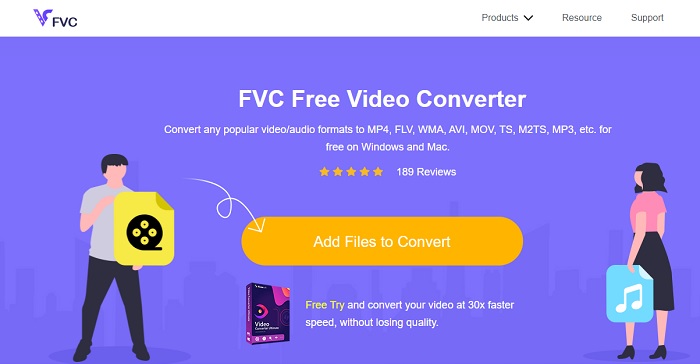
You can use this to convert MKV to AVI online with the help of the best. FVC Free Video Converter is intended to be user-friendly and no-cost as per user demand. Unlike any other tool mentioned here this tool provides a great compression on each file. You can also manipulate the bitrate, fps, codec and more in the file you want to be converted. On the contrary, all of the major features available in the premium version of this tool aren't available here. It only allows the user to have fewer formats, known as the basic format. As for now let's continue and see where the waves take us in converting videos. Follow the steps and let's start sailing the sea of conversion.
Step 1. Go to the link provided only for you to start on.
Step 2. To launch the tool, you must click the Add Files to Convert.
Download the Desktop Version to convert files in batch.
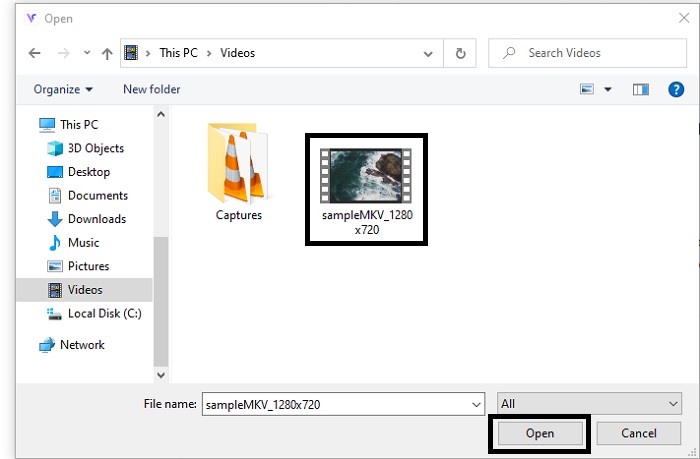
Step 3. Select the MKV file you want to be converted and click open to proceed.
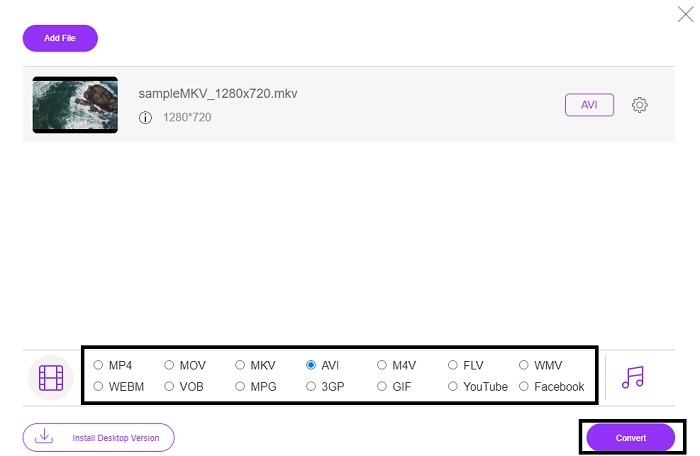
Step 4. In the interface, choose the AVI format below and select Convert to start the process.
Step 5. Wait until it is done. After a minute, clicking this folder to go to file manager will be displayed on your screen with the file you converted.

Prós
- Não é necessário fazer download porque você pode acessá-lo em seu mecanismo de pesquisa.
- Ele fornece mais formato do que as outras duas ferramentas gratuitas abaixo.
- Ótimo em compressão também.
Contras
- Não oferece recursos de edição e o formato disponível é limitado.
- Se a conexão não estiver disponível, você não poderá usar esta ferramenta.
2. VLC Media Player
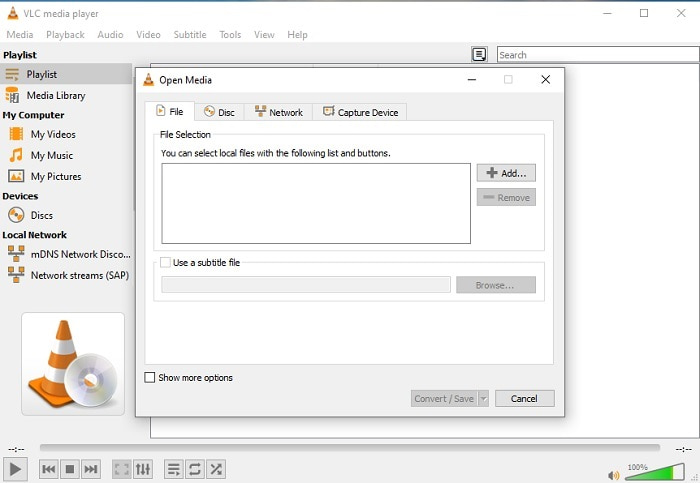
If you have a VLC then why don't you try and use it to convert. As being said, you can convert MKV to AVI on Mac using VLC. But it is not built to be the best on the job of conversion because of its limited format and other reasons. Although, this tool is infamous for being one of the outstanding media players you can use to watch and listen to. So, if you want to try using VLC as a converter then follow these steps below.
Step 1. Open VLC on your desktop.
Step 2. Click the file and locate the converter of the tool.
Step 3. Add the file you want to convert and start the process.
Prós
- Um dos maiores players de mídia que oferece recursos de conversão.
- Grátis para baixar.
- Suporta a maioria dos codecs.
Contras
- Não é a escolha do iniciante para novos a converter
- Difícil de ler e entender as instruções.
3. Faça grátis

Freemake is one of the desktop tools you can use to convert MKV to AVI on Mac and PC. This tool is downloadable so you don't need internet connection to access it. The format it provides is very limited compared to the online FVC converter above. Another, the interface of the tool is outdated though it is easy to understand but boring to look at. Nevertheless, on the job of conversion you can depend on this tool. Learn how to use Freemake by following the step below.
Step 1. Download the Freemake into your computer and launch it.
Step 2. Choose the file format you want to convert.
Step 3. Wait for more than a minute to finish the conversion.
Prós
- Não precisa de internet para usá-lo.
- Amigo do usuário.
- Interface fácil de entender.
Contras
- A combinação de cores da interface é um pouco chata e tem uma vibe infantil também.
- Limitado a oferecer formato e recursos.
Parte 2. Melhor maneira de alterar o arquivo MKV para o formato AVI com etapas detalhadas
If you want to take the converting a format to the next level then it is a must to know how to use this tool. Moreover, FVC Video Converter Ultimate provides the best conversion you want to do. Also, it allows the user to do multiple conversions at once. So, convert until you get tired of it but no need to worry because you won't get tired because of the special features it provides. For example, do you want to convert MKV to AVI and then enhance it later? By using the FVC Video Converter Ultimate you can do more. So, to know how majestic the tool is, here are the steps on how to use the unique converter feature it provides.
Step 1. Install the tool to your drive and follow the wizard setup to launch the tool.
Free DownloadFor Windows 7 or laterSecure Download
Free DownloadFor MacOS 10.7 or laterSecure Download
Step 2. Launch the tool after the installation. This is an example of the tool interface.
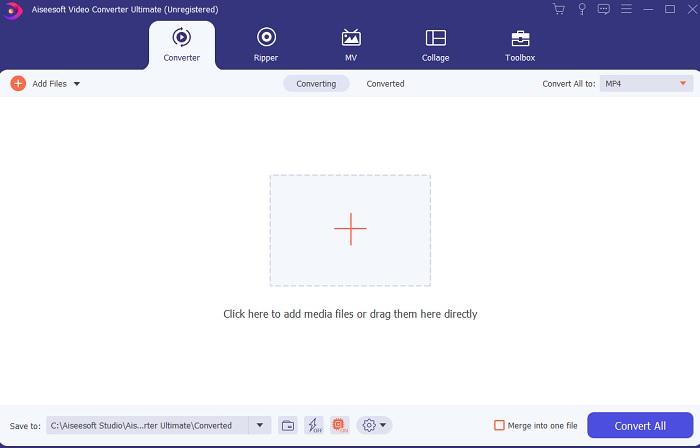
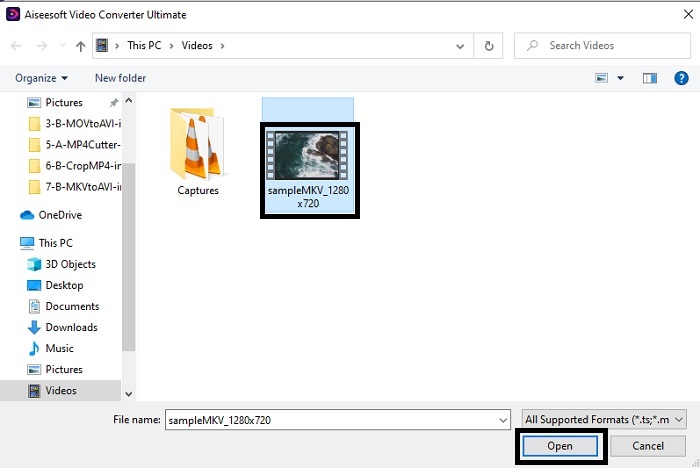
Step 3. Click the plus sign button to insert the MKV file you want to be converted. For example, if the file is more than two or three the best to insert, is to drag-and-drop it in the interface.
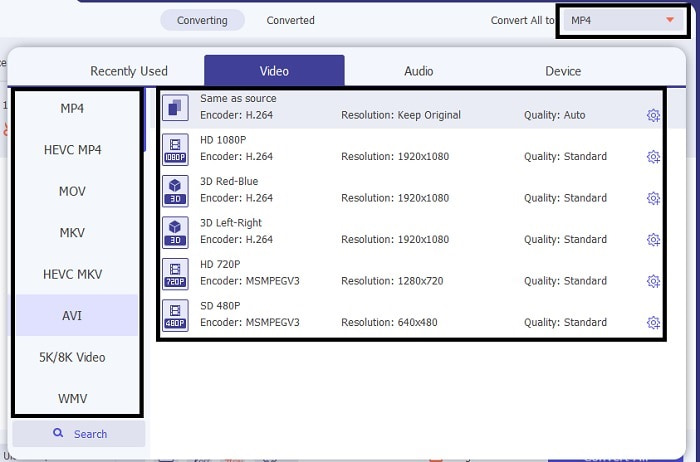
Step 4. On the drop-down menu choose what format you want it to be. Click the Convert All and wait for the conversion to be finished.
Step 5. The conversion will only take less than a second so waiting for it is not needed. After it is done, the file explorer will automatically be going to show into your screen with the file you converted. Click it and enjoy the newly converted file you just made.
Prós
- Fornece os principais recursos de edição para melhorar seu arquivo de mídia.
- 30x mais rápido na conversão do que a ferramenta online. E é 100x melhor em compressão do que a outra ferramenta.
- Fácil como 1-2-3 de usar. Não há necessidade de se tornar profissional para usar esta ferramenta.
Contras
- Precisa ser pago, mas não é muito caro.
- Você precisa baixar a ferramenta para o seu desktop.
MKV vs. AVI
O formato de contêiner multimídia Matroska, lançado em 2002, é um formato de código aberto que pode incluir várias faixas de vídeo, áudio, imagem e legendas. Assim, você pode usá-lo para armazenar clipes de vídeo curtos, programas de TV e filmes facilmente. É bastante popular para legendas de fãs de anime.
Baseado no Resource Interchange File Format (RIFF), o formato AVI foi introduzido pela Microsoft em 1992. Ele pode salvar vídeo/áudio de alta qualidade, pois usa menos compactação. Mas isso também causa o tamanho grande do arquivo AVI, o que pode ser um problema quando há espaço limitado.
Parte 3. Perguntas frequentes sobre MKV para AVI
O Handbrake pode converter MKV para AVI?
Sim, você pode usar o Handbrake para converter qualquer formato. Mas esta ferramenta está limitada apenas ao Windows 10 e superior.
O MKV tem ou não perdas?
MKV é um tipo de compressão sem perdas.
Quais são as desvantagens do MKV?
As MKV creates a new future for the format worldwide. This format is still in progress as it is mentioned earlier it can contain different codecs. So, it means it is much larger than an AVI format and more complicated as well. However, you can choose to convert MKV to MP4 to get a smaller file.
Conclusão
As for now, learning how to convert is essential especially to those who love watching. There are times that our file format will not be playable into our default media player because the format or codec is not supported. So, the best we can do to solve this problem is to convert it into a new format. FVC Video Converter Ultimate is the ultimate tool that gives you the greatness you want. Instead of choosing a low quality tool why don't you try to use the ultimate tool that solves any converting, enhancing, joining, creating problem you ever have.
-
 MKV para MOV - Como converter MKV para MOV
 Como faço para converter MKV para MOV no Mac? O iMovie consegue ler MKV? O que significa o formato MOV? Esta postagem mostra 2 maneiras simples de ajudá-lo a converter MKV em MOV com conversores de vídeo profissionais e online gratuitos.
-
 Como converter arquivos MKV para jogar no PS3 sem problemas [Resolvido]
 Quer reproduzir vídeos MKV no seu PS3? No entanto, o PS3 não pode reproduzir arquivos MKV diretamente. Este artigo mostrará maneiras de converter vídeos MKV para formatos de vídeo compatíveis com PS3 para reproduzir no PS3 sem problemas.
-
 Como converter vídeos MKV em GIFs animados sem Photoshop / FFmpeg
 Depois de baixar e assistir a filmes MKV em seu computador, você pode querer compartilhar alguns momentos maravilhosos com amigos ou na Internet como GIFs. Neste artigo, você pode aprender sobre as 2 maneiras mais fáceis de converter MKV em GIF.

