


 Video Converter Ultimate
 Gravador de ecrã
 Reparo de vídeo
 Secure Download
Um Guia Rápido para Converter MKV para DivX Online e Offline Gratuitamente Facilmente
MKV file format is a file container that stores audio, video, and subtitle tracks. It is a multi-purpose file format because it can also store HD videos. However, since it can keep a lot of data into one file, it takes too much space in a device. So, if you want to make your MKV file smaller in file size, you must convert it to a DivX file format. Keep on track because we will tackle the best ways to convert MKV to DivX Online and Offline for Free.

Parte 1. Informações sobre MKV e DivX
Antes de abordar os conversores MKV e DivX online e offline, devemos primeiro conhecer as semelhanças e diferenças entre os formatos de arquivo MKV e DivX. Nesta parte, você conhecerá os dados factuais e informações sobre esses dois formatos de arquivo.
Os arquivos MKV ou Matroska são um formato de arquivo famoso para os entusiastas do cinema porque é um contêiner de arquivos que pode lidar com vários fluxos de legendas e faixas de áudio em diferentes idiomas. Além disso, este arquivo é à prova de futuro, o que significa que não ficará desatualizado no futuro.
Ao contrário do arquivo MKV, o DivX é um formato de arquivo que permite compactar arquivos grandes de até doze avos do tamanho do arquivo original. Com isso dito, é a melhor escolha das pessoas se quiserem compactar seus arquivos MKV.
Como agora sabemos o que são arquivos MKV e DivX, agora aprenderemos como converter arquivos MKV para o formato de arquivo DivX.
Parte 2. 5 Ferramentas para converter o formato MKV para DivX sem esforço
Encontrar um conversor de MKV para DivX é difícil porque poucos conversores podem suportar formatos de arquivo DivX. Mas apresentamos os melhores conversores MKV para DivX para converter seu arquivo MKV para DivX facilmente.
FVC Video Converter Ultimate
FVC Video Converter Ultimate is a suitable tool if you are looking for the ultimate converter to convert MKV to DivX. This offline converter supports 1000+ file-formats, including MKV, DivX, XviD, MOV, AVI, MP4, M4V, FLV, and more. It also has the best features like adding effects to your video file and enhancing it. Moreover, it supports batch conversion, where you can merge multiple file formats into one. And if you want to know the edge of this tool against other converters, read the advantages below.

Vantagens do FVC Video Converter Ultimate:
Mais de 5.689.200 downloads- Ele suporta muitos formatos de arquivo, incluindo MKV, DivX, MP4, MPG, AVI, FLV, WMV e mais de 1000 formatos de arquivo.
- Possui recursos avançados como criador de GIF, criador de 3D e muito mais.
- Tem um processo de conversão ultra-rápido.
- Acessível em todas as plataformas de mídia cruzada, como Windows e Mac.
Free DownloadFor Windows 7 or laterSecure Download
Free DownloadFor MacOS 10.7 or laterSecure Download
Here are the steps on how to convert MKV to DivX format using FVC Video Converter Ultimate:
Step 1. Download FVC Video Converter Ultimate by clicking the Download button below. And then follow the installation process, then open the app.
Free DownloadFor Windows 7 or laterSecure Download
Free DownloadFor MacOS 10.7 or laterSecure Download
Step 2. On the software’s main interface, click the Converter option.
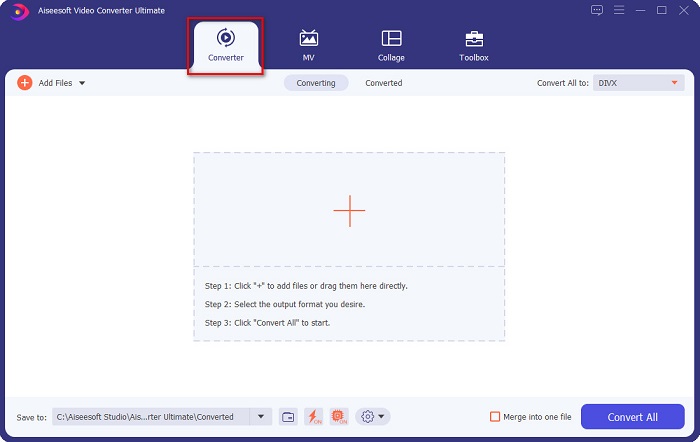
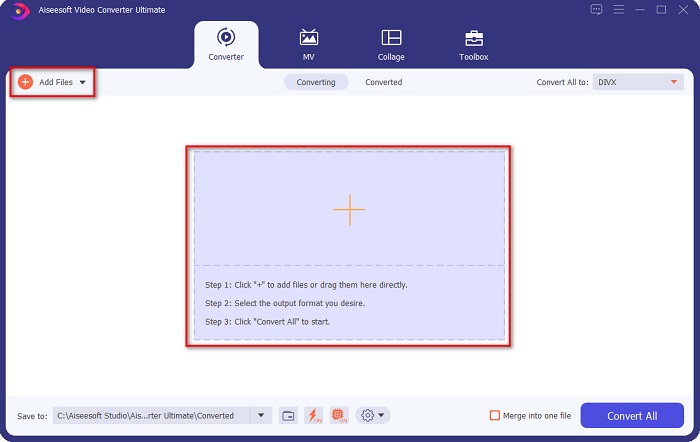
Step 3. Click the Add Files button or the + sign button on the same interface. Your computer files will appear, then select your MKV file to upload it.
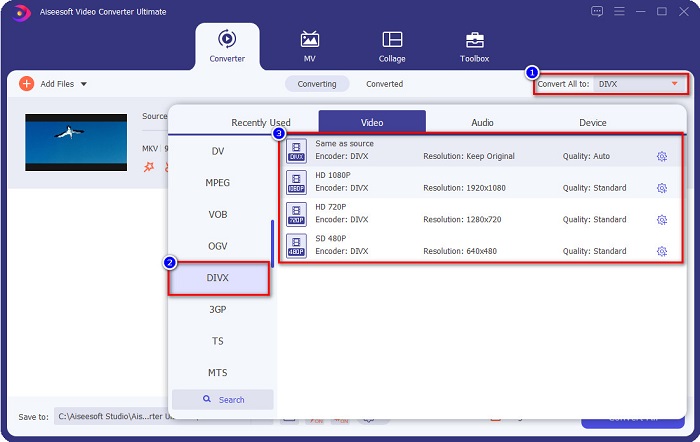
Step 4. After uploading your MKV file, click the Convert All to button to select the file output format that you want; click the DivX file format.
Step 5. Lastly, click the Convert All button to convert your MKV file to DivX file format.
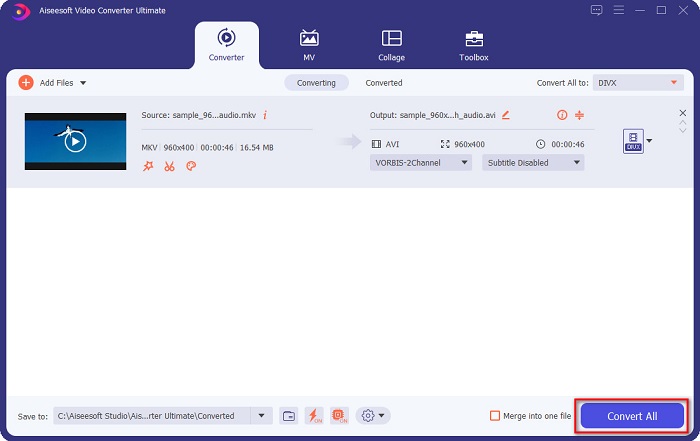
Depois é só esperar alguns segundos e pronto! Seu arquivo MKV agora é um formato de arquivo DivX!
AnyMP4 Video Converter
AnyMP4 Video Converter is a free MKV to DivX video converter that supports various file formats. It has a simple software interface, making it a user-friendly tool. You can also use a lot of features that this converter has. However, you cannot access its special features if you will not avail of the app.
Step 1. In your browser, search AnyMP4 Video Converter, then download the app. Then on the main software interface, click the Add File button to upload your MKV file.
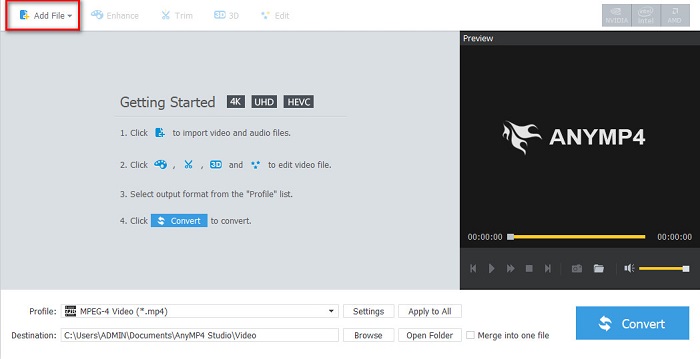
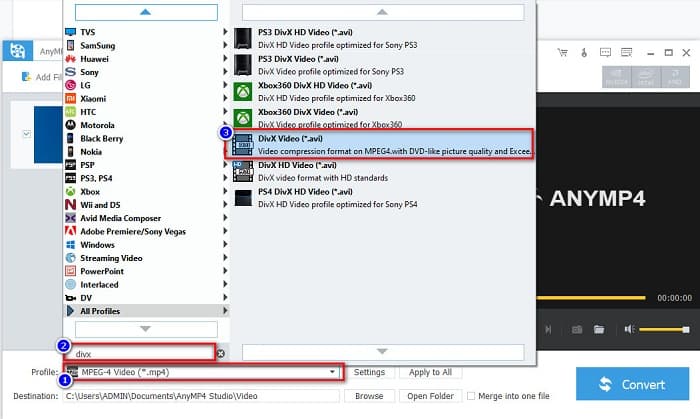
Step 2. Then on the Profile option below the software interface, search the DivX file format, then click it.
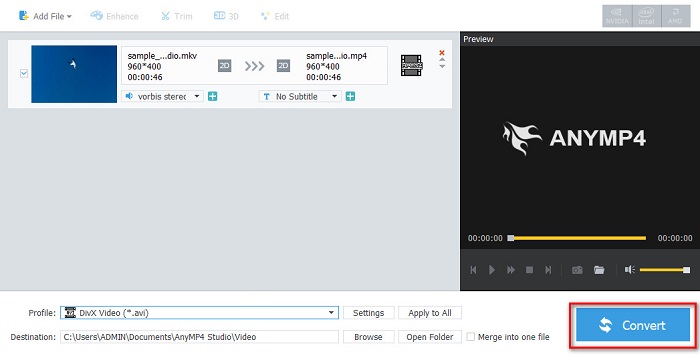
Step 3. For the last step, click the Convert button at the bottom right part corner of the interface. And then, just wait for your conversion process to finish. And it’s all done!
Media.io
Media.io is a free converter that can convert MKV to DivX online. This online converter has a simple user interface. Moreover, it does not contain any ads which other online converters have. However, you may experience having a slow conversion process because it is a web-based application.
Step 1. In your trusted browser, search Media.io. Then on the software’s main interface, click the Choose Files button.

Step 2. Then, click the drop-down button to select the DivX output format.
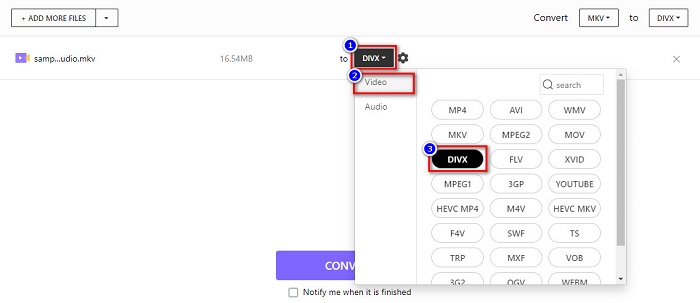
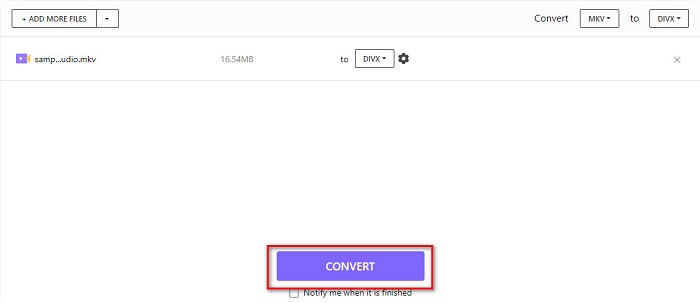
Step 3. And then, click the Convert button below to start converting your MKV file to DivX file format.
MiConv
Another way to convert MKV to DivX online for free is MiConv. This online converter is one of the know online converters you can find on the web. It is a web-based app; therefore, you do not need to download anything. Moreover, it is a beginner-friendly tool because of its easy-to-use GUI. Thus, it contains pesky ads that might be disturbing for you. Nonetheless, many people still use this online converter.
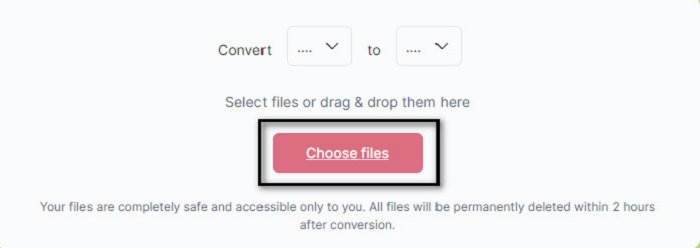
Step 1. Search MiConv on your browser to go to their webpage. And then, click the Choose files button. Your computer folders will appear, where you will select your MKV file.
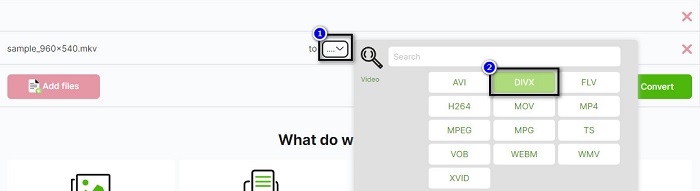
Step 2. Then, click the drop-down button on the bottom part of the software interface to select your output format.
Step 3. Finally, click the Convert button to transcode your MKV file to DivX.

AnyConv
The last converter that we will talk about is AnyConv online converter. This free MKV to DivX video converter is one of the most used online converters on the internet. Like the other online tools presented above, it also has an easy-to-use interface. Furthermore, it supports almost all standard video file formats. However, it contains disturbing ads and is internet-dependent, which means it depends on how fast your conversion process will be.
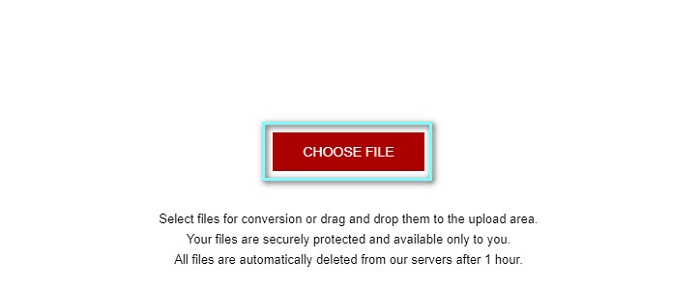
Step 1. Go to AnyConv website by searching AnyConv online converter on your browser. And then, click the Choose File button.
Step 2. Next, choose the DivX file format as your output format on the drop-down button.
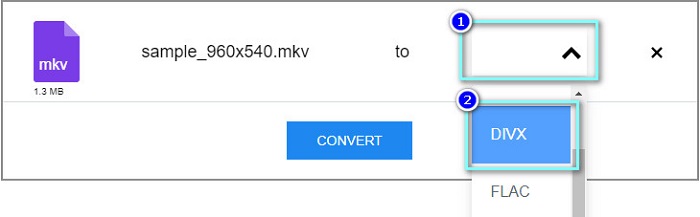
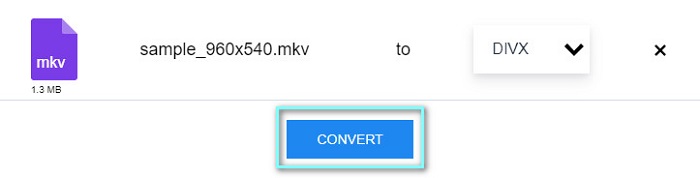
Step 3. Then, to start the conversion process, click the Convert button.
Parte 3. Perguntas frequentes sobre a conversão de MKV para DivX
Você pode reproduzir o arquivo MKV no Windows Media Player?
Windows Media Player does not natively support MKV file formats. Playing the MKV file on Windows Media Player may only show the audio. Therefore, if you want to play your MKV file on Windows Media Player, you can convert MKV to AVI file format.
Qual tem melhor qualidade, MKV ou DivX?
MKV tem melhor qualidade que o arquivo DivX; no entanto, o arquivo MKV é descompactado, tornando-o mais proeminente no tamanho do arquivo. Em contraste, DivX é um formato de arquivo compactado.
Você pode reproduzir arquivos DivX no macOS?
Infelizmente, o media player integrado do Mac, que é o QuickTime, não suporta o formato de arquivo DivX.
Conclusão
Ufa! Foi uma grande aventura que tivemos. Todo o conhecimento e informações que você tem hoje o ajudarão a escolher o melhor conversor de MKV para DivX. Portanto, se você deseja um conversor com muitos recursos excelentes para usar, muitas pessoas usam o FVC Video Converter Ultimate como sua primeira linha de escolha.
-
 MKV para MOV - Como converter MKV para MOV
 Como faço para converter MKV para MOV no Mac? O iMovie consegue ler MKV? O que significa o formato MOV? Esta postagem mostra 2 maneiras simples de ajudá-lo a converter MKV em MOV com conversores de vídeo profissionais e online gratuitos.
-
 Como converter vídeos MKV em GIFs animados sem Photoshop / FFmpeg
 Depois de baixar e assistir a filmes MKV em seu computador, você pode querer compartilhar alguns momentos maravilhosos com amigos ou na Internet como GIFs. Neste artigo, você pode aprender sobre as 2 maneiras mais fáceis de converter MKV em GIF.
-
 Dicas e truques sobre como converter arquivos MKV para MP3 [2021]
 Está tendo problemas para escolher o conversor certo de MKV para MP3? Então continue lendo este post, pois apresentamos diferentes soluções para um problema.
