


 Video Converter Ultimate
 Gravador de ecrã
 Reparo de vídeo
Melhores conversores gratuitos de MKV para WMV que podem converter seus arquivos rapidamente
MKV (Matroska) is a standard container with extensive audio and video files. Although it is a common file format, you still need to convert it to a file format that is a widely supported video format like WMV. So if you are looking for a free MKV to WMV converter, this is the article for you.

Parte 1. Por que você precisa converter MKV para WMV
MKV (Matroska) holds a vast amount of audiovisuals and multimedia files because it is a free standard container. Despite being a common file format, it is not an industry standard. Therefore, some media players might not support this type of file. In contrast, WMV or Windows Media Video is a file format widely supported by many media players available on any device. Moreover, it is a codec that compresses file size, making it one of the most common and suitable file formats in many media players.
Parte 2. Converta MKV para WMV usando o conversor de velocidade da luz
Não há dúvida de que o FVC Video Converter Ultimate é a melhor ferramenta para você quando se trata de converter arquivos MKV para WMV. Este conversor gratuito e ultrarrápido permite converter MKV para WMV sem perder qualidade. Este conversor também possui recursos impressionantes que permitem editar, aprimorar e até mesclar vários arquivos em um. Além disso, permite converter vários formatos de arquivo como MKV para WMV, MP4, M4V, AVI, MOV e muito mais.

FVC Video Converter Ultimate
Mais de 5.689.200 downloads- Suporta conversão em lote para converter vários arquivos ao mesmo tempo.
- Possui um recurso que permite converter seus arquivos MKV de forma ultra-rápida.
- Ele suporta mais de 200, incluindo MKV, WMV, MP4, AVI, MPG, MOV, VOB e muito mais.
- Disponível em várias plataformas, como Windows e Mac.
Free DownloadFor Windows 7 or laterSecure Download
Free DownloadFor MacOS 10.7 or laterSecure Download
How to convert your files using FVC Video Converter Ultimate
Step 1. To install FVC Video Converter Ultimate, click the Download button below. Then follow the installation process, and open the app.
Free DownloadFor Windows 7 or laterSecure Download
Free DownloadFor MacOS 10.7 or laterSecure Download
Step 2. After opening the application, click Add Files or the + button to upload files in the queue so that you may begin the process to convert.
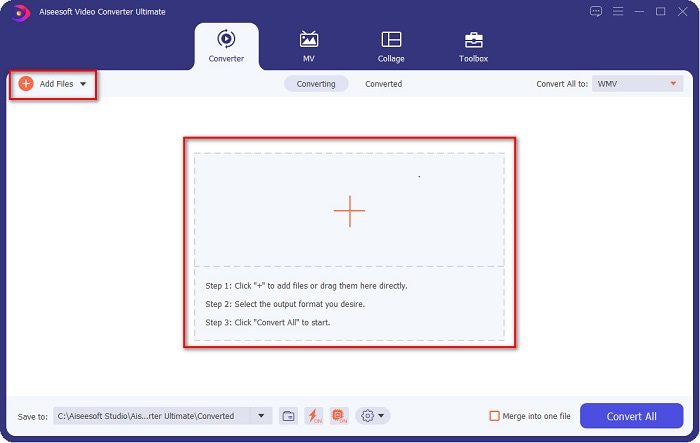
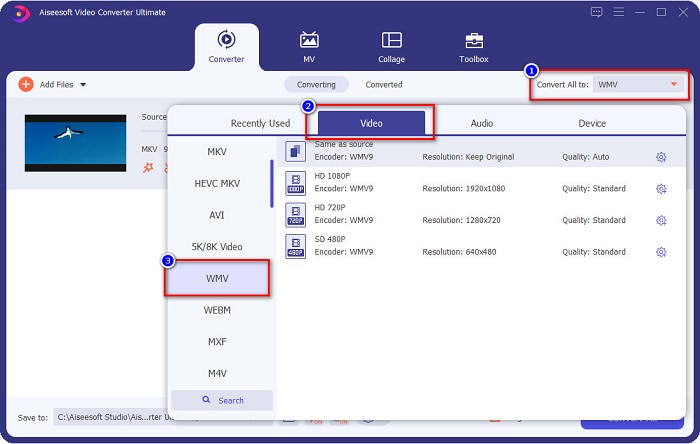
Step 3. Next is, click the Convert All to button, located at the upper right corner of the software's interface. A list of file formats will appear, then select WMV file.
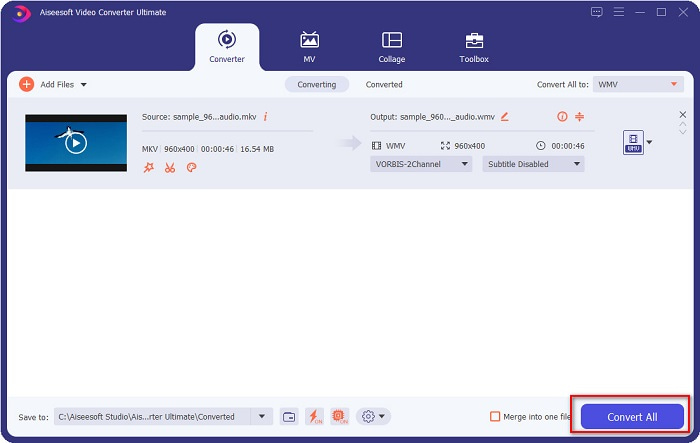
Step 4. After choosing the file format you want, click the Convert All button to convert your MKV file to WMV file format. And then wait for a few seconds, then your WMV file is ready!
Ao seguir estas etapas fáceis no uso do FVC Video Converter Ultimate, você pode converter rapidamente este conversor de MKV para WMV.
Parte 3. Converter MKV para WMV usando o VLC Media Player Converter
Outra maneira de converter seu arquivo MKV em um arquivo WMV é usando um conversor de freeware. O VLC Media Player não é apenas um player de vídeo; ele também pode converter arquivos como MKV para WMV, WebM, MP4, etc. No entanto, sua interface é um pouco difícil de entender. No entanto, este conversor está sendo usado por muitos usuários.
Guia rápido sobre como usar o VLC Media Player Converter:
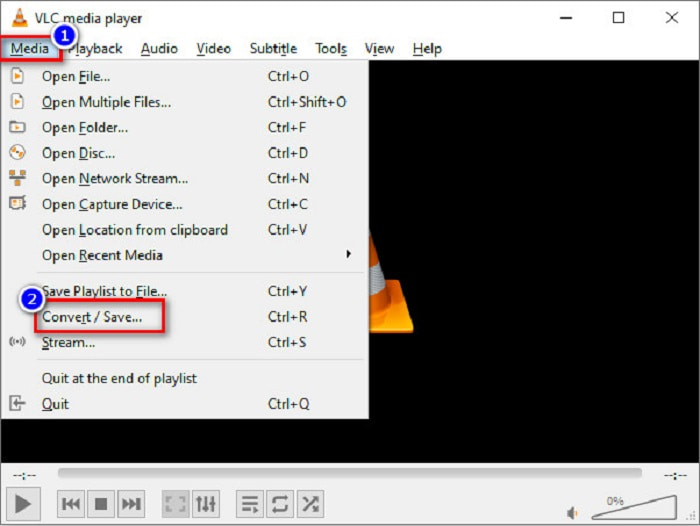
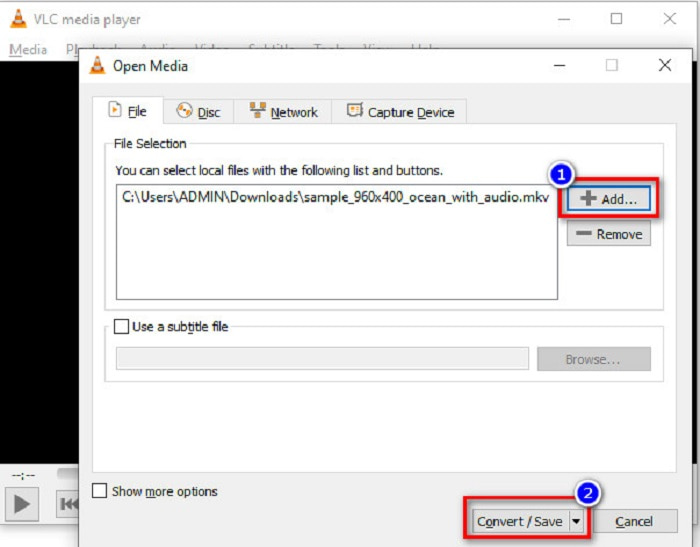
Step 1. Open VLC Media Player, or if it is not yet downloaded to your computer, search VLC Media Player, then follow the installation process. Then, located at the upper left corner of your screen, click the Media options, and click Convert/Save button.
Step 2. After clicking the Convert/Save button, a new interface will appear where you can see the list of local files you uploaded. To upload, click the + Add button to upload your MKV file. Press the Convert/Save button below to proceed to the next step.
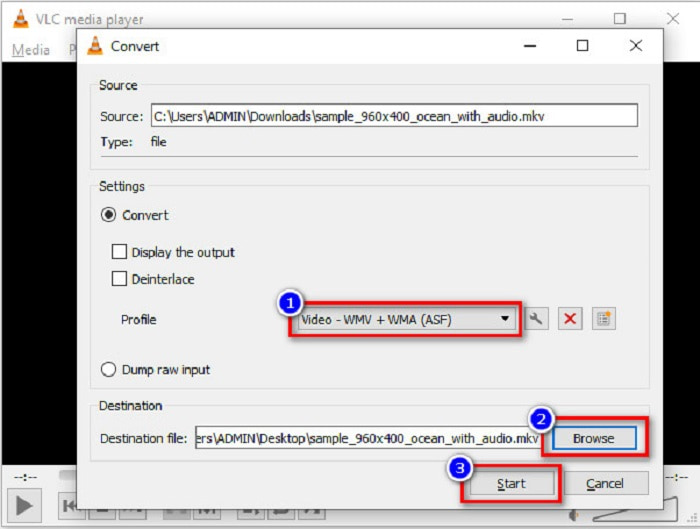
Step 3. Lastly, select the WMV file as your file format. Click the Browse button to choose the destination of your file when the conversion is finished. And finally, tick the Start button to start converting your MKV file to a WMV file.
Parte 4. Converter MKV para WMV usando o conversor online gratuito
FVC Free Video Converter Online is an MKV to WMV converter online free that allows you to convert numerous audio and video file formats, including MKV to WMV, AVI, MPG, MOV, MP4, MP3, and more. This converter also has a feature where you can edit the video bitrate, frame rate, and even the resolution of your file. Despite that it is a fantastic online converter, you may encounter a slow conversion due to your internet connection because it is an internet-reliant converter. Nonetheless, it still imposes excellent performance and is considered one of the best by many.
Here are the steps on how to convert your MKV file to WMV using FVC Free Video Converter Online
Step 1. On your browser, search FVC Free Video Converter Online to their website.
Step 2. After going to their website, click the Add Files to Convert button and launch it. Your computer files will appear, where you will select your MKV file.
Download the Desktop Version to convert files in batch.
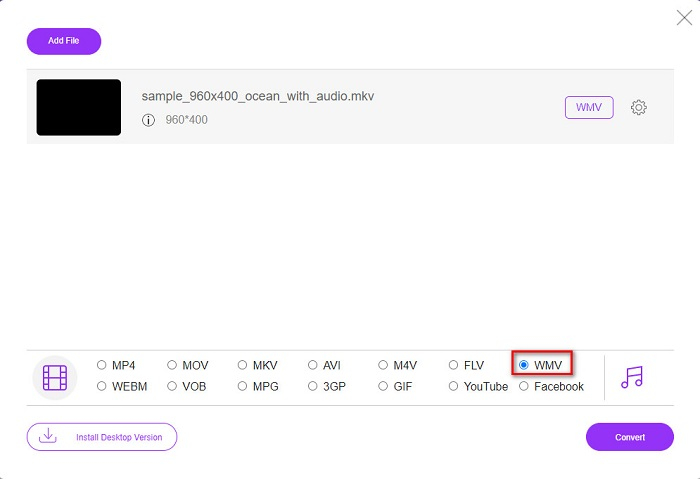
Step 3. You will see the list of file formats on the software's second interface below. Tick the circle beside the WMV file.
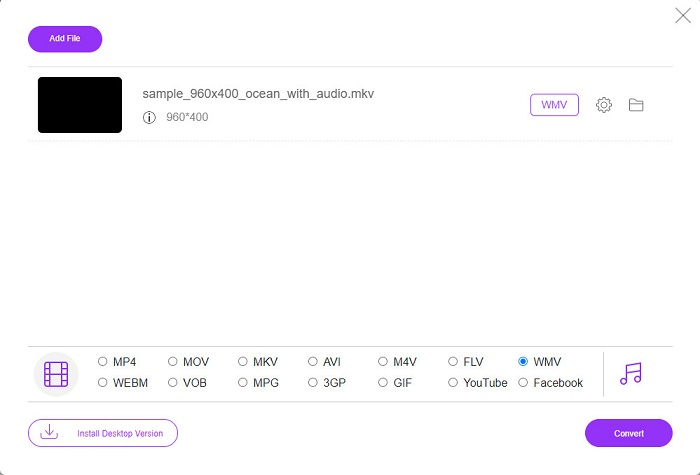
Step 4. For the last step, click the Convert button located at the bottom right corner of the software’s interface. Then your MKV file will start converting.
MKV vs. WMV
O formato de contêiner multimídia Matroska, lançado em 2002, é um formato de código aberto que pode incluir várias faixas de vídeo, áudio, imagem e legendas. Assim, você pode usá-lo para armazenar clipes de vídeo curtos, programas de TV e filmes facilmente. É bastante popular para legendas de fãs de anime.
Produzido pela Microsoft, o WMV era um dos formatos de vídeo mais comuns nos anos 2000. Ele pode ser visto na web e reproduzido por vários players de mídia no Windows. E também é o formato de arquivo de vídeo padrão do Windows Media Player. Mas foi assumido por outros formatos recentemente.
Parte 5. Perguntas frequentes sobre a conversão de MKV para WMV
Você pode alterar MKV para WMV sem perder a qualidade do seu arquivo?
Definitivamente. Ao usar o FVC Video Converter Ultimate, você pode converter seu arquivo MKV para WMV sem perder a qualidade do seu arquivo.
Qual é o melhor formato de arquivo para converter seu arquivo MKV?
As stated above, some media players do not support this file format. Therefore, you must convert it to a file format which many media players widely support. One is the MP4 format. To know more about this topic, read this article [Online & Free] How Can I Convert MKV to MP4 on Windows/Mac.
O Windows Media Player pode reproduzir arquivos MKV?
Windows Media Player does not support MKV file formats. So when you try to play an MKV file in Windows Media Player, it only plays its audio. Read on Best MKV Player to find your desired one.
Conclusão
Há muitas maneiras de como você poderá converter seu arquivo MKV para WMV. Os conversores apresentados acima possuem características distintas que os diferenciam uns dos outros.
And among the best MKV to WMV converters listed, we recommend using the FVC Video Converter Ultimate because this converter is more efficient and easy to use. In addition, it also has unique features which can help you improve your file. Still unsure about it? Download it now to experience this ultra-fast converter.
-
 MKV para MOV - Como converter MKV para MOV
 Como faço para converter MKV para MOV no Mac? O iMovie consegue ler MKV? O que significa o formato MOV? Esta postagem mostra 2 maneiras simples de ajudá-lo a converter MKV em MOV com conversores de vídeo profissionais e online gratuitos.
-
 Como converter vídeos MKV em GIFs animados sem Photoshop / FFmpeg
 Depois de baixar e assistir a filmes MKV em seu computador, você pode querer compartilhar alguns momentos maravilhosos com amigos ou na Internet como GIFs. Neste artigo, você pode aprender sobre as 2 maneiras mais fáceis de converter MKV em GIF.
-
 Dicas e truques sobre como converter arquivos MKV para MP3 [2021]
 Está tendo problemas para escolher o conversor certo de MKV para MP3? Então continue lendo este post, pois apresentamos diferentes soluções para um problema.

