


 Video Converter Ultimate
 Gravador de ecrã
 Reparo de vídeo
 Secure Download
Técnicas de primeira linha sobre como converter MPEG para M4V
Is your MPEG file not playable on QuickTime Player? If that is your problem, then the most excellent solution you can try is to convert your MPEG file to M4V format. You can play an M4V file on QuickTime Player and other Media Players. In this guidepost, we will give you the best three methods you can do to convert MPEG to M4V instantly with the help of Mac and online tools. In addition, we will show you the differences between the MPEG file format and M4V. So that you will get an idea about these two formats. Let’s read this article already and learn more about these methods.

Parte 1: Quais são as diferenças entre MPEG e M4V
Consulte a tabela abaixo para ver as informações sobre os formatos de arquivo MPEG e M4V.
| MPEG | M4V | |
| Descrição | Quando o MPEG-1 foi criado em 1993, ele rapidamente ganhou popularidade como formato de armazenamento para áudio e vídeo. Agora é o tipo de mídia mais compatível em todo o mundo. Quando o formato foi lançado originalmente, era inovador e à frente de seu tempo, fornecendo arquivos de qualidade razoável, diminuindo seu tamanho e compactando os dados, facilitando o upload e o download de arquivos. Esses recursos permitiam transmissão de áudio digital, TV digital e vídeo. Como o MPG está desatualizado e não é mais protegido por patentes, vários hardwares e softwares Mac e Windows vêm equipados com suporte nativo para vídeo e áudio MPEG. | M4V, um tipo de contêiner de vídeo em que os arquivos do iTunes podem armazenar dados de áudio e vídeo. É melhor comprar arquivos de áudio ou vídeo da loja iTunes se eles forem Apple FairPlay DRM protegidos contra visualização e cópia não autorizadas. Como o formato é baseado na estrutura MPEG-4, praticamente qualquer reprodutor contemporâneo pode exibir arquivos desprotegidos. |
| Categoria de arquivo | Vídeo | Vídeo |
| Extensão de arquivo | .mpeg | .m4v |
| Desenvolvedor | ISO, CEI | maçã |
| Programas associados | VLC Media Player LAN de vídeo Windows Media Player | Quicktime Player VLC Media Player iTunes da Apple |
Parte 2: Excelente método para converter MPEG para M4V usando o Mac
You can download the Video Converter Ultimate to easily convert MPEG to M4V on Mac. It has a high-speed conversion process of 30x faster than other converters. Also, it offers batch conversion. In this way, you can convert your MPEG file to M4V format, and at the same time, you can convert more files simultaneously. With this kind of process, you can ensure that you can convert numerous files in a short period of time. You can also convert your MPEG file to other formats, such as MOV, MKV, WMV, MP4, AVI, FLV, and 100+ more. Furthermore, Video Converter Ultimate is not only reliable in converting. If you want to crop your MPEG video before converting it, you can do it here in this application. This converter offers a cropping tool to cut and crop your video to remove the parts you don’t want to see. Also, if you plan to create a photo collage, you can use this application. It offers a collage maker feature. With this feature, you can use free templates with various designs, and also it has numerous filters you can use. In this way, making a fantastic collage is possible. If you desire to discover more about this application, you have to try utilizing it yourself.
Features
◆ Converta mais de 100 formatos de arquivo de vídeo, incluindo M4V, MPEG, MKV, WMV, MOV, FLV, AVI, MP4 e muito mais.
◆ Pode criar uma colagem com modelos e filtros gratuitos.
◆ Oferece várias ferramentas de edição, como aprimorador de vídeo, compressor, correção de cores, cortador, etc.
◆ Capaz de criar um atraente videoclipe com temas gratuitos.
◆ Pode desacelerar e acelerar um vídeo de 0,125x até 8x mais rápido.
◆ Pode comprimir vídeo e áudio.
Prós
- Perfeito para o usuário não profissional.
- Ele pode converter arquivos 30 vezes mais rápido que a velocidade de conversão normal.
- Possui uma interface intuitiva.
- Oferece processo de conversão em lote.
Contras
- Você precisa adquirir o software para aproveitar os excelentes recursos da versão pro.
Siga o guia simples abaixo para converter MPEG para M4V usando o Mac.
Step 1: Click the Download button to download and install Video Converter Ultimate on your Mac. After that, launch the application.
Free DownloadFor Windows 7 or laterSecure Download
Free DownloadFor MacOS 10.7 or laterSecure Download
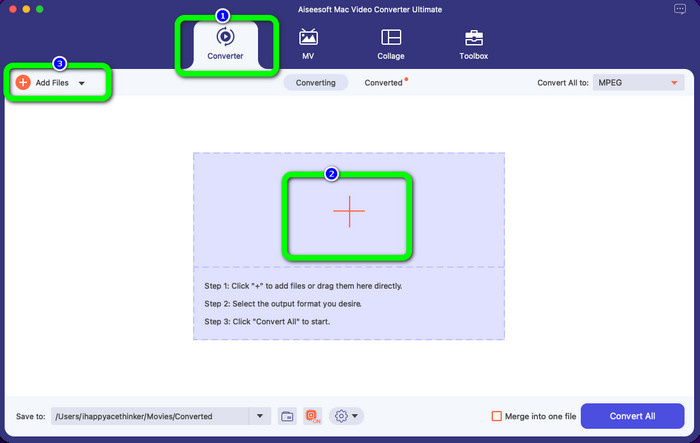
Step 2: After opening the application, you will see the four options on the upper part of the interface. Select the Converter option and click the Plus icon on the middle part of the interface to add the MPEG video you want to convert. You can also click the Add Files button.
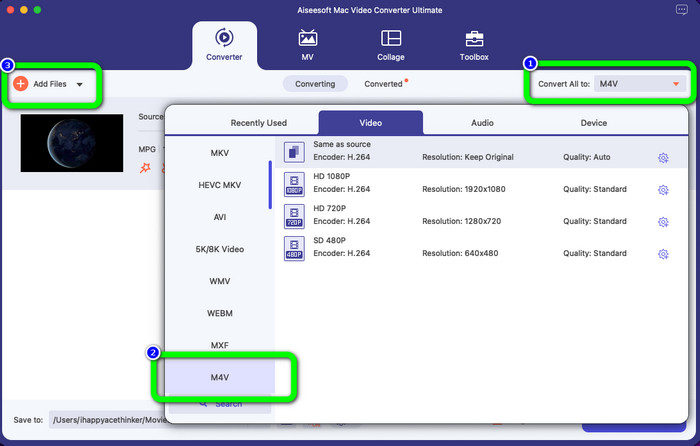
Step 3: When you insert your MPEG video file, select the Convert All to button at the upper right of the interface. Then the format options will show up on your screen. Click the M4V file, which is your desired output format. This tool offers batch conversion, so you can click the Add Files button to add more files you want to convert.
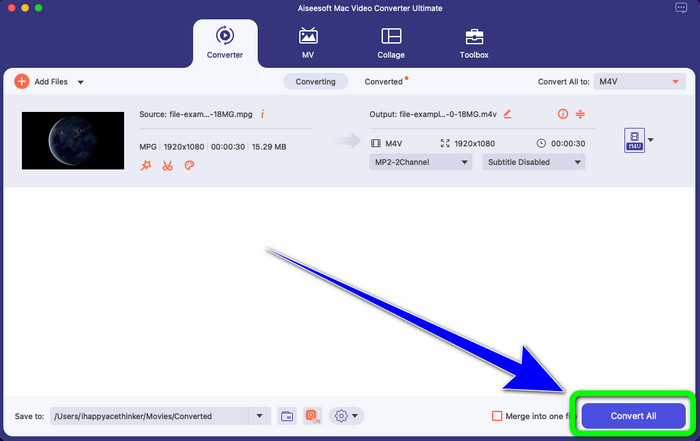
Step 4: If you are done changing the MPEG file to your desired format, click the Convert All button to save your final video with an M4V file format.
Parte 3: Melhor Maneira de Converter MPEG para M4V Online
The best way to convert MPEG to M4V using an online tool is FVC Free Video Converter Online. It is a versatile video converter that has the capability to convert almost all formats, such as AVI, MOV, MP4, FLV, TS, and more. Also, you can convert your MPEG file while still keeping its original quality. Also, this converter is 100% free, so you can use this tool limitlessly without spending any money. Follow the simple steps below to convert MPEG to M4V using FVC Free Video Converter Online.
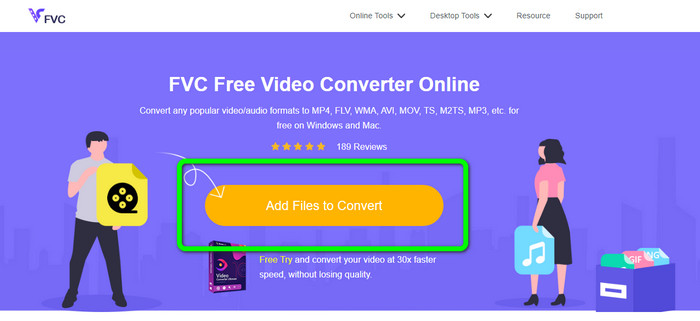
Step 1: Open your browser and visit the FVC Free Video Converter Online website. Next, click the Add Files to Convert button. Your folder will appear on your screen, and pick the MPEG file you want to convert.
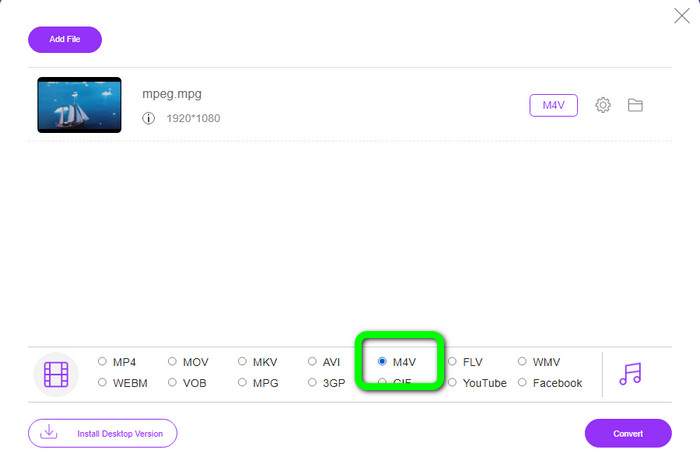
Step 2: After adding your MPEG video file, you will see the format options on the lower part of the interface. Select your desired output format, which is the M4V file.
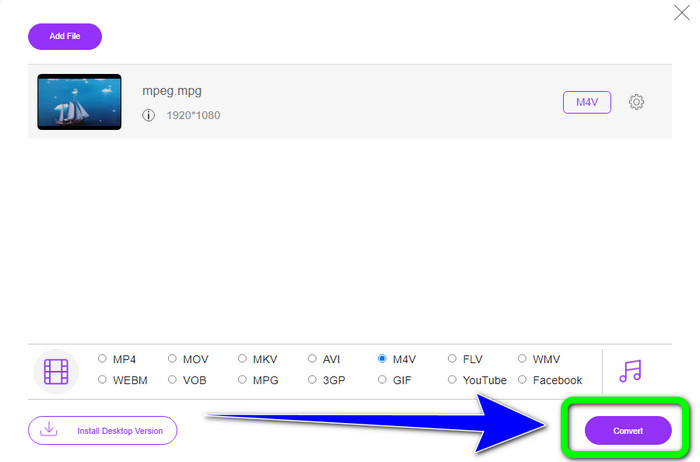
Step 3: For the final step, click the Convert button after selecting the M4V file format. Then, save it in your desired location. Wait for the conversion process, and click OK. This tool also helps you convert MP4 to M4V online.
Parte 4: Perguntas frequentes sobre a conversão de MPEG para M4V
Como usar o FFmpeg para converter MPEG para M4V?
Baixe o FFmpeg no seu computador. Em seguida, abra seu prompt de comando. Mude sua linha de comando para “Desktop”. O comando de conversão começa com FFmpeg -i, seguido pelo nome e o tipo de arquivo do arquivo de origem, bem como o nome e o tipo de arquivo do arquivo de saída. Em seguida, pressione “Enter” e aguarde o processo de conversão. Após a conversão, você verá o arquivo convertido em sua área de trabalho.
O VLC pode converter MPEG para MP4?
Yes. A popular cross-platform media player, VLC can play all major file types, including MP4, MPEG, AVI, MOV, and more. The player may be used to quickly and easily convert your MPG files to MP4 because it also enables file conversion.
Posso usar uma excelente ferramenta online para converter arquivos MPEG para outros formatos?
Yes, of course! You can use FVC Free Video Converter Online. This online tool can instantly convert your MPEG file to other formats without changing the video quality.
Conclusão
The two methods shown above are the best solution to convert MPEG to M4V file format. You can use the Video Converter Ultimate if you want a downloadable converter. And if you prefer using an online tool, you can use FVC Free Video Converter Online.
-
 3 maneiras de converter MPG para 3GP no Windows e Mac [Grátis]
 Se você está procurando maneiras de converter MPG para 3GP, leia este artigo para conhecer as melhores maneiras de converter MPG para 3GP no Windows e Mac.
-
 Como converter MPG para DivX sem perda de qualidade
 Você está procurando um aplicativo sem problemas que possa usar para converter MPG para DivX? Este artigo fornecerá diferentes métodos eficazes que você deve tentar.
-
 Como converter M4V para DivX gratuitamente no Mac [Melhores ferramentas]
 Procurando maneiras de converter M4V para DivX gratuitamente? Listamos os melhores conversores para você converter seu arquivo M4V para DivX no Mac.
