


 Video Converter Ultimate
 Gravador de ecrã
 Reparo de vídeo
Detalhes que você precisa para se iluminar ao converter MPG para AVI
Generally speaking, an MPG file is a typical video file that uses a digital video format that has been standardized by the Moving Picture Experts Group (MPEG). It stores video, audio, and metadata in a single file that is interleaved. It is common practice to employ MPG files to create movies that are delivered over the Internet. This kind of video format is not easy to convert if you don't have any knowledge or background in any converter that supports or converts MPG to AVI. Continue reading this article to be enlightened about the details and choices you should consider to achieve the converting process you want.

Parte 1. MPG e AVI - Uma Visão Geral
MPEG is a video file format developed by the Moving Picture Experts Group, the same people who brought you such formats as MP3 and MP4. Depending on how it will be used, MPEG will use either MPEG-1 or MPEG-2 file compression.
To compress VHS-level raw video and CD music down to 1.5 megabits per second without sacrificing too much quality, MPEG-1 was created. As a result, it has become one of the most popular and widely compatible video/audio formats on the planet. Video data for MPEG-1 is typically transmitted at 30 frames per second (frames per second), with a resolution of around 352240 pixels (frames per second).
However, Windows computers use AVI as the default video format. In a multimedia container format, such as DivX or XviD, audio and video can be stored using several codecs. Many alternative video formats, such as MPEG and MOV, use less compression and more storage space than an AVI file. Compression-free AVI files are also possible to produce. This results in massively bigger file sizes — around 2-3 GB each minute of video — because the files are now lossless. Regardless of how many times you open or save the file, a lossless file retains its quality. Additional advantages include playback with no codecs required.
Parte 2. Software mais eficaz para converter MPG para AVI
If you ever wondered how to convert an MPG video file to AVI for free, this new and best software is what this article recommends you to use. Video Converter Ultimate is a free-to-download software available in Windows and Mac that can convert your MPG file to AVI as fast as possible than converting files online. Other than these two video files, this software also supports various formats for you to choose from. The best because of the quality output you will have if you use this software. Now that you have the preview of what this software can do, buckle up and let's find out how this software operates:
Step 1. To get started, simply click on the Free Download button provided below. Once the download is complete, you can choose to download the software on either Windows or Mac. Once the software is installed on your computer's desktop, you can begin using it by clicking the Start Now button.
Free DownloadFor Windows 7 or laterSecure Download
Free DownloadFor MacOS 10.7 or laterSecure Download
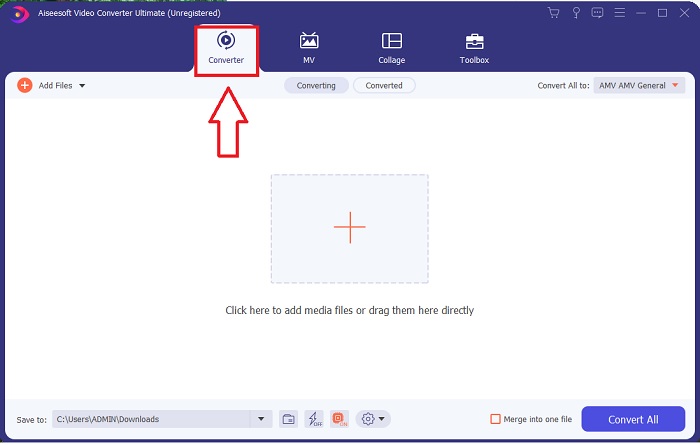
Step 2. Open the software you've just downloaded. You'll see a window with the Converter interface when you initially open the software. You'll begin the process of transcoding your video here.
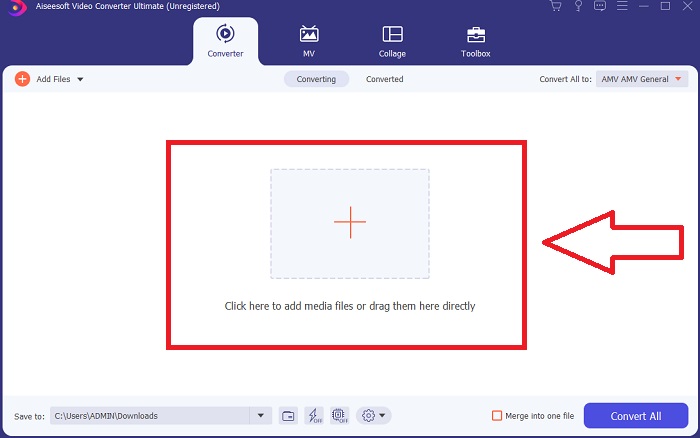
Step 3. You can begin the converting process by importing your files into the software. Converting a video is as simple as dragging it onto the Plus symbol.
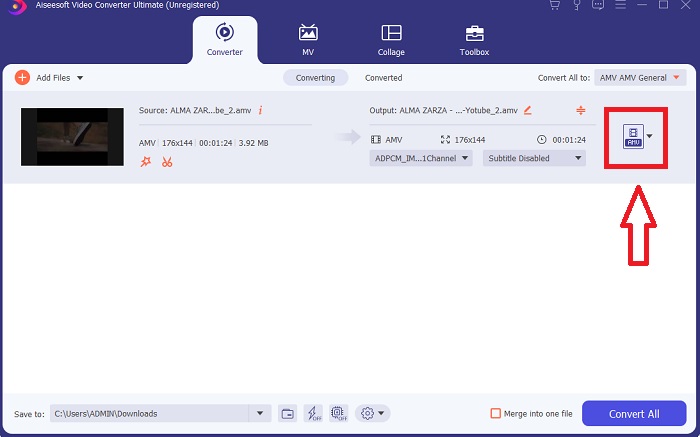
Step 4. Right-click on a video format and choose Save to or Save to external storage. Search for, and then select, an AVI file type from the drop-down option. Video quality settings are numerous once you've chosen an AVI video file type. You can alter the quality settings if your desired video output isn't mentioned. The gear icon allows you to change the display's resolution, frame rate, and audio quality. To save your edits, click the Create New button.
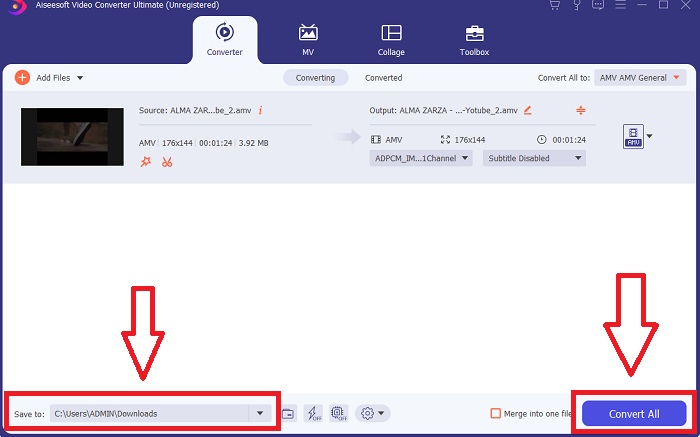
Step 5. Click Convert All when you've edited the video chosen, and it is ready to be transferred to your computer.
Parte 3. Dicas rápidas: outras ferramentas eficazes que você deve considerar
Método 1. Use CloudConvert
CloudConvert é um conversor de vídeo online. Este conversor online também suporta MP4, WEBM e AVI, entre outros formatos. Você pode escolher a qualidade, a resolução e o tamanho do arquivo de vídeo. Se você está pensando em como converter MPG para AVI nesta ferramenta online, aqui está o procedimento de como usá-la:
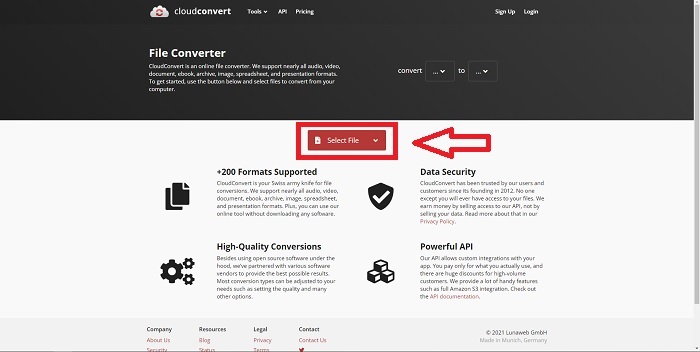
Step 1. Upload a file from your computer by clicking the Select the File.
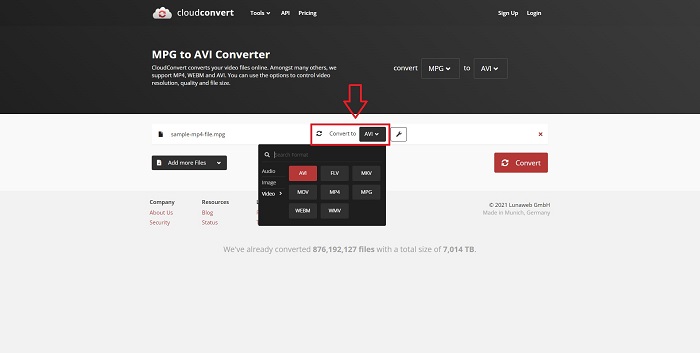
Step 2. Then, proceed with choosing where your file will be converted to by clicking the format section beside the wrench icon. You also have the option to add more files to convert.
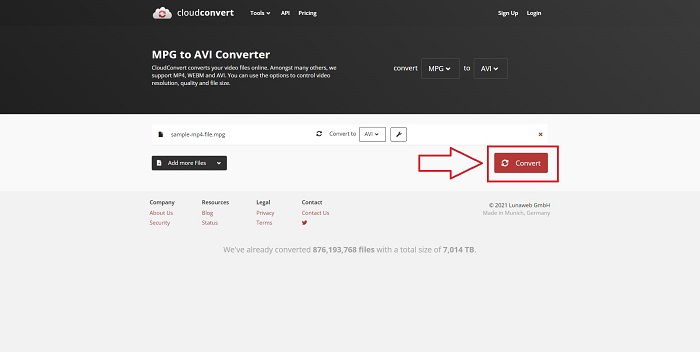
Step 3. Click Convert to convert all the files you uploaded.
Método 2. Use Zamzar
Zamzar é uma ferramenta baseada na web para conversão de arquivos. As conversões podem ser realizadas em uma variedade de formatos sem a necessidade de baixar nenhum software. O Zamzar pode converter um arquivo de um formato para outro, como um Adobe PDF em um documento do Microsoft Word, digitando uma URL ou enviando um ou mais arquivos (desde que todos estejam no mesmo formato). Para obter conhecimento sobre esta ferramenta online, aqui estão as etapas fornecidas para você:
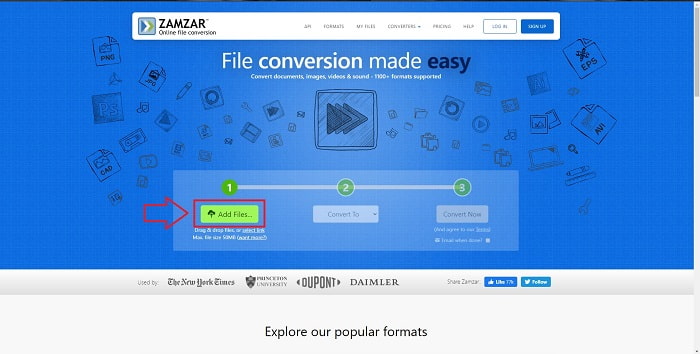
Step 1. Search for Zamzar on any search engine. After you click the website, you can now upload a file in its interface by clicking the Add Files.
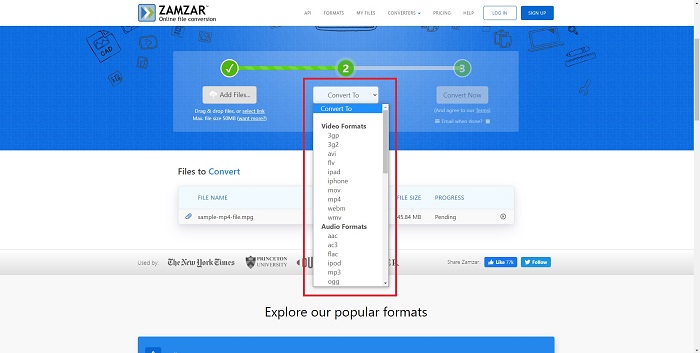
Step 2. Next, you can now convert the file by choosing the file you want. Click Convert To to see all the supported formats this online tool holds.
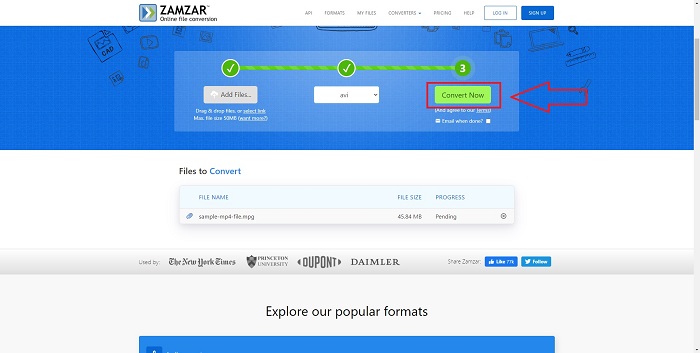
Step 3. To convert the file, click Convert Now.
Parte 4. Perguntas frequentes sobre MPG e AVI
AVI ou MPG é melhor?
O armazenamento é possível com arquivos AVI, enquanto a gravação de vídeo é realizada com arquivos MPEG. AVI é ligeiramente superior ao MPEG; no entanto, se MPEG for o formato a ser usado, você deseja gravar vídeos em DVD. O Microsoft Windows desenvolveu o formato de arquivo AVI em resposta ao formato de arquivo MOV da Apple, enquanto o Moving Picture Group desenvolveu o formato MPG.
Quais são as vantagens e desvantagens do AVI?
Em comparação com outros formatos de arquivo, os arquivos AVI podem ser extremamente grandes se não forem compactados. Você deve estar disposto a abrir mão de algum espaço em disco em troca dos benefícios do arquivo AVI, já que não será capaz de armazenar tantos arquivos como faria de outra forma. Se você compactar um arquivo AVI online além de um certo ponto, a qualidade do vídeo será reduzida como resultado.
Qual é o tamanho AVI ou MPG menor?
When it comes to the internet, larger files take longer to download. It makes sense to encode films in smaller file sizes, even if it results in a bit of loss of quality. When it comes to playback, AVI is still preferred over MPG because more set-top players can play AVI files than MPG files. Want to play your MPG files on your computer, click here to learn more.
Conclusão
To conclude everything we have discussed, Video Converter Ultimate is the best converter you should consider using over all the online MPG to AVI converters enlisted above. This software is free, and it has the fastest conversion process than the online converter tool. It also supports a lot of formats and gives you quality in video output. Other than that, there is no reason you shouldn't use this software.
-
 Como converter arquivos MPEG para MP4 gratuitamente no Windows, Mac, Online
 Leia e obtenha 3 maneiras gratuitas de converter arquivos MPEG para MP4 em seu computador. Você pode usar conversores de vídeo online e de desktop para transformar o formato MPEG em MP4 com facilidade.
-
 [2025] Melhores ferramentas e maneiras fáceis de converter MPEG para MP3
 Este artigo fala principalmente sobre como você pode converter seus vídeos MPEG em MP3 com o uso das ferramentas mais confiáveis da lista.
-
 4 maneiras eficientes de converter MOV para AVI no PC e Mac [2025]
 Você quer saber qual é o melhor conversor de MOV para AVI da web? E por que o FVC Ultimate Video Converter pode ser a pessoa certa para você.
