


 Video Converter Ultimate
 Gravador de ecrã
 Reparo de vídeo
Guia simplificado para converter seus arquivos MTV em formato WMV com etapas detalhadas
Many users ask how to convert their MTV into a playable format on Windows like the WMV format. So today is your lucky day because here we are presenting two of the best converters we can find. Furthermore, all of the detailed information stated here are facts you can use. Without any more delays, let's proceed and read the details below to have more ideas on how to convert MTV to WMV.

Parte 1. Converta MTV para WMV com o Video Converter Ultimate
FVC Video Converter Ultimate provides an efficient converting process and a professional output if you convert MTV to WMV or other formats. This converter offers an unparallel approach in transforming that no converter can contend. Moreover, it also has editing features that you would love and will help you on many occasions. Want to know more about some of its parts? If so, read the details below.

FVC Video Converter Ultimate
Mais de 3.222.440 downloads- Converta MTV para WMV, AVI, MKV, MOV, FLV ou em mais de 200 formatos suportados.
- Ele suporta aceleração de hardware e conversão super rápida para um processo de conversão rápido e eficiente.
- A melhor escolha dos iniciantes em conversão fornece uma saída profissional sem problemas.
- Recursos avançados de edição estão disponíveis para você usar, como cortar, recortar, mesclar e muito mais.
- Disponível para download em todos os sistemas operacionais como Windows e macOS.
Free DownloadFor Windows 7 or laterSecure Download
Free DownloadFor MacOS 10.7 or laterSecure Download
Agora que descobrimos seus recursos exclusivos, é hora de converter seus arquivos MTV com a ajuda desta ferramenta definitiva, seguindo as etapas abaixo.
Step 1. First and foremost, you must download the software first on your desktop drive by clicking the download button available below. After the download process, you must follow the installation promptly and run the software.
Free DownloadFor Windows 7 or laterSecure Download
Free DownloadFor MacOS 10.7 or laterSecure Download
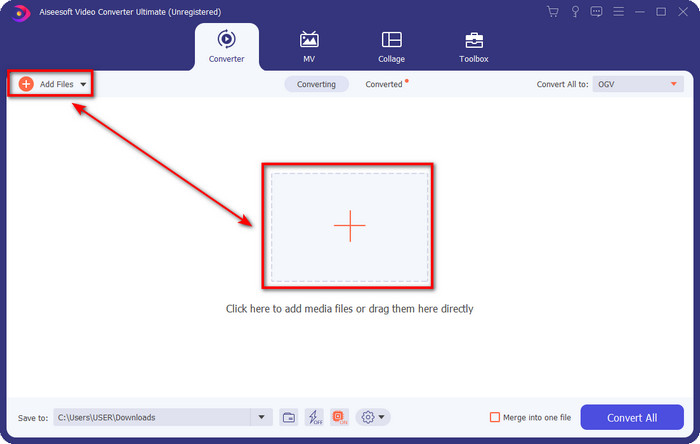
Step 2. Upload the MTV file by dragging it and dropping it on the interface. Or you can click Add Files, then locate the file on the folder that will show on your screen, and press Open.
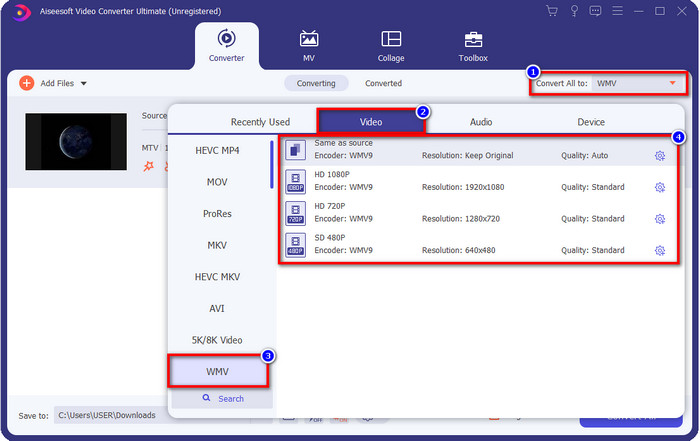
Step 3. Once you add the MTV file, you must click the Convert All to button choose the WMV format or whatever format you want available on the list.
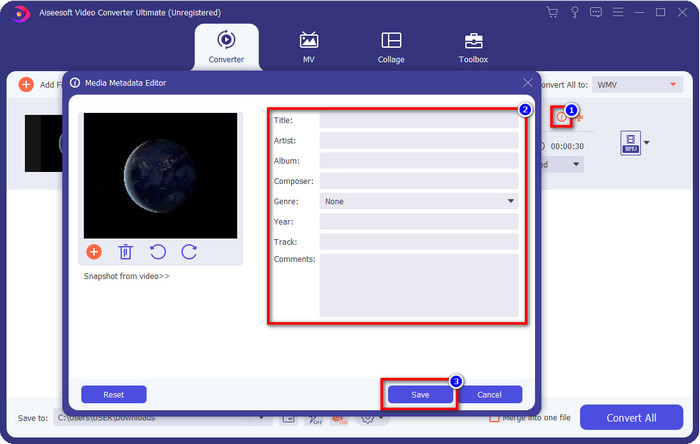
Optional. Do you need to edit the metadata? If so, click the metadata button and add the data you want to insert. For example, fill up the Title, Artist, Composer, Album, Genre, and more to save the metadata click Save.
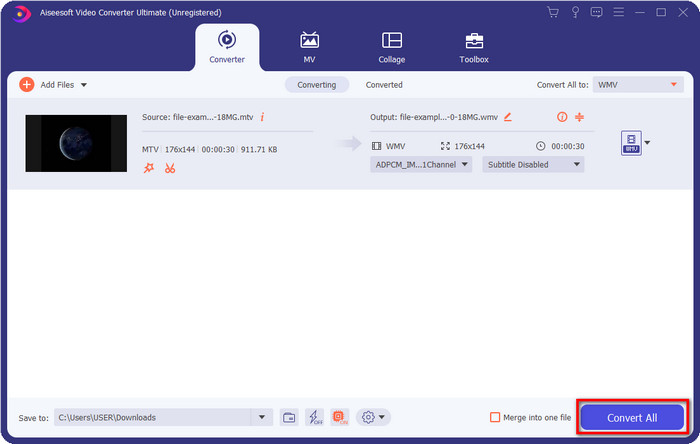
Step 4. By clicking the Convert All button, the process will begin. Once complete, a new computer folder will show on your screen with the WMV file.
Parte 2. Converter MTV para WMV Online
FVC Free Video Converter Online offers proper functions as a converter that anyone can access with an internet connection. This web converter is available in all browsers and is easy to use. Unlike the converter mentioned first, this tool is now downloadable, but you will need to download the installer before using it. Even though the tool can save some space on your drive, it is not as good as the ultimate tool. So now, let's proceed to the steps and learn to convert MTV to WMV online with the help of this web converter.
Step 1. Click this link, and the main web converter will show on a new tab.
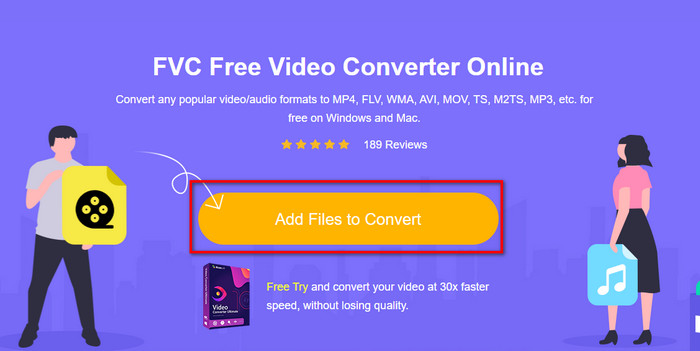
Step 2. Click the Add Files to Convert button to download the installer. Click it again; a folder from your computer will open; this time, you will need to browse the MTV file, click it and press Open.
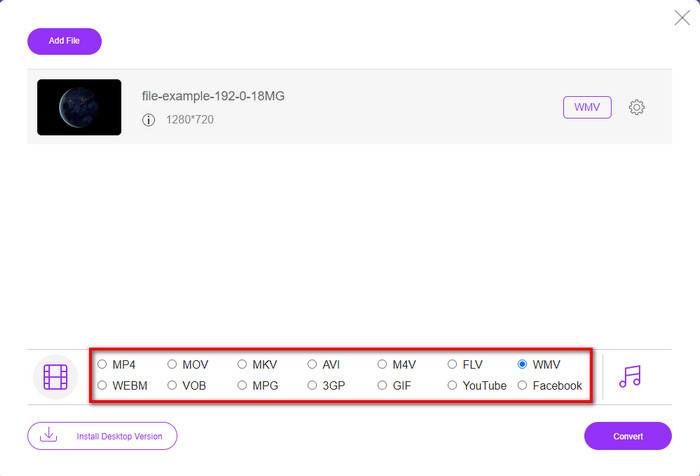
Step 3. After uploading the MTV file, click the WMV format below or any format you want to convert it into.
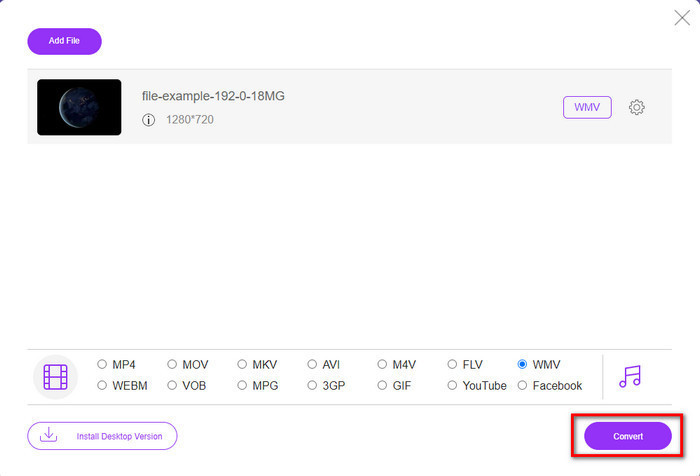
Step 4. If you are ready to convert, click the Convert button, and the process will begin.
Parte 3. Qual é a diferença entre MTV e WMV
MTV e WMV são contêineres para conteúdo de vídeo e áudio; no entanto, eles têm recursos exclusivos que o outro não pode copiar. Quer saber mais sobre MTV e WMV? Então vamos começar a ler as seguintes informações detalhadas abaixo.
Pelo contrário, o WMV oferece uma resolução muito maior em comparação com o MTV. Embora tenha uma resolução maior, ele usa um compressor para diminuir o tamanho do arquivo, mas sem prejudicar a qualidade. Além disso, este formato é mais compatível para ser reproduzido em todos os Windows do que o MTV. Portanto, se você deseja reproduzir seu arquivo MTV, deve saber como convertê-lo em um WMV e reproduzi-lo no sistema operacional Windows.
Por último, você precisará converter MTV para WMV devido à qualidade que o WMV oferece e aos motivos de compatibilidade. Portanto, se você deseja converter o arquivo MTV, deve usar o produto FVC para obter uma saída fantástica sem passar por muitos processos.
Parte 4. Perguntas frequentes sobre a conversão de MTV para WMV
Por que as resoluções de vídeo da MTV são baixas?
Se o arquivo de mídia estiver neste formato, espere baixa resolução. Porque na compressão do arquivo, a qualidade do vídeo é um sacrifício para diminuir o tamanho. Além disso, este formato só pode reproduzir uma série de imagens em 465/555 com uma conjunção, e o áudio é em MP3.
Qual player de vídeo posso usar para reproduzir arquivos .mtv?
You can use the VLC media player to play this media format because it supports different encoders and the format you want to play it on. So now, if you're going to watch your MTV files, you must download the VLC on your device to make it work. But if you want a much better media player than VLC, you must use the Blu-ray player instead because it provides an almost cinematic vibe while watching the MTV files.
O Quicktime suporta o formato MTV?
Unfortunately, the MTV format is not playable on Quicktime because of its encoder. But we found out that you can convert the file into MOV format instead. Want to know more about how to convert MTV to MOV? If so, you must spend 5 minutes reading this article to be knowledgeable.
Conclusão
Finally, we found the two best ways to convert MTV to WMV and make it compatible with Windows even better and do more that you can't do on the format of MTV. So now that we figure out what are possible converters you can use, it is now the time to choose one. Either of the two, you will surely guarantee success on your conversion. But if you want to have a professional and phenomenal output, you must use the FVC Video Converter Ultimate. Want to know more about the ultimate converter? Then you must download it now and try it yourself.
-
 [Online e grátis] 3 métodos para converter MTV em AVI sem complicações
 Você já ouviu falar de um formato de vídeo como o MTV? Como você não sabe tudo sobre esse formato e deseja converter um vídeo MTV para AVI, leia este artigo com atenção para saber mais sobre o assunto.
-
 3 maneiras principais de converter FLV em WMV no Windows e Mac
 Procurando a melhor maneira de converter FLV em WMV sem perder qualidade no PC ou Mac? Você tem sorte, pois aqui compartilhamos três métodos para fazer o trabalho facilmente.
-
 Um guia simples sobre como transformar seu GIF em WMV no Windows / Mac
 Você quer saber como converter GIF para o formato WMV? Em seguida, siga este artigo, pois ele apresenta diferentes soluções que você pode escolher.
