


 Video Converter Ultimate
 Gravador de ecrã
 Reparo de vídeo
Aprenda os 4 métodos diferentes sobre como converter arquivo MXF para AVI
MXF stores high-grade quality videos and audios that most professional videographers love to use. Also, this format can contain metadata that describes what is inside the file. Moreover, the SMPTE creates MXF to transfer the video quickly to another device and edit them. But some editors and media players don't support the HD quality this format provides. In this case, it is best to turn your MXF file into a new file format that has gained more support than the MXG, like AVI or other video formats. So now, let's classify all the converters to learn how to convert MXF to AVI.
Parte 1. Como converter MXF para AVI gratuitamente no Windows e Mac
FVC Video Converter Ultimate
This tool is known for being one of the advanced offline tools you can download on your desktop without regretting it. The FVC Video Converter Ultimate has already been on the market for several years. Because of that, a lot of its customers have already received help from this software. Also, the overall performance of this tool has been excellent all the time before, during, and after the conversion. Another good thing here is that all of the advanced features this tool provides are simplified, so even if you are not a pro, you will receive a phenomenal output. As impressive as it looks, let's try out now if this converter can handle it, if you convert MXF to AVI by following the steps under this sentence.
Steps on How to Convert MXF to AVI with the FVC Video Converter Ultimate
Step 1. Firstly, click the download button below and choose what platform you are currently using. After downloading, install it now, do the quick set-up to proceed to the next step.
Free DownloadFor Windows 7 or laterSecure Download
Free DownloadFor MacOS 10.7 or laterSecure Download
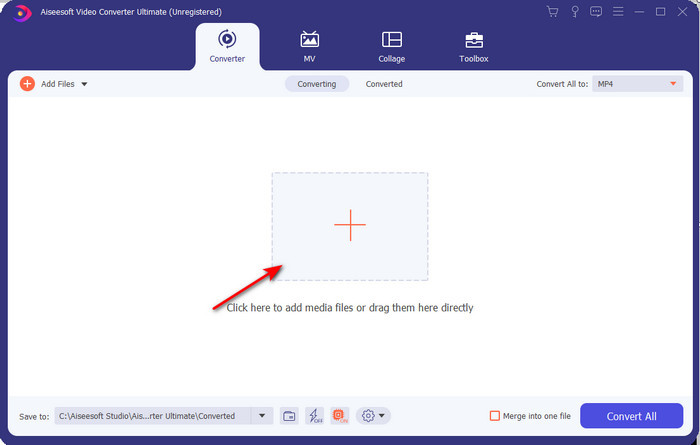
Step 2. Open the converter to access it, click the Add Files icon to search the MXF file on the folder, and click Open to export it.
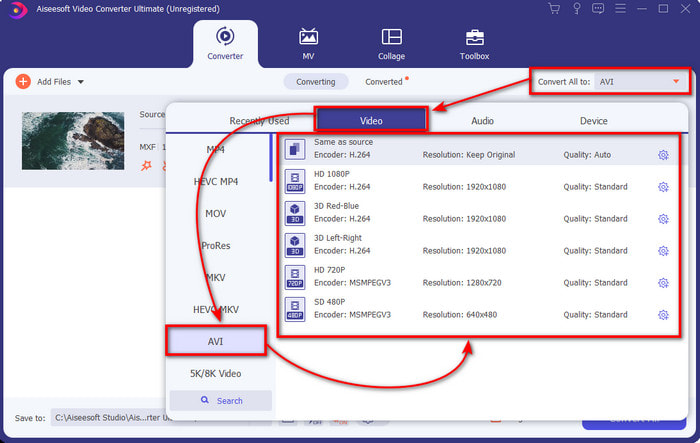
Step 3. To select the output format, click the drop-down button; under it, you will see the AVI format and the other format you can choose.
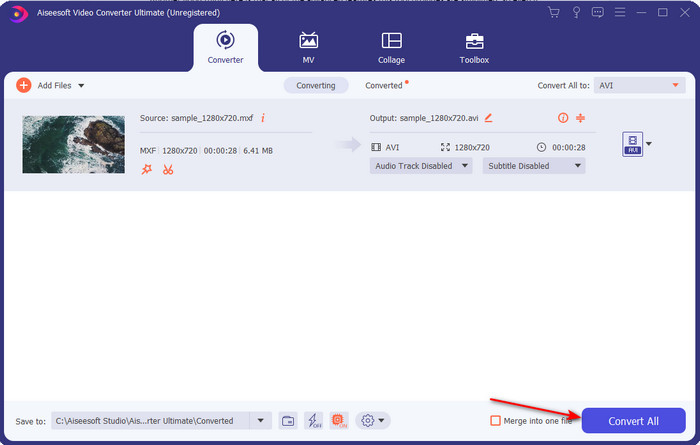
Step 4. To start the converting process, click Convert All and wait for several seconds.
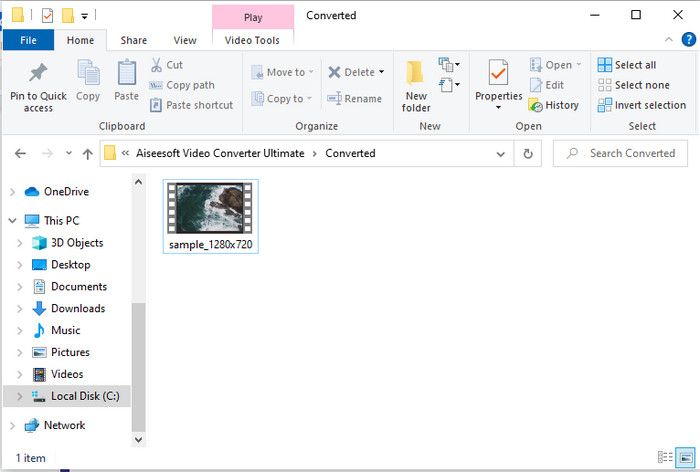
Step 5. After the conversion, a folder will pop up on your screen with the converted file. Click it and watch the video.
Parte 2. 3 Conversores on-line usados para converter MXF para AVI gratuitamente
1. Conversor de Vídeo Grátis FVC Online

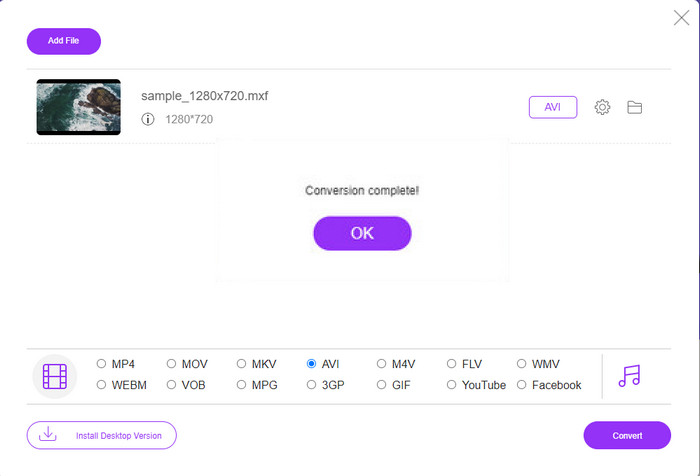
If you are looking for the best ways to convert MXF to AVI online, FVC Free Video Converter Online is the best on the list of online converters. This tool supports different formats you can choose from, and it is more than the other two online tools below. Also, you can access this tool on your PC or Mac browser without paying and the limit of conversion. However, you can't convert batch files here because it is not supported. Some of the editing features you would like to use aren't accessible here. Moreover, if you want a more straightforward way of converting and don't want to download the tool, then this must be it. So now, let's proceed to the steps we try to convert your .mxf into a new format.
Step 1. Click this link to open the website of the converter.
Step 2. Once you open the website, press Add Files to Convert then a folder will show on your screen; search the .mxf file on the folder, then click Open.
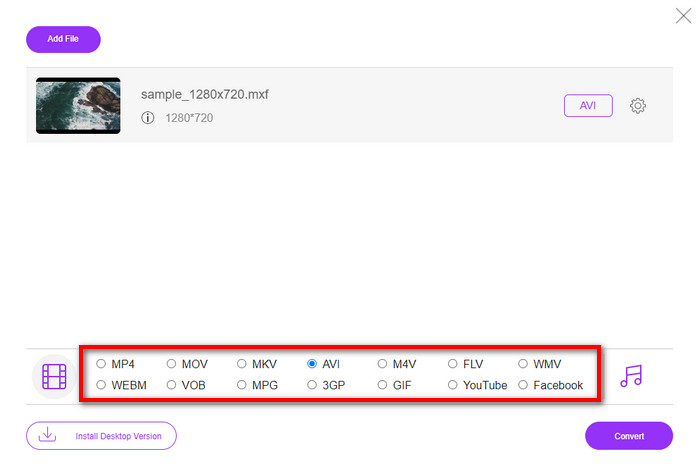
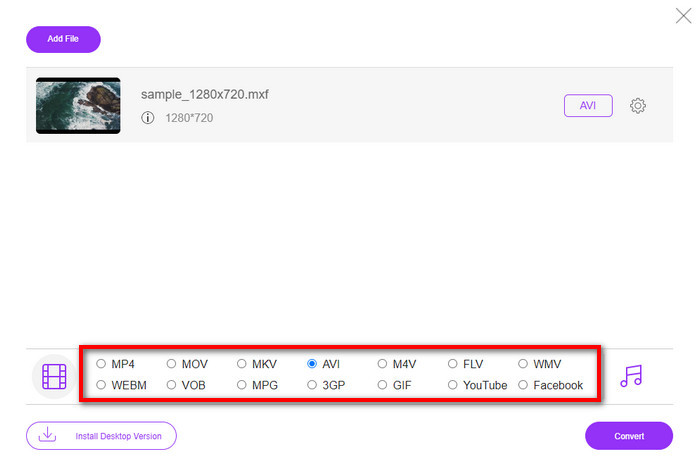
Step 3. After the file is selected, pick the AVI format from the available format below.
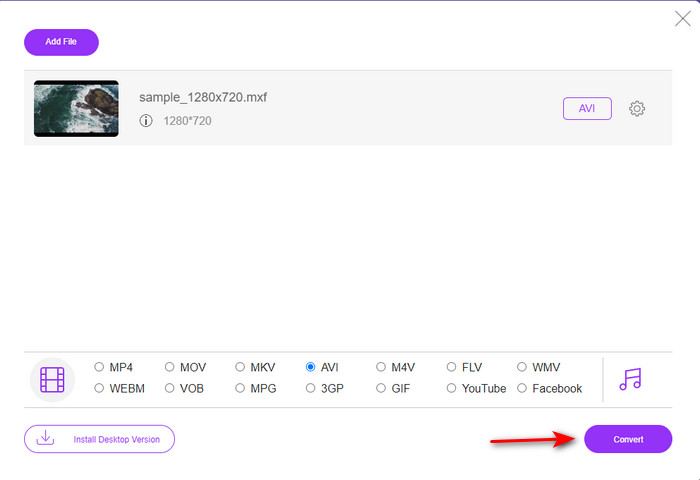
Step 4. Suppose you are now ready to start the converting process, click Convert to begin.
Step 5. A folder will show after the conversion, then open the new version of your MXF file and watch it.
2. Freefileconvert.com
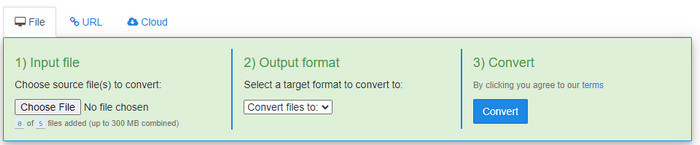
Another MXF to AVI converter available online you can use is Freefileconvert.com. One of the things this tool can do is batch conversion up to 5 files simultaneously. However, you can't change the five files into a different format but only a single format output. Also, the website has some annoying ads; another disturbing thing is the anti-virus alarm when we try to convert the format here. So now, if you want to convert your MXF format here, then follow these steps.
Step 1. Open your favorite browser and search Freefileconvert.com.
Step 2. To input the file, click Choose File. To change the format, click Convert Files to and locate AVI.
Step 3. Press Convert to start the process of converting.
3. Faça ziguezague
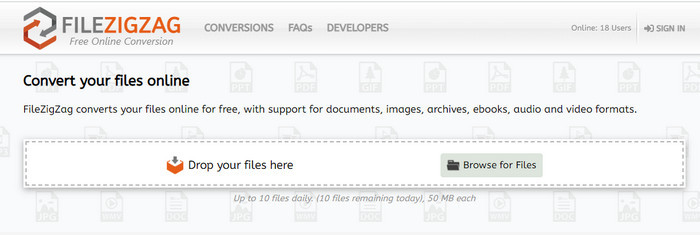
If you want to convert MXF to AVI for free, you can use Filezigzag. This web tool provides a simple converting process, and it is user-friendly. All web tools mentioned here are user-friendly, but this tool is far different from the other two web tools mentioned. The interface of the tool is excellent and free of viruses like the FVC Free Video Converter Online. Although the tool seems very impressive, this tool still limits how many you can convert and file size as well. To be specific, you can only convert ten files daily, and all of these files must be under 50 MB. Furthermore, let's proceed now to the steps on how to use this tool.
Step 1. Launch your web browser and search for Filezigzag; you need to ensure that it is the official website.
Step 2. Click Browse for File to locate the file on the web interface, then set the Target Format to AVI.
Step 3. Click Start Converting to begin the process.
Parte 3. Gráfico de comparação
| Recursos | FVC Video Converter Ultimate | FVC Free Video Converter | Freefileconvert.com | Arquivo em ziguezague |
| Convertendo |  | | | |
| Conversão em lote | |  | | |
| Livre de malware | | | | |
| Acessibilidade à Internet | | | | |
| Recursos de edição | | | | |
| Conversão rápida e aceleração de hardware | | | | |
Parte 4. Perguntas frequentes sobre MXF e AVI
Posso armazenar o arquivo MXF no meu Mac?
Sim, você pode armazená-lo em sua unidade Mac, mas lembre-se de que não pode assisti-lo no QuickTime Player. Além disso, você não pode editar este formato no seu iMovie porque não é suportado. Portanto, se você deseja que seu MXF funcione no seu Mac, o ideal é convertê-lo em um novo formato compatível com o Mac. Assim como MOV, AVI, MP4, MKV e muito mais.
Por que os arquivos .mxf são tão grandes?
A razão pela qual os arquivos MXF são grandes é apenas porque não é compactado. Ele tem a mesma estrutura do FOURCC implementado com o Generic Container, para melhorar a gravação, edição e streaming em filmadoras. Felizmente, você pode usar alguns compressores de vídeo para tornar seus arquivos MXF menores.
Posso usar o arquivo MXF no YouTube?
O YouTube suporta vários formatos e possui mais de 15 formatos no YouTube. E nessa lista os arquivos .mxf não estão incluídos. Portanto, para ser mais claro, seus arquivos MXF não são suportados no YouTube e postar seu vídeo com a extensão de arquivo .mxf é converter o arquivo MXF em MP4 ou AVI.
Conclusão
Ao concluir todos os detalhes, descobrimos que os arquivos MXF contêm vídeo de alta qualidade em todas as filmadoras. Além disso, algumas das informações, como metadados, também são salvas nesse contêiner. No entanto, este formato ganhou uma pequena quantidade de suporte em comparação com o outro formato. Agora, a melhor maneira de reproduzir ou editar o vídeo em .mxf é convertê-lo para o formato .avi. Todas as ferramentas online e offline funcionam bem na conversão do arquivo. Mas o FVC Video Converter Ultimate é de longe o mais impressionante. Para experimentar os recursos finais desta ferramenta, você deve baixá-la imediatamente.
-
 4 maneiras gratuitas de converter camcorder MXF em MP4 para reprodução universal
 Este post é o guia detalhado para converter MXF para MP4 no computador. Você pode obter 4 conversores MXF para MP4 gratuitos para transcodificar a camcorder MXF para MP4 em etapas simples.
-
 3 métodos fáceis para converter FLV para AVI no desktop e online
 Aqui estão três métodos para ajudá-lo a converter com eficiência seus arquivos de vídeo FLV para o formato AVI no Windows e Mac, para que você possa assisti-los com alta qualidade.
-
 4 maneiras eficientes de converter MOV em AVI no PC e Mac [2021]
 Você quer saber qual é o melhor conversor de MOV para AVI da web? E por que o FVC Ultimate Video Converter pode ser a pessoa certa para você.
