


 Video Converter Ultimate
 Gravador de ecrã
 Reparo de vídeo
 Secure Download
Método mais rápido sobre como converter MXF para M4V no desktop e online
MXF file is an industry-standard format for audio and video. However, this file format is not supported by Apple QuickTime Player, so it is impossible to play your MXF file using this program. If you can’t play your MXF file to Apple QuickTime Player, you need to convert it to another file format, like M4V. You are lucky because we have the best solution for you. This article will give you the most effective and useful methods to convert MXF to M4V using trustable converters offline and online. In addition, we will let you get an idea of how to make your videos more attractive by simply editing them. Read this article immediately and get the information you need.

Parte 1: Ótimo método para converter MXF para M4V online
One of the best online converters you can utilize to convert MXF to M4V is FVC Free Video Converter Online. This online software is capable of converting various video files, such as MOV, MKV, AVI, FLV, MP4, WEBM, VOB, and more. Also, you can convert many files in a single procedure because this converter can convert batches. In addition, before converting your videos, you can edit their resolution, bit rate, and frame rate based on your preference. It also has a user-friendly interface and a simple way to convert files. This way, everyone can operate this online converter, either advanced or non-professional users. Moreover, this online converter is available in all browsers, such as Google Chrome, Mozilla Firefox, Microsoft Edge, and more, which makes it accessible to users.
Além disso, além da conversão de vídeo, você também pode converter vários formatos de áudio, incluindo AAC, MP3, M4A, M4B, FLAC e muito mais. Ele também possui uma configuração de áudio que permite ajustar suas taxas de amostragem e bits. Com esses recursos, você pode dizer que o FVC Free Video Converter Online é confiável.
Features
◆ Converta vários formatos de vídeo, como MP4, AVI, M4V, MXF, MOV, WMV, MKV, FLV e muito mais.
◆ Capaz de editar a resolução, taxa de bits e taxa de quadros do vídeo.
◆ Oferece processo de conversão em lote.
◆ Converta arquivos de áudio como MP3, AAC, AC3, M4B, FLAC e muito mais.
◆ Pode editar a taxa de amostragem e taxa de bits do áudio.
Veja as etapas abaixo para saber como converter o arquivo MXF para o formato M4V usando o FVC Free Video Converter Ultimate.
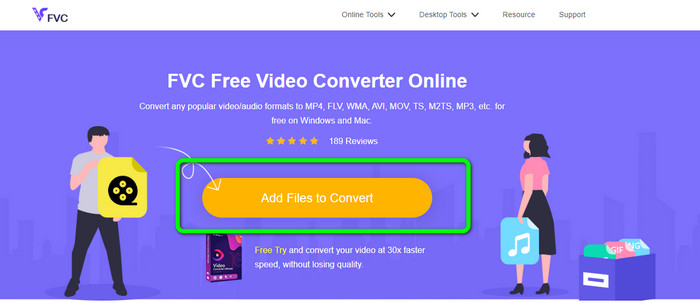
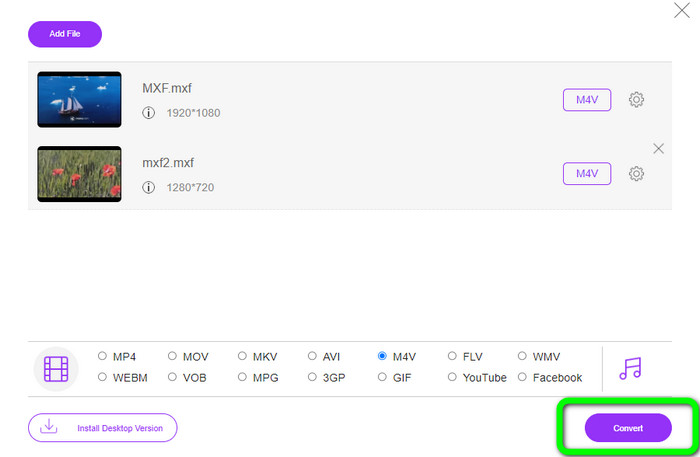
Step 1: Go to your browser and visit the FVC Free Video Converter Online website. Once you are on the main page, hit the Add Files to Convert to upload the MXF video file you want to convert.
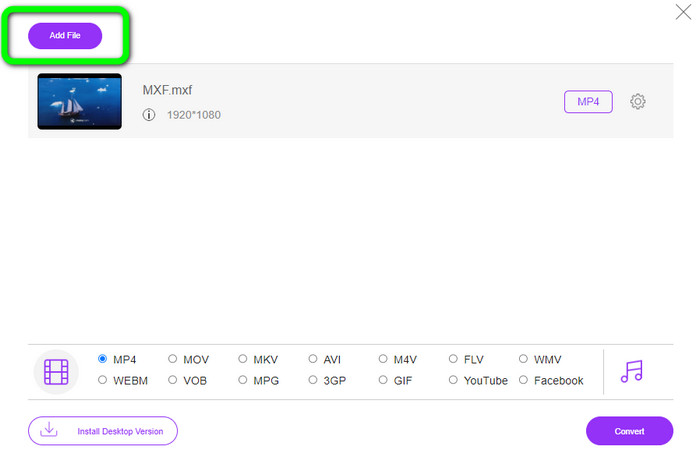
Step 2: This converter offers a batch conversion process. So if you want to upload more MXF files, click the Add File button.
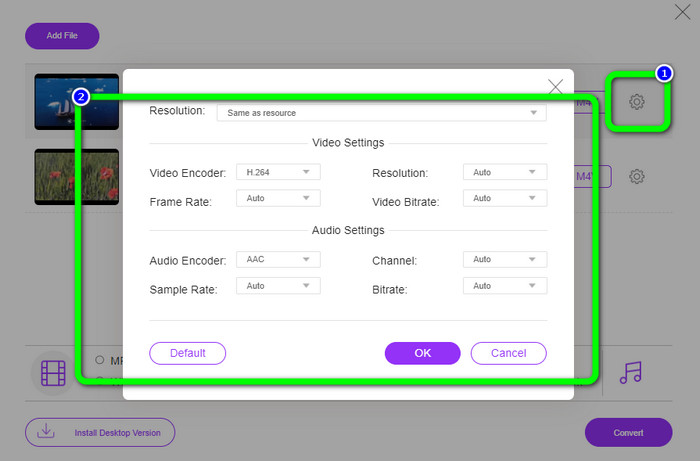
Step 3: In this part, you can edit your video by clicking the Setting icon. After clicking this icon, you can edit the video’s frame rate, resolution, and bit rate. Also, you can change the audio’s sample rate and bitrate. Then, click the OK button.
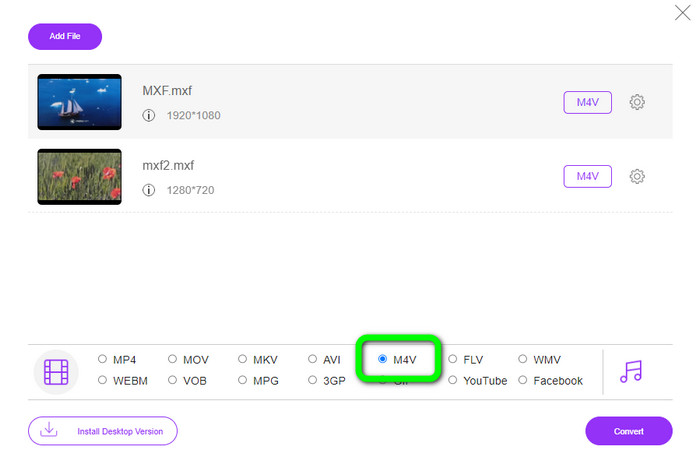
Step 4: After editing your videos, you can change the output format by clicking the M4V format from the format options on the lower part of the interface.
Step 4: For the last step, press the Convert button. Wait for the conversion process and save your video in your desired location.
Parte 2: Maneira mais rápida de converter MXF para M4V sem perdas
If you want a downloadable tool to convert MXF to M4V losslessly, Video Converter Ultimate is the best choice. This ultimate converter can convert various files quickly because it has a fast conversion process, not 10x, not 20x, but 30x faster than the average conversion speed. In addition, it has another great feature you can enjoy. You can convert multiple files at the same time because this converter offers a batch conversion process. Also, aside from MXF and M4V, this online tool supports various video formats, including MP4, FLV, AVI, MKV, MOV, WMV, VOB, and more. Moreover, Video Converter Ultimate is accessible on both Windows and Mac, which is great for both Mac and Windows users.
Além disso, este aplicativo para download possui mais recursos excelentes além da conversão de vídeos. Se você deseja criar um videoclipe para seu parceiro, família, amigos etc., pode usar esta ferramenta. O Video Converter Ultimate oferece um criador de videoclipes onde você pode fazer filmes maravilhosos com música. Ele também oferece temas gratuitos, como feliz, chique, simples, noites com neve, romântico e muito mais. Além disso, se você tiver um vídeo com um tamanho de arquivo grande, poderá compactá-lo usando o Video Compressor. Com a ajuda desta ferramenta, você pode alterar facilmente o tamanho do seu vídeo.
Features
◆ Converta mais de 100 formatos de arquivo de vídeo, incluindo M4V, MXF, FLV, AVI, MP4, XVID, VOB, MOV, SWF, MKV e muito mais.
◆ Converta vários arquivos simultaneamente.
◆ Oferece criador de videoclipes.
◆ Crie uma colagem fantástica.
◆ Oferecer ferramentas de edição de vídeo, como aparador de vídeo, compressor, aprimorador, correção de cores, etc.
◆ Converta formatos de arquivo de imagem como BMP, PNG, JPG e muito mais.
Siga as etapas detalhadas abaixo para converter MXF para M4V sem perdas usando o FVC Video Converter Ultimate.
Step 1: Download Video Converter Ultimate on your device by clicking the Download button. There are two downloading buttons below. If you are a Windows user, click the Windows version. And click the Mac version if you are a Mac user. Then, launch the application.
Free DownloadFor Windows 7 or laterSecure Download
Free DownloadFor MacOS 10.7 or laterSecure Download
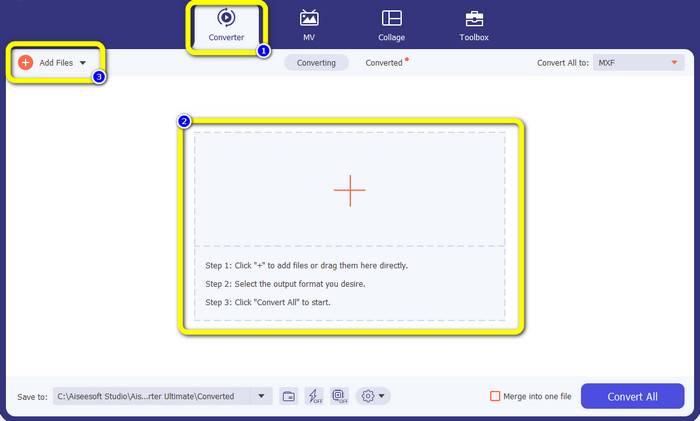
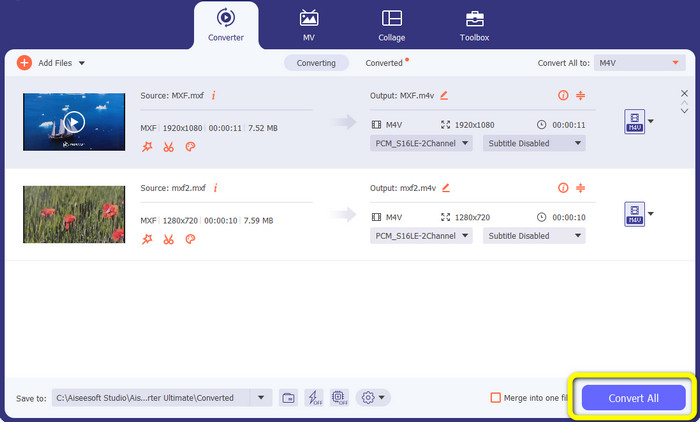
Step 2: Afterward, select the Converter panel. Click the + icon or the Add File button to import the MXF video file.
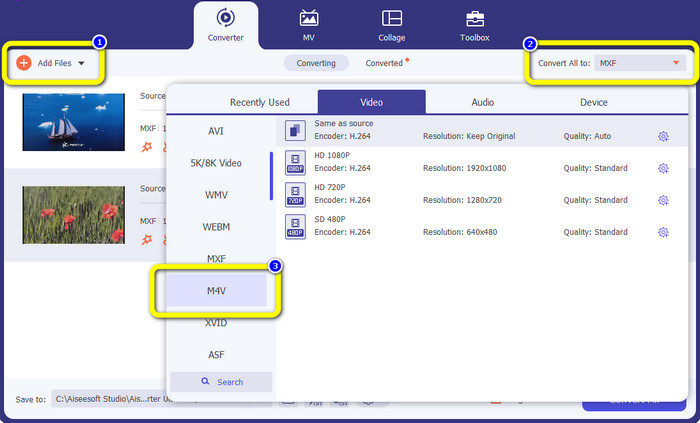
Step 3: If you want to convert multiple files simultaneously, click the Add File button. Then, click the Convert All to button and select the M4V file format. You can also choose your desired resolution for your video.
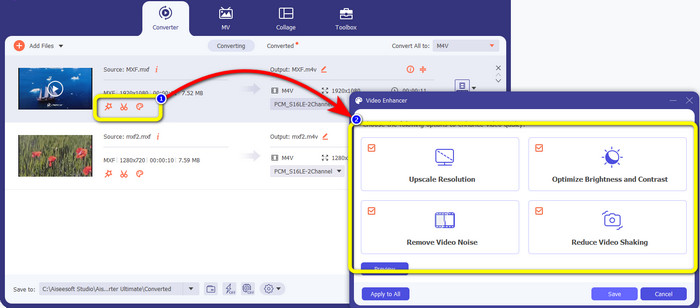
Step 4: If you want to edit your videos before converting them, you can do so. Click the editing tools on the first box. Then, select the video enhance icon. Then, check all the boxes to enhance resolution, optimize brightness and contrast, and reduce video noise and shaking.
Step 5: When you are done editing and changing the output format of your videos, click the Convert All button and save your video on your device.
Parte 3: O que é MXF?
A associação SMPTE criou o contêiner de mídia MXF para uso comercial. O MXF implementa uma parte do esquema de dados Advanced Authoring Format (AAF) e surgiu recentemente como o padrão da indústria para edição de vídeo profissional não linear. Os arquivos MXF podem ser facilmente convertidos para qualquer formato de vídeo comum e compactados usando praticamente qualquer codec. É importante notar que a implementação deste formato pela Sony, Panasonic e Canon teve inúmeras incompatibilidades, uma grande fraqueza deste contêiner. A revisão de 2009 da norma aborda esses problemas.
Parte 4: O que é M4V?
M4V é um tipo de contêiner de vídeo usado pelos arquivos do iTunes para armazenar dados de áudio e vídeo. É melhor comprar arquivos de áudio ou vídeo da loja iTunes se eles forem Apple FairPlay DRM protegidos contra visualização e cópia não autorizadas. Como o formato é baseado na estrutura MPEG-4, praticamente qualquer reprodutor contemporâneo pode exibir arquivos desprotegidos.
Further Reading:
Best MXF to WMV Converters to Convert MXF to WMV for Free
Top 4 Greatest Solutions on Converting MXF to MKV [Solved]
Parte 5: Perguntas frequentes sobre a conversão de MXF para M4V
Qual é o tamanho de um arquivo MXF?
MXF suporta tamanhos de arquivo de até 2 gigabytes. Além disso, o MXF oferece suporte a arquivos mais longos. O tempo máximo de captura de arquivo de mídia para o formato OMF é de três horas. O MXF pode lidar com 12 horas de áudio em dois canais a 48 kHz.
Quem usa arquivos MXF?
Vários comerciais de produção, incluindo a série SONY MSW 2000 de gravadores de vídeo IMX, o usaram. Além disso, o equipamento de edição Avid oferece suporte a uma determinada variante do MXF.
Como faço para converter MXF para MOV?
You can use FVC Free Video Converter Online. Upload your MXF file, choose the MOV format from the format options and click the Convert button. This way, you can convert MXF to MOV instantly.
Conclusão
There are many ways to convert MXF to M4V. But if you want the best and most worthy converters, you can use the applications mentioned above: Video Converter Ultimate and FVC Free Video Converter Online. These two converters can convert files faster than other converters, and you can use them for free.
-
 Vários métodos sobre como alterar o formato de arquivo MOV para M4V
 Você deseja um método eficaz para converter o arquivo MOV para o formato M4V? Então, este artigo irá conceder o seu desejo. Aqui estão os melhores conversores que você pode usar.
-
 Excelentes técnicas para converter GIF para M4V instantaneamente
 Este guia fornece as estratégias mais eficazes para converter GIF em M4V. Além disso, apresentaremos os dois melhores conversores que você pode experimentar.
-
 As 2 principais maneiras excepcionais de converter M2TS para M4V
 Você acha que converter o arquivo M2TS para outro formato é possível? Mostraremos como converter o formato de arquivo M2TS para M4V se você deseja a melhor solução.
