


 Video Converter Ultimate
 Gravador de ecrã
 Reparo de vídeo
 Secure Download
Instruções simples sobre como converter OGV para MKV
Do you want to know how to convert OGV to MKV and open it on another media player? Then, you are fortunate because this post will introduce you to excellent applications with basic steps in converting different files. Also, you don’t have to worry; these tools are worth utilizing, and you will never be disappointed. So, it would be best to proceed to the main discussion because we don’t want you to wait any longer. Let’s discover these methods and read this article right away.

Parte 1: Informações sobre o formato OGV e MKV
Antes de converter o arquivo OGV para o formato MKV, vamos primeiro fornecer suas informações valiosas.
O que é OGV?
Um codec e formato de contêiner multimídia gratuito, de código aberto e não patenteado é Ogg Vorbis (OGV). Ele pertence ao formato Ogg e à família de codecs, que a Fundação Xiph.Org, sem fins lucrativos, criou para assumir codecs patenteados. OGV pode enviar texto (legendas) e metadados de multiplexação direta no tempo (TDM). Além disso, para compactação com e sem perdas, ele suporta streaming.
O que é MKV?
MKV é um contêiner de código aberto que pode conter material de mídia que foi compactado usando vários codecs. Ele tem muitos benefícios em relação ao contêiner AVI tradicional, incluindo a capacidade de incluir faixas de áudio e legendas em vários idiomas que podem ser alternados sem pausar a reprodução e busca e retrocesso rápidos de arquivos. Além disso, o formato é simples de alterar, simplificando a extração de dados de áudio e vídeo.
Parte 2: Como converter OGV para MKV sem perdas
If you are here to learn how to convert OGV to MKV losslessly, then you are in the right place. The best downloadable converter you can find is Video Converter Ultimate. It is one of the most reliable converters on your Windows and Mac computers. Also, this tool supports 100+ formats, such as FLV, MP4, M4V, MOV, SWF, AVI, MTS, and more. It is not also limited to converting videos. You can convert your image format here because it supports JPG, PNG, GIF, WEBP, etc. The best part is that you are able to convert files up to 30x faster, unlike other tools with a normal conversion speed. In addition, batch conversion is allowed in this tool, which means you can attach multiple video files and convert them with a single process.
Além disso, há mais coisas que você pode fazer em seu arquivo OGV. Se você deseja redimensionar seu vídeo porque o tamanho do arquivo é muito grande, pode usar este aplicativo porque oferece um recurso de compactador de vídeo no qual você pode alterar o tamanho do seu vídeo. Existem mais recursos que você pode aproveitar para melhorar seu arquivo OGV antes ou depois de convertê-lo para o formato MKV.
Features
◆ Converta formatos de vídeo, como MP4, M4V, AVI, FLV e mais de 1000.
◆ Forneça vários temas para criar um videoclipe.
◆ A criação de uma colagem está disponível.
◆ Capaz de combinar áudio e vídeo.
◆ Oferece vários recursos para melhorar os vídeos, como aprimorador de vídeo, removedor de marca d'água, controlador de velocidade de vídeo, etc.
◆ Permite alterar a velocidade de um vídeo.
Prós
- Possui uma interface compreensível, perfeita para iniciantes.
- O processo de conversão é 30x mais rápido.
- Oferece conversão em lote.
- Converta arquivos sem perder qualidade.
Contras
- Você deve obter a versão pro para experimentar recursos extraordinários.
Para converter o formato de arquivo OGV para MKV usando o Video Converter Ultimate, siga os guias detalhados abaixo.
Step 1: Download the Video Converter Ultimate on your Mac and Windows. Run the application after the installation process.
Free DownloadFor Windows 7 or laterSecure Download
Free DownloadFor MacOS 10.7 or laterSecure Download
Step 2: After launching the application, select the Converter panel. There are two options to add the OGV file. You can click the Add Files button or click the Plus sign.
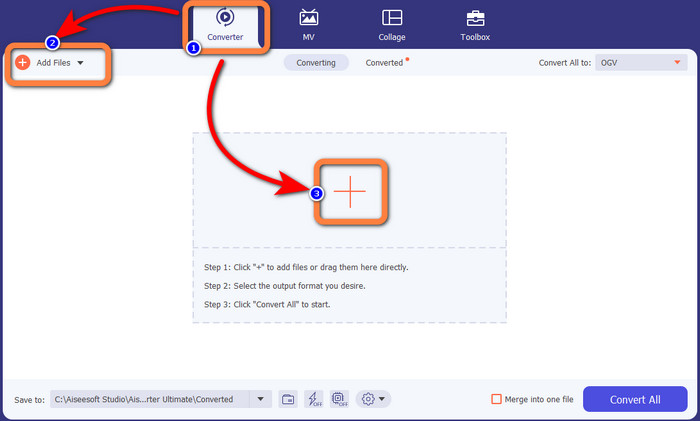
Step 3: Go to the format options by clicking the drop-down icon next to Convert All to, and select the MKV file format for the next step.

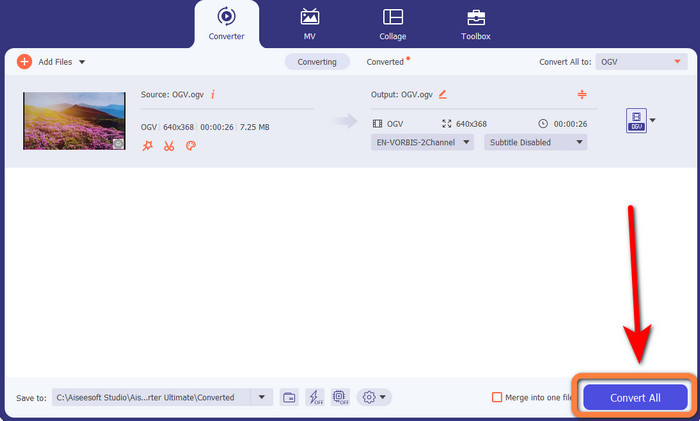
Step 4: The last step is to convert your file by clicking the Convert All button. Next, you can save your video with an MKV file.
Parte 3: Soluções online fáceis para converter OGV em MKV
Usando o Converthelper
If you are amazed by the Video Converter Ultimate, it is reassuring that you will also be satisfied with using Converthelper. This online tool lets you convert OGV to MKV easily and efficiently. Also, it supports various files, like WMA, FLV, AVI, MP4, 3GP, and more. It also has basic methods to convert files, so even a beginner won’t encounter some difficulty in utilizing this online application. In addition, this free video converter can also convert your videos without losing quality. This way, you will make sure that your video looks the same when it comes to quality. However, there are some instances in which Converthelper is not performing well, especially when you have a slow internet connection. Also, it has a slow conversion process, which is time-consuming for users. Try converting your OGV file to MKV using this software.
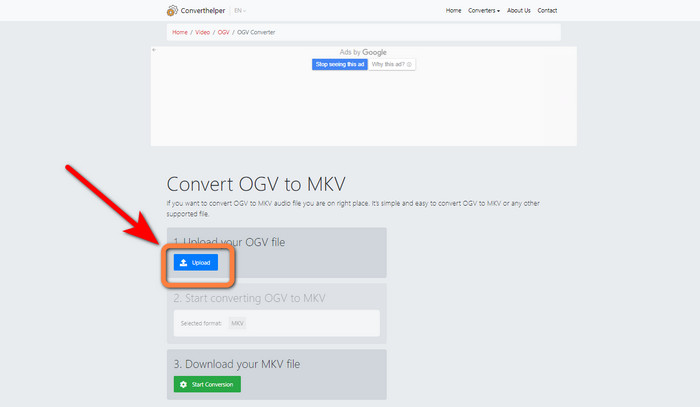
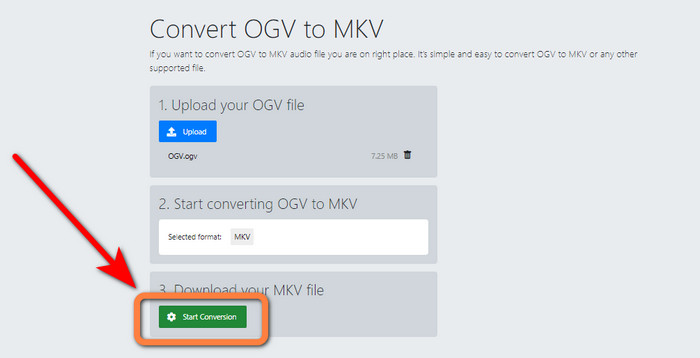
Step 1: You must visit the Converthelper website. Then, click the Upload button and import the OGV file format.
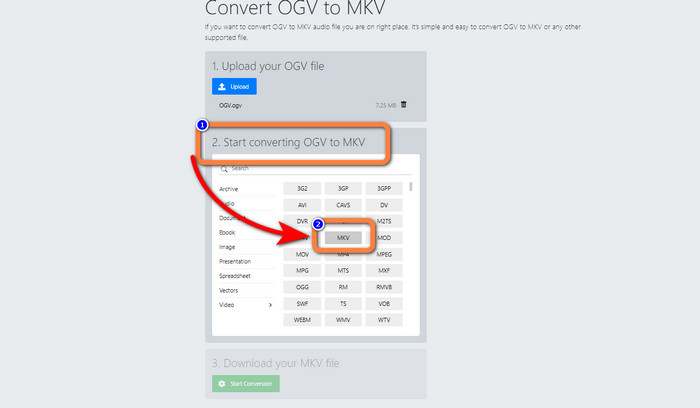
Step 2: Proceed to the number 2. Select the MKV file format from the format options.
Step 3: For your last step, click the Start Conversion button and wait for the conversion process. This tool also enables you to convert OGV to FLV.
Usando o FreeConvert
FreeConvert lets you convert OGV to MKV instantly. Also, you can use this tool to convert other file formats, such as MP4, WMV, AVI, WEBM, 3GP, MOV, etc. It also has simple steps to convert files, which is perfect for beginners. Aside from converting, FreeConvert can also compress videos, images, audio, documents, and more. In addition, you can edit your video with its editing tools, like a video cropper and a video trimmer. Unfortunately, when it comes to converting, it can only convert with a maximum size of 1GB. This way, you can only convert limited files. You must buy a subscription if you want to increase the maximum file size. Also, it is a web-based application, so it is essential to have an internet connection. Follow the steps below to convert OGV to MKV.
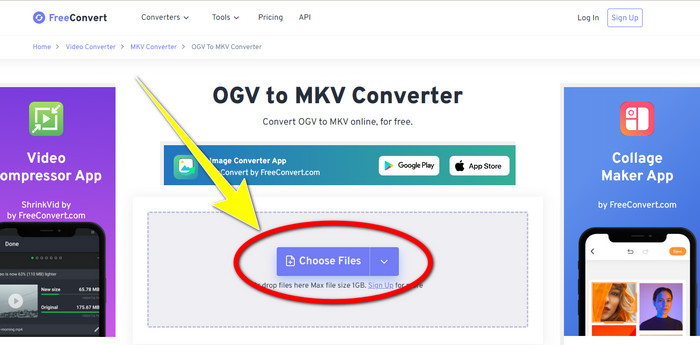
Step 1: Go to the website of FreeConvert. Click the Choose File button to add the OGV file.
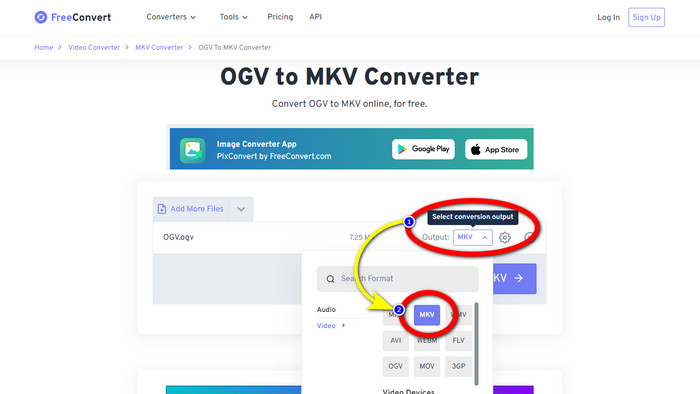
Step 2: The next step is to proceed to the Output button. Click it to see the format options and select the MKV file format.
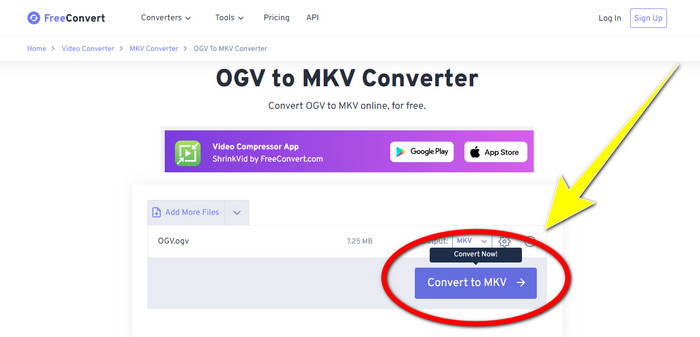
Step 3: After selecting the MKV file format, click the Convert to MKV button. Then the conversion process will begin and save your final video.
Parte 4: Perguntas frequentes sobre a conversão de OGV para MKV
1. Posso usar o FFmpeg para converter OGV para MKV?
Of course, you can. Download the FFmpeg. It is a command-based tool that can convert various video files, including OGV, MKV, MOV, MP4, AVI, and more.
2. O MKV é um formato comum?
A maioria dos dispositivos atuais são compatíveis com o formato. Numerosas faixas de áudio e legendas podem ser armazenadas em um arquivo usando o formato MKV ou Matroska Video. É incrivelmente popular para guardar filmes. Um tamanho de arquivo bastante pequeno e vídeo de alta qualidade.
3. OGV é um OGG?
Não. OGG é um formato de código aberto usado pelo contêiner OGV. Um dos principais objetivos do desenvolvimento da OGG era estar livre de restrições de patentes de software. Um fluxo de vídeo com ou sem áudio compactado usando o método Opus, Vorbis, Theora ou Speex é armazenado usando a extensão de arquivo OGV.
Conclusão
Using online tools to convert OGV to MKV is effective, but you can’t ignore the fact that annoying ads always show up when converting. So, if you want to convert files without being disturbed by the ads, you can use Video Converter Ultimate.
-
 As 4 melhores soluções para converter MXF em MKV [Resolvido]
 Conheça esses quatro ótimos métodos para converter MXF para MKV online e offline facilmente. Os aplicativos incluídos neste post podem ajudá-lo a converter arquivos sem problemas.
-
 4 maneiras de converter MPG para MKV usando conversores online/offline
 Você está procurando um conversor fácil de usar que possa converter arquivos MPG para MKV? Este artigo lista as melhores e mais fáceis maneiras de converter rapidamente arquivos MPG para MKV
-
 Maneiras mais fáceis de converter MOV para MKV gratuitamente no Mac
 Deseja converter MOV para MKV gratuitamente no Mac? Leia este artigo para conhecer as maneiras mais fáceis e simples de converter seu arquivo MOV para MKV.
