


 Video Converter Ultimate
 Gravador de ecrã
 Reparo de vídeo
[Maneira rápida e fácil] Converta arquivos RMVB em WMV com os 2 principais conversores RMVB
Nowadays, Asians produce more television episodes, animated films, and movies then distribute them worldwide, similar to North Americans. Most of these films are embedded with .rmvb to encode the file because RMVB is smaller and has a lower bitrate, but its quality is best. However, when you download the file on your Windows, your native media player won't play this format because it is unsupported. Isn't troublesome, right? But today, we can convert your RMVB file into a playable WMV. For that reason, let's start a journey to determine how to convert RMVB to WMV with the two tools you can use.

Parte 1. Outras razões pelas quais você precisa converter seu arquivo RMVB para WMV
Antes de iniciar nossa expedição de conversão, vamos primeiro entender o possível motivo para converter o arquivo RMVB. A lista abaixo mostra os possíveis motivos pelos quais você precisa de um conversor RMVB para WMV online ou offline.
It said above that the RMVB file is not compatible with almost all media players, especially Windows Media Player. This problem is not new to us because there are many formats Windows Media Player doesn't support; unfortunately, RMVB is one of them. Although you can convert the RMVB to a new compatible format, there is still another solution by downloading a third-party media player like the Blu-ray Player. This media player supports a much broader scope of format to play your video compared to Windows Media Player. So, if you want to download this media player, you can click the download button below. But if you want to read more detailed information about the RMVB Players, click this link.
Free DownloadFor Windows 7 or laterSecure Download
Free DownloadFor MacOS 10.7 or laterSecure Download
Os arquivos RMVB são um contêiner de arquivo de código aberto, cujo formato não usa um codec específico. Embora seja uma grande vantagem manipular o codec, nem todos os aplicativos suportam abertamente todos os tipos de codecs. Portanto, se você deseja usar o arquivo RMVB para fins de edição ou reprodução, não deve se surpreender se ele não funcionar com o codec incompatível.
Portanto, agora, para descobrir como converter RMVB em WMV, vamos prosseguir com os detalhes abaixo e ler com atenção. Você gastará apenas cinco minutos lendo este artigo e adquirindo conhecimento suficiente sobre como converter seus arquivos RMVB com os conversores disponíveis.
Parte 2. Conversor mais excepcional para converter RMVB em WMV com Video Converter Ultimate
FVC Video Converter Ultimate specializes in converting your RMVB to WMV, AVI, MKV, MOV, MP4, and more in less than a minute. It has a built-in super-fast conversion and hardware acceleration to finish your conversion faster than a bolt of lightning. If truth be told, this converter supports multiple and super-advanced editing features you would be going to love. So now, want to finish the task of converting your RMVB file because you are in a hurry? Then what are we waiting for? Let's proceed directly to the process by copying the steps below.
Steps on How to Convert RMVB files into WMV Format with the FVC Video Converter Ultimate:
Step 1. Download the FVC Video Converter Ultimate on your Windows by clicking the download button below. But if you are a Mac user, you must click the other button to download the Mac version of the tool. Follow the installation process and open the converter.
Free DownloadFor Windows 7 or laterSecure Download
Free DownloadFor MacOS 10.7 or laterSecure Download
Step 2. Insert the RMVB files on the converter by pressing the Add Files, locate the file on the folder that will show on your screen, and press Open.
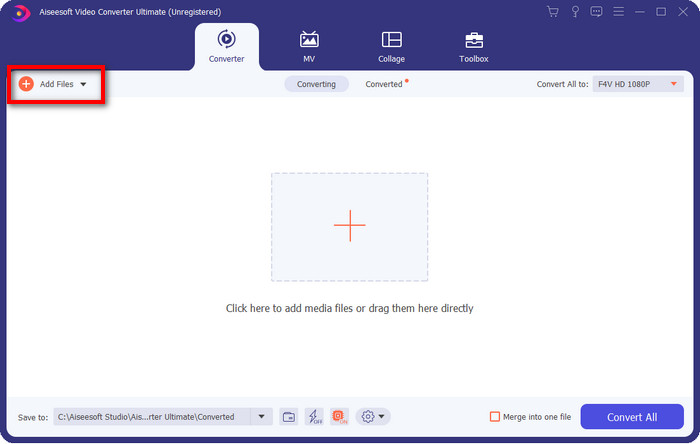
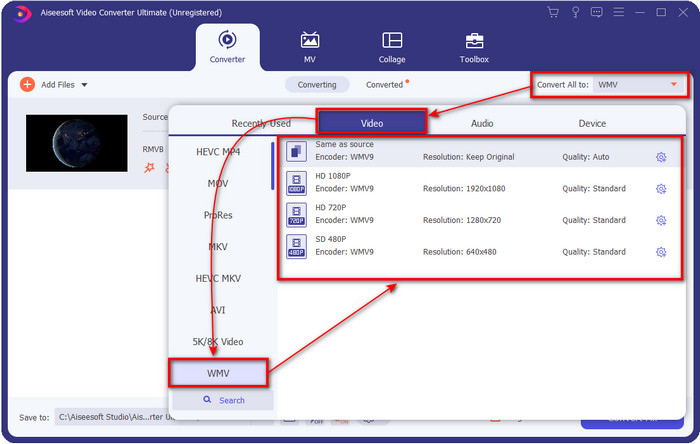
Step 3. Press the Convert All to button, and a list of the formats will show; pick one format you want or the WMV by clicking it.
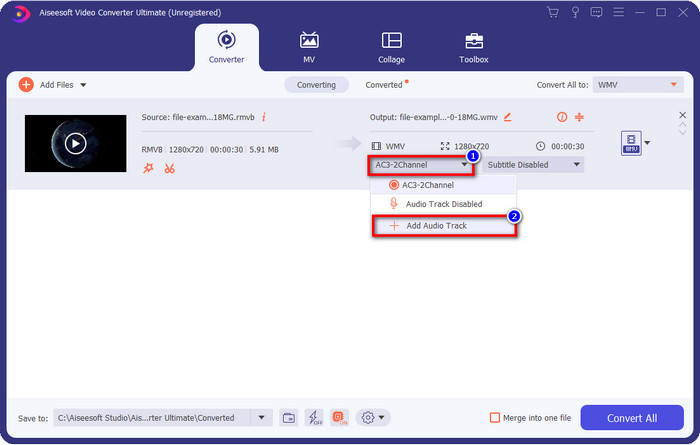
Optional: Want to add audio to your video before converting the file? If so, click the drop-down button, click Add Audio Track, browse the audio track saved on your desktop, and hit Open.
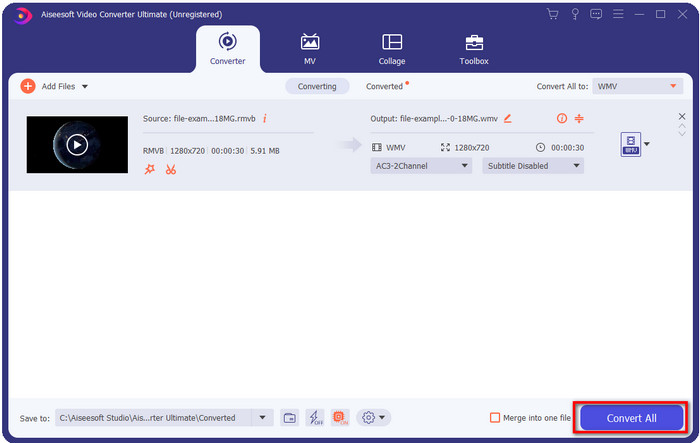
Step 4. By clicking the Convert All button, converting your file will start eventually. A folder with the converted file will show on your screen after the process.
Parte 3. Melhor conversor da web para converter RMVB para WMV online
Suppose you are looking for a powerful RMVB to WMV converter online. In that case, you must use the FVC Free Video Converter Online. This web converter is the best solution for your converting problem without a single doubt. However, it supports a limited format you can upload and choose on; this is a problem, right? But the RMVB file is supported here if you are looking for an online solution. Furthermore, here in the list below is how to use this web tool.
Steps on How to Convert RMVB files into WMV Format with the FVC Free Video Converter Online:
Step 1. Click this link, and a new tab will show on your web browser.
Download the Desktop Version to convert files in batch.
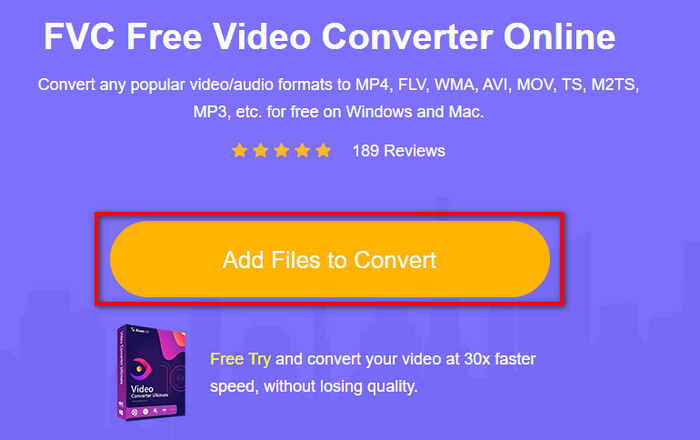
Step 2. Click Add Files to Convert on the website, and a desktop folder will show on your screen. Select the RMVB file you want to convert and press Open.
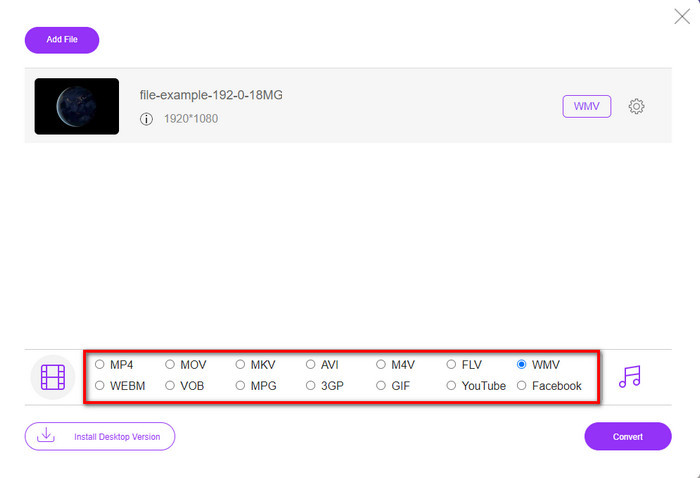
Step 3. Once uploaded, pick the WMV format below or whatever format you want under the list.
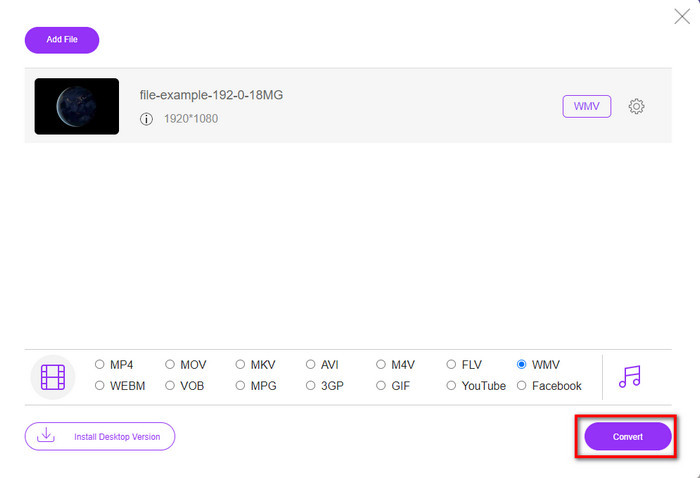
Step 4. Click Convert to start the converting process.
RMVB vs. WMV
RMVB, uma variação mais recente do formato Real Media (.RM) padrão, é um formato de arquivo de vídeo Real Media compactado usando uma taxa de bits variável. É um formato popular para filmes e animes asiáticos. Os arquivos RMVB são menores em tamanho e têm taxas de bits mais baixas, mas melhor qualidade.
Produzido pela Microsoft, o WMV era um dos formatos de vídeo mais comuns nos anos 2000. Ele pode ser visto na web e reproduzido por vários players de mídia no Windows. E também é o formato de arquivo de vídeo padrão do Windows Media Player. Mas foi assumido por outros formatos recentemente.
Parte 4. Perguntas frequentes sobre conversão de RMVB em WMV
RMVB e RM são iguais?
Não há diferença significativa entre os dois contêineres. As mudanças de nome ocorrem porque o CBR era codecs reais mais antigos, apenas para fins de streaming. O nome é alterado, mas o propósito do formato não.
O que devo fazer para reproduzir arquivos RMVB no Mac?
You can download a third-party RMVB player on your Mac to play the video. But if you don't want to download a third-party player, consider converting the RMVB to MOV. Want to know how to do it? Then click this link to learn how to convert RMVB to MOV.
A conversão do arquivo RMVB perde a qualidade?
A conversão de seu RMVB não deve diminuir a qualidade do vídeo em si. Mas a maior parte do conversor muda a qualidade porque 1080 ou pixels de qualidade ainda mais alta não são suportados. Portanto, agora, se você deseja converter seus arquivos sem perder a qualidade, deverá usar o FVC Video Converter Ultimate. Esta ferramenta suporta a conversão de arquivo 1080 e ainda superior sem degradar a qualidade.
Conclusão
If you want to download a converter on your desktop and keep it or use an online tool, FVC got your back. These two mentioned converters are excellent in many aspects if we compare them with the other converters online or offline. Instead of comparing these two tools with the others, let's compare the tools with each other. FVC Free Video Converter Online will help you with your converting problem. Moreover, the great advantage of this tool is that it is ready to use whenever you have an internet connection. On the contrary, FVC Video Converter Ultimate provides a phenomenal output that will amaze you and others. So, if you want to make your converting process even more exciting, use this ultimate converter and do more.
-
 Os 4 principais aplicativos de conversão de RMVB para FLV gratuitos na área de trabalho ou online
 Este artigo apresentará o melhor software conversor de RMVB para FLV e aplicativos da web que podem converter arquivos RMVB (Taxa de bits variável da RealMedia) em vídeo FLV.
-
 2 da melhor escolha de conversor de arquivo RMVB para AVI [online e offline]
 Não sei como converter RMVB para AVI? Este artigo enfoca os conversores que você pode usar para converter RMVB em AVI, seja online ou offline.
-
 Guia sobre como converter RMVB para MP4 no Windows / Mac (3 formas gratuitas)
 Deseja converter RMVB em MP4 para fácil reprodução em seu computador ou telefone celular? Você encontrará maneiras simples de converter seus arquivos RMVB em MP4 neste guia.

