


 Video Converter Ultimate
 Gravador de ecrã
 Reparo de vídeo
 Secure Download
Como converter SWF para 3GP de forma fácil e instantânea
Small Web Format, or SWF, is an Adobe file format that contains vector-based animations and videos. However, this file format is not common and is supported by other browsers and programs. So it is hard to play this file. In this case, you must best convert your SWF file to other formats supported by browsers and programs like the 3GP format. Luckily, this article will provide an effective way to convert SWF to 3GP using various converters. Let’s find these helpful ways by reading this article without further ado.

Parte 1: Conversor de SWF para 3GP mais confiável para alterar SWF para 3GP
Converter SWF para 3GP por Video Converter Ultimate
Video Converter Ultimate is the most reliable offline tool for your Windows and Mac. This application lets you convert SWF to 3GP instantly. Also, you can convert more files because it supports 100+ file formats, including MP4, MOV, MKV, FLV, DIVX, XVID, and more. In addition, this offline tool can convert files up to 30x faster than other converters. You can also use it for free. Moreover, you can convert multiple files in one go, so you don’t have to wait longer. The best part is that all users can utilize this tool because it has a simple interface with basic steps for converting different files.
Além disso, Video Converter Ultimate também tem mais recursos excelentes do que você imagina. Você pode prosseguir para o recurso Caixa de ferramentas se quiser aprimorar seu vídeo SWF. Você pode usar aprimoradores de vídeo para aprimorar a resolução, o brilho e o contraste do vídeo. Você pode até remover o ruído do seu vídeo. Este é apenas um dos grandes recursos que você pode experimentar ao usar este conversor. Se você quiser descobrir mais recursos, use o Video Converter Ultimate e veja você mesmo.
Features
◆ Converta muitos arquivos de vídeo, como MP4, AVI, FLV, SWF, M4V, MTS, etc.
◆ Crie um videoclipe com diferentes temas maravilhosos.
◆ Faça uma colagem com vários modelos e filtros gratuitos.
◆ Possui uma caixa de ferramentas que oferece várias ferramentas para aprimorar o vídeo, como aprimorador de vídeo, correção de cores, 3D Maker, etc.
◆ Ajuste a velocidade do vídeo até 8x mais rápido.
◆ Adicionar e remover marcas d'água de um vídeo.
◆ Capaz de alterar o tamanho do arquivo do vídeo.
◆ Capaz de converter imagens.
Prós
- Disponível para todos os usuários.
- Ele suporta mais de 1000 formatos de arquivo.
- Acessível em Windows e Mac.
- Pode melhorar o vídeo facilmente.
Contras
- Para experimentar mais recursos excelentes, é recomendável comprar a versão pro.
Para converter facilmente seu SWF para 3GP, siga os guias básicos abaixo.
Step 1: You must download the Video Converter Ultimate application on your Windows or Mac by clicking the download button below. Then, proceed to the installation process and launch the application.
Free DownloadFor Windows 7 or laterSecure Download
Free DownloadFor MacOS 10.7 or laterSecure Download
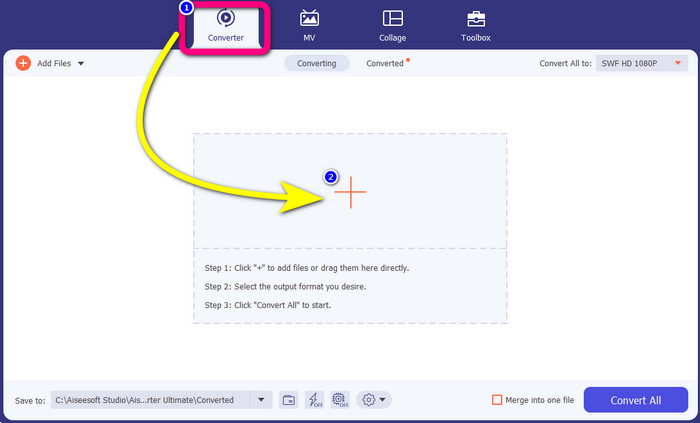
Step 2: On the four options at the upper part of the interface, select the Converter panel. Click the Plus icon and choose the video with an SWF file you want to convert.
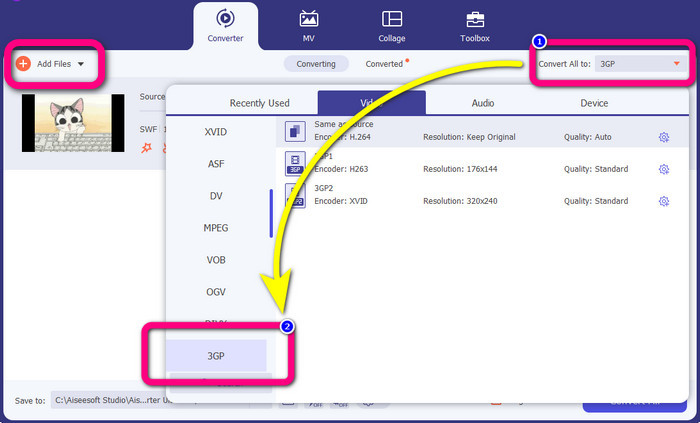
Step 3: Click the Convert all to button and pick the 3GP format from the format options. You are allowed for batch conversion, so if you want to convert more files or convert your SWF file to other formats like MP4, MKV, MOV, AVI, and more, click the Add Files button. You can convert them at once.
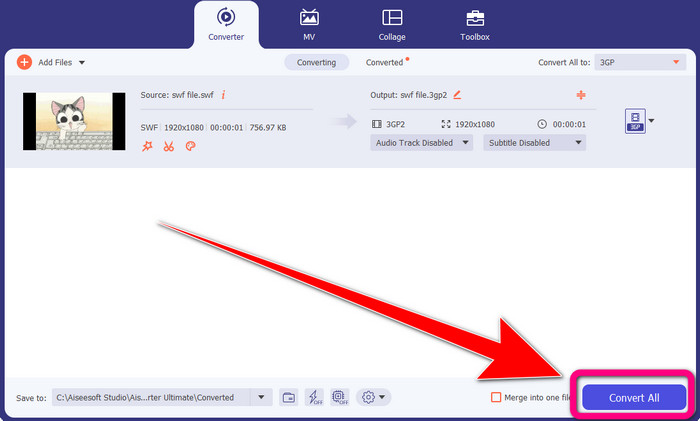
Step 4: Lastly, if you are done selecting the 3GP file format, click the Convert All button. Wait for the fast conversion process and save your final video output.
Parte 2: Excelentes ferramentas online para converter SWF para 3GP
FVC Free Video Converter Online
When converting SWF to 3GP online, you can use the FVC Free Video Converter Online. This online tool is reliable for converting video and audio file formats, such as FLV, MP4, MTS, MP3, AVI, WMA, etc. You can also use this for free for both Mac and Windows. Moreover, this is suitable for all users, especially beginners. It has an excellent and simple method, so you don’t have to trouble yourself. Lastly, follow the steps below if you are excited about using FVC Free Video Converter Online to convert SWF to 3GP.
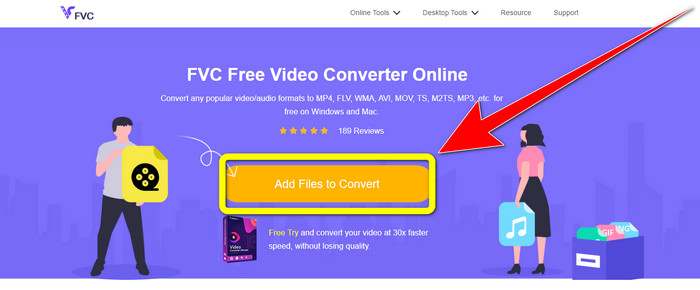
Step 1: Visit the FVC Free Video Converter Online website. Click the orange box to insert your video with the SWF file format.
Step 2: After you insert the video file, you can already choose the 3GP file format from the format options and click it.
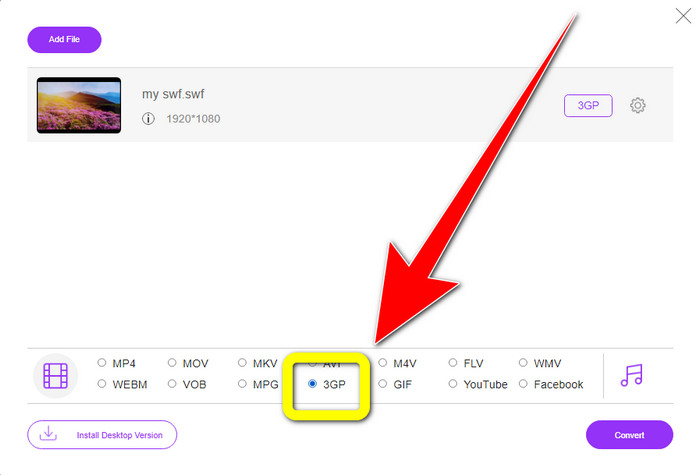
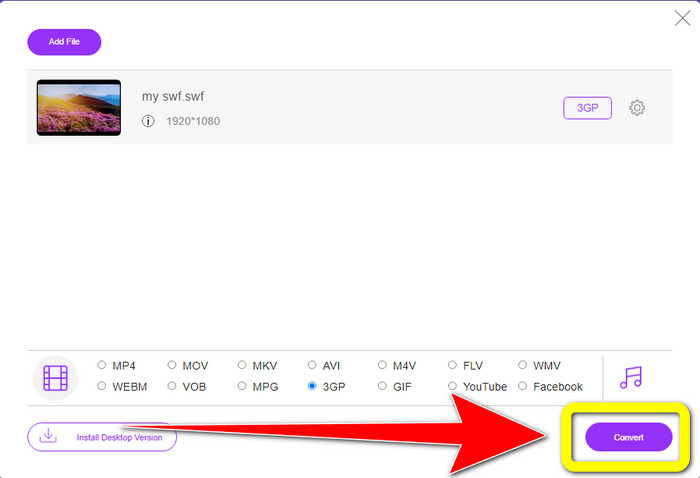
Step 3: Click the Convert button to convert your SWF file to 3GP format.
Converter online grátis
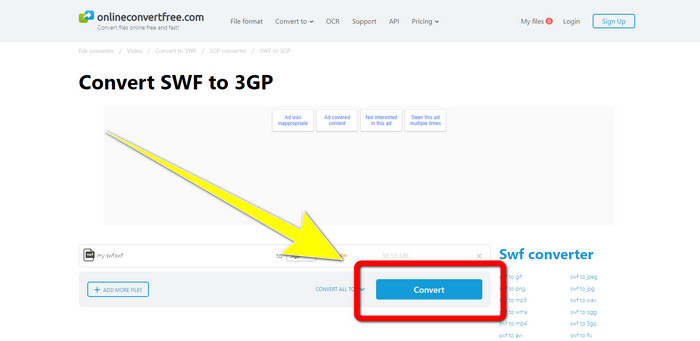
Another useful and helpful online tool to convert SWF to 3GP is Online Convert Free. With the assistance of this online software, you can convert different files, including M4V, MP4, AVI, WEBM, XVID, FLV, and more. So, you can convert MP4 to 3GP with this tool. You can also trust this tool to convert images, audio, documents, etc. The conversion process is fast. Also, it is easy to use, which gives an advantage to non-professional users. However, converting your file using this software only has a maximum of 100Mb when using the free version. To increase the maximum file size, you have to purchase a subscription. Follow the steps below to convert SWF to 3GP using this online tool.
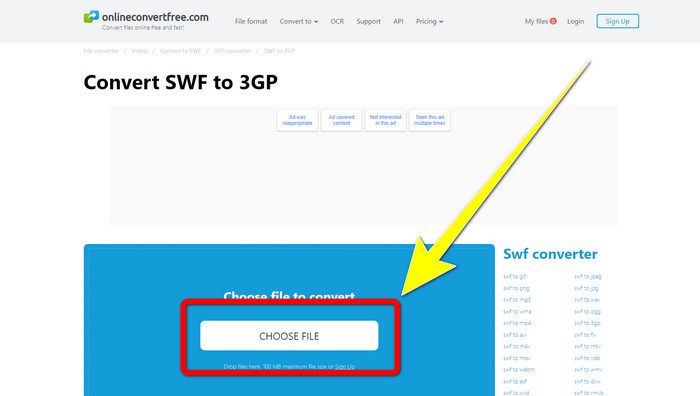
Step 1: Go to the Online Convert Free website. Click the Choose File button to import the video file.
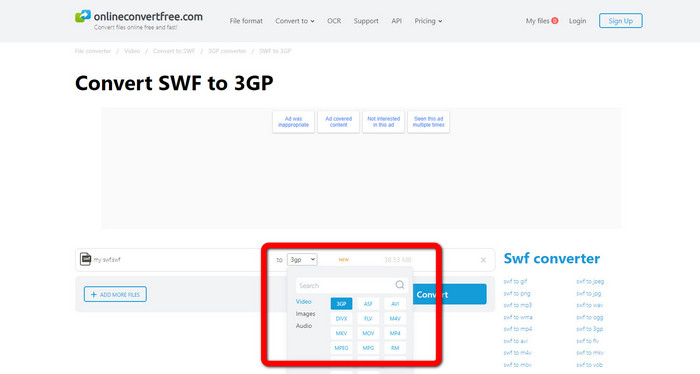
Step 2: Gelect the 3GP file format from the format options after importing the video file.
Step 3: To convert your file to 3GP, click the Convert button and save your output on your desktop
Parte 3: SWF vs. 3GP
| SWF | 3GP | |
| Descrição | Uma animação que contém vetor, gráficos raster, texto e conteúdo interativo escrito em ActionScript. | Contêiner multimídia definido por 3GPP para serviços 3G UMTS. |
| Desenvolvido por | Adobe | Projeto de parceria de terceira geração |
| Tipo de arquivo | Formato de arquivo Adobe Flash | Formato multimídia 3GPP |
| Prós | Geralmente pode ser usado para entrega eficiente de conteúdo multimídia. | Disponível em quase todos os programas/dispositivos |
| Contras | Não suportado por outros navegadores ou programas. | As lojas de vídeo em baixa qualidade |
Parte 4: Perguntas frequentes sobre a conversão de SWF para 3GP
1. Os arquivos SWF têm áudio?
- Um formato SWF é feito para conter gráficos vetoriais e animação, mas também pode conter outros tipos de dados, como texto, vídeo e som. Esses arquivos são frequentemente usados para produzir animações, jogos, vídeo e áudio em sites.
2. O que pode abrir arquivos .SWF?
- Para abrir um arquivo SWF, você pode usar o VLC Player ou o Flash Player oculto da Adobe, que os desenvolvedores utilizam com frequência.
3. Posso converter o arquivo SWF para outros formatos?
- Definitely, yes! The best solution is to download the Video Converter Ultimate on your Windows or Mac. This application lets you convert your SWF file to MKV and other file formats.
Conclusão
Here is the most detailed guide for converting SWF to 3GP format. People prefer simplicity over complicated ways. So, if you want to convert different files easily, use the FVC Free Video Converter Online.
-
 3 maneiras de converter MPG para 3GP no Windows e Mac [Grátis]
 Se você está procurando maneiras de converter MPG para 3GP, leia este artigo para conhecer as melhores maneiras de converter MPG para 3GP no Windows e Mac.
-
 Melhor maneira de editar, remover e visualizar metadados 3GP na área de trabalho
 O que são metadados 3GP? Como visualizar, alterar e editar as tags no meu 3GP? Se você tem a mesma dúvida, então este artigo é para você.
-
 Como converter DIVX para 3GP no Windows, Mac e Online
 Como converter DIVX para 3GP? Se você está procurando uma resposta, leia este artigo. Mostraremos ótimos procedimentos com a ajuda de diferentes conversores.
