


 Video Converter Ultimate
 Gravador de ecrã
 Reparo de vídeo
Melhores conversores online e offline na conversão de arquivos SWF para MKV
SWF file is a format for Adobe flash that contains videos and vector-based animations.And this type of file usually cannot handle various subtitle streams. Many people are looking for a file format that can handle multiple subtitle streams and audio tracks in various languages.Therefore, if you are one of those people who is looking for a solution to change SWF to MKV, we present the best converters for you!

Parte 1. Converta SWF para MKV offline usando o FVC Video Converter Ultimate
FVC Video Converter Ultimate is a free offline tool that allows you to convert various file formats like SWF to MKV, MP4, WMV, MOV, AVI, FLV, and many more. This converter has many great features that could help you improve your files. You can trim, add effects, add watermark, and add subtitles. What's fantastic is you can also batch convert your SWF files. Moreover, it supports ultra-fast conversion, in which you can convert files in just a few seconds. The steps provided below will surely help you convert your SWF to MKV file.
Step 1. For the first step, download the converter by clicking the Download button below for Windows or Mac. Then after downloading, open the application to start the process.
Free DownloadFor Windows 7 or laterSecure Download
Free DownloadFor MacOS 10.7 or laterSecure Download
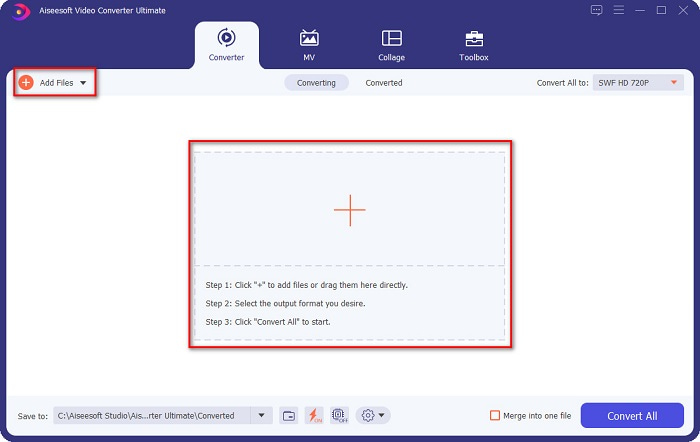
Step 2. After opening the converter, click the Add Files button or the + sign button to upload your SWF file in the software’s first interface.
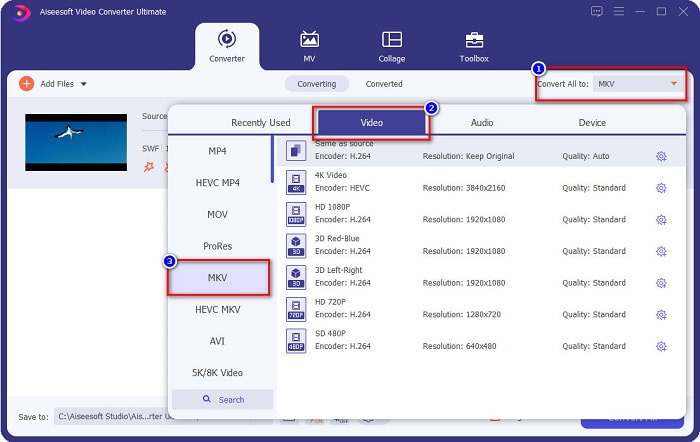
Step 3. Next is, click the Convert All to button. After clicking the Convert All to button, a list of file formats will appear. Then select the MKV file format.
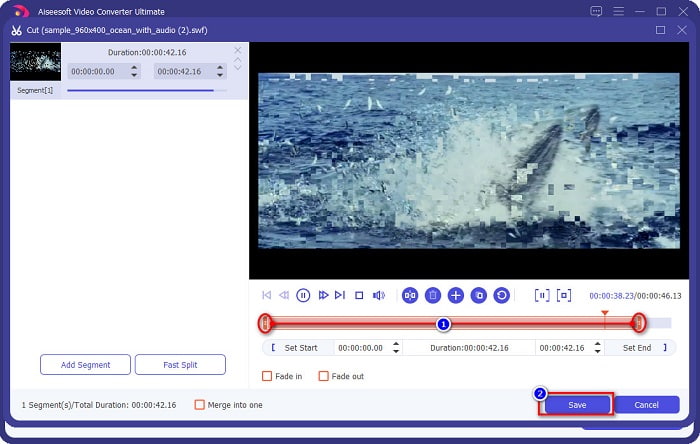
Optional. If you want to cut the length of your file, click the scissor button. You can trim the length by adjusting the play heads to your desired length. Then click the Save button, to save the changes.
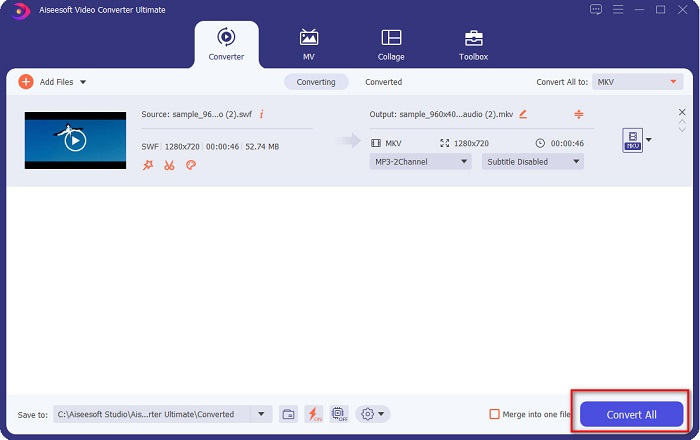
Step 4. And lastly, click the Convert All button to convert your SWF file to an MKV file. And that is it! After a few seconds, your file will be ready.
Parte 2. Converta SWF para MKV Online Usando Conversores Online Gratuitos
Não há como negar que converter arquivos usando uma ferramenta online é mais conveniente porque você não precisará baixar nada. Por isso, disponibilizamos ferramentas online gratuitas que são uma das melhores da atualidade.
FVC Free Online Video Converter
Steps on how to convert using FVC Free Online Video Converter:
Step 1. To use this converter, search FVC Free Online Video Converter, or click this link, and you will be directed to their website.
Step 2. After going to the website, click Add Files to Convert. Then launch the converter, and then select your SWF file when your computer files appear.
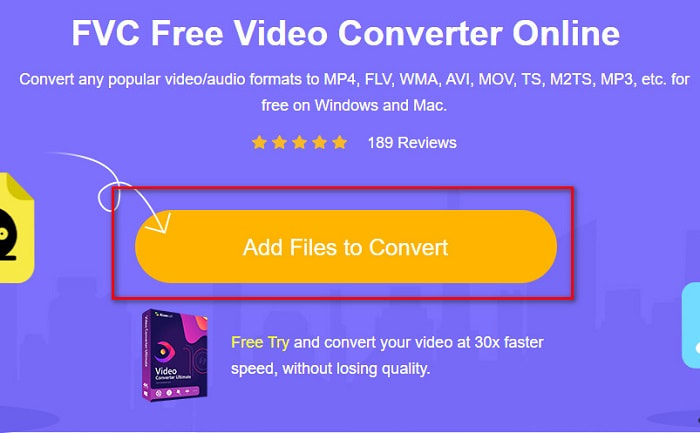
Step 3. The available file formats are listed below the software's second interface. Click the MKV file, then proceed to the next step.
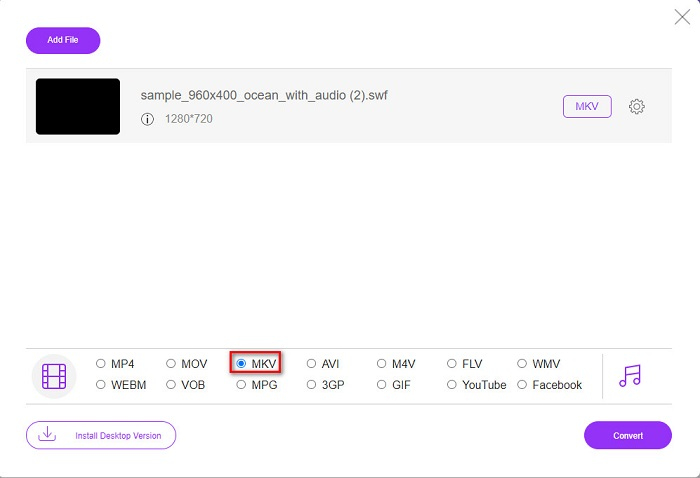
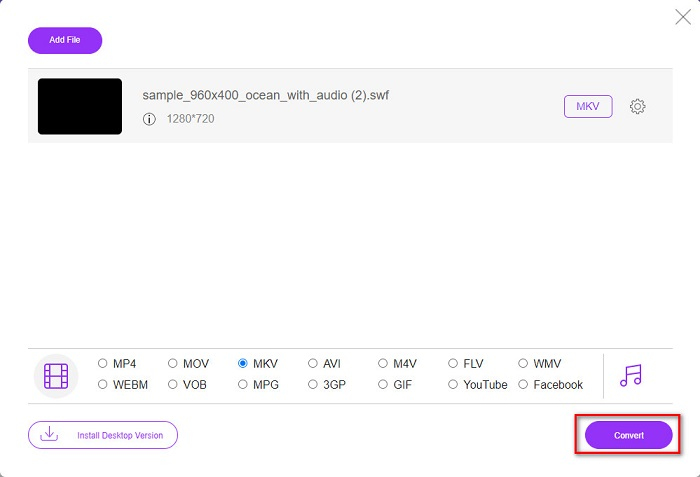
Step 4. To finish, click the Convert button to start your conversion. Then wait for your conversion to finish.
Aconvert.com
Another free online converter that you must try is Aconvert.com. This tool can convert various files across the net. It is also easy-to-use and allows you to convert quickly depending on your internet speed. Since this converter is an online tool, you may experience having a slow conversion and have ads that might be disturbing. Still, this converter allows you to convert SWF to MKV with ease.
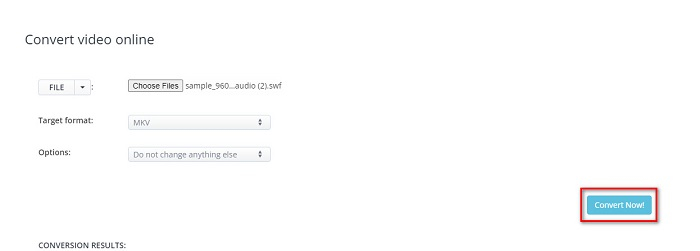
Step 1. On your browser, search Aconvert.com. Then click the Video panel on the left side of the software’s interface.

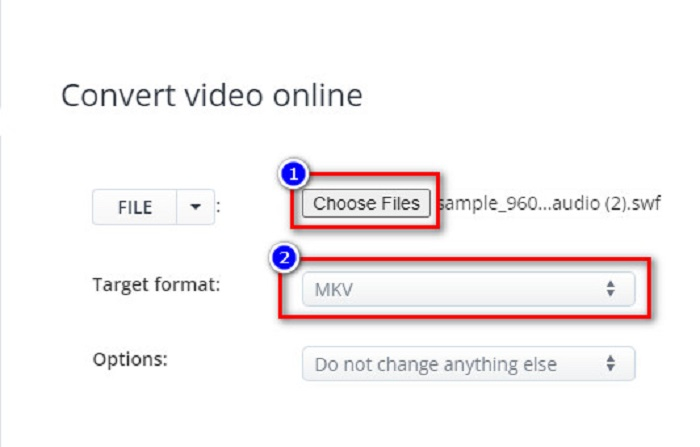
Step 2. After, click the Choose Files button, and select your SWF file. Then on the Target Format, click the MKV file.
Step 3. For the last step, click the Convert Now! button, to begin your SWF file to MKV conversion.
FreeConvert.com
FreeConvert.com is an online converter to convert your SWF file to MKV file format. It is easy to use; however, it contains many disturbing ads. Nevertheless, this converter supports various file formats available on the web.
Step 1. Search FreeConvert.com on your browser to be led to their website. And then, click the Choose Files button. Your computer files will appear, then select your SWF file.

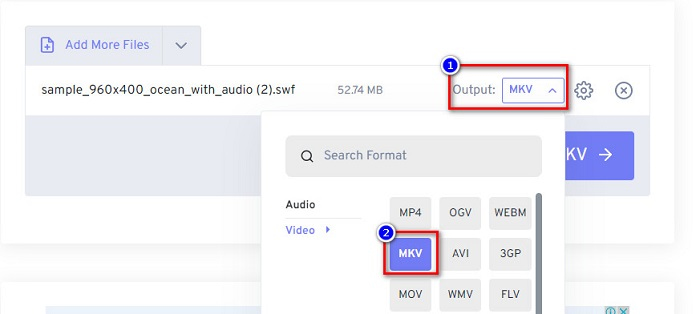
Step 2. Click the drop-down button beside the Output word to select your conversion output. Click MKV as your file output format.
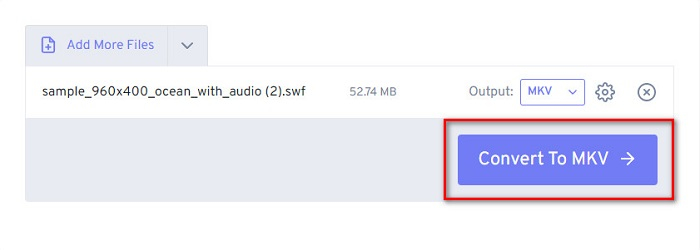
Step 3. Then click the Convert to MKV button to start converting your file.
Parte 3. Conhecimento estendido de SWF e MKV
SWF ou Shock Wave File é um formato de arquivo Adobe Flash. A Macromedia o desenvolveu, mas mais tarde, de propriedade da Adobe. Esse formato de arquivo geralmente é usado pela rede, mas você pode abri-lo ativando o Adobe Flash em seu navegador. Os arquivos SWF contêm não apenas vídeos, mas também animações baseadas em vetores. Além disso, esse tipo de formato de arquivo possui áudio, vídeo e animações compactados, para que possam ser disponibilizados na web.
Em comparação, o arquivo MKV ou Matroska é um formato de arquivo suportado por vários codecs de áudio e vídeo. Geralmente está sendo usado para armazenar videoclipes e filmes curtos. Embora o tamanho do arquivo MKV seja maior, o arquivo MKV é um arquivo à prova de futuro, e isso significa que esse tipo de arquivo foi projetado para não ficar desatualizado.
Parte 4. Perguntas frequentes sobre a conversão de SWF para MKV
Você pode converter SWF para MKV sem perdas?
sim. Você pode converter seus arquivos SWF em arquivos MKV sem perder a qualidade. Alguns conversores podem alterar SWF para MKV sem perdas, como o FVC Video Converter Ultimate. Este conversor pode converter arquivos sem que a qualidade seja afetada.
Você pode jogar SWF no Windows?
Sim você pode. No entanto, você ainda precisa baixar um flash player oculto para o adobe porque o adobe flash está sendo desativado.
O Windows Media Player suporta arquivos SWF?
No. Windows Media Player does not support SWF files. Nonetheless, you must have a .swf codec to play it on Windows Media Player. Or the easiest choice is to convert your SWF file to a file like MP4, which various media players widely support. To have more information about converting SWF to MP4, read this article SWF to MP4: Free Convert SWF to MP4 Online and PC.
Conclusão
This article shows you how to convert SWF to MKV by using the offline and online converters presented above. And there is no denying that online tools are more convenient to use; however, you can experience slow conversion in using them. In addition, the FVC Video Converter Ultimate has more features that are beneficial for your file and in your conversion—still having doubts about it? Download it now and experience the unique features that this converter can offer!
-
 Ferramentas excepcionais [Free & Easy] para usar na conversão de SWF para MOV
 Você já tentou converter SWF para MOV porque você não pode editar vídeos? Quem é o culpado pela incompatibilidade do seu editor de vídeo? Continue lendo para sua solução.
-
 4 conversores ocultos usados para converter SWF para FLV online e offline gratuitamente
 Quer saber mais sobre os conversores ocultos que você pode usar para converter arquivos .swf para .flv? Se for esse o caso, então você deve ler este artigo para ter uma ideia para fazê-lo.
-
 Ferramentas mais úteis para converter SWF para WMV (online e offline)
 Você luta para encontrar um player para seus arquivos SWF? Você não precisa se preocupar porque você pode simplesmente convertê-lo para o formato WMV para uma melhor experiência de consumo de vídeo. Leia este artigo para saber mais sobre esse processo de conversão.
